
Pitch Shift Audio: Change Pitch Without Changing Speed
You’ve got a six second clip, the client wants the voice a tone higher, and the export comes back three percent short or with a cartoon squeak where the actor used to be. Both failures start in the same place: in FFmpeg a pitch shift and a speed change are two different operations, and the fast recipe for one quietly does the other.
I ran every route below on this machine and measured the delivered samples rather than trusting a preview. A 440 Hz tone, a synthetic vowel whose f0 and formant I set by hand, and a six second test clip with picture. The results settle a few forum arguments: atempo never moves pitch, a pitch shift built from asetrate loses 158 samples per pass, and rubberband keeps the length to the sample but doesn’t preserve formants unless you ask.
If you want a faster clip with the voice intact, that’s the other direction, and the speed up a video guide covers it. This one is the narrower job: change pitch, keep the duration.
What you’ll learn
- Which FFmpeg filter changes pitch, and which only changes speed
- The three stage pitch shift command, with its measured f0 and its 3 ms cost
- What a pitch shift does to a voice’s formants, measured on two vowel-like signals
- The
-shortesttrap that cut 28 frames of picture off my test clip
Pitch shift and tempo are separate controls
Two filters sit next to each other in the docs and get confused constantly. atempo changes how fast audio plays while keeping pitch. asetrate changes the sample rate of the data without touching a single sample, so the same waveform plays at a new pitch and a new speed at once.
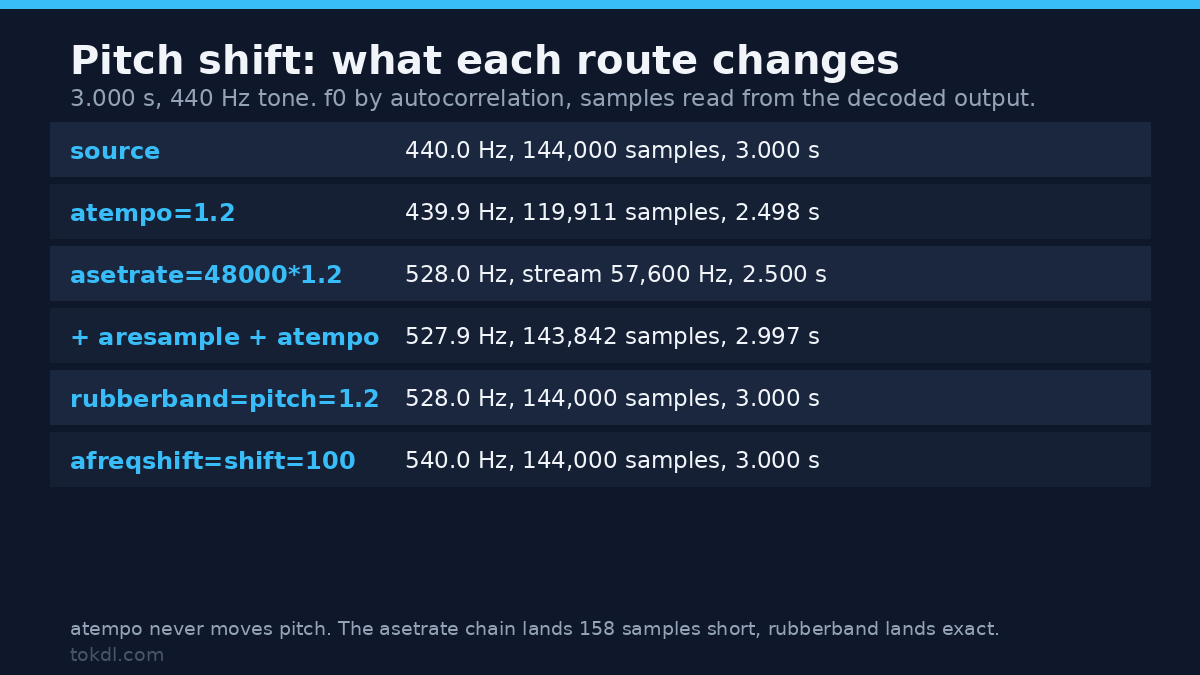
On a 3.000 second, 440.0 Hz tone, atempo=1.2 delivered 2.498 seconds and still measured 439.93 Hz. The pitch didn’t move, which is the whole point of the filter. If you’ve been reaching for atempo to change pitch, you’ve been changing tempo instead.
Here’s what each pitch shift route produced, read back from the output files at 48 kHz with an autocorrelation f0 estimate:
| Filter chain | f0 out | Length | Samples |
|---|---|---|---|
| none (source) | 440.0 Hz | 3.000 s | 144,000 |
atempo=1.2 |
439.9 Hz | 2.498 s | 119,911 |
asetrate=48000*1.2 alone |
528.0 Hz | 2.500 s at 57,600 Hz | 144,000 |
asetrate + aresample=48000 |
528.0 Hz | 2.500 s | 120,000 |
+ atempo=1/1.2 |
527.9 Hz | 2.997 s | 143,842 |
rubberband=pitch=1.2 |
528.0 Hz | 3.000 s | 144,000 |
afreqshift=shift=100 |
540.0 Hz | 3.000 s | 144,000 |
Look at the third row: 144,000 samples in, 144,000 out, but the stream now claims 57,600 Hz, so the file is 2.5 seconds long. Nothing was resampled, the label moved. That’s asetrate doing what it says, and it’s why the filter can’t be the last step in a pitch shift: something downstream has to bring the rate back.
Method 1: the three stage pitch shift
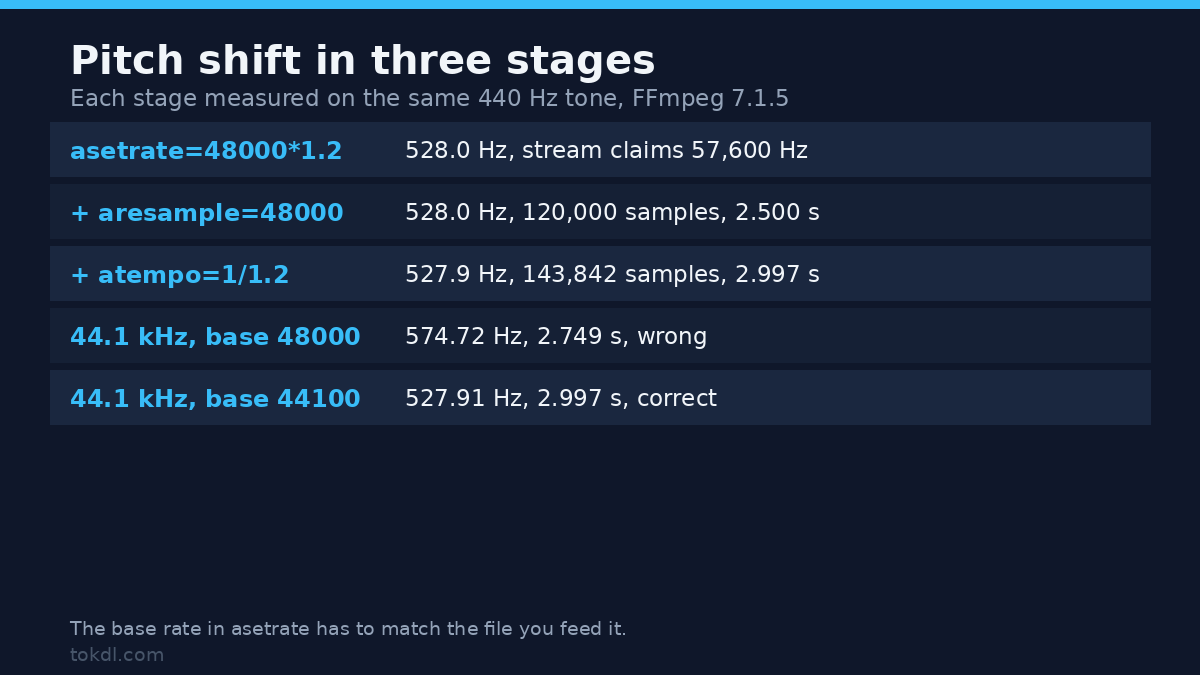
The chain is asetrate to shift the pitch, aresample to put the audio back at a legal rate, and atempo to undo the length change asetrate caused. For a 20 percent lift on a 48 kHz source:
ffmpeg -i input.mp4 -af "asetrate=48000*1.2,aresample=48000,atempo=1/1.2" -c:v copy -c:a aac -b:a 192k output.mp4Measured on the tone: 527.91 Hz and 143,842 samples, which is 2.9967 seconds against a 3.000 second source. The 158 missing samples are 3.3 ms, and they come from the frame granularity of atempo. On a six second clip that’s inaudible; stacked across a dozen edits it turns into visible lip drift, the sort of thing the audio sync guide deals with after the fact.
Flip the factor to downshift and the chain lands slightly long: 0.8 gave 351.94 Hz and 144,036 samples, or 3.0008 seconds.
Use the input’s own sample rate in the factor
The most common failure is hardcoding 48000. asetrate takes an absolute rate, so the factor only works out if the number you multiply matches the file you feed it. A 44.1 kHz source pushed through the recipe above gave 574.72 Hz instead of 528, and finished at 2.749 seconds instead of 2.997. That’s a 30.7 percent shift where 20 was asked for, plus a quarter of a second lost, with no warning.
Swap the base rate and the same file behaves: asetrate=44100*1.2,aresample=48000,atempo=1/1.2 measured 527.91 Hz at 2.9967 seconds. Phone clips and mixed timelines arrive at different rates, so check with ffprobe before you batch; the sample rate guide covers why the number matters.
Method 2: rubberband, no rate arithmetic
rubberband does the whole job in one filter because it never touches the sample rate. It resynthesises the audio at the new pitch and keeps the timeline:
ffmpeg -i input.mp4 -af "rubberband=pitch=1.2" -c:v copy -c:a aac -b:a 192k output.mp4On the 48 kHz tone it returned 527.97 Hz and exactly 144,000 samples. On a 44.1 kHz source it returned 527.44 Hz, exactly 3.000 seconds, and left the stream at 44,100 Hz, so there’s no rate to correct when the next file arrives at a different rate. That’s the strongest argument for it in a batch.
It isn’t free. A factor of 3 came back 588 samples short (2.9878 seconds), the only case in my run where it missed the length, and a factor of 0.5 halved the peak amplitude, so you’ll want to normalize after a big drop. The filter also has to be compiled into your build; this one is FFmpeg 7.1.5 from Debian with librubberband, and on a build without it the filter isn’t there. Both filters are documented in the FFmpeg filter reference.
Which one should you run
| asetrate chain | rubberband | |
|---|---|---|
| Filters | three | one |
| Length on a 3 s tone | 2.9967 s (-3.3 ms) | 3.0000 s (exact) |
| Rate math | must match the source rate | none |
| Formant control | no, formants always scale | yes, formant=preserved |
| Extreme factors | any positive factor | 0.01 to 100, length drifts at 3x |
| Needs a special build | no, core filters | yes, lib rubberband |
My rule for a pitch shift: rubberband for voices and anything on a fixed timeline, the asetrate chain for sound design material where milliseconds don’t matter and you’ll keep the sync anyway.
What a pitch shift does to a voice: formants
A vowel is two things stacked. The f0 sets how low the voice sounds, and a formant envelope, a broad spectral hump, sets which vowel you hear. A pitch shift that scales the whole spectrum moves both, and that’s the chipmunk effect: the pitch rises, the vowel’s resonance rises with it, and an adult turns into a small character instead of the same person singing higher.
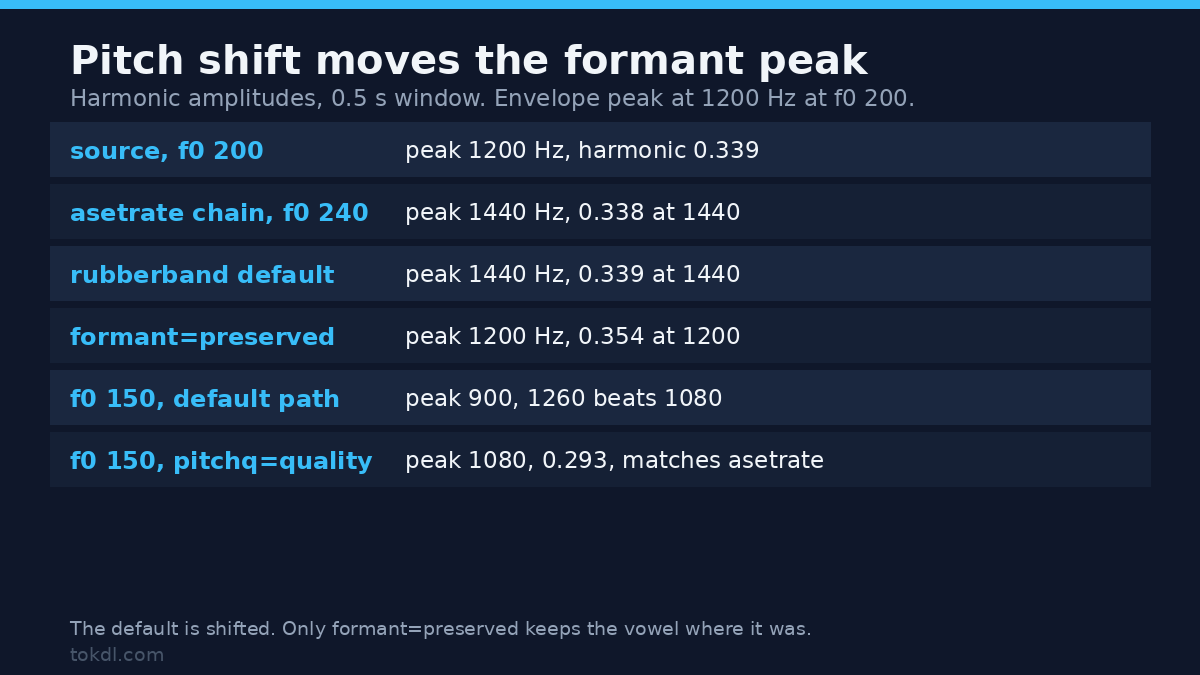
For the formant test I built a signal with f0 at 200 Hz and a narrow envelope peak at 1200 Hz, then read the amplitude of each harmonic after the pitch shift:
| Route | f0 | 1200 Hz harmonic | 1440 Hz harmonic | Envelope peak |
|---|---|---|---|---|
| source | 200 Hz | 0.339 | no harmonic | 1200 Hz |
asetrate chain |
240 Hz | 0.217 | 0.338 | 1440 Hz |
rubberband=pitch=1.2 |
240 Hz | 0.217 | 0.339 | 1440 Hz |
rubberband with formant=preserved |
240 Hz | 0.354 | 0.214 | 1200 Hz |
So rubberband‘s default is shifted, the same behaviour as asetrate, despite the option that sounds like it should be on by default. The last row is the one you want for a voice: f0 moves from 200 to 240 Hz while the envelope stays at 1200 Hz, so the character of the vowel survives the lift.
The default pitch shift isn’t reliable at a low f0
I ran a second fixture with f0 at 150 Hz and the envelope peak at 900 Hz, because one signal proves one case. There the default pitchq=speed path behaved differently: the peak stayed at 900 Hz and the harmonic at 1260 Hz came out stronger than the one at 1080. Naming pitchq=quality reproduced the clean shifted result exactly, 0.293 at 1080 Hz, matching asetrate. If you need predictable formants, name both options instead of trusting the defaults.
Pitch shift by semitones, not by guesses
Editors think in semitones, filters take a ratio. The conversion is 2^(n/12), so one semitone is 1.0595 and an octave is 2.0. The recipe for one semitone up on a 48 kHz file:
ffmpeg -i input.mp4 -af "asetrate=48000*1.059463,aresample=48000,atempo=0.943874" -c:v copy -c:a aac -b:a 192k output.mp4That measured 466.15 Hz against the 466.16 the arithmetic predicts, and 143,953 samples, or 2.999 seconds. The formula beats a lookup table, but here are the common intervals:
| Interval | Factor | 440 Hz becomes |
|---|---|---|
| down an octave | 0.5000 | 220.0 Hz |
| down a semitone | 0.9439 | 415.3 Hz |
| up a semitone | 1.0595 | 466.2 Hz |
| up a fifth | 1.4983 | 659.3 Hz |
| up an octave | 2.0000 | 880.0 Hz |
Pitch shifting a video without touching the picture
-c:v copy means the video packets are copied, not decoded and re-encoded, so the picture can’t change. I checked rather than assumed: the video stream of the 6 second test clip hashed to 58fb8363 before and after, and both files carried 150 frames.
The trap is the length mismatch if you stop at asetrate: a 20 percent lift with no atempo gives audio that ends at 5.013 seconds against 6.000 of picture. Add -shortest and FFmpeg cuts the video to match, so my render came back with 122 frames and a 4.880 second video stream. Leave it out and the picture survives but the last second is silent. Both exit 0 with no warning, and you won’t hear the silent one on a laptop speaker.
Mistakes that cost a render
- Reaching for
atempoto change pitch. It keeps 439.9 Hz on a 440 Hz tone and just makes the clip shorter. - Letting
asetratebe the last filter. Every sample survives, the file plays at 57,600 Hz, so it’s 2.5 seconds long. - Writing
-c:a copynext to a filter. The combination fails with exit code 218 and writes no file at all. - Asking
atempofor 0.25. Its range here is 0.5 to 100, and 0.25 won’t run: exit 222. Chain two passes at 0.5 instead: 11.958 seconds for a 3 second source instead of 12.000. - Assuming a pitch shift keeps formants.
rubberband‘s default isshifted, which matchesasetrateto three decimals. - Hardcoding 48000 on a 44.1 kHz file. You get 574.72 Hz and 2.749 seconds when you asked for 528 and 3.000.
FAQ
Does a pitch shift change the speed in FFmpeg?
Only if you use asetrate on its own. It relabels the sample rate, so pitch and speed change together. Add aresample and atempo, or use rubberband, and the length comes back to the source value.
What’s the difference between a pitch shift and a frequency shift?
A pitch shift multiplies every frequency by the same factor, so harmonics stay in tune with each other. afreqshift adds a fixed number of hertz, which is why it sounds metallic: on the 440 Hz tone it produced 540.0 Hz and left the harmonic spacing broken. Use it for effects, not for transposing music.
Why does my audio sound like a chipmunk after a small shift?
Because the formants moved with the pitch. On the 200 Hz fixture a 20 percent lift pushed the envelope peak from 1200 to 1440 Hz. Switch to rubberband with formant=preserved and the peak stays put while the f0 rises.
Can I pitch shift without re-encoding the audio?
No. Any filter means decoding, processing and encoding again, so pick a codec and bitrate that survive it (the codec comparison has the numbers). If the audio is already lossy, encode at a higher bitrate than the source rather than matching it.
Conclusion
The reliable pitch shift is three filters or one, never two. asetrate plus aresample plus atempo gets any factor with core filters and a 3 ms length error, and rubberband=pitch=1.2 keeps the length to the sample and needs no rate arithmetic, at the cost of a build dependency.
For voice pitch shifts, add formant=preserved and check the result against the original: the pitch should rise while the vowel stays the same. Then confirm the length and the stream rate with ffprobe before the file leaves your machine, because both failures in this article were silent.