
How to Bleep Out a Word in a Video: Frame-Accurate Censoring (2026)
Four numbers decide whether a bleep works: where the word starts, where it ends, and the same pair again in the file you actually export. Miss by a tenth of a second and the tone lands on the vowel next door.
Bleeping isn’t a filter you switch on. To bleep out a word in a video you place a cut at a timestamp, and that’s why the same clip comes back clean from one tool and leaks half a consonant from another.
Here’s the short route first, then the parts that trip people up.
The short answer: how to bleep out a word in a video
Replace the word with silence or with a tone, using an exact time window. In ffmpeg a volume filter with a timeline expression does it in one pass and leaves the picture untouched:
ffmpeg -i input.mp4 -c:v copy -af "volume=enable='between(t,12.42,12.86)':volume=0" output.mp4That mutes from 12.42 s to 12.86 s and copies the video stream without re-encoding it. Only the audio is re-encoded. Swap the mute for a tone when a silent gap would be more noticeable than a beep, which is most of the time in clean dialogue.
Before you edit: find the real in and out points
Play the clip on a timeline at maximum zoom and mark where the word begins and ends. Then add a buffer of 40 to 80 milliseconds on each side. A word is rarely just the vowel; the plosive at the front and the sibilance at the back carry as much of it as the middle does.
When the speech is dense, let the audio find the gaps for you. A silence detection pass prints the quiet spans between phrases, and the word you want usually sits inside one of those brackets. The silencedetect workflow explains how to read that output.
Write the numbers down twice: once against the original file, once against whatever you’re exporting. A trim resets the clock, so a timestamp noted before a cut no longer points at the same frame afterwards. That one mistake accounts for most beeps that land on the wrong syllable. A bleep placed from a stale timestamp misses by exactly the amount you trimmed.
Method 1: mute the word
Muting is the fastest way to bleep out a word when the clip already has something behind the voice: room tone, traffic, a music bed. A silent hole is masked by whatever surrounds it, and nobody notices the edit at all.
Check the file before you touch it, so you know which stream you’re working on:
ffprobe -v error -select_streams a -show_entries stream=index,codec_name,channels,sample_rate -of default=nw=1 input.mp4Then apply the window. Chaining a second volume filter handles a second word without disturbing the rest of the track:
ffmpeg -i input.mp4 -c:v copy -af "volume=enable='between(t,12.42,12.86)':volume=0,volume=enable='between(t,48.10,48.53)':volume=0" output.mp4You can also stack the conditions inside a single expression with a plus sign. The result is identical and the command reads a little shorter:
ffmpeg -i input.mp4 -c:v copy -af "volume=enable='between(t,12.42,12.86)+between(t,48.10,48.53)':volume=0" output.mp4The enable option belongs to the volume filter, and the filter reference documents the expression forms that work inside it. Past four or five words, chained filters stay easier to read and to debug one at a time.
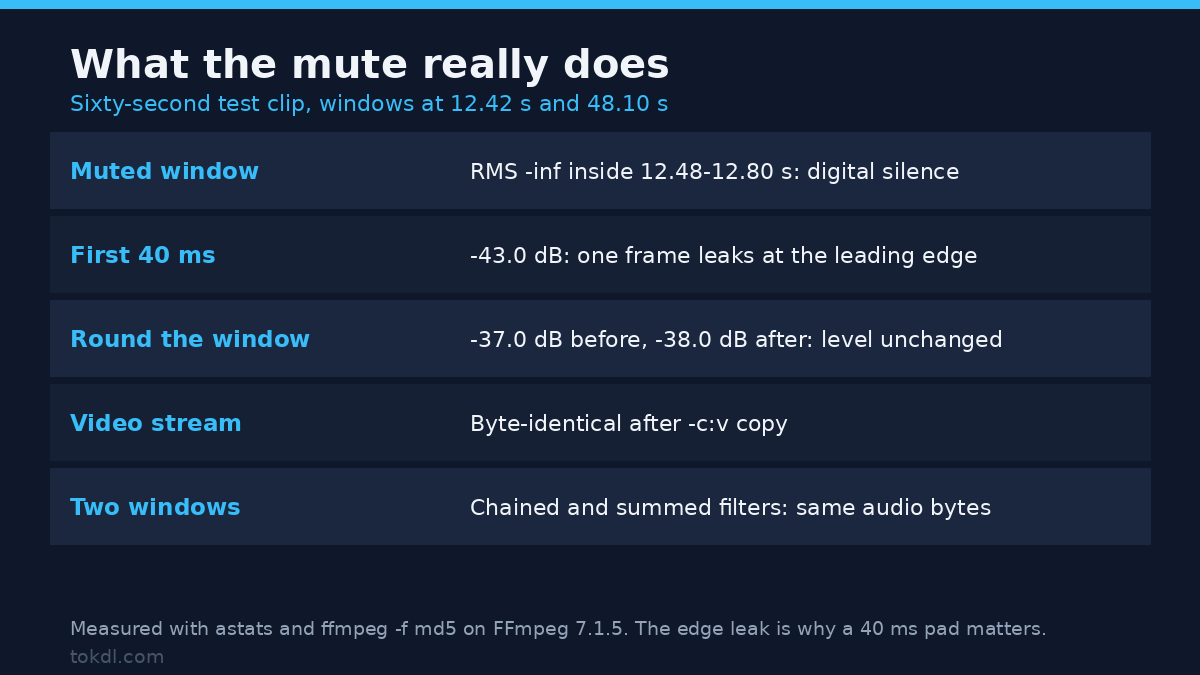
Both forms were tested on a sixty second clip before this was written, with the windows at 12.42 s and 48.10 s. Inside the muted window the decoded samples measured -inf: digital silence, not a quiet patch. The only residue sits in the first 40 ms, where one frame leaks at about -43 dB, while the level before and after the window stayed at -37 dB and -38 dB. The video stream stayed a byte-identical copy rather than a re-encode. Listen to each edit on headphones: laptop speakers hide the frequency range where a half-muted consonant still leaks.
Method 2: put a tone where the word was
A tone is the better answer for clean dialogue, where an abrupt silence sounds like a broken file. Generate a 1 kHz sine, delay it to the right timestamp, and mix it with the programme using the normalisation switched off:
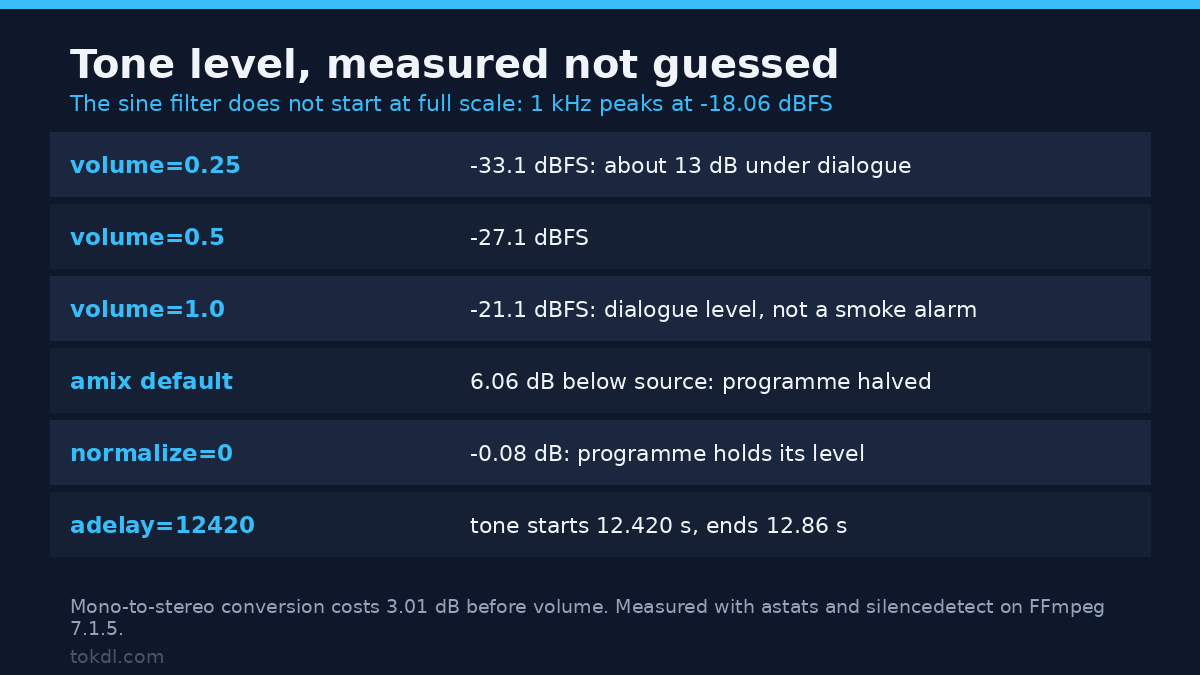
ffmpeg -i input.mp4 -f lavfi -i "sine=frequency=1000:duration=0.44:sample_rate=48000" -filter_complex "[1:a]aformat=channel_layouts=stereo,adelay=12420|12420,volume=0.25[b];[0:a][b]amix=inputs=2:duration=first:normalize=0[a]" -map 0:v -map "[a]" -c:v copy -c:a aac -b:a 192k output.mp4adelay takes milliseconds per channel, so 12420 places the tone at 12.42 s in both ears. normalize=0 is the flag people miss. Without it, amix divides every input by the number of inputs, and the measured programme level fell 6.06 dB the moment the beep was added. With normalize=0 the same programme sat 0.08 dB from the source.
Keep the tone near the level of the speech around it instead of at full scale, and remember the sine filter doesn’t start at full scale either. On this build a 1 kHz sine peaks at -18.06 dBFS, and the mono-to-stereo conversion takes another 3 dB off. That puts volume=0.25 at -33.1 dBFS, roughly 13 dB under dialogue, while volume=1.0 lands at -21.1 dBFS, right around speech level. Sweep those two values on your own clip: a bleep that’s too quiet reads as a dropout rather than a censor.
Level is easy to check without trusting your ears on a phone speaker:
ffmpeg -i output.mp4 -af astats=metadata=1 -f null -Length matters as much as level. Make the tone slightly longer than the mute window, about 40 ms on each side, so no fragment of the original consonant survives at the boundary. A bleep that stops on the word’s last sample leaves the sibilance behind it fully audible. A beep that starts precisely on the first millisecond of the word usually clips the plosive that came just before it.
Method 3: the editor route, and the platform that has none
No major publishing platform bleeps audio for you. YouTube Studio’s editor trims clips and blurs faces; it doesn’t have anything that replaces a word with a tone, so the bleeped file has to exist before upload.
On a timeline the operation is the same as on the command line. Razor at the in and out points, then either delete the audio and leave the gap, or drop a tone on the track above at matching length. CapCut and iMovie both allow that second audio track.
Precision is the difference. A mouse drag lands on a frame boundary, so at 25 fps your window moves in 40 ms steps. That’s usually enough for a word, and occasionally not enough for a word with a soft ending and a breath behind it.
If the file carries more than one audio track, confirm which one your export keeps before you spend an hour editing the other. Files from cameras and screen recorders routinely ship with a second, duplicate track, and the default track flags decide which survives.
What bleep tools actually do, and where they stop
Search for a bleep tool and two families appear. One is a web page that accepts a file, re-encodes the audio, and offers a mute or a noise overlay. The other is a feature buried inside a video editor that most people never open.
Neither one knows which word to remove. Speech recognition can point at a profanity with reasonable confidence, but not with the reliability a published file needs, and it’ll occasionally miss the word you care about. Treat any automatic detection as a first pass that still needs a listen.
The web tools carry a second limit that costs more time than it saves. Most re-encode the whole file to apply a filter, cap uploads below the length of a typical interview, and don’t let you type an exact in point. For one word in a five-minute clip, a local pass on the copy is faster and never touches the picture.
What no tool will tell you is whether the edit is needed at all. On your own informal footage, cutting the sentence is often cleaner than beeping a word nobody would have noticed. Covering a face or a plate works the same way, with the same trade-off between concealment and looking tampered with in visual censorship edits.
Rights and responsible use
The recording belongs to the person who made it. When that’s you, deciding which words leave the house is your call, and censoring your own upload is ordinary editing.
Editing someone else’s recording is a different act. Removing a word from an interview, a call, or a stream you didn’t record changes what that person said, and publishing the result misrepresents them even when the tone is subtle. A bleep hides a word; it doesn’t grant any rights over the material and doesn’t make a re-upload lawful.
Platform rules sit on top of that. YouTube’s Terms of Service require that you own or have permission for what you upload, and its community guidelines treat manipulated media that misleads viewers as a separate violation. Bleeping a word isn’t a loophole for either.
Troubleshooting
The tone lands on the wrong syllable
Your timestamps came from a different version of the file than the one you filtered. Trimming rewrites the clock, and so does any export that starts from a selection rather than the full clip. Re-measure against the file you’re feeding to ffmpeg.
The whole track gets quieter after the mix
The default in amix divides the mix by the number of inputs. Add normalize=0 and the programme keeps its original level while the tone is layered on top. That’s the single most common complaint about bleep commands, and it’s one flag.
The bleep only plays on one side
A sine generator produces one channel, while the programme behind it usually runs in stereo. amix will upmix, but the result can sit unevenly. Put aformat=channel_layouts=stereo before the delay so the placement is deliberate rather than inherited.
A fragment of the word survives at the edge
The bleep window is too tight. Extend both ends by 40 to 80 ms and listen again. A hard consonant often starts earlier than the waveform suggests, and a breath after the word carries the vowel’s tail.
The captions still show the word
The subtitle file is a separate asset and nothing in the audio pass touches it. Edit the cue in the sidecar file, or re-render burned-in captions if the text was stamped into the picture. Publishing censored audio with an uncensored transcript undoes the whole edit.
The export still has the original audio
You mapped the wrong stream, or the player picked the first track and ignored yours. Check the bleeped output with ffprobe, and remember that a file can be technically correct and still play the wrong track in some players if the default flag points elsewhere.
Frequently asked questions
Can I bleep out a word in a video without an editor?
Yes. A single ffmpeg command with a volume filter and a time window will mute the word, and a second command can add a tone. No timeline, no project file, and the video stream is copied rather than re-encoded.
Is muting the same as bleeping?
No. A mute removes the sound and leaves a gap; a bleep replaces the sound with a tone. The gap is less noticeable when there’s background noise, and more noticeable in quiet dialogue, which is why the choice depends on what sits behind the voice.
How long should a bleep be?
Long enough to cover the whole word plus a 40 to 80 ms margin on each side. Measure the word, then extend both ends. A beep cut to the exact length of the vowel will leave the consonant in front of it audible.
Does bleeping break audio sync?
No. Muting or overlaying a tone doesn’t change the clip’s duration, so picture and sound stay aligned. Problems appear only when you cut the word out and close the gap, which shortens the audio against the video.
Can I bleep a word on a phone?
Yes, in CapCut, iMovie, or a similar mobile editor, by adding a tone on a second audio track. Frame accuracy is the limit: dragging with a finger quantises your window to the frame grid, and phones record at 30 or 60 fps.
Do I have to change the subtitles too?
Yes, if the word is written in them. A subtitle file or burned-in caption track keeps publishing the word in text form, which defeats the point of censoring the audio. Fix both in the same pass.
What tone do broadcasters use?
The beep you hear on television is usually a 1 kHz sine, short and close in level to the speech around it. Any clean sine works, though a midrange frequency cuts through a music bed better than a low or high one.
Which method should you use?
The distinguishing question is what sits behind the voice. Clean dialogue with nothing underneath wants a tone, because a hole is louder than a beep. A word buried in traffic, room tone, or music wants a mute, since the surrounding sound covers the join.
| Situation | Method |
|---|---|
| Quiet studio dialogue, one word | Tone at speech level |
| Street recording or music bed | Mute the window |
| Already cutting in an editor | Razor, then replace on a second track |
| Several words, precise timing | Chained volume filters |
Any of these will bleep out a word in a video cleanly if the two timestamps are right. Get those first, in the file you’re exporting, then pick the treatment. The edit that fails is almost never the wrong effect; it’s the right effect applied twenty milliseconds early.