
How to Remove Silence From a Video: Cut Dead Air Without Breaking Sync
You record a five minute demo where half the running time is dead air. Twenty seconds of typing, one sentence, another gap while a build finishes. So you look for a way to remove silence from a video, find a one line FFmpeg filter, run it, and end up with something worse than the original: the sound drifts away from the picture, and the last third of the clip plays in silence.
That isn’t rare. It’s what the obvious command does by default when you try to remove silence with a single filter, and every number below was measured on this machine rather than copied from a manual.
You’ll see how FFmpeg decides what counts as silence, the two commands that look right and quietly damage the clip, and the filter chain that lets you remove silence from picture and sound together. The test clip is a 30 second 720p recording with six bursts of speech separated by 3 second gaps.
What FFmpeg counts as silence
Silence isn’t zero. Every room has a floor, and a phone or laptop mic records it well above digital zero. FFmpeg compares each block of audio against a threshold you supply and calls a block silent when it sits below it. Before you can remove silence, you need that number. Get it wrong and the whole job fails without a word.
I built two versions of one clip: a room tone at -65 dBFS, and the same speech over a -35 dBFS floor, quiet but normal for a mic at low gain.
| Room tone | Threshold used | Gaps found by silencedetect |
|---|---|---|
| -65 dBFS | -40 dB | 7 of 7, all 21 seconds |
| -35 dBFS | -40 dB | 0, nothing detected |
| -35 dBFS | -30 dB | 7 of 7, all 21 seconds |
The middle row is the trap. A threshold under the noise floor tells the tool that nothing is quiet, so it reports a clean file and hands your input straight back: 30.016 seconds in, 30.016 seconds out, same audio, exit code 0. Nothing warns you that the threshold was the reason.
Aim 10 to 20 dB above the measured floor. If you don’t know it, measure it first:
ffmpeg -i input.mp4 -af astats=metadata=1:reset=0 -f null -That prints an RMS level for the whole file in dBFS, the number a remove silence pass should be built on.
Find the gaps before you remove silence
Detection is a separate job from removal, and doing it first keeps you out of trouble. The silencedetect filter reports every quiet stretch without touching the file.
ffmpeg -i input.mp4 -af silencedetect=noise=-40dB:d=1 -f null -Two options matter. noise is the threshold from above. d is the shortest stretch that counts as a gap, so anything shorter is invisible: on a clip built with ten 0.4 second gaps, d=1 found none and d=0.3 found all ten, so d=1 hides quarter second pauses.
On the test clip the filter printed seven segments that match the file’s design:
| Gap | Span | Length |
|---|---|---|
| Head | 0.000 to 4.000 | 4.00 s |
| Five interior gaps | 5.500 to 26.500 | 3.00 s each |
| Tail | 28.000 to 30.016 | 2.02 s |
silencedetect writes those lines at info level. Wrap the command in -v error and you’ll get an empty screen that looks like a filter which found nothing.
The one flag fix that damages the clip
The command everyone reaches for applies silenceremove to the audio stream. It’s the fastest way to remove silence and to wreck the file:
ffmpeg -i input.mp4 -af silenceremove=stop_periods=-1:stop_duration=1:stop_threshold=-40dB:detection=rms -c:a pcm_s16le out.wavstop_periods=-1 means keep scanning and cut every gap, and that part works. stop_duration is the option that surprises people, because it doesn’t set the shortest gap worth cutting. It sets how much silence survives each cut, so when you remove silence with this filter you keep a second of dead air in every former gap.
stop_duration |
Output | Left behind |
|---|---|---|
| 1 second | 19.09 s | A 1.018 s silence at each former gap, plus the untouched 4 s head |
| 0.5 seconds | 16.09 s | About half a second per gap |
| omitted (0) | 13.09 s | All interior and tail silence gone, head still untouched |
One more surprise hides there: not one of those runs trimmed the head. That needs start_periods=1 as well. A 5 second file of pure silence came back at 5.0 seconds, unchanged, because all of its silence sits at the start.
So even stop_duration=0 is wrong here, because it still edits only the audio. Add -c:v copy and the damage becomes measurable:
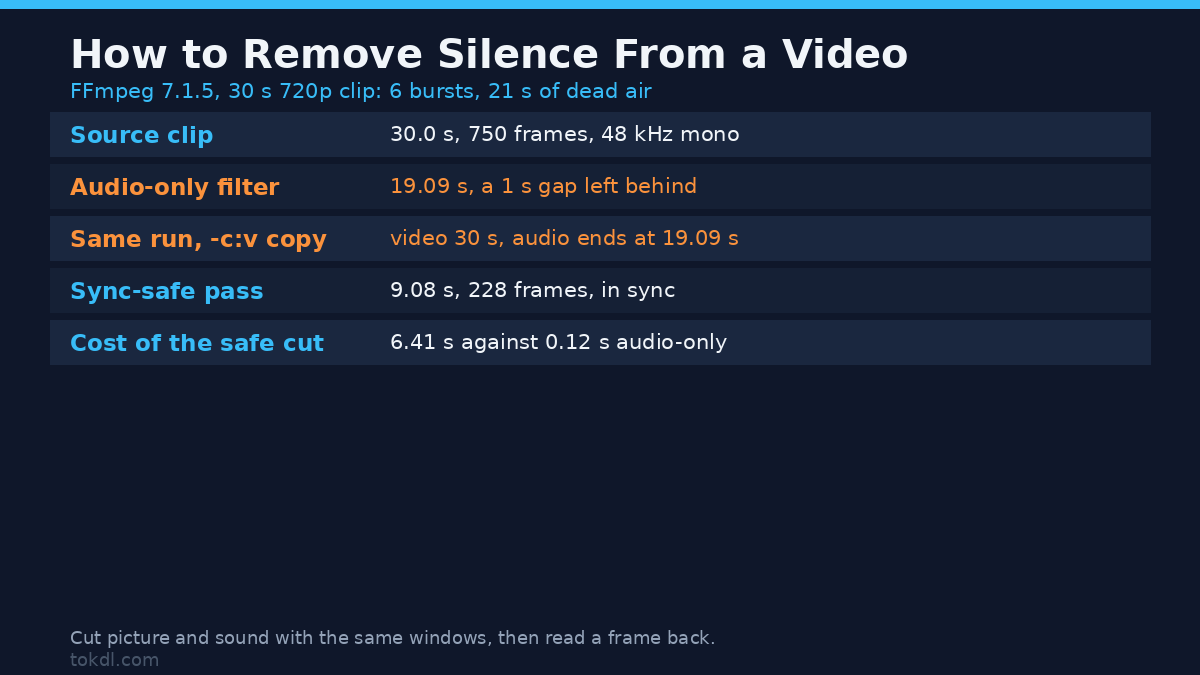
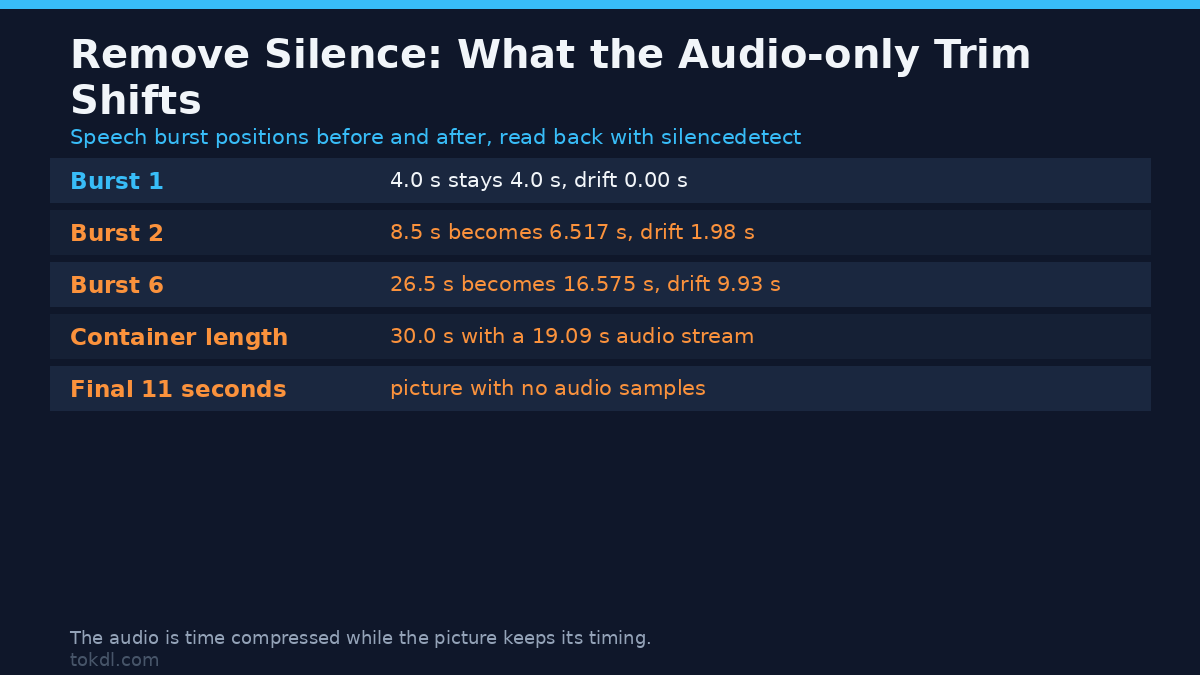
ffmpeg -i input.mp4 -af silenceremove=stop_periods=-1:stop_duration=1:stop_threshold=-40dB -c:v copy -c:a aac -b:a 192k out.mp4That output is a 30.0 second container holding a 30.000 second video stream with all 750 frames, and an audio stream that ends at 19.090 seconds. The last eleven seconds are picture with no sound at all: a probe of the window from 25 to 29 seconds returned no audio samples, not quiet ones.
What’s left doesn’t match the picture either, the part most remove silence guides leave out. I traced the bursts in both files by running the detector again.
| Burst | Source | After an audio-only trim | Drift |
|---|---|---|---|
| 1 | 4.0 s | 4.0 s | 0.00 s |
| 2 | 8.5 s | 6.517 s | 1.98 s |
| 6 | 26.5 s | 16.575 s | 9.93 s |
The audio is time compressed while the picture keeps its timing, so the error grows with every gap: by the last sentence the sound is nearly ten seconds ahead of the mouth that made it.
Why -shortest doesn’t rescue it
The next move is to add -shortest so the file ends when the audio does. It does exactly that, which is the problem: on this clip it produced a 20.0 second file with 500 video frames against 19.09 seconds of audio. It cut the tail off the picture instead of closing the gaps in the middle, and to remove silence you’ll have to work on the middle of a file.
How to remove silence without breaking sync
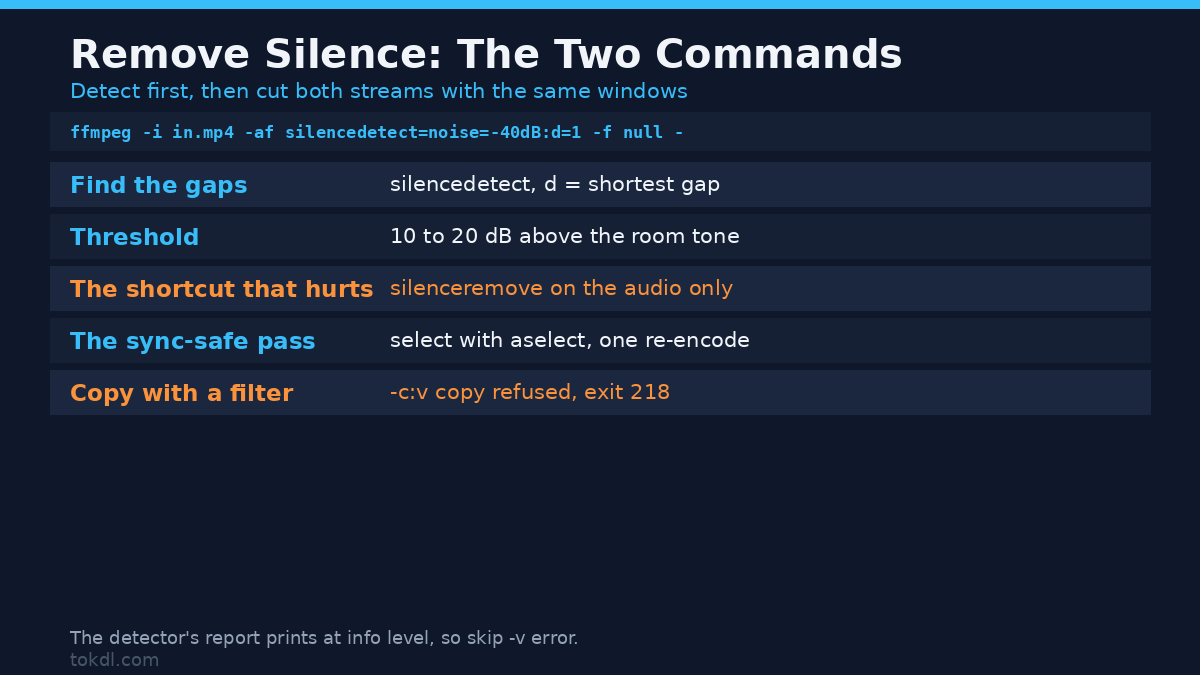
Cutting both streams at the same timestamps means listing the stretches to keep, the inverse of what the detector printed, then applying it to picture and sound together. For the test clip that’s six windows: 4.000 to 5.500, 8.500 to 10.000, 13.000 to 14.500, 17.500 to 19.000, 22.000 to 23.500, and 26.500 to 28.000.
ffmpeg -i input.mp4
  -vf "select='between(t,4,5.5)+between(t,8.5,10)+between(t,13,14.5)+between(t,17.5,19)+between(t,22,23.5)+between(t,26.5,28)',setpts=N/FRAME_RATE/TB"
  -af "aselect='between(t,4,5.5)+between(t,8.5,10)+between(t,13,14.5)+between(t,17.5,19)+between(t,22,23.5)+between(t,26.5,28)',asetpts=N/SR/TB"
  -c:v libx264 -crf 20 -pix_fmt yuv420p -c:a aac -b:a 192k out.mp4
select keeps only the frames inside those windows, and setpts=N/FRAME_RATE/TB renumbers what survives so it starts at zero and runs without holes. aselect and asetpts do the same job for the audio, and that’s the part which stops the two streams drifting apart.
Measured on the test clip: 9.08 seconds of output, 228 video frames, and zero silence left on a second detector pass. That’s what a correct remove silence pass looks like.
Don’t take my word for it. Read the frames back. I burned a timecode into the source before cutting, so every output frame can be identified.
ffmpeg -ss 1.6 -i out.mp4 -frames:v 1 frame_at_1_6s.pngThe frame at 1.6 seconds carries the source timecode 00:00:08.600, 0.1 seconds inside the second keep window. The frame at 4.0 seconds reads 00:00:13.960 where the arithmetic predicts 14.0. The picture travelled with the sound instead of sitting still while the audio was rewritten underneath it.
Cut and join segments instead
If you’d rather not build one long filter graph, export each keep window as its own clip and join them with the concat demuxer: six -ss and -to pairs and a list file.
| Method | Output | Frames | Sync |
|---|---|---|---|
select and aselect in one pass |
9.08 s | 228 | In sync, one re-encode |
| Six parts joined by the concat demuxer | 9.26 s | 228 | In sync, but 0.18 s longer |
Six joins add a frame or two of slack each, so the extra length lands at the seams. The single pass is also easier to reproduce, since the window list is text you can regenerate.
Common mistakes
- Filtering the audio while copying the video. That’s the audio-only way to remove silence. It keeps the container at full length while the sound stops early, so everything after the first cut is out of sync.
- Setting the threshold below the room tone. Nothing is detected, the file comes back identical, and the tool exits successfully.
- Leaving
stop_durationat its default of 1. Each gap keeps a second of dead air, so a job that should remove silence from a 30 second clip returns a 19 second file. - Forgetting the head. Leading silence survives unless you add
start_periods. - Reading the report with
-v error. The findings are printed at info level and disappear.
Check what you measured
Every number here came out of a measurement, and one of them lied. volumedetect on a seeked window reported -33.3 dB for the stretch between 20 and 22 seconds, and the same window through an output seek reported -20.7 dB. The true level is -65.1 dB, which I confirmed twice: filtering the window with atrim=20:22, and extracting it to a WAV first. Both produced byte identical files, md5 3c911b2b34af301a1450b5f4628e18e5, so the extraction is right. It reproduced in three consecutive runs.
Anyone auditing a remove silence pass should extract the stretch and measure that file, check its sample count against its duration, then cross check with a second metric such as astats. volumedetect also prints a first line reading n_samples: 0, so read the last value.
Questions people ask
Can you remove silence without re-encoding?
No. Cutting audio out of the middle of a file changes its timing, and a copied stream can’t be re-timed. FFmpeg refuses the combination outright: -af silenceremove with -c:a copy exits with code 218 and the message that filtering and streamcopy can’t be used together, and no file is written. It takes the same view of -vf select with -c:v copy.
How long does the safe version take?
6.41 seconds to produce a 9 second 720p output at CRF 20, against 0.12 seconds for the audio-only pass over 30 seconds of audio. That pass looks free because it never touches a pixel, which is why the cheap remove silence command is so tempting. The container reports 64 CPUs but its cgroup quota is 2, so timings swing with the host load.
Should I remove silence or cut the clip by hand?
For one or two gaps, hand trimming is faster. Our guide to splitting a video into parts covers the manual route, and trimming a video handles the single cut. When there are ten gaps or more, use a command that can remove silence for you.
What if the audio is loud but the words are quiet?
Then the threshold decides between a gap and a mumbled word. Use detection=rms rather than peak, because peak reacts to a single click and keeps a block that’s otherwise silent. The two modes differed by 25 milliseconds of output, which only matters when a gap sits close to stop_duration. If the recording already hisses, removing background noise first gives the detector a cleaner floor to work against.
Remove silence in five steps
Measure the room tone, set the threshold above it, and run silencedetect with a d shorter than the pauses you care about. Turn that gap list into keep windows, then remove silence from picture and sound in one pass with select and aselect. Read a frame back to confirm the timecode moved with the audio, and check the output length against the sum of your windows.
Skip the audio-only remove silence filter, skip -shortest, and treat any run whose length doesn’t add up as a failed test. The official references for silenceremove and silencedetect are worth keeping open, since the defaults hide the surprises. If you’re working on the sound instead, normalizing the audio and fixing audio out of sync catch what this filter can’t.