
Remove Hum From Audio: The 50/60 Hz Buzz, Fixed (2026)
Cut a 60 Hz notch into a mains hum and the file drops about five decibels. It still hums. The sound you are chasing isn’t the fundamental tone, it’s the second and third harmonics stacked above it, and a filter aimed at the root frequency never reaches them.
That’s why most attempts to remove hum from audio fail on the first attempt. The frequency was right. The filter was right. The list of targets was one line long.
Hum arrives through the power system, so its pitch is set by the local grid, and the recipe to remove hum is set by the same number. Most of Europe, Africa, Asia and Australia run at 50 Hz. North America, much of South America and western Japan run at 60 Hz, and Japan is split between the two grids.
A transformer, a switching supply or a cable running beside a mains lead doesn’t emit a clean sine wave. It emits the fundamental plus energy at double, triple and quadruple the rate. Those upper notes are the buzz, and they sit in the same octaves as the human voice, which is why a cut aimed at 60 Hz alone never removes it.
The direct answer: to remove hum, cut three, not one
Find the fundamental, then cut the next few multiples of it with narrow peaking filters. For a 60 Hz hum that means cuts at 60, 120 and 180 Hz. For 50 Hz it means 50, 100 and 150 Hz. Each cut has to be narrow enough to miss the voice above it and deep enough to matter.
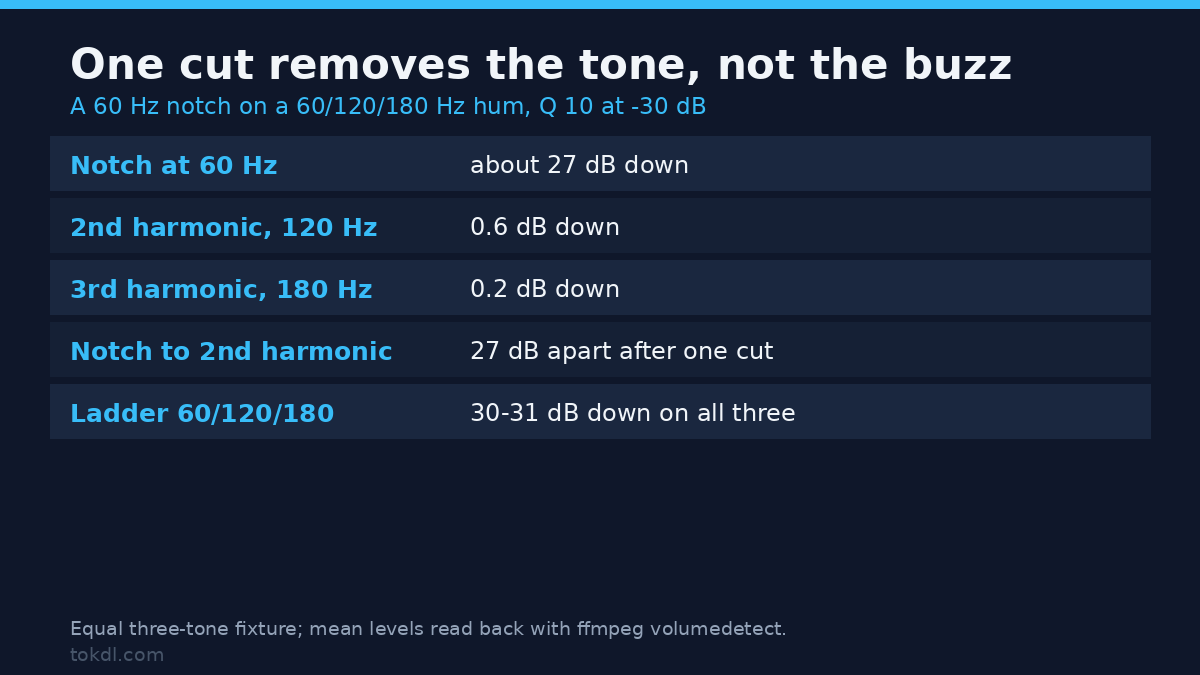
Here is what that difference looks like on a test signal built for this article. Three sine waves at 60, 120 and 180 Hz, each run through the same peaking EQ at Q 10 and minus 30 dB of gain.
| Signal | No filter | Cut at 60 Hz only | Cuts at 60, 120, 180 |
|---|---|---|---|
| 60 Hz tone | -33.1 dB | -59.7 dB | -60.6 dB |
| 120 Hz tone | -33.1 dB | -33.7 dB | -63.7 dB |
| 180 Hz tone | -33.1 dB | -33.3 dB | -63.9 dB |
Read the middle columns. The single cut at 60 Hz removed 26.6 dB from the 60 Hz tone and left the 120 and 180 Hz tones almost untouched, at minus 0.6 and minus 0.2 dB. On the mixed hum, that one cut lowered the total level by 5.4 dB. The ladder lowered it by 27.5, which is the whole point of cutting three bands instead of one when you remove hum.
Three checks before you apply any filter
First, before you remove hum, establish the grid frequency. If you know where the recording was made, you know the number. If the file came from a client, a second camera or imported equipment, measure it instead of guessing. A 60 Hz cut on a 50 Hz file removes nothing at all.
Second, measure which band is hot. A narrow bandpass followed by a level meter answers the question in one command:
ffmpeg -i input.wav -af "bandpass=f=60:width_type=q:w=30,volumedetect" -f null -Run that twice, once at 60 and once at 50, and compare the mean_volume lines. On the test file the 60 Hz band read -33.4 dB and the 50 Hz band read -53.8 dB. A gap that wide is an answer, not a hint.
Third, find how far the harmonics run. Probe 120, 180, 240 and 300 Hz the same way. You stop when the numbers flatten out, which for most recordings happens by the fourth harmonic.
Method 1: How to remove hum from audio with FFmpeg
One filter, repeated per harmonic. Here is the form for a 60 Hz ladder:
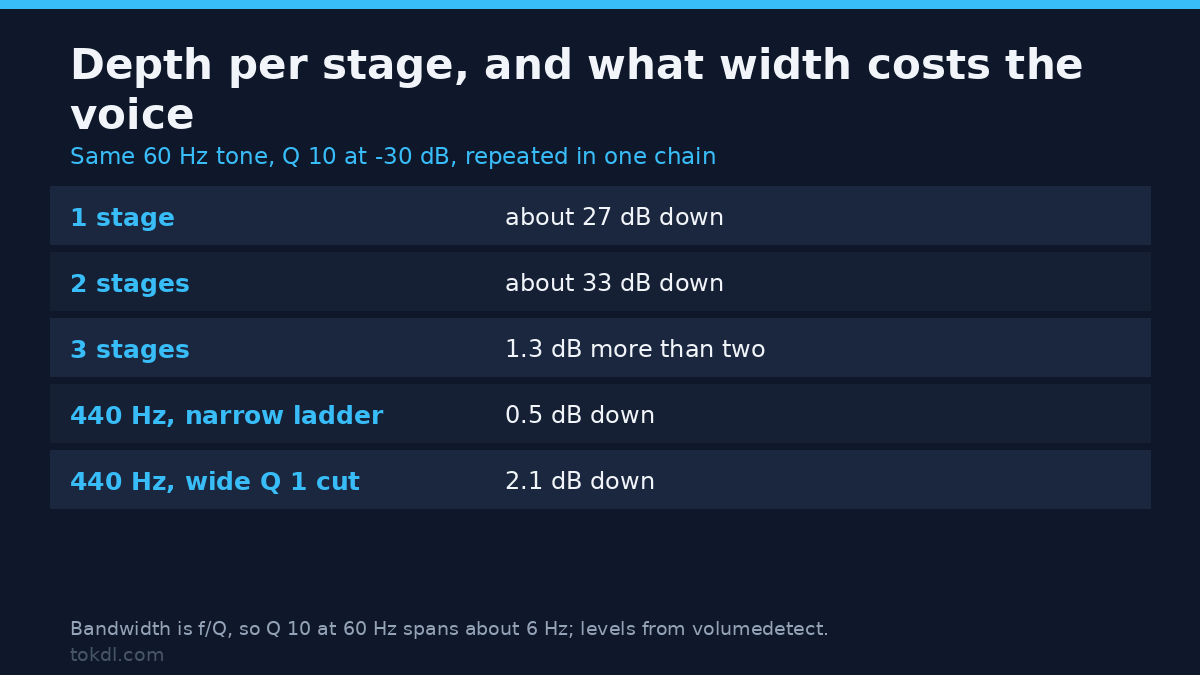
equalizer=f=60:width_type=q:w=10:g=-30The Q value sets the width. Bandwidth is roughly the centre frequency divided by Q, so Q 10 at 60 Hz cuts a band about six hertz wide. That’s narrow enough to leave a bass note alone and wide enough to survive a hum that drifts a fraction of a hertz. The FFmpeg filter documentation lists the parameters in full.
Stack the cuts in one chain to remove hum, and keep the picture out of the encoder. On an MP4 this replaces the audio once and copies the video stream unchanged:
ffmpeg -i input.mp4 -af "equalizer=f=60:width_type=q:w=10:g=-30,equalizer=f=120:width_type=q:w=10:g=-30,equalizer=f=180:width_type=q:w=10:g=-30" -c:v copy -c:a aac -b:a 192k output.mp4For a 50 Hz grid, change every frequency to 50, 100 and 150. Then verify the result by re-running the bandpass probe on the output at 120 Hz. If that number hasn’t fallen by 25 dB or more, the chain isn’t doing what you think.
Depth per stage has a ceiling. On a pure 60 Hz tone, one stage of Q 10 at minus 30 dB removed 26.6 dB, a second stage reached 32.3 dB, and a third added 1.3 dB more. Two stages is where the return stops, so there’s no reason to paste five copies of the same line.
Method 2: a notch filter in an editor you already have
If you would rather remove hum from audio by eye, open the file in an editor with a spectrogram view. Audacity is free, cross-platform, and turns hum into something impossible to miss: a stack of horizontal lines at the fundamental and each multiple.
Switch the track to Spectrogram, zoom into the first ten seconds, and read the lowest solid line. Set Audacity’s Notch Filter to that frequency with a Q near 10, apply it, then repeat for every line you can see. Any parametric EQ can do the same work with a bell band set to high Q, following the same logic as a dialogue EQ chain.
An editor is the better way to remove hum when the noise changes mid-file, because you can select the affected section and leave the clean part untouched. FFmpeg filters everything it reads unless you split the file into pieces first.
Why a denoiser won’t remove hum
Broadband denoisers learn a noise profile and subtract it, which is why they never remove hum. Hum isn’t a profile. It’s a handful of steady tones, and steady tones survive subtraction. On the same test file, FFmpeg’s FFT denoiser at a noise floor of minus 30 dB moved the level from -31.5 to -31.6 dB, which is nothing you can hear.
That doesn’t make denoising useless. It’s the correct tool for hiss, fans and room rumble, where energy is spread across the spectrum. If that’s your problem, the fix is a guide to broadband noise rather than a notch.
The limits of any attempt to remove hum deserve stating plainly. A notch can’t rescue hum that clipped the recorder, can’t separate hum from a voice speaking at the same pitch, and can’t fix buzz from a dimmer, which is broadband rather than tonal.
Remove hum before it reaches the file
Most hum is a wiring problem, not a software problem. A ground loop between two mains-powered devices, a USB microphone fed from a laptop charger, or an unbalanced cable lying across a power supply tends to produce the same ladder on every take.
Try the cheap experiments before you spend an hour trying to remove hum with filters. Unplug the laptop charger and run on battery, then move the audio cable away from mains leads. Both changes are free and take a minute.
If the hum survives, put the interface and the computer on the same outlet. A ground loop isolator is cheap and fixes a fault no filter can undo. If you’re still at the recording stage, microphone placement and gain will save more time than any repair will.
Rights and responsible use
The recording belongs to the person who made it. Cleaning hum out of a file is an edit, and an edit isn’t a transfer of ownership. If the file is a client’s interview, the words are still theirs, and if music sits under the hum, the licence for that music is a separate question a filter can’t answer.
Personal listening and publication are different acts. Making a noisy file comfortable on your own headphones isn’t the same as republishing it, monetising it, or cutting it into a video that earns money. Processing a file grants no rights to what is inside it.
FFmpeg itself is free software, distributed under the LGPL or the GPL depending on the build. FFmpeg’s licence covers the tool, not the material you feed it.
Troubleshooting
The notch made no audible difference
You cut the wrong frequency, so nothing you did could remove hum. A 60 Hz filter on a 50 Hz file does nothing, and so does a filter typed as 60 when the hum sits at 50. Probe both bands before building the chain.
It got quieter, but the buzz is still there
The harmonics above 300 Hz are still passing through. Add cuts at 240 and 300, or accept that the source is a dimmer or a switch-mode supply putting out broadband buzz rather than a tonal hum.
The voice sounds thin after you remove hum
The cuts are too wide or too low. A male speaking fundamental often sits between 100 and 150 Hz, so a broad cut at 120 will take body out of the voice along with the hum. Narrow the Q and check the level of a test tone at 440 Hz.
The hum comes and goes through the file
Something in the room switched on. A fridge, a charger or a dimmer starting up changes the noise floor mid-recording, and a single filter chain can’t follow that. Split the file at the change and treat each section separately.
Two different hums in one recording
Two devices on two grids, or one clean recorder and one noisy input. Build both ladders in the same chain, then confirm each band with the probe, because a 50 Hz cut won’t touch a 60 Hz harmonic.
The export sounds worse than the preview
The audio was encoded once more at a low bitrate. Keep 192 kbps or higher for stereo dialogue, or work on a lossless intermediate and encode only at the final step.
Frequently asked questions
Can I remove hum from audio without re-encoding the video?
Yes. Copy the video stream and re-encode only the audio. The flag -c:v copy does exactly that, so the picture is bit-identical to the source and the file loses nothing visually.
Is my hum 50 Hz or 60 Hz?
It follows your power grid, and that number decides the first cut you make to remove hum. Europe, Africa, Asia and Australia use 50 Hz; North America and much of South America use 60 Hz. When the origin is unclear, the bandpass probe gives a number in seconds.
Will noise reduction software remove hum on its own?
No, not reliably. Denoisers subtract a broadband profile, and a steady tone isn’t broadband. Measured on a synthetic hum, FFmpeg’s FFT denoiser changed the level by 0.1 dB.
Does a cut used to remove hum damage the dialogue?
Barely, if the cuts are narrow. Three narrow cuts moved a 440 Hz test tone by 0.5 dB, while a single wide cut at Q 1 moved it by 2.1 dB. Width is what costs you, not depth.
How many harmonics should I cut to remove hum?
Until a measurement stops falling. Probe 120, 180, 240 and 300 Hz, and stop at the point where the band level is close to the noise floor of the recording.
Can hum be fixed in a file that’s already compressed?
Yes, at the cost of one more encode, and you can still remove hum from a compressed file this way. Lossy audio has already lost detail around the hum, so keep the cuts narrow and the export bitrate high to avoid stacking artefacts.
Which route fits your file?
If the hum is steady, you have FFmpeg and one file to deliver, build the ladder: measure the grid, cut three or four harmonics, verify at 120 Hz. That route is fast, repeatable and leaves the picture untouched.
If you need to see the problem, or the hum only affects part of a long recording, use the editor and its spectrogram. If the hum is intermittent, or you’re about to record the same room again, fix the wiring first: no filter recovers a signal that was clipped at the input.
And if the noise is hiss rather than tone, close this page. A notch won’t remove hum from audio that never had any, and broadband noise needs a different tool entirely.