
How to EQ Audio in a Video: A Measured Equalizer Chain for Clean Dialogue
Your dialogue sounds like it’s coming from inside a cardboard box. You push the fader up, and it gets louder without getting clearer. That’s usually the moment someone opens an equalizer and starts guessing.
I’ve mixed enough talking-head footage to know that the guess makes things worse. A +6 dB boost at 3 kHz sounds exciting for ten seconds, then every S and T turns into a spike. The fix is subtraction first, and a small measured lift second.
Everything below comes from measurements I ran on FFmpeg 7.1.5 with pink noise at 48 kHz, on a container limited to a 2-CPU quota. “Cut the mud” means nothing until you know that a Q of 1 centred at 250 Hz still lifts 125 Hz by 1.6 dB, so you’ll get numbers here rather than adjectives.
What an equalizer changes
An equalizer is a set of gain controls that only act on a slice of the spectrum, which is the same idea audio equalization has covered since the first tone controls. In FFmpeg the workhorse is the equalizer filter (documented in the FFmpeg filter reference), a peaking bell with three parameters: the centre frequency f, the gain g in dB, and the width, set either as Q with w or as a bandwidth in Hz.
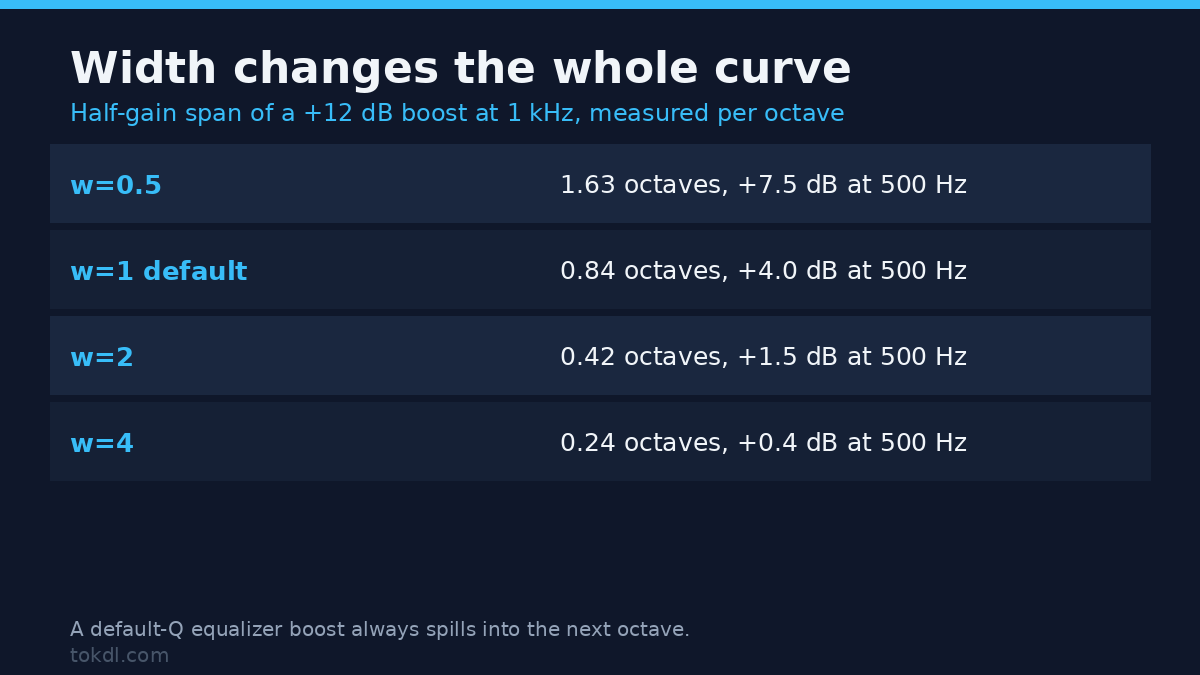
Width is the parameter people skip, and it’s the one that decides whether an equalizer sounds surgical or sloppy. I boosted 1 kHz by 12 dB and measured the result at each octave, then found the points where the boost fell to half its value in dB. That half-gain span is the honest width of the bell:
| Width setting | Half-gain span | Gain at 500 Hz | Gain at 2 kHz |
|---|---|---|---|
| w=0.5 | 1.63 octaves | +7.5 dB | +7.5 dB |
| w=1 (default) | 0.84 octaves | +4.0 dB | +4.0 dB |
| w=2 | 0.42 octaves | +1.5 dB | +1.5 dB |
| w=4 | 0.24 octaves | +0.4 dB | +0.4 dB |
Read the second row again. With the default width, a 12 dB boost at 1 kHz also lifts 500 Hz and 2 kHz by 4 dB each. If you stack three of those boosts while chasing clarity, the low mids and the sibilance band come up with them, and the mix turns harsh in a way no single band explains. Narrow the equalizer before you raise the gain. A graphic equalizer with fixed octave bands can’t do that, because its width is baked in.
The w value isn’t the only way to express width. FFmpeg also accepts t=h with width= in Hz, which stays the same absolute width as you move the centre frequency. I use Q for dialogue because a bell that scales with the octave behaves predictably when I move it from 200 Hz to 300 Hz, and that’s the whole reason it’s the default.
How to find the frequency that’s bothering you
Set a peaking equalizer to +9 dB with a narrow Q of 4, then sweep the centre frequency while the dialogue loops. The band that makes the problem worse is the band to cut. On one boom-heavy recording I found it at 230 Hz, not the 250 Hz I’d assumed, and a 3 dB cut there did more than 6 dB at 250 did.
The four moves that fix most dialogue
1. High-pass at 80 Hz, and know its slope
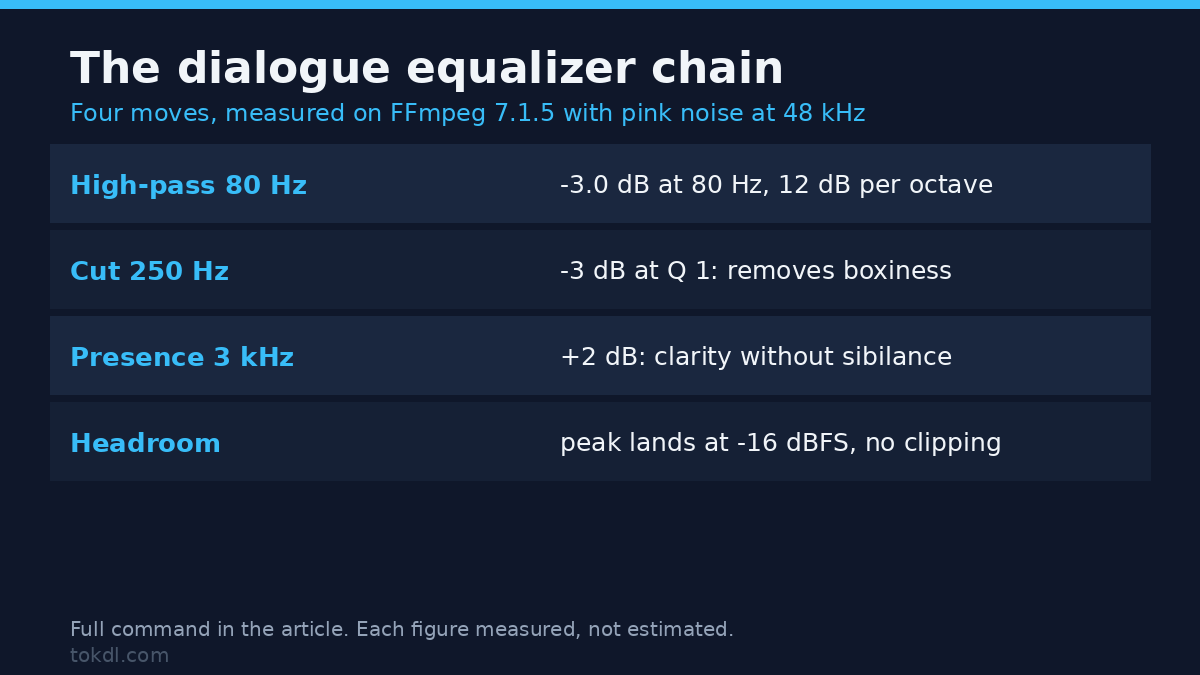
Rumble, traffic, desk thumps and air-conditioning live below the fundamental of a human voice. A high-pass filter removes them without touching intelligibility. Measured on pink noise, highpass=f=80 gives -3.0 dB at 80 Hz, -8.7 dB at 50 Hz, -12.1 dB at 40 Hz and -23.9 dB at 20 Hz.
That curve is a 12 dB per octave slope, which is what you get from the default two-pole filter. Add poles=1 and the same cutoff manages only -6.8 dB at 40 Hz, a 6 dB per octave slope that lets more rumble through. The gentle version is safer on a deep voice; the steep one suits a booming room.
2. Cut the mud at 250 Hz
Boxiness sits between roughly 150 and 400 Hz. A 3 dB cut centred at 250 Hz with Q of 1 measured -3.0 dB at 250 Hz, -1.6 dB at 125 Hz and -0.9 dB at 500 Hz. That’s enough to thin out a boomy room tone without making the voice sound like a telephone.
Resist going deeper on the first pass: six dB at 250 Hz starts removing chest weight. If the recording still sounds hollow after a 3 dB cut, the room is likely the problem, not the equalizer curve.
3. Add presence at 3 kHz, gently
Intelligibility lives in the 2 to 5 kHz range. I measured a +2 dB bell at 3 kHz with Q of 1: +1.9 dB at 3 kHz, +1.5 dB at 4 kHz and +1.1 dB at 2 kHz. That’s a lift you notice as clarity rather than brightness.
Six dB at the same frequency is a different animal. It measured +2.0 LU of integrated loudness on my pink-noise bed, and it pushed the true peak up while making the track feel louder instead of clearer. Use the small lift, then check on a phone speaker. If the S sounds spit at you, drop to +1 dB or narrow the bell.
4. Leave the top end alone unless you’ve tested it
A high shelf is the wrong tool for sibilance. FFmpeg’s treble=g=6 measured +4.6 dB at 4 kHz, +5.9 dB at 8 kHz and +6.0 dB at 16 kHz, which is a broad lift across every consonant. If you need air, +2 dB is plenty. If you need de-essing, a multiband compressor or a dynamic filter does the job without brightening the whole mix.
Copy this FFmpeg chain
This is the chain I use for interview and voiceover tracks. It keeps the video stream untouched, so the picture doesn’t lose a generation:
ffmpeg -i input.mp4 -af "highpass=f=80,equalizer=f=250:t=q:w=1:g=-3,equalizer=f=3000:t=q:w=1:g=2" -c:v copy -c:a aac -b:a 192k output.mp4On a 12-second 720p test clip the video stream’s MD5 stayed identical before and after (38ea3249e3578d164d7ffbba0e37d936), and the output grew by 70 bytes. That’s the whole point of -c:v copy. The equalizer touches audio, and the encoder never re-processes a frame.
If the room has heavy low-end rumble, keep the default two-pole filter and raise the cutoff instead of the slope. If the voice is deep and the rumble is mild, drop to one pole with the same cutoff, which halves the steepness:
ffmpeg -i input.mp4 -af "highpass=f=80:poles=1" -c:v copy -c:a aac -b:a 192k output.mp4Try the gentle version first on a deep voice, then swap back to the two-pole default when the rumble survives it.
Which equalizer filter should you reach for?
| Filter | Shape | Measured behaviour | Best use |
|---|---|---|---|
equalizer |
Peaking bell | +12 dB at 1 kHz also lifted 500 Hz and 2 kHz by 4 dB at Q=1 | Surgical cuts and small presence lifts |
highpass |
12 dB/oct below cutoff | -3.0 dB at 80 Hz, -12.1 dB at 40 Hz | Rumble and handling noise |
bass |
Low shelf | +6 dB setting measured +5.8 dB at 40 Hz, +4.3 dB at 80 Hz, +0.9 dB at 160 Hz | Music beds, not dialogue |
treble |
High shelf | +6 dB setting measured +4.6 dB at 4 kHz, +6.0 dB at 16 kHz | Dull room tone, used sparingly |
Peaking bells solve problems in one place. Shelves shift everything above or below a line, which is why the peaking equalizer does most of the work on dialogue and the shelves stay near zero.
Don’t give back the headroom you just saved
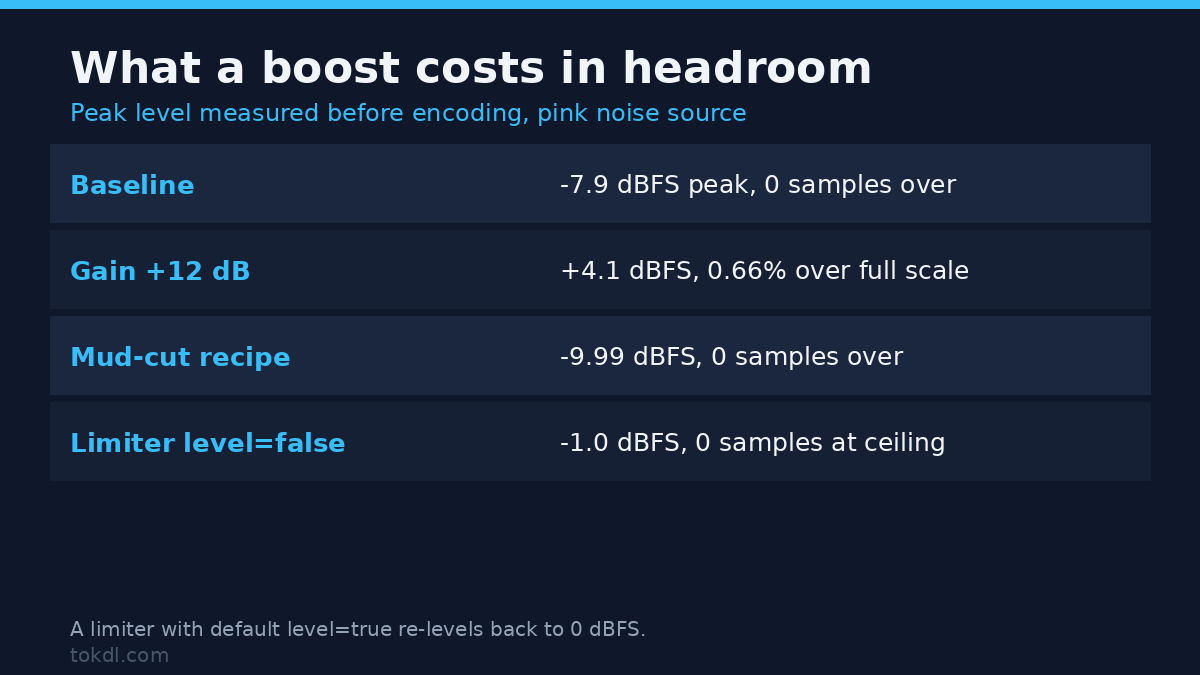
Every boost spends headroom, and a float pipeline won’t warn you. I took pink noise peaking at -7.9 dBFS and added 12 dB of gain: the peak landed at +4.1 dBFS, and 1,912 samples out of 288,000 (0.66%) sat at or above full scale. Encoding that to 16-bit PCM or a lossy audio codec turns those samples into flat-topped distortion.
The chain above is safer because it cuts before it boosts. On a loud test source the mud-cut recipe finished at -9.99 dBFS with zero samples at the ceiling. Adding 6 dB of headroom before the filters put the peak at -16.0 dBFS, which leaves room for the limiter stage later in the master.
If you reach for alimiter as a safety net, set level=false. With defaults, alimiter=limit=0.891 re-levels its output back to 0 dBFS: my measurement showed 278 samples sitting exactly at the ceiling. Adding level=false held the peak at -1.0 dBFS with zero samples at full scale. The limiter did its job either way, but only one version left the headroom you asked for.
An equalizer also changes loudness, which surprises people who expect a tone control to be volume-neutral. On the same pink-noise bed, the high-pass cost 0.2 LU, the 3 dB mud cut cost 0.3 LU, a +2 dB presence lift added 0.5 LU, and a +6 dB presence lift added 2.0 LU. Small moves, but they add up across a timeline. Run a loudness normalization pass after the equalizer, not before, so the level you set is the level that ships.
Five equalizer mistakes that make dialogue worse
Boosting instead of cutting. A 3 dB cut at 250 Hz and a 3 dB boost at 3 kHz both add clarity, but only one of them spends headroom. Cut first, then decide whether a lift is still needed.
Using a wide bell for a narrow problem. At Q=0.5 a boost spreads 1.63 octaves, which is most of the voice range. Narrow the bell until the change is boring, then raise it by 1 or 2 dB.
Copying the audio stream while filtering it. -af ... -c:a copy fails with exit code 218 and the message “Filtering and streamcopy cannot be used together.” It’s a helpful error, since the alternative is a silent no-op that leaves the file sounding identical. Re-encode the audio and copy only the video.
Equalizing clipped audio. If the waveform is already flat-topped, an equalizer shapes distortion instead of sound. Read how to repair clipped audio first, then EQ.
EQing before noise reduction. A denoiser works better on a full-band signal, and a high-pass before it can remove the low-frequency evidence it uses to build its noise profile. Clean the noise with a dedicated background noise removal pass, then shape the tone.
FAQ
Does an equalizer work on phone recordings?
Yes, within limits. Phone mics roll off below roughly 100 Hz already, so a high-pass at 80 Hz does little; the recording setup matters more than the curve. The useful moves are a 2 to 4 dB cut around 300 Hz and a small presence lift, because the small capsule exaggerates the low mids and dulls the top.
How much gain is too much?
More than 3 dB on a peaking bell usually means you’re fixing the wrong frequency. Move the centre first, narrow the Q, and only then raise the gain. If a 6 dB cut still leaves the problem, the recording itself is the issue, and no equalizer will rescue it.
Should I equalize before or after compression?
Subtractive equalization goes first, so the compressor isn’t reacting to rumble you’re about to remove. Presence lifts go after compression, because a compressor can undo a boost that arrives before it.
Does EQ change the file size?
Barely. On my test clip the video stream was copied and the audio re-encoded at 192 kbps, and the output grew by 70 bytes. File size moves with video encoder settings, not with an equalizer band.
The short version
Cut before you boost, keep the bell narrow, and check the numbers instead of trusting your ears on laptop speakers. A high-pass at 80 Hz, a 3 dB cut at 250 Hz and a 2 dB lift at 3 kHz will fix most dialogue that sounds boxy, and none of those moves costs more than half a LU of loudness.
Then measure the result: export a version, check the peak level, and listen on the worst speaker you own. An equalizer is a measuring tool, not a magic wand, and the chain above is a starting point you can defend with numbers.