

Shutter Speed for Video: The 180° Rule and When to Break It (2026)
A 24 fps camera with a 180° shutter holds each frame open for 1/48 of a second. No consumer menu prints that number. It offers 1/50, or a shutter angle dial if you paid for one, and that small gap is where most arguments about motion blur begin.
The standard shutter speed for video is half your frame rate. 1/48 or 1/50 at 24 fps, 1/60 at 30, 1/120 at 60. Everything below is either how to reach that number or a good reason to leave it alone.
Three routes follow: a mirrorless body, a cinema camera, a phone. After that, the situations where the rule quietly makes footage worse.
Shutter Speed for Video: The Short Answer
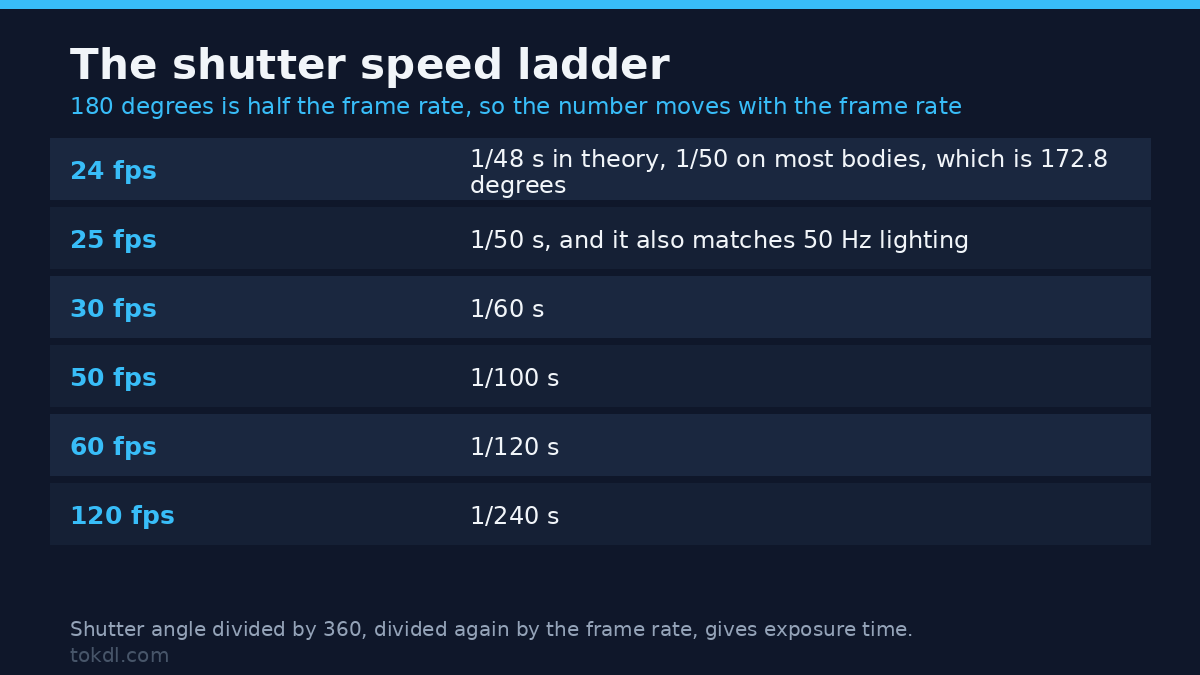
Exposure time equals the shutter angle divided by 360, divided again by the frame rate. At 180° the arithmetic collapses into something you can do without a calculator: half the frame rate.
| Frame rate | Exposure time | Angle |
|---|---|---|
| 24 fps | 1/48 s (1/50 on most bodies) | 180° |
| 25 fps | 1/50 s | 180° |
| 30 fps | 1/60 s | 180° |
| 50 fps | 1/100 s | 180° |
| 60 fps | 1/120 s | 180° |
| 120 fps | 1/240 s | 180° |
A shutter angle survives a frame rate change; a fixed shutter speed doesn’t. Set 180° on a camera, switch from 24 to 48 fps, and the exposure time halves on its own so the blur per frame stays the same. A body left at 1/48 keeps 1/48 and now smears each frame across its whole interval.
The number is a leftover from film. A rotary disc shutter spun in front of the film gate, and a half-open disc let light through for half the frame interval. Video kept the convention because the result looked right, not because any standards body required it.
One naming trap before any of this. The 180° rule in editing is about keeping the camera on one side of the action line. Same number, unrelated idea, and no shutter setting has ever fixed a jump cut.
Before You Start: Frame Rate, Manual Control, and Light
Shutter speed comes third, after two decisions that constrain it. Pick the frame rate you want first, because every number in the table above is derived from it. Deliver to a 24 fps timeline and shoot 24. Cut sport or gameplay at 60 and the whole ladder moves up.
Then take the camera out of full auto. Auto exposure will move the shutter speed to hold brightness, so the moment a cloud crosses the sun you’ll see the blur change and every face in the shot soften. Manual mode, or shutter priority with ISO pinned, keeps the blur fixed and lets brightness drift instead.
Finally, control the light. Indoors that means more of it. Outdoors it means an ND filter, because at ISO 100 a 1/50 exposure in direct sun lands near f/22, and reaching f/2.8 from there takes six stops of glass in front of the lens.
Method 1: Set the Shutter Speed on a Mirrorless Camera or DSLR
Four settings and one habit, in this order. Get the frame rate and the mode wrong and the other two can’t save the shot.
- Set the frame rate in the video menu. 24, 25, 30 or 60. Do it first, because the shutter value depends on it.
- Switch to M. Shutter priority works as long as ISO is locked. With auto ISO running, the camera answers your aperture changes by moving ISO, and the picture gets noisy instead of brighter.
- Set the shutter speed to half the frame rate. At 24 fps the dial stops at 1/50 rather than 1/48. That’s 172.8° of angle, and it’s also the setting that keeps 50 Hz lighting steady.
- Expose with aperture, then ND, then ISO. Aperture sets depth of field, so it goes first. ND removes light you can’t lose any other way. ISO comes last because it costs noise, and a stop of ISO is harder to reduce noise later than a stop of light.
Then confirm exposure with a tool instead of the rear screen. Zebras at 95% or a waveform will flag a blown forehead while the LCD still looks fine, and in sunlight you’ll find that screen flatters the shot.
Method 2: Shutter Speed as an Angle on a Cinema Camera
Cinema bodies and most pro camcorders let you set the angle directly. Choose 180° and stop thinking about it, because the camera holds half the interval whatever frame rate you select next.
Two values are worth knowing beyond 180. In a 50 Hz country at 24 fps, 172.8° gives exactly 1/50 of a second, which keeps fluorescent tubes and cheap LED fixtures from banding. For a crisp, staccato action look, 90° halves the exposure and sharpens every frame.
The dial also turns the other way. At 270° or 360° you gain light for a dark room, and 360° means the sensor never closes between frames, so anything moving leaves a continuous trail. That’s a choice rather than an error, as long as you can say why you made it.
Method 3: The Shutter Speed a Phone Lets You Set
The native camera app on a phone decides the shutter for you. iPhone’s Camera app offers no manual shutter control, and Android’s stock app usually hides the value in a Pro mode that some phones leave out entirely. Auto exposure chases brightness, so in a dim room the shutter stretches and hands smear.
Third-party camera apps are the workaround. Blackmagic’s free iOS app and the Pro modes on most Android flagships expose shutter speed and ISO directly, which is enough to hold 1/60 at 30 fps through a whole take. Lock exposure while you’re in there, or the app drifts back as soon as the light changes.
Where the Rule Produces Worse Footage
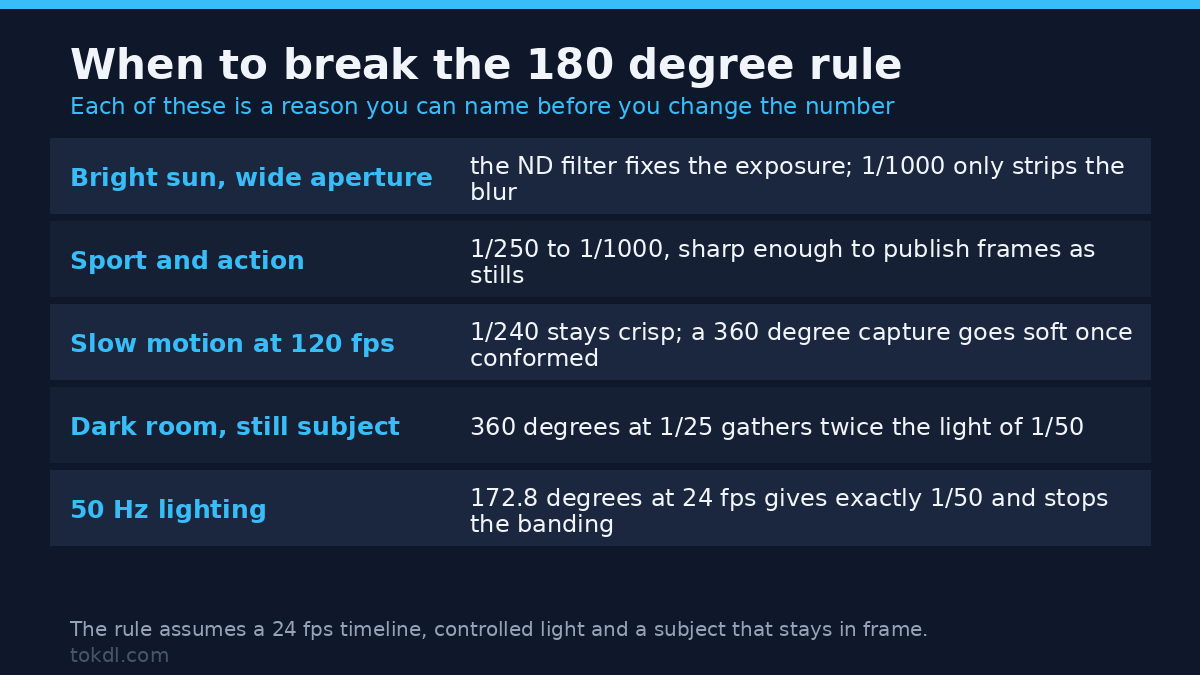
The standard shutter speed for video assumes a 24 fps timeline, controlled light, and a subject that isn’t trying to leave the frame. Five situations fall outside that.
- Bright sun at a wide aperture. At 1/50 and f/2.8 the frame is blown by five or six stops. Reaching for 1/1000 fixes the brightness and strips the blur, which is why the filter, not the shutter, is the answer.
- Sport and action. When the point is to see the ball leave the boot, sharp beats cinematic. Somewhere between 1/250 and 1/1000, and the same footage then gives frames good enough to publish as stills.
- Slow motion. 120 fps at 1/240 conformed to 24 gives clean, readable slow motion. Drop to 360° on that same capture and the result gets softer and dreamier at the cost of detail.
- Low light with a still subject. A 360° shutter at 1/25 gathers twice the light of 1/50. With nothing moving, blur is cheaper than the noise that two stops of ISO would add.
- Fast pans. A fast shutter freezes the skew that rolling shutter introduces, so leaning buildings become obvious. A slower shutter hides the skew inside the blur, and a slower pan fixes both.
Rights and Responsible Use
Copyright in a recording belongs to the person who made it, unless an employer or a contract says otherwise. Shoot for a client and the footage is often theirs, whatever sits on your card when the job ends. That part is simple; the contents of the frame are not.
A song playing in a café, a match on a wall-mounted television, a poster, a stranger’s face on a busy street: capturing them transfers nothing. Watching a clip at home and publishing it are different acts, and publishing it and selling it to a brand are two more.
Commercial work usually needs permission from anyone identifiable in frame, and venues set their own rules that outrank any argument about public space. A sign at the door is a condition, not a suggestion. Recording something doesn’t grant rights to it, and a technically perfect capture of a performance you had no right to film is still that.
If the finished clip goes to YouTube, what you may publish is governed by YouTube’s terms and by the rights of whoever owns what you filmed. Shutter speed has no bearing on any of it.
Troubleshooting Shutter Speed Problems
Five failures that look like camera faults and are usually a shutter setting. Each one has a cause you’ll find in under a minute.
Bands or Pulsing at the Wrong Shutter Speed
The shutter interval and the light’s flicker cycle are out of step. A 1/50 exposure in a 50 Hz country averages one full mains cycle per frame, so every frame catches the same brightness. Shorter exposures sample part of that cycle and the brightness wobbles.
Pans That Strobe at a 1/500 Shutter Speed
A shutter speed left at 1/500 from a photo shoot leaves every frame razor sharp, and sharp frames at 24 fps read as a slideshow. Return to 1/48 or 1/50, then pan slowly enough that an object takes about seven seconds to cross the width of the frame.
Smearing in a dim room
Auto exposure stretched the shutter speed to 1/25 or slower to hold brightness. Lock the shutter speed and raise ISO instead, then accept the noise; blur from a shutter speed that was too slow can’t be recovered after the fact.
Slow motion that looks steppy
The clip was captured at 30 fps and slowed to 24, so there aren’t enough frames left to fill the timeline. Capture at 120 fps with the shutter speed at 1/240 and conform that. Software interpolation can invent frames, and on fast movement it’ll invent them badly.
Blur that changes mid-shot
Something automatic moved while you were recording, usually exposure or ISO in a semi-manual mode. Lock exposure before the take and let brightness ride. A slightly dark ending is easier to correct in post than a blur that shifts halfway through a sentence.
Frequently Asked Questions
What shutter speed for video should I start with?
Half your frame rate, rounded to whatever number the camera offers. 1/50 at 24 fps, 1/60 at 30, 1/120 at 60. That default covers interviews, events and tutorials, and it’s the setting to come back to after every experiment.
Is 1/60 okay for 30 fps video?
Yes, 1/60 is the exact 180° exposure for 30 fps. The one exception is a 50 Hz country, where 1/50 keeps artificial light steady at the cost of a longer exposure and a little more blur.
Do I need an ND filter to follow the 180 degree rule outdoors?
Usually, yes, in direct sun at a wide aperture. The correct exposure for 1/50 at ISO 100 is around f/22, so reaching f/2.8 needs about six stops of ND. A variable ND covers most of it, while a fixed six-stop filter tends to be sharper.
Does shutter speed affect slow motion?
Yes, it sets how much blur each slowed frame carries. 120 fps at 1/240 stays crisp frame by frame, while 120 fps at 1/120 carries a full frame of blur and looks softer once conformed to 24.
Why do my videos flicker under LED lights?
The shutter speed and the light are running on different clocks. Cheap fixtures flicker with the mains supply, and a shutter that doesn’t span one complete cycle catches each frame at a different point in that cycle.
Can I fix motion blur in post?
No, blur can’t be removed once it’s recorded. You can add blur in an editor, but taking it away means guessing at detail that was never captured. Optical flow tools can sharpen a frame slightly, and on faces and hands the result usually reads as smeared plastic.
Is a 180 degree shutter the same shutter speed as 1/48?
Only at 24 fps, because the angle is a proportion of the frame interval. At 30 fps the same 180° setting gives 1/60, and at 60 fps it gives 1/120. The fraction changes; the look stays consistent.
Which Method Should You Use?
Start with method 1 on any hybrid camera. Four settings cover interviews, events, tutorials and channel work, and 1/50 at 24 fps sits close enough to 180° that the difference disappears after compression.
Switch to shutter angle if the body offers it and the project moves between frame rates, since the angle carries over without another decision. On a phone, use whichever app exposes the value and lock exposure while you’re at it.
Break the rule when you can name the reason. 1/250 because the subject is a rally car. 360° because the room is dark and nothing moves. The standard shutter speed for video is a way to start, not a law to obey.
[…] or 1/60 rule will do more than any filter here. For the shutter angle background, see our guide to shutter speed for video, and if grain is your problem rather than brightness, the fix is in reducing video noise. When the […]