
How to Fix Flickering Video: LED Lights, Banding and Exposure Pumping
A client sent me a forty second interview last month, shot in a rented office with the lights on dimmers. It looked fine on the camera screen. On a calibrated monitor the whole frame pumped like a slow strobe, bright, dull, bright, dull, about twice a second. Nobody in the room had noticed, because the camera screen was too small and the room too bright. That’s a flickering video, and it’s almost never the camera’s fault. It’s the light, the shutter, or the exposure mode, and each one has a different fix.
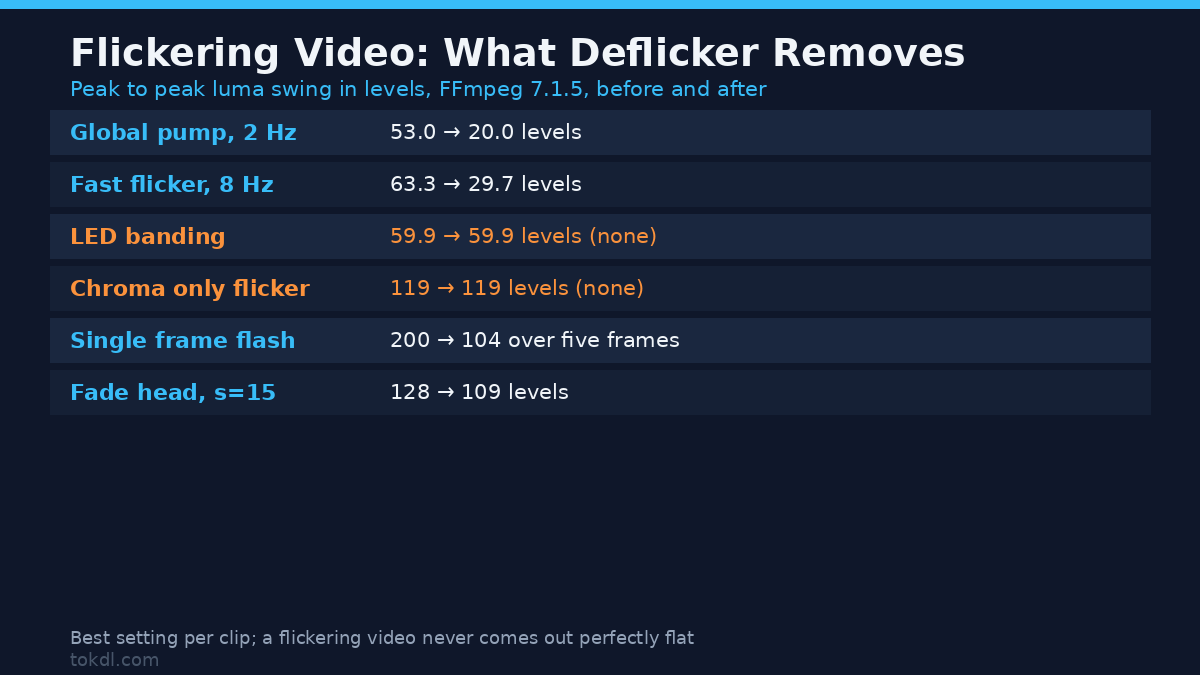
I measured what FFmpeg’s deflicker filter does to a flickering video, on test clips where I knew the answer in advance. The short version: it removes about half of a global brightness swing, it never touches the striped bands an LED panel throws across a frame, and its median mode slides bright events three frames earlier in time.
What you’ll learn
You’ll learn how to tell the three kinds of flicker apart with one FFmpeg command, which of them a pass can rescue, and the shutter speeds that keep a flickering video out of your camera.
Three kinds of flicker, and why the fix differs
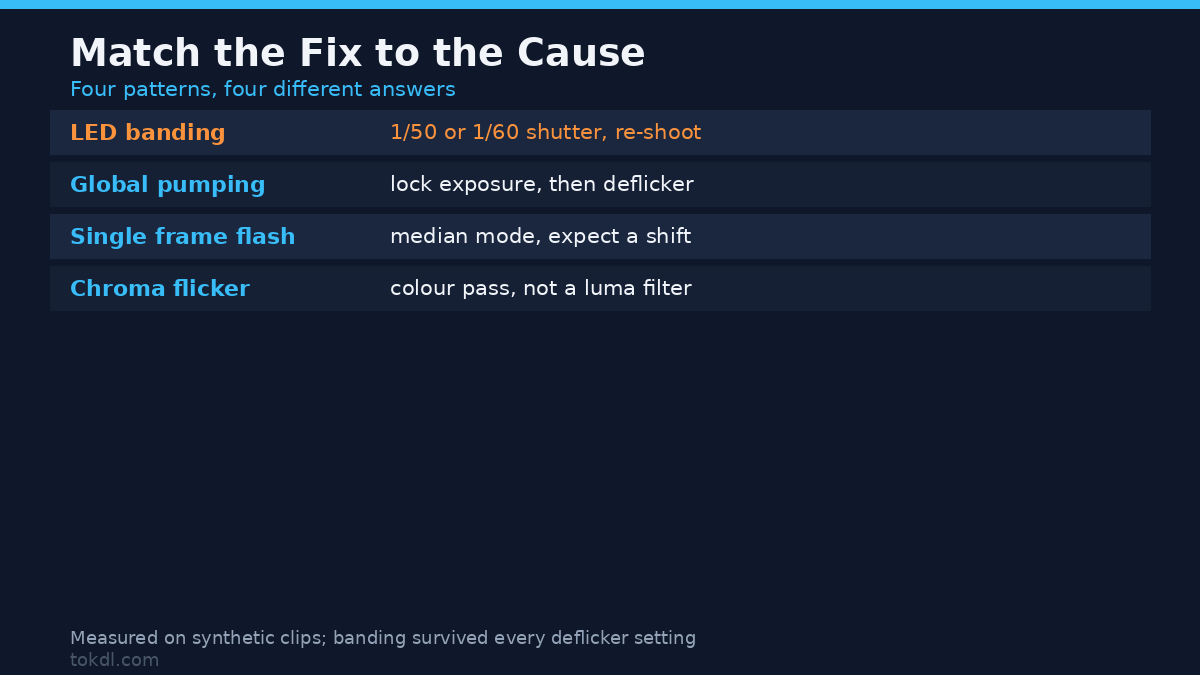
Flicker isn’t one defect. In a flickering video I look for one of three patterns, because each behaves differently on a luma graph and each needs its own remedy.
| Pattern | What you see | What fixes it |
|---|---|---|
| Global pumping | The whole frame brightens and darkens together, often 2 to 5 times a second. Typical of auto exposure hunting, or a dimmer at partial power. | Lock exposure at capture. In post, deflicker removes roughly half the swing. |
| LED banding | Horizontal stripes that crawl down the frame. Average brightness stays almost flat. | 1/50 or 1/60 shutter, or the camera’s anti-flicker mode. Re-shoot; no filter recovers it. |
| Single frame flashes | One or two frames far brighter than their neighbours, then normal. | Median mode in deflicker, or replace the frame. |
People reach for a filter first and then decide it’s broken. If your flickering video has stripes, the filter is doing what it was built to do: nothing, since its input has no global swing to correct.
Measure it before you touch it
FFmpeg ships a statistics filter that prints the mean luma of every frame. Run it over the source and you get the amplitude of a flickering video in levels, which is the number to compare against after the fix.
ffmpeg -i flicker_8hz.mp4 -vf "signalstats,metadata=print:file=stats.txt" -an -f null -The output fills with one block per frame. The line you want is lavfi.signalstats.YAVG, the average luma of that frame on a 0 to 255 scale. On my test clip, a synthetic gradient with an 8 Hz swing, YAVG ran from 58.47 to 121.75. That’s 63.3 levels peak to peak, about 1.06 stops, and it reads as pumping on a big screen even though every frame looks correctly exposed.
Read YAVG, not the YDIF beside it. YDIF measures how much pixels changed between frames, so a moving subject inflates it and a static wall doesn’t. I wasted twenty minutes chasing a “flicker” that was a hand crossing the frame. A flickering video with a flat YAVG and visible shimmer has banding or colour flicker, and spikes on single frames mean the third pattern in the table.
What deflicker actually removes
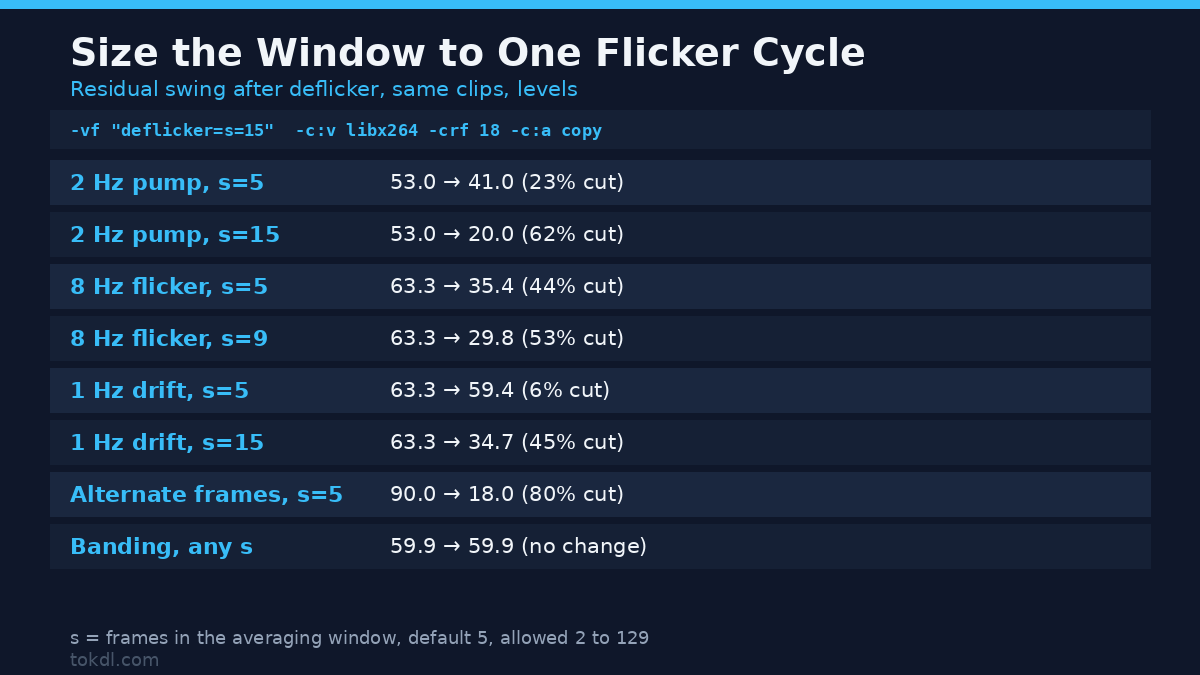
For a flickering video the filter takes each frame’s mean luma, compares it with the mean of a window of neighbours, and scales the frame toward that local average. The s option sets the window in frames, from 2 to 129, default 5. I built three clips with known flicker and measured the residual swing after each setting. Peak to peak YAVG in levels:
| Setting | 2 Hz exposure pump | 8 Hz flicker | 1 Hz slow drift |
|---|---|---|---|
| Source | 53.0 | 63.3 | 63.3 |
s=2 |
not run | 45.2 | 62.9 |
s=5 (default) |
41.0 | 35.4 | 59.4 |
s=9 |
not run | 29.8 | 50.8 |
s=15 |
20.0 | 29.7 | 34.7 |
s=31 |
18.0 | not run | not run |
Read that as a warning, not a menu. On the 2 Hz pump the default cut the swing by 23 percent, which hides nothing; a 15 frame window cut 62 percent and 31 frames reached 66. On the 8 Hz flicker the default took 44 percent off, then flattened near 53 whatever I set. On the 1 Hz drift the default barely moved, because five frames at 25 fps covers a fifth of one cycle.
Here’s the rule I’d give a friend: the window has to cover at least one full flicker cycle, and even then you’d expect a reduction of half to two thirds, never a clean file. A flickering video that swings 60 levels will still swing 20 after the best setting I found, and 20 levels shows on a gradient sky.
Frame count and duration survive untouched. On a 50 frame, 2.000 second clip the output still declared 50 frames and 2.000 seconds, and with -c:a copy the audio MD5 stayed byte identical (721a63aa2095cb4e3b3e975f206caff4) while the video MD5 changed. The pass is safe on a finished edit.
Three things deflicker can’t fix
One flickering video can carry all three of these at once, and each needs its own answer.
1. LED banding
I built a clip with brightness bands travelling down the frame, the way a cheap LED panel looks at a fast shutter. Global YAVG was almost flat, 0.17 levels of swing, so the filter barely engaged. To measure the bands I averaged nine horizontal strips of a frame before and after a default pass. Before: 94.7, 86.1, 145.8, 94.7, 86.3, 146.0, 94.6, 86.2, 145.8. After: 94.7, 86.1, 145.8, 94.9, 86.4, 146.0, 94.5, 86.3, 145.8. The strip to strip range was 59.9 levels both times, so a flickering video with stripes needs a re-shoot: a banded frame has no global swing to average out.
2. Chroma only flicker
Same story, different plane. A clip whose luma stayed constant while its colour pulsed at 8 Hz kept a U swing of 119 levels after a default pass, and a V swing of 79, identical to the level. A flickering video where the colour pumps and the brightness doesn’t comes out unchanged, so fix it with a colour pass or, better, with a camera that isn’t fighting a dimmer.
3. Fast flicker
High frequency flicker is the hardest case: the window needed to average it out is short, and short windows are weak. My 8 Hz clip never got better than a 53 percent cut, and faster lights won’t do better.
The traps inside the filter
Median mode shifts time. Two isolated one frame flashes at frames 10 and 30 of a 50 frame clip came out at 7 and 27 with s=5:m=median, and at 3 and 23 with s=9:m=median. The events slid three and seven frames earlier, which at 25 fps is 120 and 280 milliseconds. If the flash is tied to something in the audio, that’s now out of sync. Median suits single frame defects, but check timing afterwards.
It smears across hard cuts. A clip that stepped from luma 60 to 170 on one frame boundary came out of a default pass as 82, 104, 125, 148, 170. Four frames of gradient where there was a cut. A flickering video with edits in it needs the shots split, fixed separately, then rejoined.
It fights a fade. A two second fade from luma 128 to 0 started at 109 instead of 128 after s=15, and at 1.5 seconds read 20 where the source read 32. The filter pulls each frame toward neighbours that are darker on purpose. Same logic for a dissolve. Short clips misbehave too: a 40 frame clip with s=129 drifted from luma 32 to 23 over the first fourteen frames as the window filled, which reads as a slow fade in.
Fix it at the camera instead
A minute on shutter speed saves ten in post. A 50 Hz mains supply pulses 100 times a second, so one full cycle lasts 20 milliseconds. Set a 1/50 second shutter and each frame integrates exactly one cycle, which cancels the pulse by construction. Set 1/100 and you get two cycles, also clean. Set 1/60 in a 50 Hz country and each frame catches one and a fifth cycles, so the leftover fifth shows up as a flickering video.
In a 60 Hz country the numbers mirror: 1/60 and 1/120 are clean, 1/50 isn’t. That’s a happy accident of the 180 degree rule, since a 180 degree shutter at 25 fps is 1/50 and at 30 fps is 1/60. At 24 fps it’s 1/48, close to but not exactly one 50 Hz cycle, so under flickering light I shoot 1/50 or 1/100 and accept a slightly crisper look.
Two backups. Turn on the camera’s anti-flicker setting if it has one, which Canon documents as detecting sources from 50.0 to 2011.2 Hz and picking a shutter speed that avoids them. And lock exposure and white balance in manual, because the most common cause of a flickering video is auto exposure reacting to a light that’s already unstable. If you need the wide aperture, use an ND filter rather than a fast shutter.
A workflow that works
- Run the statistics pass and note the YAVG swing. Under about 6 levels, leave it alone.
- Look at a frame. Stripes mean banding, so skip to the camera section. Oscillation means a pass can help.
- Size the window to one cycle. For a 2 Hz pump at 25 fps that’s 13 frames, so start at
s=15. - Run the pass on the flickering video, measure again, and compare peak to peak numbers. Don’t trust your eye on a laptop.
- Cut around edits and fades first, or the filter will smear them.
ffmpeg -i input.mp4 -vf "deflicker=s=15" -c:v libx264 -crf 18 -preset slow -c:a copy fixed.mp4Re-encode rather than stream copy, since the filter has to decode and rewrite every frame, and keep the audio copied. If the flickering video has isolated bad frames instead of a continuous swing, use m=median with a small window and confirm the timing afterwards:
ffmpeg -i input.mp4 -vf "deflicker=s=5:m=median" -c:v libx264 -crf 18 -preset slow -c:a copy fixed.mp4Common mistakes
- Running deflicker on a banded clip and blaming the filter. It has nothing to correct.
- Leaving the window at 5 for a slow exposure hunt. The measured gain is 23 percent.
- Cranking the window to 129 on a short clip. The first frames drift while it fills.
- Running the pass across cuts and fades. It smears four frames across a cut.
- Using median mode without checking sync. Bright events moved three frames at
s=5. - Chasing a colour pulse in a flickering video with a luminance filter. The chroma came through untouched.
FAQ
Why does a video flicker only on some screens?
Because a small swing disappears in a bright room and jumps out on a large, dimmer, calibrated display, especially on flat walls and skies. Measure the YAVG swing and you’ll know whether it’s real.
Does deflicker work on phone video?
Yes, once the clip is decoded. What changes is the cause: phone footage usually got that way from auto exposure reacting to a dimmed LED, or from a rolling shutter reading a pulsed light. The first improves with a pass, the second doesn’t.
Can I fix a flickering video without re-encoding?
No. Fixing a flickering video this way rewrites pixel values on every frame, so it needs a full decode and encode. Stream copy is for cutting and remuxing only.
Conclusion
A flickering video is usually a lighting and shutter problem that got recorded, not an editing problem you can filter away. My measurements say the filter removes 44 to 66 percent of a global brightness swing depending on the window, and exactly nothing from LED banding or colour flicker. So the order of work is: measure with signalstats, decide which pattern your flickering video has, fix banding at the camera, and only then reach for deflicker with a window sized to the period. If you shoot a lot of interiors, the 1/50 or 1/60 rule will do more than any filter here. For the shutter angle background, see our guide to shutter speed for video, and if grain is your problem rather than brightness, the fix is in reducing video noise. When the defect turns out to be combing, deinterlacing is the article you want. If the frame looks washed out rather than pulsing, check the colour range first.
Numbers came from FFmpeg 7.1.5 on synthetic clips with known swing amplitudes, measured back through signalstats. This box reports 64 CPUs through nproc but its cgroup quota is 2, with load between 60 and 100, so I quote levels and durations, never encode times.