
Surround Sound to Stereo: Downmix 5.1 Without Losing Dialogue
You open a 5.1 file on a laptop and the mix falls apart. Dialogue that sounded centred in the edit now sits behind the music, the low end has gone thin, and a loud scene crackles. Nothing is broken. A surround sound file carries six channels and your speakers have two, so something has to fold one into the other, and the default fold is doing things you didn’t ask for.
I measured what FFmpeg’s default downmix does to a 5.1 source on this machine, one channel at a time, and the numbers explain the usual complaints about surround sound on stereo gear. The centre channel arrives 3 dB below the front pair. The LFE channel is deleted outright. The whole programme loses about 9.6 LU of loudness, and the obvious fix for that last one quietly makes things worse.
Here’s what you’ll learn: how the default matrix works, which weights to change for dialogue, the two commands that do the job, and the traps that make a correct-looking command produce a quiet or distorted file.
What a downmix does to a surround sound file
A surround sound downmix is a matrix. Each output channel is a weighted sum of the six input channels, and the weights decide what survives. FFmpeg applies one by default whenever you ask for fewer channels than the file has, which is why -ac 2 on a 5.1 source returns a stereo file with no warning and no options.
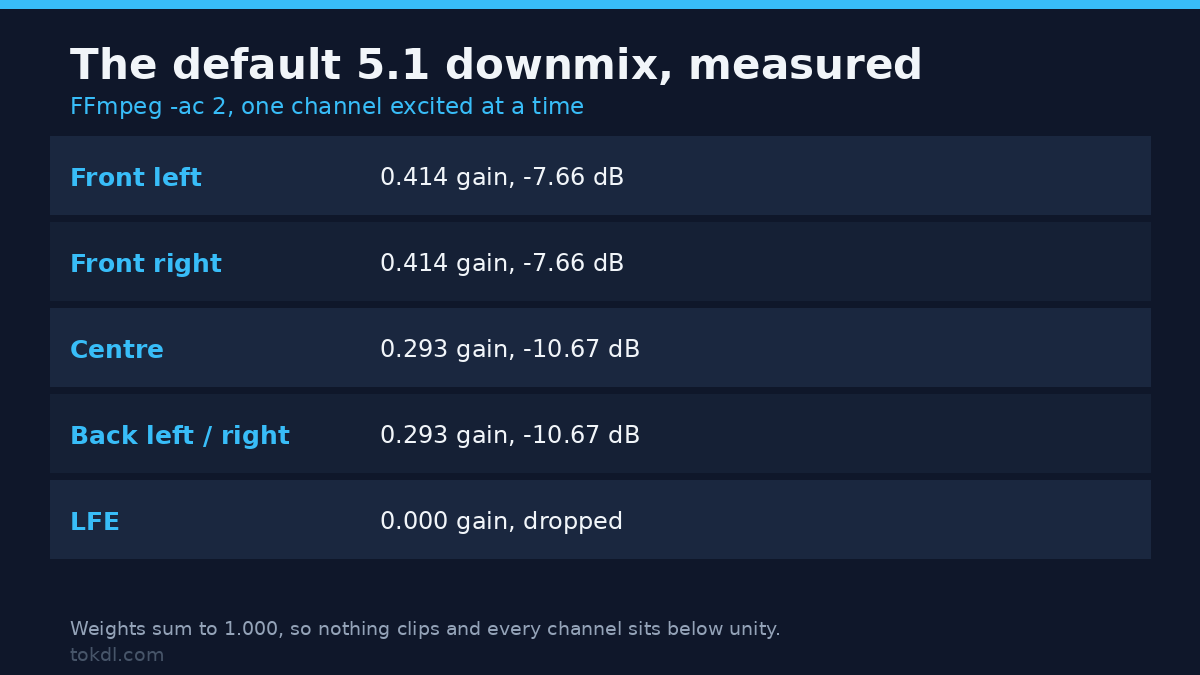
I built six test files, each with a 1 kHz tone in exactly one channel at half scale, and read the stereo output sample by sample. That gives the real matrix rather than the documented one.
| Surround sound channel | Gain to left | Gain to right | Level |
|---|---|---|---|
| Front left | 0.414 | 0 | -7.66 dB |
| Front right | 0 | 0.414 | -7.66 dB |
| Centre | 0.293 | 0.293 | -10.67 dB |
| LFE | 0 | 0 | dropped |
| Back left | 0.293 | 0 | -10.67 dB |
| Back right | 0 | 0.293 | -10.67 dB |
The weights add up to exactly 1.000 on each side. The classic ITU weights use unity for the front pair and 0.707 for the centre and surrounds, but a row of those sums to 2.414, so FFmpeg divides the whole row by 2.414 before mixing. The matrix can’t push a full-scale input past full scale, and the price is that every individual channel lands well below where it started.
Two consequences follow. First, a front channel of a surround sound mix is quieter by 7.66 dB, not by 3 dB, and a centre channel quieter still. Second, anything that was only in the LFE is gone. I excited the LFE with a 60 Hz tone at half scale and the stereo output measured a peak of 0. Zero. If the mix leans on the LFE for weight, a plain downmix throws that weight away.
A 7.1 surround sound file gets the same arithmetic, and it’s harsher. With eight channels the divisor becomes 3.121, so a front channel arrives at 0.320 (-9.89 dB) and a side channel at 0.227 (-12.9 dB). More channels means a quieter fold.
Why dialogue drops in a surround sound downmix
Film and TV mixes usually put dialogue in the centre channel of the surround sound mix, because a centre speaker keeps speech anchored to the picture. The default downmix sends that centre to both outputs at 0.293, while the front pair keeps 0.414. Put the same line of dialogue in the front left and then in the centre, and the left output measures 9123 against 6451, a drop of 3.01 dB.
Three decibels doesn’t sound like much on paper. It’s the difference between a line you follow and a line you lean in for, especially when the music sits in the front pair at full weight. The centre is also the one channel carrying the story, so a 3 dB cut there reads as a much bigger loss than 3 dB applied to the whole mix.
For the theory behind the weights, the ITU’s BS.775 recommendation is the reference document for multichannel downmixing, and the FFmpeg pan filter is how you replace the default matrix with your own.
Three surround sound recipes, measured on the same mix
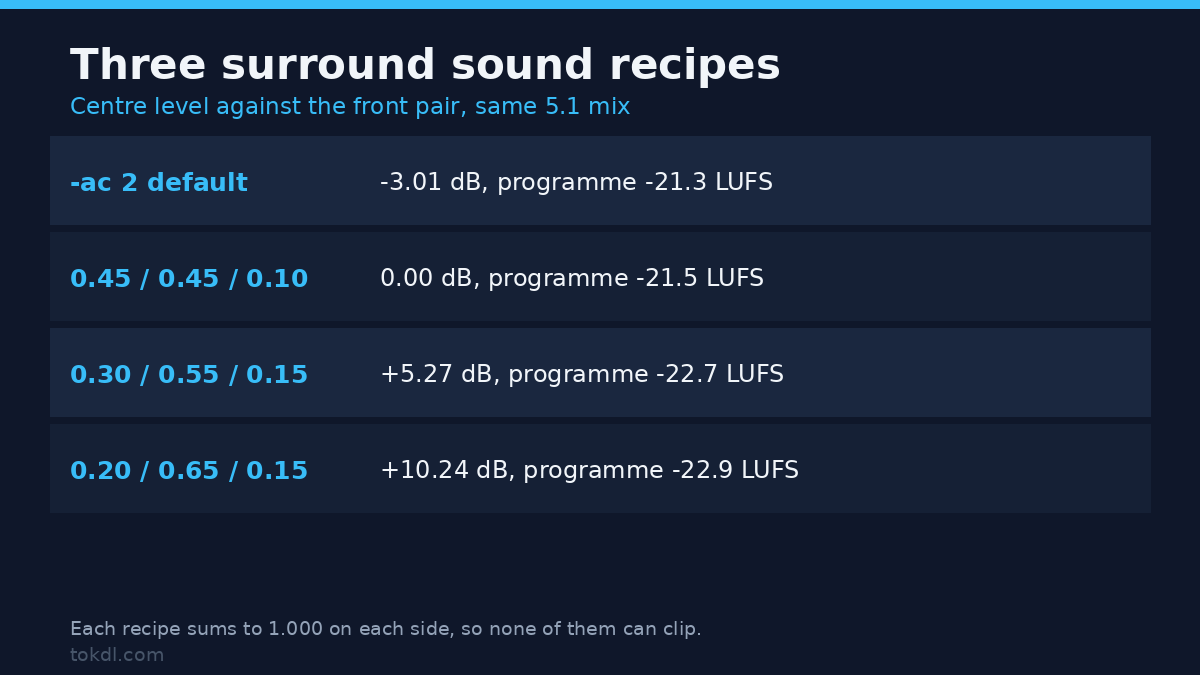
Once you know the matrix is just weights, the fix is a pan filter with weights you choose. I tested three surround sound recipes against the default on a three second programme: dialogue in the centre at 0.40, music in the four corner channels at 0.18, a little LFE at 0.10. Each surround sound recipe sums to 1.000, so none can clip a full-scale source.
| Recipe | Centre vs front | Dialogue lift | Programme |
|---|---|---|---|
-ac 2 default |
-3.01 dB | 0 dB | -21.3 LUFS |
| 0.45 front, 0.45 centre, 0.10 back | 0.00 dB | +3.01 dB | -21.5 LUFS |
| 0.30 front, 0.55 centre, 0.15 back | +5.27 dB | +8.28 dB | -22.7 LUFS |
| 0.20 front, 0.65 centre, 0.15 back | +10.24 dB | +13.25 dB | -22.9 LUFS |
The second row is the one I reach for first. It puts the centre back level with the front pair, a 3 dB lift, and the programme loudness barely moves. The third row suits a film where the music is loud and the dialogue still has to win. The fourth is a rescue setting, and it does what it says: the centre ends up 10 dB above the fronts, which sounds hollow on music but keeps every word audible on a phone speaker.
Notice what the last column does as the centre gains weight: loudness falls slightly, because you’re taking energy out of the channels that carry the bed. That’s expected, and it’s why you normalise after the fold rather than before it.
The level problem, and the one-command trap
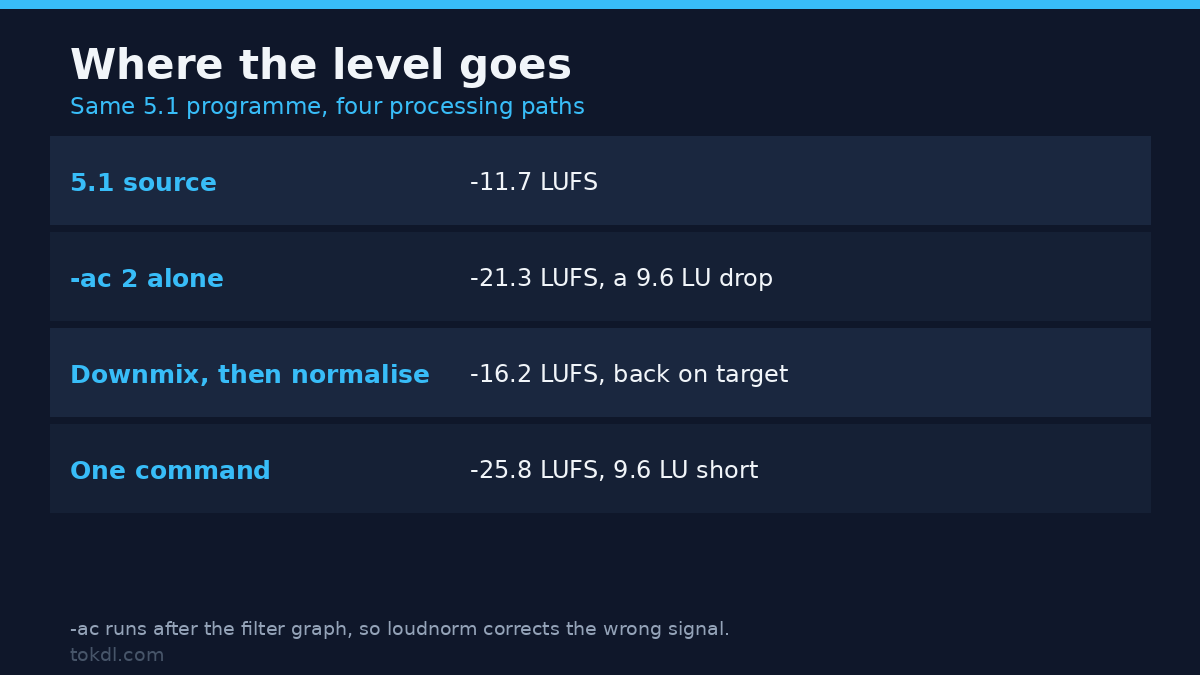
Here’s where most people lose an evening. Downmix the surround sound file first, then normalise, and it lands on target. Do both in one command and it doesn’t.
| Path | Result | Peak |
|---|---|---|
| 5.1 source | -11.7 LUFS | -11.4 dBFS |
-ac 2 alone |
-21.3 LUFS | -15.0 dBFS |
-ac 2, then loudnorm |
-16.2 LUFS | -9.8 dBFS |
pan and loudnorm in one chain |
-16.2 LUFS | -9.8 dBFS |
-ac 2 -af loudnorm in one command |
-25.8 LUFS | -19.4 dBFS |
That last row is a real defect, reproducible on FFmpeg 7.1.5 and independent of the order you write the two options in. -ac is applied at the output stage, after the filter graph has run, so loudnorm measures and corrects the six channel signal and then the downmix attenuates the result by another 9.6 LU. You asked for -16 LUFS and got -25.8.
A 3 second clip and a 10 second clip behaved the same way, so it isn’t a short-file fluke. The fix is to keep the downmix inside the filter chain, where the order is explicit, or to run the two steps as two commands. Both land on -16.2 LUFS with peaks around -9.8 dBFS.
Don’t try to restore the loss with a fixed gain. On a hot master, all six channels at 0.9 and in phase, the downmix produced a peak of -0.9 dBFS with nothing clipped. Adding the 7.66 dB back pushed the peak to +0.1 dBFS and clipped 136,000 of 192,000 samples, which is 71% of them. A limiter after that gain isn’t a repair, it’s a different distortion. If you need the level up, use loudnorm, or check the ceiling with the recipe from our audio limiter guide.
Downmixing a surround sound file in FFmpeg, step by step
Start by reading the surround sound source. You need the channel count and the layout, not the filename.
ffprobe -v error -select_streams a:0
  -show_entries stream=channels,channel_layout,sample_rate
  -of default=nw=1 input.mkv
A file reported as 6 channels and 5.1 gets the matrix above. A file with six channels but no layout is still read as 5.1 by channel count, which I confirmed by putting a tone in channel one and watching it arrive on the left at 0.414. That’s convenient until you meet a 6 channel file that isn’t 5.1, and then the matrix is wrong with no error at all.
Next, the downmix with the dialogue kept level. The filter is explicit, so nothing happens behind your back.
ffmpeg -i input.mkv -vn
  -af "pan=stereo|c0=0.45*FL+0.45*FC+0.10*BL|c1=0.45*FR+0.45*FC+0.10*BR"
  -c:a aac -b:a 192k out.m4a
Then normalise as a second pass, and check what you got rather than trusting the exit code.
ffmpeg -i out.m4a -af "loudnorm=I=-16:TP=-1.5:LRA=11" -ar 48000
  -c:a aac -b:a 192k final.m4a
ffmpeg -hide_banner -i final.m4a -af ebur128=peak=true -f null -
The loudness line prints at info level, so don’t wrap that check in -v error. You’ll get an empty log that looks exactly like a failed test.
Keep the video out of the re-encode. If the picture is fine, map it through unchanged with -c:v copy and let only the audio reach the filter. And don’t fold a stereo file: -ac 2 on a stereo source returns audio with an identical MD5, because there’s nothing to fold.
Six mistakes that cost people an evening
1. Adding -c:a copy next to -ac 2. The command exits 0 and the output still has six channels. I measured exactly that: rc=0, layout 5.1, no error line. Stream copy means the filter never runs.
2. Normalising before the fold. Covered above, and it’s the most expensive one because the file sounds fine, just 9.6 LU quiet.
3. Expecting the LFE of a surround sound mix to survive. It doesn’t. If the low end matters, copy the LFE into the front channels with a pan expression before the fold, or accept a thinner mix.
4. Boosting with a fixed gain. On a hot master that clipped 71% of the samples. Normalise, or leave headroom and set a ceiling.
5. Assuming the downmix can clip. The default matrix can’t, because the row is normalised to 1.000. Your own pan recipe clips if the weights sum past 1.0, and so does a gain stage after the fold.
6. Treating a surround sound file like a stereo one with extra channels. The centre carries the dialogue and the surrounds carry the room. Weights that ignore that difference are why the result sounds wrong even when it measures fine.
Questions I get about surround sound to stereo
Does a surround sound downmix lose quality? It loses information, not quality in the codec sense. Six channels become two, the LFE is discarded, and the centre drops 3 dB relative to the fronts under the default matrix. A good recipe keeps what matters and normalises the result.
Can I keep the surround sound track and add a stereo one? Yes, and it’s the better delivery choice. Encode both and let the player pick. For scale, two seconds of my test signal came to 33,550 bytes as 128k stereo AAC and 98,277 bytes as 384k 5.1 AAC, so the surround track costs roughly three times the bitrate.
Why is my surround sound downmix quieter than the original? The default matrix divides each row by 2.414 so it can’t clip. That’s a 7.66 dB cut on the front channels and about 9.6 LU on a real programme, and it needs a normalise pass to put back.
Does the sample rate matter? It does if you chain filters. Keep the source rate until the end and set it once on output, the rule we covered in the sample rate guide.
What to take away
Downmixing surround sound to stereo is a matrix, and the default matrix is a compromise tuned for headroom rather than for dialogue. Know the weights, pick the ones your material needs, and normalise after the fold instead of before it. If you’re folding a 5.1 file down to mono instead of stereo, the arithmetic changes again, and the stereo to mono guide covers that case with the same measured approach.
Run the commands on one short clip first, read the loudness line, and listen to a scene with dialogue over music. If a word disappears, you need more centre. If music sounds hollow, you need less. The numbers get you close, and your ears finish the job. For codec choices on the way out, our audio codec comparison covers what to encode the result with.