
Audio Limiter for Video: Set a Ceiling That Holds
You export at -14 LUFS, the mix sounds right in the timeline, and then the finished file crackles on a phone speaker. Or YouTube plays it back a touch quieter than you sent it. The loudness number was fine both times. The peaks were not. One plosive, a door slam, a kick with a fast attack can sit well above the average level, and that gap is where an audio limiter earns its place in the chain.
This guide comes out of measurements rather than settings folklore. I built two test signals, a steady 1 kHz tone and a percussive bed made of a 70 Hz kick plus two short clicks, pushed both of them 12 dB into the red, and then measured what each tool delivered. Everything below was run on FFmpeg 7.1.5 on a two-core container. Timing figures come from sample counts, not wall-clock stopwatches, so a loaded host can’t move them.
What you’ll learn
By the end you’ll know why a compressor can’t guarantee a ceiling and an audio limiter can, which of the four controls changes what you hear, and how far a lossy encode pushes your peaks back up after you’ve already capped them. You’ll also get a command you can paste onto a real file, the check that proves it worked, and the two defaults that quietly undo the audio limiter you just added.
What an audio limiter does that a compressor doesn’t
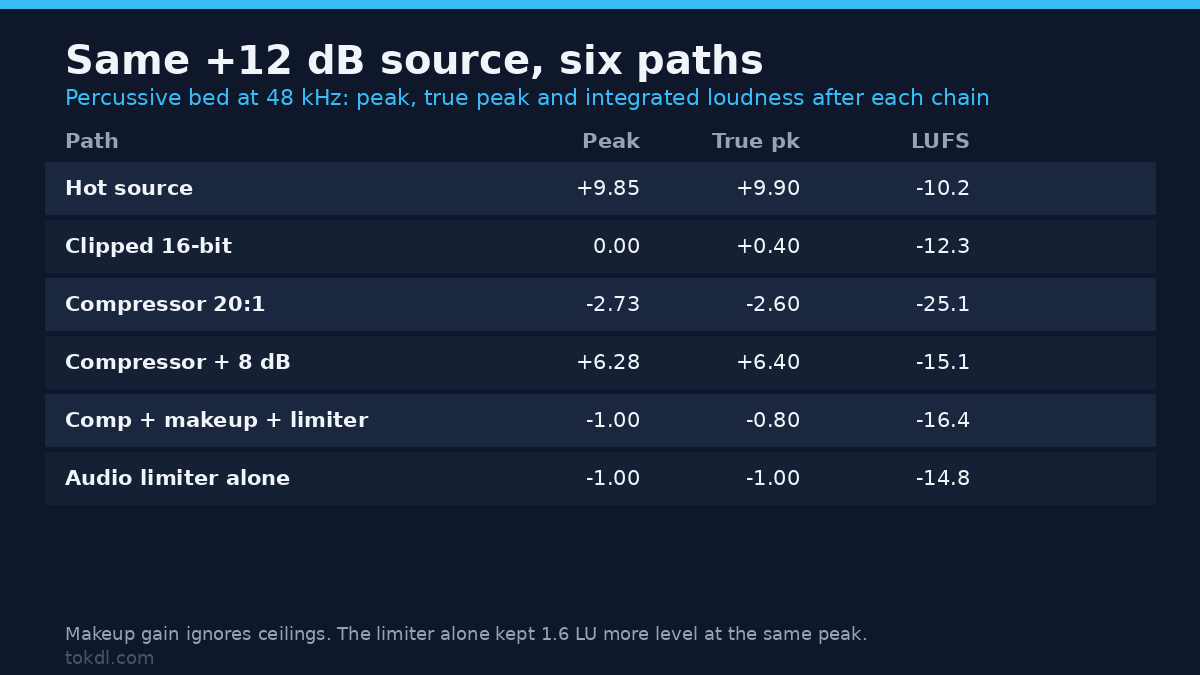
A compressor reduces gain by a ratio. Above the threshold, output still rises with input, just more slowly. At ratio 20 with a -18 dBFS threshold, a peak reading +9.85 dBFS still came out at -2.73 dBFS, and the integrated level fell to -25.1 LUFS because nothing put the gain back. An audio limiter works differently: it holds a hard maximum, and the amount of reduction is whatever that maximum requires.
Same source, six paths, all measured on the percussive bed after a +12 dB push:
| Path | Sample peak | True peak | Integrated | Flat factor |
|---|---|---|---|---|
| Hot source, +12 dB | +9.85 | +9.90 | -10.2 LUFS | 0.00 |
| Clipped 16-bit write | 0.00 | +0.40 | -12.3 LUFS | 33.18 |
| Compressor, ratio 20 | -2.73 | -2.60 | -25.1 LUFS | 0.00 |
| Compressor + 8 dB makeup | +6.28 | +6.40 | -15.1 LUFS | 0.00 |
| Compressor + makeup + limiter | -1.00 | -0.80 | -16.4 LUFS | 0.00 |
| Audio limiter alone at -1 | -1.00 | -1.00 | -14.8 LUFS | 0.00 |
Two rows in that table surprised me. The compressor with 8 dB of makeup gain put the peak back at +6.28 dBFS, which is worse than where the source started, because makeup gain doesn’t know anything about ceilings. And the limiter on its own landed 1.6 LU louder than the whole compressor chain at the same ceiling. If you want density, compress first and limit after. If you only want a ceiling, an audio limiter alone does the job and keeps more level.
The clipped row is the honest comparison for anyone tempted to skip the filter. Writing the hot file straight to 16-bit pinned 2.2% of its samples to the ceiling in 480 flat runs, the longest 109 samples long, and it still measured +0.40 dBTP even though every sample read 0.00 dBFS. Clipping bought 2.5 LU over limiting at the same ceiling. That’s the trade: distortion for loudness, and the same deal every cheap “make it louder” button offers.
The four audio limiter controls that decide whether the ceiling holds
Limit is exact, and that’s the point
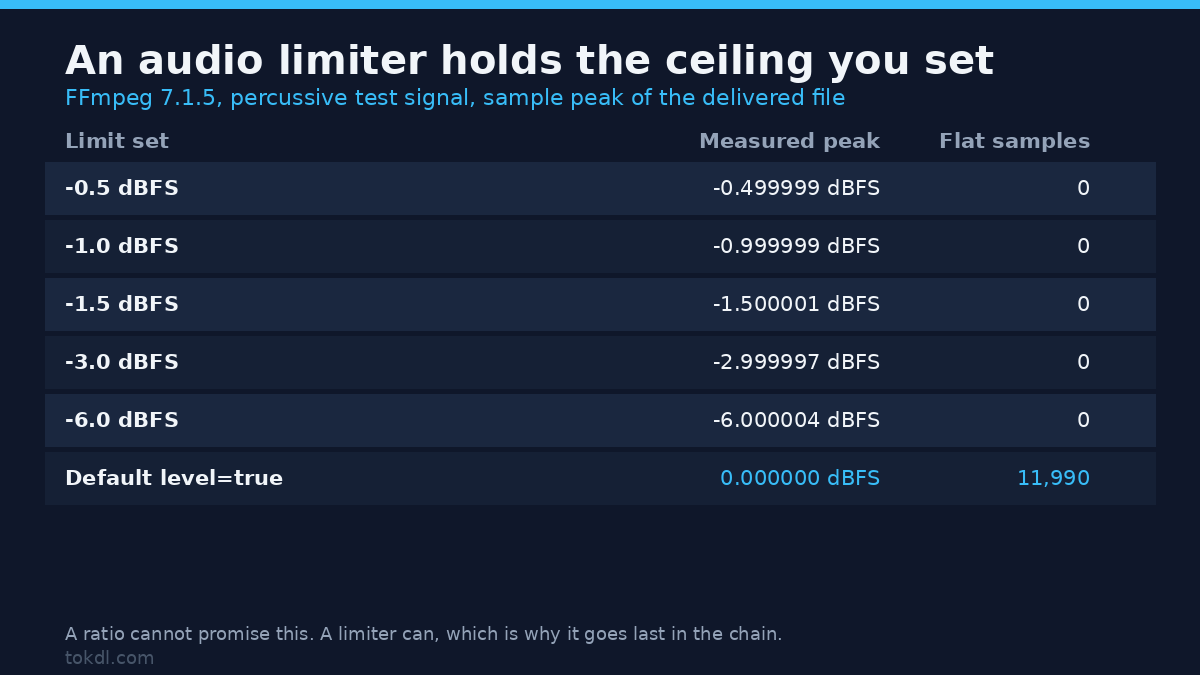
I set five ceilings between -0.5 and -6 dBFS and measured the delivered peak each time: -0.499999, -0.999999, -1.500001, -2.999997, -6.000004 dBFS. No flat-topped samples anywhere. That accuracy is the whole reason to add an audio limiter instead of relying on a ratio, because the number you type is the number the file leaves with. Use 0.794 for -2 dBFS, 0.891 for -1, 0.708 for -3, and 0.501 for -6.
Attack and the 5 ms you didn’t know you lost
Attack is the lookahead window, 5 ms by default. I measured the delay between input and output on a burst: 239 samples at 48 kHz, or 4.98 ms. That’s the entire default attack time, handed to you as a delay. Set latency=true and the lag goes to zero, which matters when you’re copying video and the sound has to land on the same frame it started on. Shortening attack to 1 ms or stretching it to 20 ms both still held a -6 dBFS ceiling on the same burst, so don’t reach for attack to fix overshoot on an audio limiter. Reach for it when you can hear the gain movement.
Release is close to the literal recovery time
I put a 10 ms burst on top of a steady bed, the bed peaking at -9.8 dBFS and the burst at +4.9 dBFS, then read the gain curve after the burst through one audio limiter at five release settings. The numbers below are the gain relative to unity at fixed offsets, plus when the gain got back to 0 dB:
| Release | +10 ms | +100 ms | +250 ms | Back to 0 dB |
|---|---|---|---|---|
| 50 ms | -6.99 dB | 0.00 dB | 0.00 dB | 50 ms |
| 200 ms | -9.73 dB | -3.77 dB | 0.00 dB | 250 ms |
| 500 ms | -10.40 dB | -7.32 dB | -3.81 dB | 500 ms |
| 2000 ms | -10.76 dB | -9.85 dB | -8.51 dB | over 500 ms |
Release behaves like the recovery time you asked for. That makes it easy to reason about: 50 ms is fast enough to follow speech and slow enough to avoid chatter, and anything past 500 ms will audibly duck the room tone after every loud syllable. The deepest reduction was -10.88 dB in every row, set by the attack and the burst height, not by release.
level=true hands the headroom back
The default is level=true, and it re-levels the output after limiting. With limit=0.891 I got a peak of 0.000 dBFS and 11,990 samples parked at full scale on a steady tone. Set level=false whenever the ceiling is the reason you added the filter. Leave it on only if you wanted a maximizer and didn’t care where the peaks ended up.
A working audio limiter command for video
Check the file before you touch it. This prints the sample peak and RMS of the audio stream and nothing else:
ffmpeg -i input.mp4 -af "astats=measure_perchannel=none:measure_overall=Peak_level+RMS_level" -f null -Then apply the ceiling. The video stream is copied, so only the audio is re-encoded:
ffmpeg -i input.mp4 -c:v copy
  -af "alimiter=limit=0.794:level=false:latency=true"
  -c:a aac -b:a 192k output.mp4
I ran both commands on a 4 second 720p clip whose audio had been pushed 12 dB hot. The input measured +9.34 dBFS sample peak and -12.23 dB RMS. The output measured -1.99 dBFS sample peak, -2.0 dBFS true peak, and -17.0 LUFS integrated, with the video stream copied untouched. That’s an 11.3 dB peak reduction with no flat-topped samples and no re-encode of the picture.
One trap costs people an afternoon: you can’t filter the audio and copy it in the same pass. -af next to -c:a copy exits with code 218 and writes a zero-byte file, so check that the output exists and isn’t empty before you walk away. The filter’s full option list is in the FFmpeg filter documentation, and the wider background on what a limiter is doing to the waveform is covered under dynamic range compression.
Why -1 dBFS still clips on YouTube and phones
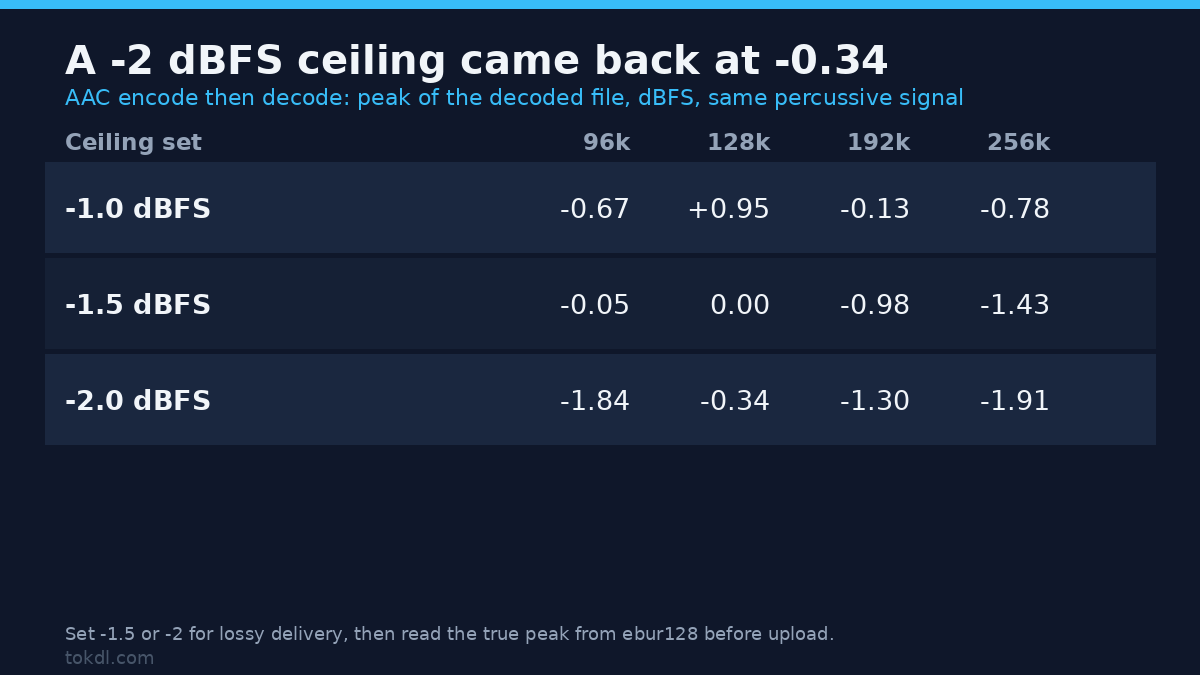
A sample-peak ceiling is not a delivery ceiling. Lossy codecs reconstruct waveforms that overshoot the samples they were given, and the decoder hands you peaks above the number you set. I limited the percussive bed to three ceilings, encoded AAC at four bitrates, decoded the result, and measured what came back:
| Ceiling set | 96k | 128k | 192k | 256k |
|---|---|---|---|---|
| -1.0 dBFS | -0.67 | +0.95 | -0.13 | -0.78 |
| -1.5 dBFS | -0.05 | 0.00 | -0.98 | -1.43 |
| -2.0 dBFS | -1.84 | -0.34 | -1.30 | -1.91 |
Every figure in that table is a decoded peak in dBFS. A -2 dBFS ceiling came back at -0.34 dBFS after a 128k encode, so the encoder ate 1.66 dB of the headroom I’d reserved. The overshoot isn’t monotonic either: 128k overshot more than 96k on this signal, and at the -1.5 ceiling a 96k encode came back 1.45 dB over its ceiling while 192k came back 0.52 dB over. One signal on one build, so treat the pattern as a warning rather than a law. A steady tone behaved better, landing at -0.29 dBFS from a -1.0 ceiling at 128k.
Practical version: for anything that leaves your machine as AAC, set the audio limiter to -1.5 or -2 dBFS and check the result yourself. Treat MP3 and Opus the same way until you’ve measured them, because the overshoot comes from the codec, not the container. Read the true peak from ebur128 rather than astats:
ffmpeg -i output.mp4 -af "ebur128=peak=true" -f null -The Peak line in that summary is a true-peak reading, and it’ll disagree with the sample peak when inter-sample peaks exist. That’s the number platforms care about. If it sits above -1 dBTP, lower the ceiling and re-encode rather than shaving the file afterwards.
Common mistakes
1. Calling a compressor an audio limiter. At ratio 20 the peak still came out at -2.73 dBFS, and the level fell 15 LU. A ratio is not a ceiling.
2. Leaving level=true on an audio limiter. The ceiling you set becomes 0 dBFS, measured, every time.
3. Forgetting latency=true. A 4.98 ms shift is inaudible on its own and glaring when you stack three segments or cut picture to a hit.
4. Shipping -1 dBFS to a lossy platform. The measurements above put decoded peaks back near zero.
5. Setting release to 2 seconds on dialogue. The gain stays 8.5 dB down a quarter of a second after every loud word, so the room tone pumps.
6. Filtering with -c:a copy. Exit code 218 and an empty file, every time.
FAQ
Is an audio limiter the same as normalization? No. Normalization shifts the whole file to a target loudness and can leave peaks where they were; the limiter holds a ceiling and changes only what crosses it. If your problem is uneven level rather than peaks, normalize the audio first and limit afterwards.
What limit should I set on an audio limiter for YouTube? Between -1.5 and -2 dBFS if you’re delivering AAC, and check the decoded true peak before upload. The exact figure matters less than measuring it once per export preset.
Can an audio limiter repair clipped audio? No. It can stop a future pass from clipping, and it can hold down reconstructed peaks after a repair, but flattened samples carry no information to recover. Repairing clipped audio is a separate job with its own tools.
Where does the audio limiter go in the chain? Last, after EQ and compression. An EQ move that boosts 3 kHz will raise peaks after you’ve already set your ceiling, so set the ceiling after the last gain change. If you’re shaping dynamics before the limiter, the compressor settings decide how hard the limiter has to work, and cleaning the noise floor first with noise reduction means less of it gets pushed up.
Does an audio limiter make a file louder? It can, indirectly, because you can raise the input until the loudest parts touch the ceiling. The limiter itself only removes peaks. Adding density first is what buys loudness, and that’s the compressor’s job.
Conclusion
An audio limiter is the one stage in a video audio chain that makes a promise you can measure: give it a ceiling and it holds that ceiling to within a fraction of a decibel. The defaults work against you in two quiet ways, though, through level=true and an uncompensated 4.98 ms of lookahead, and no sample-peak ceiling survives a lossy encode unchanged. Set the limit at -1.5 or -2 dBFS, disable level, enable latency, then read the true peak back from the delivered file. If it clears -1 dBTP, the audio limiter has done its job and you can stop touching it.