
Stereo to Mono: How to Downmix Without Losing Anything
You export a two-mic interview, the platform asks for a mono track, and one command later the file has gone quiet, hollow, or almost silent. I hit that last one with a podcast recorded in two takes, one of them flipped in polarity, and the merged file was nothing but hiss. The fix isn’t a better converter. It’s knowing what a stereo to mono downmix does to the samples, and checking the source first.
Here’s what this guide covers: the arithmetic behind the downmix, the one failure mode that eats a recording, a two-command test to run first, the stereo to mono recipes worth using and the one that clips half your samples, what changes with a 5.1 source, and how to get the loudness back. Every number below comes from tests on this machine with FFmpeg 7.1.5, so you can repeat them.
What a stereo to mono downmix does to your samples
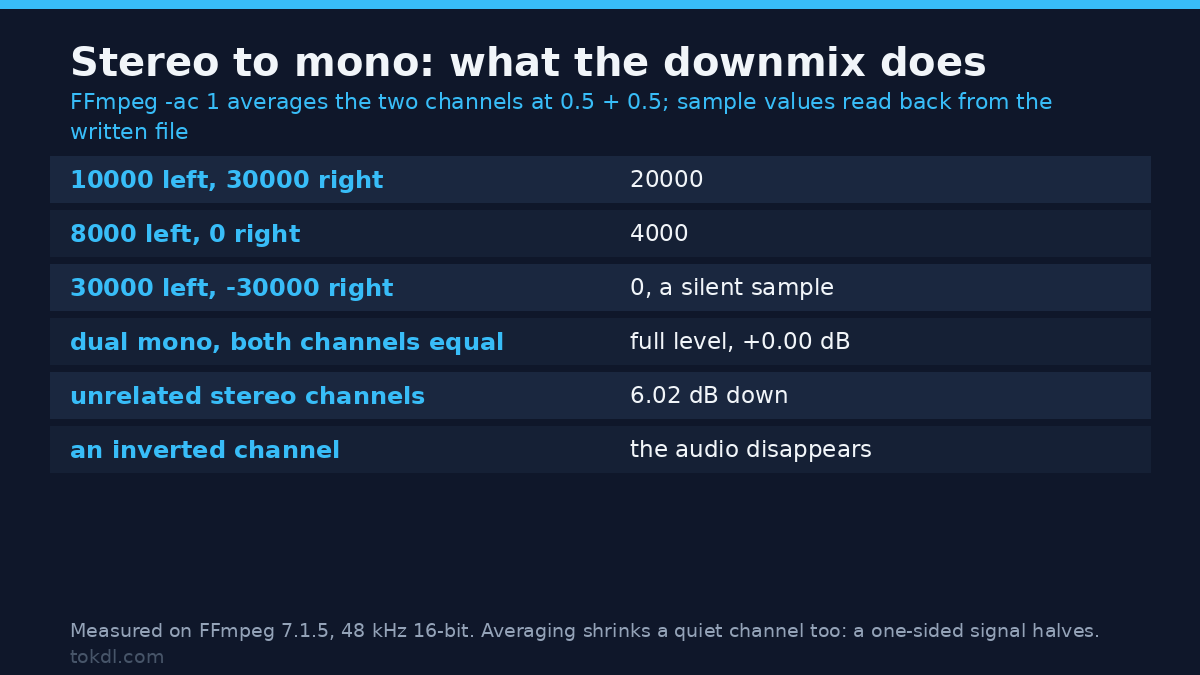
A stereo file holds two sample streams, a mono file holds one, and the conversion has to invent that single stream. FFmpeg’s -ac 1 flag does it by averaging: half of the left channel plus half of the right, sample by sample. I wrote constant values into a stereo file and read the mono result back sample by sample:
| Left sample | Right sample | Mono result |
|---|---|---|
| 10000 | 30000 | 20000 |
| 8000 | 0 | 4000 |
| 30000 | 30000 | 30000 |
| 30000 | -30000 | 0 |
| 32767 | -32768 | 0 |
That last row matters more than it looks. Two full-scale samples of opposite polarity average to digital zero. Nothing errors, nothing warns, and the stereo to mono result is silent at exactly the spot where your audio used to be.
The matrix is normalised to sum to one, at 0.5 plus 0.5, because adding the channels would push a loud mix past full scale. FFmpeg’s resampler documentation describes that matrix. That one choice explains every surprise in this article. Identical channels survive at full level. Unrelated channels each arrive at half level, which is 6.02 dB down. Opposed channels cancel. A stereo to mono downmix is exact, lossy, or destructive depending on what your two channels are holding.
The failure mode that eats a recording
Polarity inversions are common in the wild: a mis-wired cable, a plugin with the phase button engaged, a channel pasted back inverted. You won’t hear it in stereo, because your speakers reproduce each side separately. You hear it the moment the stereo to mono downmix runs.
I built a 1 kHz stereo tone at an amplitude of 20000 and ran four variants through -ac 1, measuring RMS from the output file:
| Source | Mono RMS | Mono peak | Versus one channel |
|---|---|---|---|
| R identical to L | -7.30 dBFS | 20000 | +0.00 dB |
| R inverted (R = -L) | -330 dBFS | 0 | -323 dB |
| R at half level, inverted | -19.34 dBFS | 5000 | -12.04 dB |
| R silent | -13.32 dBFS | 10000 | -6.02 dB |
A perfect inverse pair returns a file of zeros. The peak is 0 and the RMS reads -330 dBFS. If that had been a 40-minute interview, the master would still be fine and the delivered file wouldn’t play.
Test the source before you convert
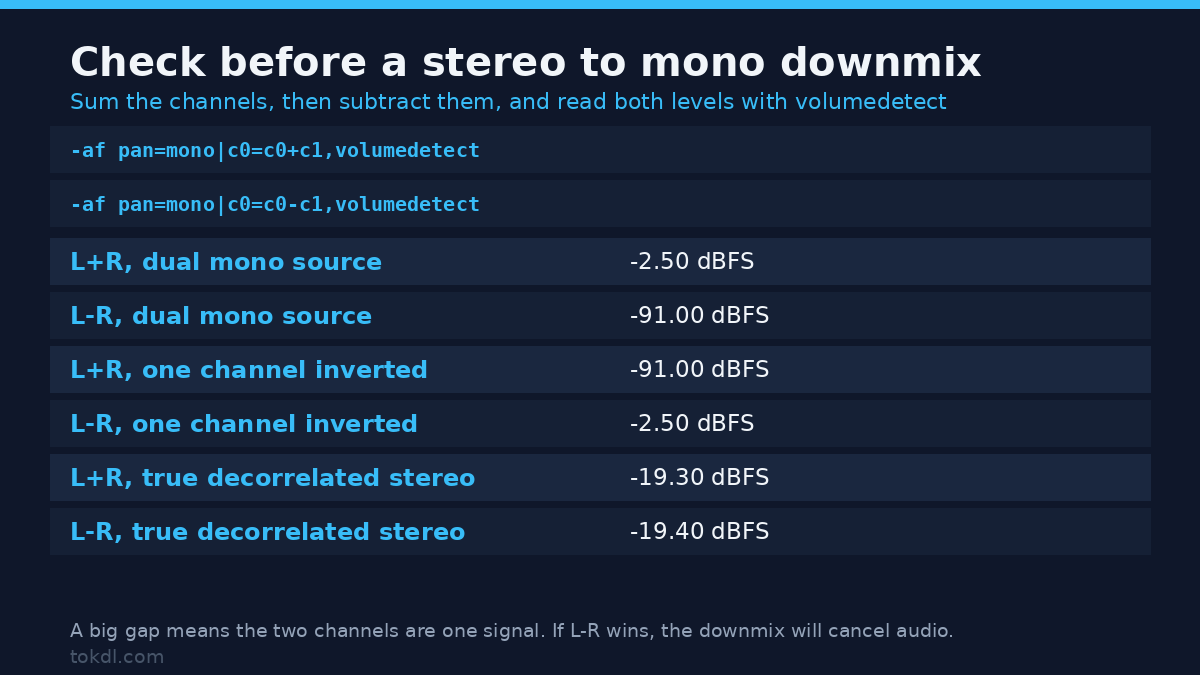
Ten seconds of work tells you what a stereo to mono downmix will do to your file. Sum the channels, then subtract one from the other, and read the levels with volumedetect:
ffmpeg -hide_banner -i input.mp4 -af "pan=mono|c0=c0+c1,volumedetect" -f null -
ffmpeg -hide_banner -i input.mp4 -af "pan=mono|c0=c0-c1,volumedetect" -f null -
The first command measures what the mono file would contain. The second measures what a stereo to mono downmix throws away. I ran that pair on three synthetic sources:
| Source | L+R mean | L-R mean | Gap |
|---|---|---|---|
| Dual mono (L equals R) | -2.50 dBFS | -91.00 dBFS | 88.5 dB |
| One channel inverted | -91.00 dBFS | -2.50 dBFS | 88.5 dB |
| True stereo (decorrelated) | -19.30 dBFS | -19.40 dBFS | 0.1 dB |
Read it like this. If L+R is far louder than L-R, your channels are effectively one signal and the stereo to mono downmix is safe. If L-R wins, some of your audio runs in opposite phase and the downmix will cancel it, so fix the phase or take a single channel. If the two numbers sit within a dB or two, the file is genuinely stereo, and folding it costs about 6 dB. The filter reports at the info log level, so don’t wrap it in -v error or you’ll get an empty log and think the test failed.
Four stereo to mono recipes, and what each one costs
The pan filter gives you the matrix directly. These are measured on a stereo file holding 20000 in the left and 30000 in the right:
| Recipe | What it does | Mono sample |
|---|---|---|
-ac 1 |
Averages both channels | 25000 |
pan=mono|c0=0.5*c0+0.5*c1 |
Same average, written out | 25000 |
pan=mono|c0=c0 |
Keeps the left, discards the right | 20000 |
pan=mono|c0=c0+c1 |
Raw sum, no attenuation | 32767, clipped |
Avoid the raw sum. On a full-scale pair it pushed every one of 4800 test samples to the ceiling. On a 700 Hz tone at 24000 amplitude, the average came out at -2.70 dBFS with zero clipped samples, while the unattenuated sum hit 0.00 dBFS and clipped 25000 of 48000 samples, which is 52% of the file. The pan filter’s matrix set is documented in the FFmpeg filter reference.
Keeping one channel is the right call when the sides disagree in phase, or when one of them is a room mic you’d rather lose.
The flag that gets ignored
Add -c:a copy next to -ac 1 and FFmpeg copies the audio stream bit for bit, so the downmix never happens. My test returned exit code 0 and the output still reported two channels. Probe the result instead of trusting the code. If you’d rather work on the audio alone, the audio extraction guide covers that path:
ffprobe -v error -show_entries stream=codec_name,channels,channel_layout -of default=nw=1 output.mp4What changes with a 5.1 source
A 5.1 source needs a real matrix for a stereo to mono downmix, and FFmpeg builds one. I measured its coefficients by feeding a 1 kHz tone into one channel of a 5.1 file at a time and reading the mono gain:
| Channel | Measured gain | Coefficient |
|---|---|---|
| Front left and front right | -13.68 dB | 0.2071 |
| Centre | -10.67 dB | 0.2929 |
| LFE | silent | 0.0000 |
| Back left and back right | -16.69 dB | 0.1465 |
Those numbers look arbitrary until you add them up: 0.2071 + 0.2071 + 0.2929 + 0.1465 + 0.1465 = 1.0000. The whole matrix is normalised so the coefficients sum to one, exactly like the stereo case, which keeps a signal present in every channel at unity gain. A tone fed to all six channels came out at +0.00 dB. It also means the LFE, your subwoofer channel, is dropped completely.
The cost appears when the channels carry different content. Six different tones spread across six channels measured -5.9 LUFS as a 5.1 file and -20.5 LUFS after the stereo to mono downmix, a drop of 14.6 LU. The normalisation is doing what it was designed to do. It just assumes your channels are correlated, and a real mix isn’t.
How much loudness a stereo to mono downmix takes
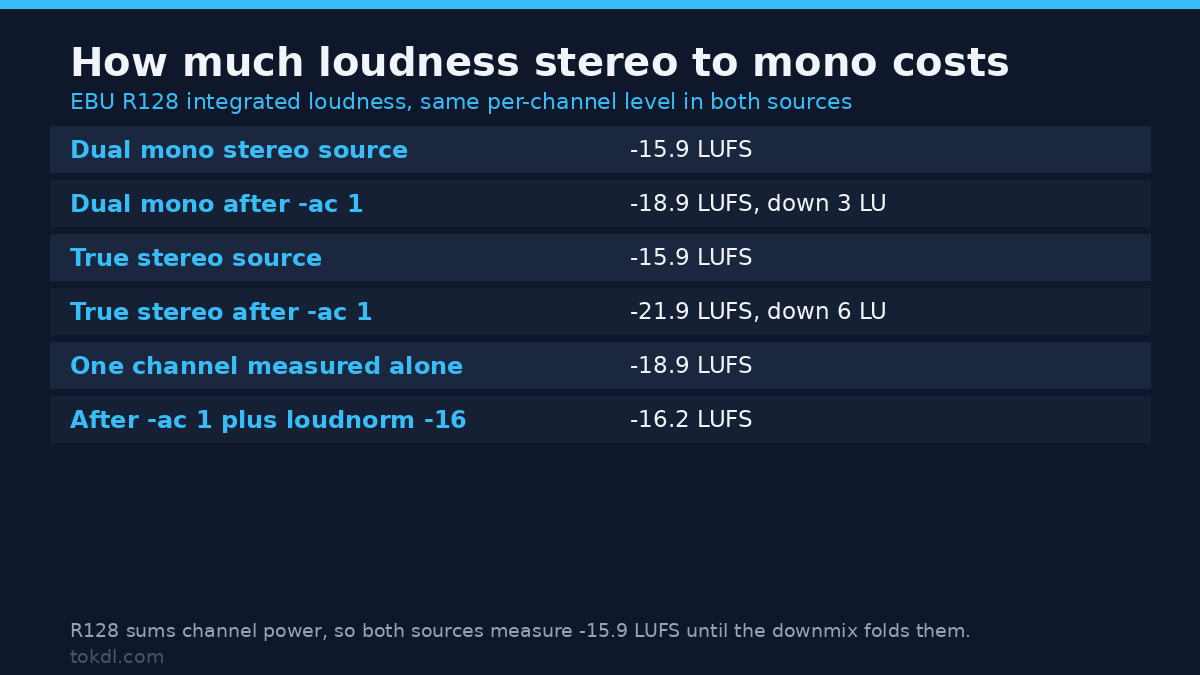
The loss depends on how similar the channels are, so a single “mono is 3 dB quieter” rule is wrong. I measured integrated loudness with EBU R128 on two stereo files with identical per-channel level, one dual mono and one decorrelated:
| Source | As stereo | After -ac 1 |
|---|---|---|
| Dual mono (L equals R) | -15.9 LUFS | -18.9 LUFS |
| Decorrelated stereo | -15.9 LUFS | -21.9 LUFS |
| One channel alone | -18.9 LUFS | – |
Both stereo files measure -15.9 LUFS, because R128 sums channel power and doesn’t care about correlation. The stereo to mono step costs 3 LU on the dual mono file and 6 LU on the true stereo one. The third row is the sanity check: the dual mono downmix lands on the loudness of a single channel.
Don’t guess the compensation. A flat volume=6dB restored my decorrelated test to -15.9 LUFS, but on a dual mono source the same 6 dB would overshoot by 3 dB and start clipping. Use a loudness normaliser with a true-peak ceiling, the same approach as the audio normalisation workflow:
ffmpeg -i input.mp4 -c:v copy -ac 1 -af "loudnorm=I=-16:TP=-1.5:LRA=11" -ar 48000 -c:a aac -b:a 96k output.mp4That recipe measured -16.2 LUFS at a -5.3 dBFS peak on my decorrelated source.
Pin the sample rate after a stereo to mono downmix
One trap hides in that command. Run loudnorm without the -ar flag and FFmpeg hands back audio at 192000 Hz, because the filter works at a high internal rate and the output keeps it. Six seconds of mono PCM measured 2310246 bytes at 192 kHz against 577614 bytes at 48 kHz, a 4x difference for identical audio. Encoded to AAC, the stream still reported 96000 Hz rather than the 48000 Hz I fed in. The sample rate guide goes deeper on why the number matters.
Does a stereo to mono downmix touch the picture?
No, provided you copy the video stream instead of re-encoding it. I hashed the video stream before and after a stereo to mono downmix and both came back MD5=e1523ba3a655c4da510e350f3d633875. The audio went from two channels to one and the H.264 stream stayed byte-identical, which is what -c:v copy is for. The same stream-copy logic drives the remux method. Skip that flag and FFmpeg re-encodes the picture, so you’ll lose a generation of quality for a change that only concerned the audio.
Delivery size doesn’t drop the way people expect. Encoded to AAC at a 128k target, my 30-second test file was 486782 bytes as stereo and 487025 bytes as mono, a difference of 243 bytes. Lower the target to 64k for the mono file and you get 247530 bytes, about half. If your bottleneck is a platform ceiling rather than bitrate, the upload limit guide covers that fight.
Common mistakes
- Re-encoding the video while downmixing the audio. Add
-c:v copyso the picture survives. - Using
pan=mono|c0=c0+c1without attenuation, which clipped 52% of the samples in my test. - Trusting exit code 0. With
-c:a copyin the same command,-ac 1is ignored and the file keeps two channels. - Compensating with a fixed
volume=6dB, which is right for decorrelated stereo and 3 dB too loud for dual mono. - Forgetting
-arafterloudnorm, which leaves a 192 kHz file four times bigger than it needs to be. - Converting to stereo to mono before checking for an inverted channel, the one case where the audio does disappear.
FAQ
Will a stereo to mono downmix make my file smaller?
Not at the same bitrate target. My stereo and mono AAC files at 128k differed by 243 bytes. Drop the target to 64k for the mono version and the file halves to 247530 bytes. Mono buys you quality at a lower bitrate, not a smaller file at the same one.
Can I undo a stereo to mono downmix later?
No. Averaging two channels into one throws the difference away, and you can’t rebuild it later. Keep the stereo master and deliver the mono file as a copy.
Will a mono file play out of both speakers?
Yes, players duplicate the single channel after a stereo to mono downmix. To write that duplication into the file, use pan=stereo|c0=c0|c1=c0, which measured at unity gain: a 20000 sample came back as 20000 in both channels. -ac 2 also duplicates, but it attenuated the same sample to 14142, which is 3.01 dB down.
Does a stereo to mono downmix change the video stream?
Not with -c:v copy. The video MD5 stayed identical in my test while the audio went from stereo to mono. Without that flag, FFmpeg re-encodes the picture as well.
Conclusion
A stereo to mono downmix is one line of arithmetic, and every surprise comes from the source rather than the tool. Identical channels survive intact, unrelated channels lose 6 dB, and opposed channels disappear. So run the L+R and L-R check first, choose between the average, a single channel, or the explicit pan form, put loudnorm after the downmix with the sample rate pinned, and keep -c:v copy in the command so the picture is never touched twice.
It took one ruined podcast to teach me the check was worth ten seconds. Now it’s the first thing I run.