
Video Has No Sound? Find the Silent Track Before You Re-Export (2026)
A three-minute export finishes, the file plays, the picture is clean, and there’s no sound. ffmpeg prints no warning and no error, because a video with the audio dropped is still a perfectly valid video file. Pass -an by mistake and the encoder removes the track without a word.
If a video has no sound, the cause is almost always one of four faults, and three of them need repairs that have nothing to do with each other. Two ffprobe commands separate them before you open an encoder.
Why a video has no sound: the short answer
Every cause below produces the same experience: a video with no sound that still scrubs, plays and shows a full volume slider, with nothing coming out. What separates them is what the file actually contains, and each one is measurable in a terminal.
| Cause | What ffprobe shows | Where it comes from |
|---|---|---|
| No audio stream | Empty stream list | Export with -an, unlinked clip, camera mic off |
| Stream holds silence | Channel listed, level at -inf or about -91 dB | Muted clip or track, dead microphone input |
| Silent track is the default | Two or more audio streams | Placeholder or alternate-language track flagged default |
| Codec the player refuses | ac3, eac3 or pcm_* inside MP4 |
Files muxed from cameras, broadcast or disc sources |
The fourth row is the awkward case. The audio sits there at full level, and one player ignores it while another plays it perfectly. That’s a compatibility problem rather than a missing track, and the repair is different again.
Before you start: ffprobe and a copy of the original
ffprobe ships in the same download as ffmpeg, so a machine with one usually has the other. Confirm it’s there first.
ffprobe -versionIf the shell can’t find the program, install the official build for your system and put its bin folder on your path. There’s no account, upload or subscription involved. The commands below only read the file; every repair writes a new one beside it.
Check 1: does the file contain an audio stream?
Ask for audio streams only. An empty result is the answer, and it takes under a second.
ffprobe -v error -select_streams a -show_entries stream=index,codec_name,channels -of default=noprint_wrappers=1 input.mp4A single AAC stereo track prints three lines: index, codec name and channel count. Nothing printed means there’s no audio in the file to mute, convert or recover: the first way a video ends up with no sound. Counting a folder uses the same query:
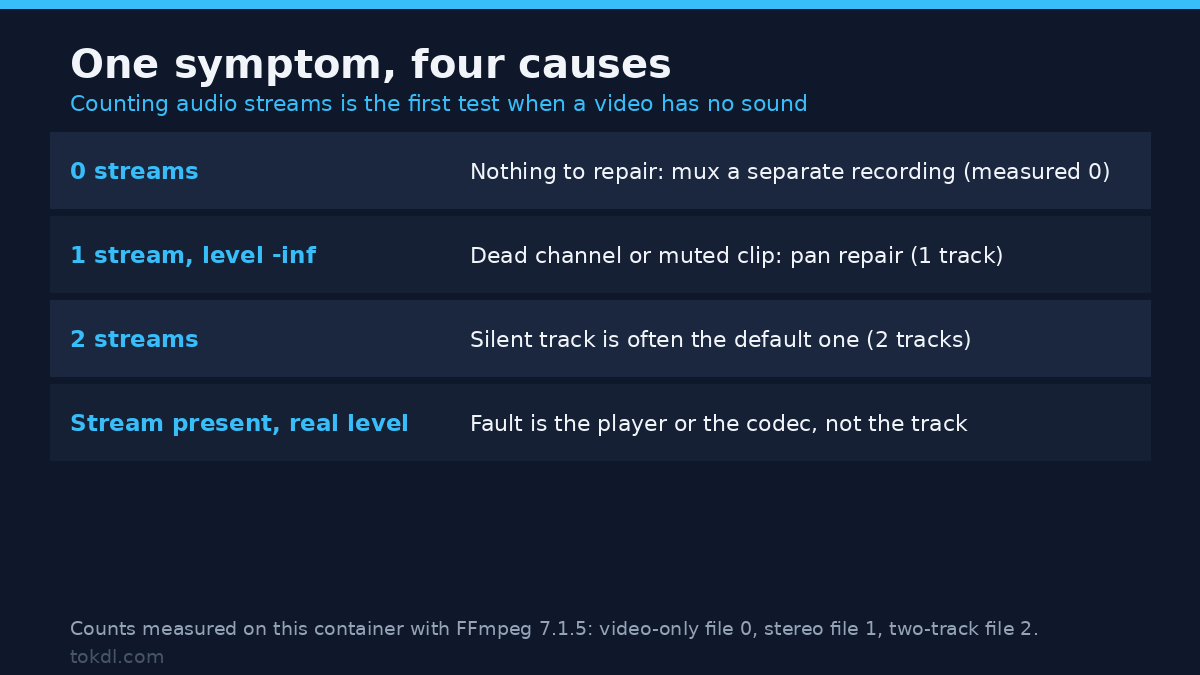
ffprobe -v error -select_streams a -show_entries stream=index -of csv=p=0 clip.mp4 | wc -lThat returns 0 for a video with no sound track at all, and 2 for one carrying two tracks. That number decides which half of this guide applies to you.
Check 2: is the stream silent, or just quiet?
A track that exists can still be digitally empty, and that’s a second kind of video with no sound. Overall loudness hides it, because the loudest channel dominates the average. Measure per channel instead.
ffmpeg -hide_banner -i input.mp4 -map 0:a -af astats -f null -A clip with real sound reports an RMS level like -21 dB. A channel with no signal reports -inf, and it stays there after encoding: an AAC track built from pure silence still measured -inf through FFmpeg’s own encoder. A reading near -91 dB is preamp hiss from muted hardware, not digital silence.
The difference matters. -inf on one side of a stereo pair points to a dead input; a floor-level reading on both sides points to a muted clip or track. That distinction often saves a re-record.
For a single summary number, volumedetect is shorter:
ffmpeg -hide_banner -i input.mp4 -af volumedetect -f null -On a left-only test recording it reported a mean of -24.1 dB, which looks perfectly healthy. That’s exactly why a video with no sound in one channel goes unnoticed for weeks.
Check 3: attach existing audio without touching the picture
When the file has no audio stream but a separate recording exists, mux the two. The picture stays bit for bit identical, which is the entire point of this route. The stream specifier rules explain the 0:v:0 and 1:a:0 syntax used here.
ffmpeg -i video.mp4 -i audio.m4a -map 0:v:0 -map 1:a:0 -c:v copy -c:a aac -b:a 192k out.mp4On a six-second test clip the result kept the identical video stream and gained a stereo AAC track, at 103 KB. Nothing on the video side was scaled or re-encoded.
The container’s more tolerant than the players. ffmpeg will mux AC-3, and even PCM, into MP4 without complaint, and those files open in tools that support the codecs. Browsers are far less forgiving, so encode AAC when the file is headed for a web page or an upload. If you’re weighing AAC against Opus and MP3, the codec comparison covers where each one fails.
Check both durations before exporting. A three-second recording muxed onto an eight-second clip produces a file that runs eight seconds and then has no sound, which reads as a new bug rather than the old one.
Check 4: make the audible track the default
Some files carry a silent placeholder stream first and the real audio second, so a video has no sound while its audio is right there. Players obey the default flag, so they open the silent one and never touch the other.
ffprobe -v error -show_entries stream=index,codec_type:stream_disposition=default -of default=noprint_wrappers=1 input.mp4In a test file built this way, the first audio stream measured -91 dB and the second measured -21 dB, with the default flag sitting on the silent one. Flipping the flags copies the video without re-encoding it:
ffmpeg -i input.mp4 -map 0 -c copy -disposition:a:0 0 -disposition:a:1 default fixed.mp4With three or four tracks the ordering gets harder to reason about, and default track flags are worth understanding once rather than guessing.
Sound in one ear only: the dead channel repair
A left-only recording is the most common half-failure. The file has audio, the meters move, and everyone wearing headphones hears it on one side. astats reports one channel at -inf and the other at a normal level.
The pan filter copies the working channel into both outputs:
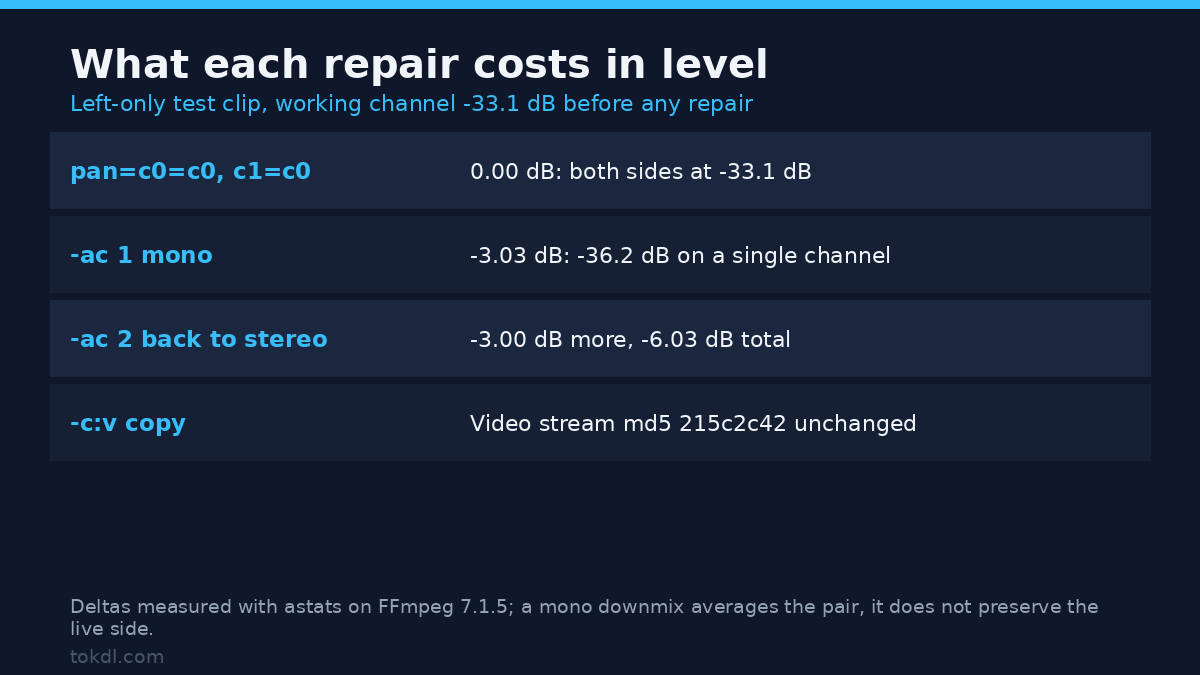
ffmpeg -i input.mp4 -c:v copy -af "pan=stereo|c0=c0|c1=c0" fixed.mp4Measured on the test clip, the repaired file reported -21.1 dB on both channels. Swapping sides instead uses the same filter with the channels exchanged, pan=stereo|c0=c1|c1=c0, which turned a left-only track into a right-only one on purpose. The pan filter’s syntax covers the rest of the channel expressions.
The blunter option is a mono downmix, and for a video with no sound on one side it’s quieter than expected:
ffmpeg -i input.mp4 -c:v copy -ac 1 mono.mp4-ac 1 averages the pair, so the working channel lands 3 dB lower: -21.1 dB became -24.1 dB. Upmixing that mono file back with -ac 2 costs roughly another 3 dB, ending near -27 dB. The pan route skips both losses. That’s also why downmixing stereo to mono turns a one-mic interview hollow if you apply it blind.
What editors and converters actually do with your audio
An editor is the right tool when the fault lives in the project rather than the file: a clip with its audio disabled, a track left muted, or an export setting that ignores audio. Those mistakes aren’t visible in the finished MP4 and are obvious in the timeline.
Converters are weaker at this. Most take the first audio stream and re-encode it, so converting a silent file yields a silent file in a new container. A few strip audio completely when the codec is unfamiliar.
None of them can produce a track that was never recorded. If the microphone was off, a video with no sound stays that way: the information doesn’t exist in any stream, and a fresh voiceover is a new recording rather than a repair.
Rights and responsible use
Audio carries more legal weight than picture. A face is visible and obviously personal; a voice identifies a person just as precisely, and a repaired track is easier to publish.
The voice belongs to the person who spoke, and the recording belongs to whoever made it, which isn’t always the same party. Fixing a client’s broken export gives you no ownership of the conversation inside it and no permission to distribute it.
Work on recordings you made, recordings you had permission to handle, or your own material. When you replace missing sound with music, that music needs its own licence, and a synthetic voice imitating a real person is a separate problem with its own rules.
FFmpeg is free software, and its licence covers the program rather than your footage. FFmpeg’s licence page sets out those terms; nothing in it grants rights to the recording you process.
Troubleshooting: five failures that look identical
These five cases arrive as one complaint, and the checks above name most of them. What follows is what each one looks like when a video has no sound and the cause turns out to sit one step earlier in the chain.
The export is silent but the timeline had sound
The export mapped video only. An unticked audio box, an unlinked clip or a pasted -an removes the track during encoding, and ffmpeg exits cleanly. Verified on a test export: one stream in the output, video only, no warning printed.
Sound stops a few seconds in
The audio stream is shorter than the video. An eight-second clip muxed with a three-second recording reports a container length of 8.000 s and an audio stream of 3.000 s. Nothing’s corrupt there; trim the video or extend the audio.
ffmpeg fails with “Stream map matches no streams”
You asked for -map 0:a on a file with no audio. The command exits with code 234 and suggests a trailing ?, which lets it run and quietly produce a video-only file. Map a second input instead.
It plays in VLC but not in the browser
Codec, not container. AC-3 and PCM inside MP4 are legal and mux cleanly, and browsers are the least tolerant players in the chain. Re-encode the audio to AAC and leave the video copied.
One side of the headphones has no sound
A dead channel, reported as -inf by astats. The pan filter further up repairs it without touching the picture.
Frequently asked questions
What’s the first thing to check when a video has no sound?
Count the audio streams. If ffprobe lists none, there’s no track to repair, and the video has no sound: nothing was ever there.
Can I fix a silent video without re-encoding the picture?
Yes, when a separate audio source exists. -c:v copy keeps the video bit for bit while the new track is encoded.
Why did my export lose the audio when the preview had sound?
The export ignored the audio track. A mute flag, an unlinked clip or -an drops it during encoding.
Does converting the file to another format bring the sound back?
No. Conversion moves streams between containers and can’t create one that’s absent.
Why is the sound only in one ear?
One channel of the stereo pair is empty. astats reports -inf on the dead side and a normal level on the other.
Can audio that was never recorded be recovered?
No. A replacement voiceover is a new recording, and it should be labelled as one.
How do I keep this from happening on the next export?
Run the stream count once after exporting. One command, one second, so a video with no sound never leaves unnoticed.
Which check should you run?
Start with the stream count every time a video has no sound: it eliminates two of the four causes in a single step. An empty list sends you looking for a source recording. One stream that measures silent sends you to the channel levels. Two streams send you to the default flags.
The remaining two cases look alike until you test them. A file that plays in a player but not a browser is a codec problem, and a channel reading -inf is a pan repair.
That’s the useful part: the diagnosis takes thirty seconds and the repair is usually one line. Keep these four commands in a note, so the next time a video has no sound you’re not searching for this page again.