
Audio Fade In and Out: How Long, Which Curve, Where It Clicks
The music bed stops dead at 1.2 seconds and the last frame pops. Or you add an audio fade to the tail, render, and the level never moves. Same filter, two opposite failures, and both come from the same misunderstanding about how the filter reads time.
An audio fade is a gain curve applied over a window of samples. That’s the whole idea. The complications start with three questions. How long is the window? Which curve runs inside it? And where does the filter think time zero is? I ran all three against FFmpeg 7.1.5, using a 440 Hz tone at half scale, and every number below came out of that run.
One disclosure: this container reports 64 CPUs but its cgroup quota is 2, and the load average sat near 108 while I worked. So there are no wall-clock claims here. Every figure is a sample value, a level in dB or a duration, and all of them reproduce on any box.
What you’ll learn
- The one audio fade command worth memorising, and what each argument does.
- How the eight built-in curves differ, measured at four points inside the fade.
- Why a 10 ms audio fade kills a click that a hard cut leaves behind.
- The timestamp trap that makes
st=0do nothing on a trimmed stream.
The shortest audio fade that works
Fade the last two seconds of a clip, keep the picture untouched, and re-encode only the audio:
ffmpeg -i input.mp4 -af "afade=t=out:st=8:d=2" -c:v copy -c:a aac -b:a 192k out.mp4Three arguments carry the thing. t=out selects a fade-out, st=8 is where it starts and d=2 is how long it runs. For a fade-in at the head, swap the type: afade=t=in:st=0:d=0.5.
The picture is untouched. I compared the video stream before and after that command and both came back with the same MD5, 6eb115d2af3f755f09e63e0cac4f9a6f. Only the audio re-encodes, which is why the duration reads 3.000 seconds before and 3.008 after: AAC frames carry padding the PCM source didn’t have.
A fade won’t shorten anything either. A 6 second mono file at 48 kHz went in with 288,000 samples and came out with 288,000, a delta of zero. If you were hoping an audio fade would trim the tail, you’ll want atrim instead, and probably both.
Which audio fade curve should you use
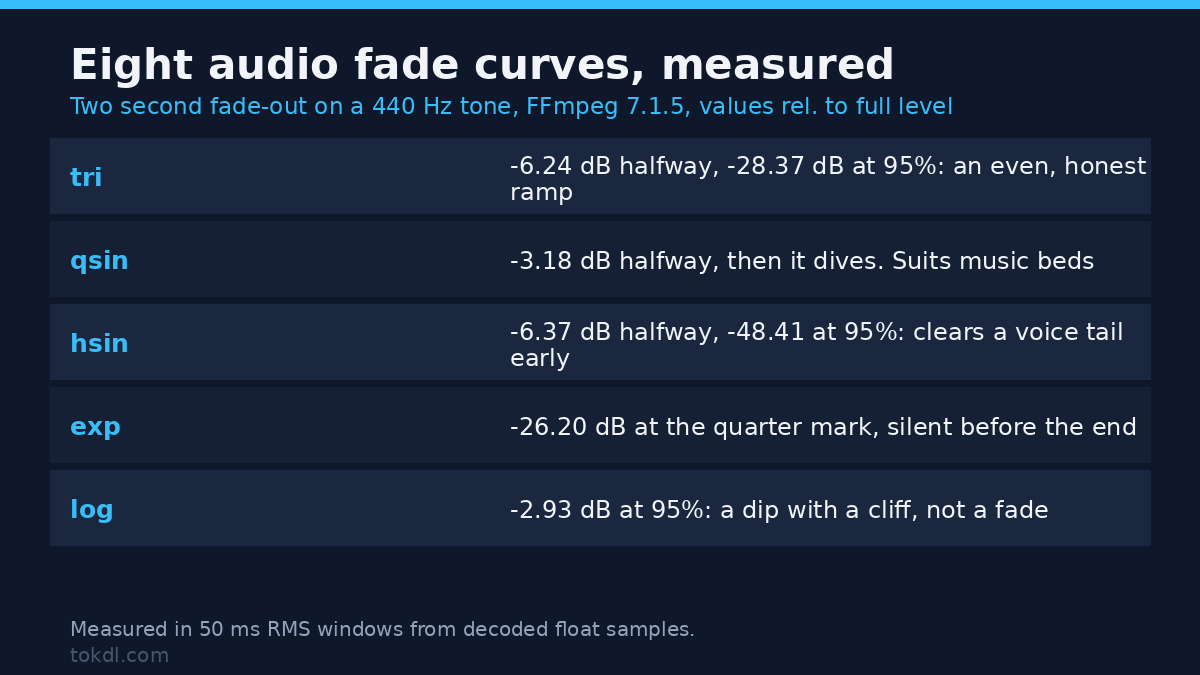
afade ships with more curves than most people expect. I applied each one to the same 6 second tone as a 2 second fade-out starting at 4 seconds, decoded the output to raw float samples and measured RMS in 50 ms windows. Levels are relative to the un-faded tone.
| Curve | At 25% | At 50% | At 75% | At 95% |
|---|---|---|---|---|
tri |
-2.64 dB | -6.24 dB | -12.48 dB | -28.37 dB |
qsin |
-0.76 dB | -3.18 dB | -8.76 dB | -24.45 dB |
hsin |
-1.52 dB | -6.37 dB | -17.52 dB | -48.41 dB |
exp |
-26.20 dB | -51.31 dB | -78.35 dB | silent |
log |
-0.23 dB | -0.56 dB | -1.16 dB | -2.93 dB |
par |
-6.24 dB | -10.93 dB | -17.94 dB | -34.31 dB |
squ |
-1.32 dB | -3.12 dB | -6.24 dB | -14.26 dB |
cbr |
-0.88 dB | -2.08 dB | -4.16 dB | -9.53 dB |
Two rows explain most of the confusion around audio fades. The log row isn’t a fade at all. At 95% of the window it sits at -2.93 dB, so the last sliver plays at roughly 71% of its amplitude and then stops: a dip with a cliff attached, and the most common reason someone reports that their audio fade “didn’t work”. exp has the opposite problem. It loses 26 dB inside the first quarter, so a 2 second exponential fade is over by 4.5 seconds. Both are correct behaviour and both are bad defaults.
tri is the honest one: -6.24 dB at the midpoint, the textbook -6.02 dB for a linear ramp measured through a 50 ms window, and an even fall. qsin holds the level and then dives, which suits music where you’ll want the last beat audible. hsin drops early and is nearly gone by 75%, so it suits a voice tail you’ll want out of the way. squ ends at -14.26 dB, audible enough to sound like a mistake. Use tri unless you’ve got a reason not to.
How long an audio fade should be
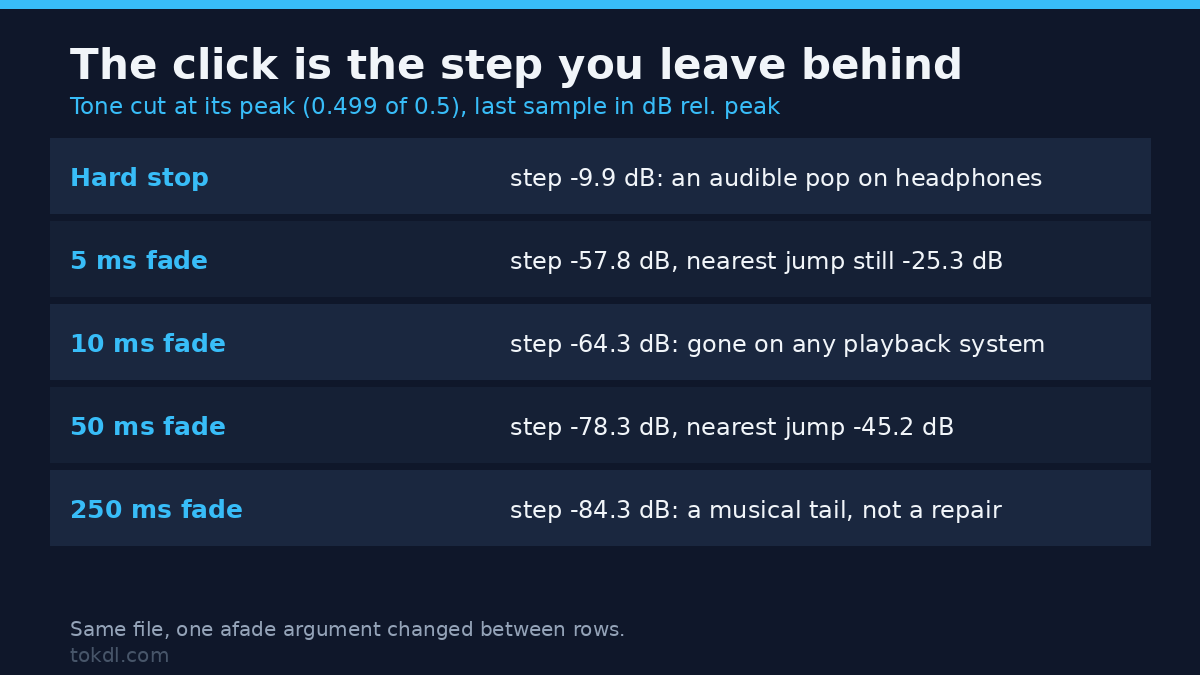
The length question is a click question. A fade exists to stop a waveform mid-cycle, and the click at a hard cut is the size of the step you left behind. I measured it directly: a 440 Hz tone cut at its peak, the last sample’s value in dB relative to peak, and the largest sample-to-sample jump within 4 ms of the cut.
| Tail treatment | Step at the cut | Largest jump near it |
|---|---|---|
| Hard stop | -9.9 dB | -24.8 dB |
| 5 ms audio fade | -57.8 dB | -25.3 dB |
| 10 ms audio fade | -64.3 dB | -31.3 dB |
| 50 ms audio fade | -78.3 dB | -45.2 dB |
| 250 ms audio fade | -84.3 dB | -59.2 dB |
The hard stop left a step of 0.159 against a peak of 0.5, which is an audible pop on headphones. A 10 ms audio fade took the same step to -64.3 dB, inaudible on any playback system, and 50 ms reached -78.3 dB. Notice that 5 ms improves the step but leaves the largest nearby jump at -25.3 dB, so the shortest fades can still tick. If you only want the click gone, 10 to 20 ms is your window.
Musical fades are longer. Two seconds is standard for a bed ending under narration and four to six for a standalone outro. On a 3 second clip, a 2 second fade means two thirds of the clip is ramping, which usually sounds wrong.
The timestamp trap that kills half of all audio fades
This one produces no error at all. Trim a stream with atrim, then ask for a fade from zero:
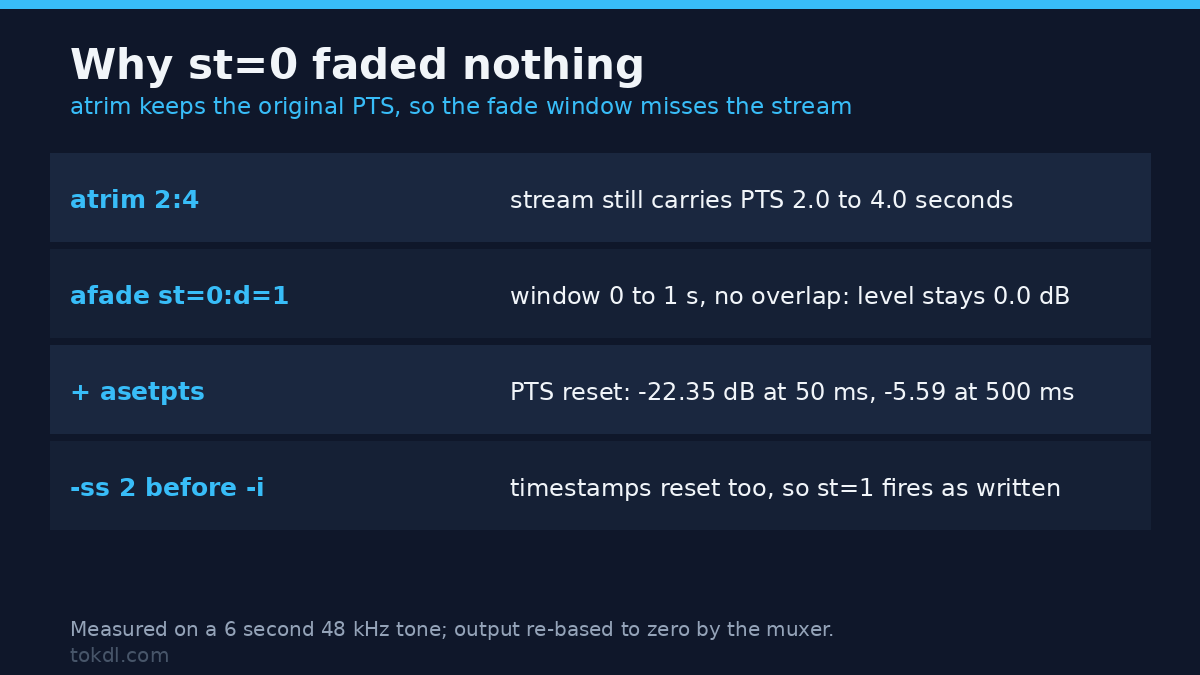
ffmpeg -i tone.wav -af "atrim=2:4,afade=t=in:st=0:d=1" out.wavThat ran cleanly and faded nothing. I measured the output at 50 ms, 500 ms and 1.5 seconds and all three sat at 0.0 dB, identical to the source level. The reason: atrim keeps the original timestamps, so the audio inside the filter chain still carries PTS from 2.0 to 4.0 seconds. The fade window st=0:d=1 covers 0 to 1 seconds and never overlaps the stream. The muxer re-bases the output to zero only after the filters finish, so the file looks perfectly normal.
Add one filter and it works:
ffmpeg -i tone.wav -af "atrim=2:4,asetpts=PTS-STARTPTS,afade=t=in:st=0:d=1" out.wavSame measurement, now reading -22.35 dB at 50 ms, -5.59 dB at 500 ms and 0.0 dB at 1.5 seconds. The ramp is there.
Seeking behaves the opposite way, which is why the bug looks inconsistent between projects. With -ss 2 before the input the timestamps reset, so the fade fires: 0.0 dB at 0.5 seconds, -2.79 dB at 1.25 and -22.35 dB at 1.9 on a 4 second output. The same st=1 works after a seek and fails after a trim. If an audio fade silently does nothing, print the timestamps before blaming the curve.
One more rule from the same run: st can’t be negative. A 50 ms fade that would begin before zero returns Value -0.032820 for parameter 'st' out of range and refuses the job, which is at least a loud failure.
Crossfading two clips instead of fading to silence
If the next clip should arrive before the current one ends, you want acrossfade, not two audio fades plus a concat. The arithmetic is worth knowing: output equals the first clip plus the second minus the overlap. Two 3 second clips crossed over 0.2 seconds produced 278,400 samples, exactly 5.8 seconds.
ffmpeg -i a.wav -i b.wav -filter_complex "[0:a][1:a]acrossfade=d=0.2:c1=tri:c2=tri" out.wavThe level at the midpoint measured -2.85 dB relative to a single tone, which is the two tones partly reinforcing and partly cancelling rather than a clean handover. On real material that dip is inaudible; on pure tones it’s obvious.
Two things it won’t tell you about. It accepts mismatched sample rates: I fed it a 48 kHz and a 44.1 kHz file, it returned exit code 0 with no warning, and the output came back at 48 kHz because ffmpeg resampled the second input quietly. And a 20 ms fade-out plus a 20 ms fade-in joined by concat isn’t the same thing: that pair left the join at -10.81 dB, a gap you can hear as a hiccup on sustained material.
Fading the picture at the same time
The video filter is also called fade and takes the same st and d:
ffmpeg -i input.mp4 -vf "fade=t=out:st=1.5:d=1.5" -af "afade=t=out:st=1.5:d=1.5" -c:v libx264 -crf 20 -c:a aac out.mp4I measured average luma frame by frame on a 3 second clip. It sat at 127 through the first 1.5 seconds, reached 65.2 at 2.25 and finished at 2.51 on the last frame, with the brightest pixel there at 14. That last figure is worth pausing on: limited-range H.264 treats 16 as black, so the final frame carries values below the legal floor. It looks black on every player I tried, and a QC pass that clamps to legal range would flag it.
Video fades force a re-encode, and ffmpeg is blunt about it. Pairing the filter with stream copy returns exit code 218 and the message Filtergraph 'fade=t=out:st=1.5:d=1.5' was specified, but codec copy was selected. Filtering and streamcopy cannot be used together. The same refusal appears for an audio filter next to -c:a copy, so neither side of a fade can ride a stream copy. That’s where an audio fade wins: the audio filter runs happily while the picture is copied byte for byte.
Five mistakes that keep coming back
- Filter plus stream copy. Exit code 218, no output file. Drop the copy flag on whichever stream you’re fading.
- Applying the audio fade twice. Two
afade=t=outfilters multiply instead of adding: the midpoint measured -12.48 dB instead of -6.24 dB, so the tail vanishes twice as fast as you planned. - Expecting the fade to trim. A 6 second file kept all 288,000 samples. Fades change level, never length.
- Choosing
curve=logfor a fade-out. Measured at -2.93 dB at 95% of the window. It’s a dip, not a fade. - Setting
ston a trimmed timeline.atrimkeeps the original PTS, sost=0covers a window the stream no longer occupies.
There’s a sixth worth a line, because it isn’t about the filter: a fade can’t repair a clipped ending. Lowering a distorted syllable gives you a quiet distortion.
FAQ
Does an audio fade change the file length?
No. Sample counts came back identical in every test, 288,000 in and out. Re-encoding to AAC adds container padding, which is why a 3 second clip can read 3.008 seconds, but the fade removes nothing.
Can I fade only part of the audio?
Yes, that’s what st is for. Set it to the second where the fade begins and d to how long it lasts. Both take decimals, so st=8.35:d=1.25 is valid.
Does the fade apply to both stereo channels?
Yes. Left and right RMS at the midpoint of a stereo fade both read 0.168002, identical to the last digit. The filter applies one gain curve to every channel, so they’ll always move together.
Where this leaves you
An audio fade is a gain ramp with two knobs and a hidden clock. Pick tri for anything musical, keep it to 10 to 20 ms when you only need to kill a click, and give a music bed two seconds. Then check the clock: if the stream was trimmed, reset the timestamps; if it was sought, leave them alone.
If you take one thing away, take the log row in the curve table. It’s the cheapest audio fade bug in the world to avoid, and the most confusing one to diagnose after the render.
Related reading: how to crossfade between clips when the picture is doing the transition, why normalising levels is a separate job from fading them, and what to do when a recording is already clipped at the end. If audio and picture drift apart instead of fading, start with audio sync. The filter documentation for afade and acrossfade lists every curve and option.