
How to Add Video Transitions: Crossfade, Wipe and Dissolve
A hard cut between two shots is honest. A bad video transition isn’t. The second you drop a crossfade onto a timeline you’ve told the viewer those two shots belong together, and if the timing is half a second out, the blend reads as a mistake you can’t take back.
I spent a few evenings measuring what actually happens when FFmpeg blends two clips, because most guides stop at the flag and never show the arithmetic underneath it. The flag is easy. This part decides whether your video transitions look deliberate.
What you’ll learn
- The formula that predicts the length of any video transition, before you run it
- How to choose from the 58 named transitions FFmpeg 7.1.5 ships with
- How to fade audio in step with the picture
- The offset mistake that silently deletes your second clip
- The two clip mismatches that fail outright at exit code 234
What a video transition really does to your timeline
Every blend works the same way, whether you click it in an editor or type it in a shell: the two clips overlap. The outgoing clip keeps rolling while the incoming clip has already started, and for the length of the transition both sit on screen with a varying mix between them.
That overlap explains the arithmetic. Two 4-second clips joined by the concat demuxer measured exactly 8.00 s. An end-to-end join needs no filter at all (merge videos). The same pair blended with a one-second fade measured 7.00 s. You paid one second for the video transition, and the payment comes out of your footage. Ten one-second blends cost ten seconds of running time, worth knowing before someone asks why the episode is short.
The overlap also hides the seam. In a cut, the last frame of clip A sits next to the first frame of clip B. In a blend, the last second of A and the first second of B occupy the same stretch of time, so the eye reads continuity. That’s the whole effect. Wipes and dissolves are decoration on top of it.
Video transitions in FFmpeg: the xfade filter
The filter is called xfade. It takes two video inputs and one transition length:
ffmpeg -i clipA.mp4 -i clipB.mp4
  -filter_complex "[0:v][1:v]xfade=transition=fade:duration=1:offset=3[v]"
  -map "[v]" -c:v libx264 -pix_fmt yuv420p out.mp4
Three values do the work. transition picks the effect, duration is how long the blend lasts, and offset is when it starts, measured in seconds on the first clip’s timeline. On FFmpeg 7.1.5 the transition option accepts 59 values: custom plus 58 named effects, from fade and wipeleft through circlecrop, fadeblack, pixelize, dissolve and hblur to the newer zoomin, squeezeh and coverleft. Don’t memorise them. Ask the build you’re running:
ffmpeg -hide_banner -h filter=xfadeThat prints the names your version accepts. A guide written for an older FFmpeg lists fewer than yours has, and an unknown name is a hard failure rather than a quiet fallback. The FFmpeg wiki examples are a good companion.
The formula behind every video transition
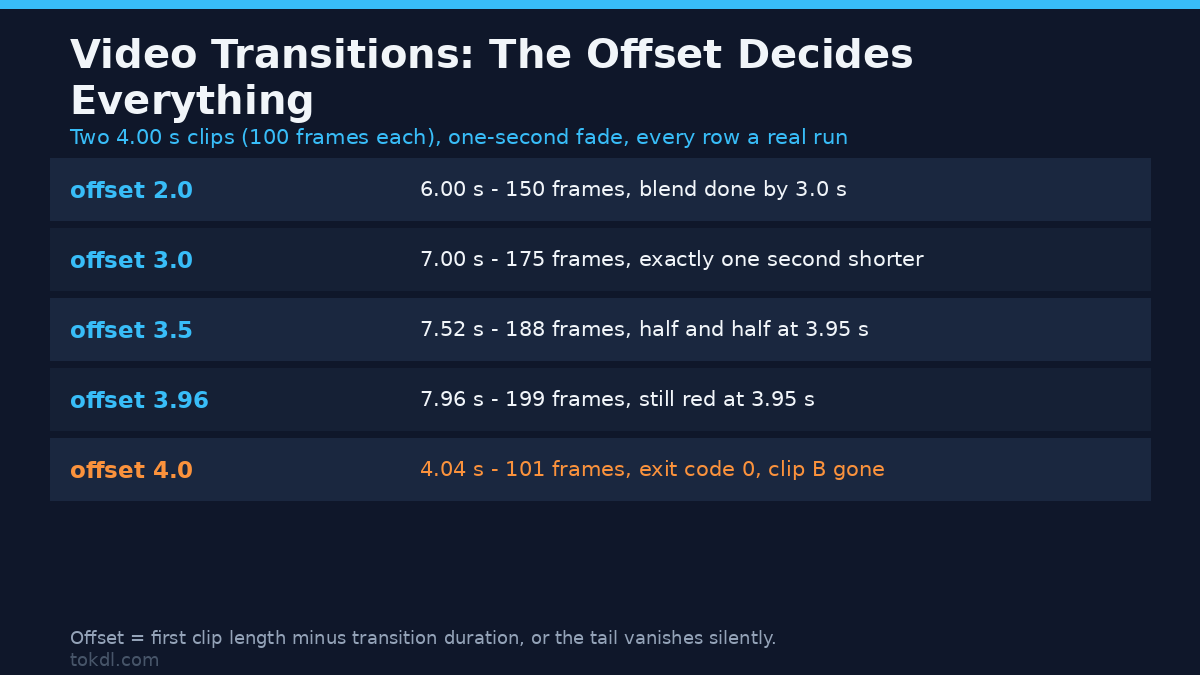
The bit worth internalising is the formula. For a two-clip blend, the finished length is your offset plus the length of the second clip. I tested that against an offset sweep on two identical 4.00-second clips (1280×720, 25 fps, 100 frames each) with a one-second fade. Every row is a real run; the last column samples the centre pixel 50 ms before the fade ends.
| offset | Output | Frames | Pixel at 3.95 s |
|---|---|---|---|
| 2.0 | 6.00 s | 150 | blue (0, 0, 254) |
| 3.0 | 7.00 s | 175 | nearly blue (9, 0, 243) |
| 3.5 | 7.52 s | 188 | half and half (135, 0, 115) |
| 3.9 | 7.92 s | 198 | nearly red (237, 0, 13) |
| 3.96 | 7.96 s | 199 | red (253, 0, 0) |
| 4.0 | 4.04 s | 101 | red (253, 0, 0) |
The first five rows follow the formula: nudge the offset a tenth of a second and the output moves with it. Then read the last row. An offset equal to the length of the first clip doesn’t shorten the transition, it deletes it. The output came back at 4.04 seconds and 101 frames instead of 7.00 and 175, the exit code was 0, and nothing in the log warned me. Sampled at 3.95 s the frame was still pure red. Clip B never appeared. Offsets of 4.5 and 5.0 behaved identically.
So the safe form for any video transition is offset = first clip length minus transition duration. Two 4-second clips and a one-second blend give 3. The moment the offset reaches the clip’s full length you lose everything after it.
Reading the blend instead of trusting the video transition
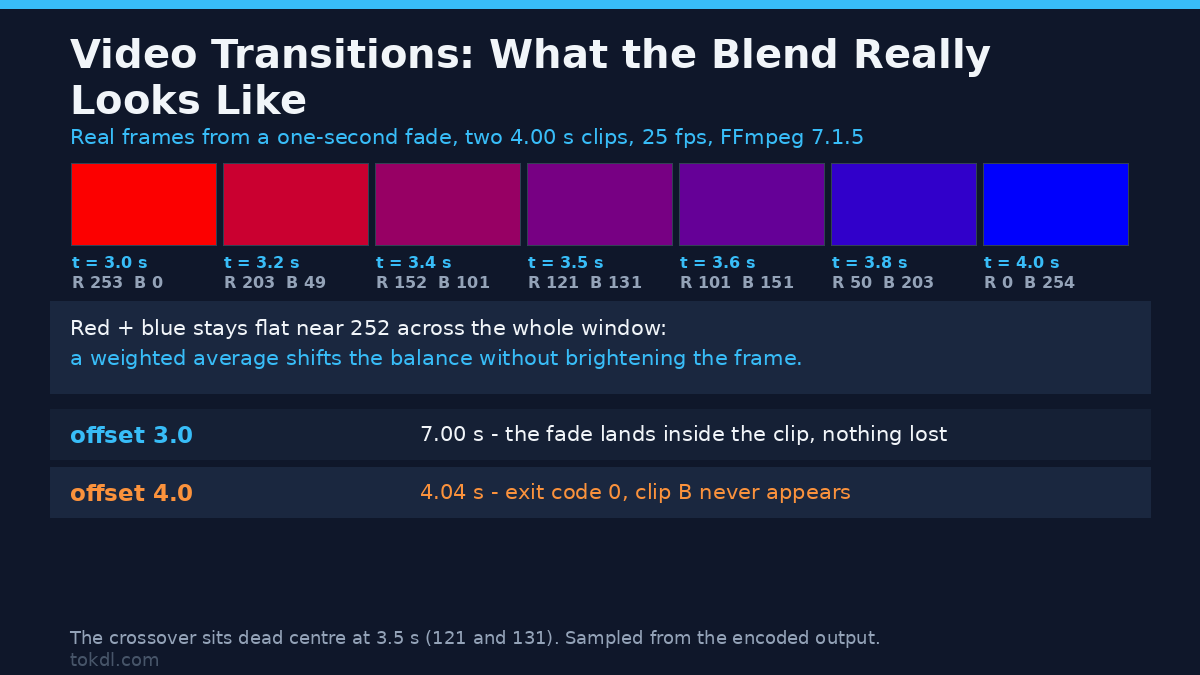
That sampling doubles as a check on the filter: both clips were flat colour, so the mix is measurable. Across the fade window the channels behave as a linear blend should:
| Time | Red | Blue | Sum |
|---|---|---|---|
| 3.0 s | 253 | 0 | 253 |
| 3.2 s | 203 | 49 | 252 |
| 3.4 s | 152 | 101 | 253 |
| 3.5 s | 121 | 131 | 252 |
| 3.6 s | 101 | 151 | 252 |
| 3.8 s | 50 | 203 | 253 |
| 4.0 s | 0 | 254 | 254 |
Two things stand out. The crossover sits dead centre at 3.5 s, where the channels read 121 and 131, so the blend is symmetric rather than front-loaded. And the sum stays flat near 252 the whole way across, which is what a weighted average of two colours does: it shifts the balance without brightening or darkening the frame. If a fade is dissolving into grey instead of blending, that sum catches it.
Sampling a frame takes ten seconds and settles arguments a preview never will: a 25 fps preview hides a video transition that’s two frames off.
Fading the audio with the video transition
A visual blend with a hard audio cut is the most common way a video transition gets noticed for the wrong reason. The picture softens and the sound snaps. The audio counterpart to xfade is acrossfade:
ffmpeg -i clipA.mp4 -i clipB.mp4
  -filter_complex "[0:v][1:v]xfade=transition=fade:duration=1:offset=3[v];
                   [0:a][1:a]acrossfade=d=1[a]"
  -map "[v]" -map "[a]" -c:v libx264 -pix_fmt yuv420p
  -c:a aac out.mp4
On the same pair, audio alone measured 7.02 s and the combined file 7.02 s, matching the video-only 7.00 s within the AAC frame padding you always see in a container duration. Watch the option names, though: xfade spells it duration, acrossfade spells it d. Same idea, and mixing them up is an error rather than a silent no-op.
One caution. The audio crossfade blends two waveforms, so if both clips carry music, a one-second overlap means a second of two tempos at once. On speech that’s usually inaudible; on a beat it won’t be, and the fix is a shorter crossfade, 200 to 300 ms, not a longer one.
Three clips or more: the offsets stack
Chaining a third clip is where hand-written graphs fall apart, because each offset is measured against the accumulated timeline, not against the clip before it. The same arithmetic applies when you split a video first.
ffmpeg -i a.mp4 -i b.mp4 -i c.mp4
  -filter_complex "[0:v][1:v]xfade=transition=fade:duration=1:offset=3[t];
                   [t][2:v]xfade=transition=fade:duration=1:offset=6[v]"
  -map "[v]" -c:v libx264 -pix_fmt yuv420p out.mp4
Three 4-second clips and one-second blends want offsets of 3 and 6, and the output measured exactly 10.00 s: 4 + 4 + 4 minus the two seconds those video transitions consumed. Writing 4 as the second offset, the intuitive “one second before the end of the middle clip” guess, gave 8.00 s and chopped two seconds off the tail. Same exit code, no warning, two seconds shorter.
The pattern is that the first offset ends one transition-length before the end of clip one, and each offset after that slides forward by the previous clip’s length minus the transition length. Build the graph in a script that carries the running total, because that arithmetic is exactly how a tail gets eaten.
Where video transitions fail
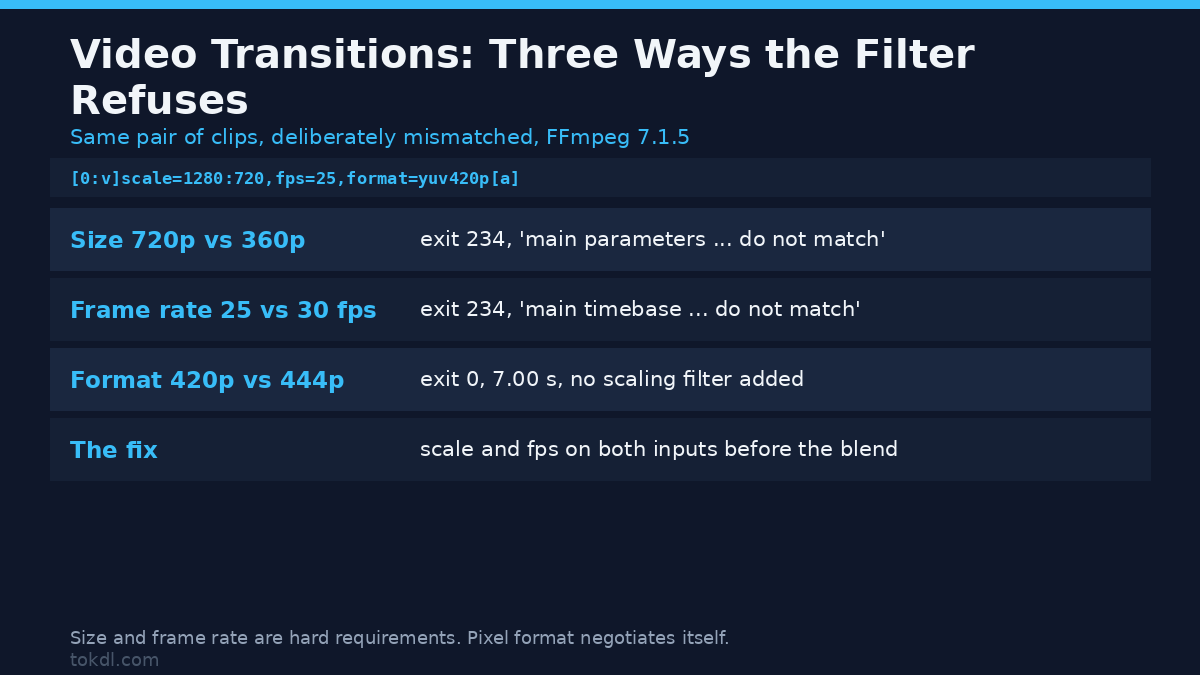
Blending two clips that don’t match is the other failure zone, except this one complains. I fed xfade three mismatched pairs:
| Mismatch | Exit | What FFmpeg said | Result |
|---|---|---|---|
| Size 1280×720 against 640×360 | 234 | “main parameters (size 1280×720) do not match … xfade parameters (size 640×360)” | nothing written |
| Frame rate 25 fps against 30 fps | 234 | “main timebase (1/12800) do not match … xfade timebase (1/30)” | nothing written |
| Pixel format yuv420p against yuv444p | 0 | nothing | 7.00 s, no scaling filter added |
Size and timebase are hard requirements. Get either wrong and the graph is rejected at exit code 234 before a frame is encoded, with a message naming the two values it couldn’t reconcile. The frame-rate case surprises people, because 25 and 30 fps look interchangeable right up to the refusal. The filter reference lists both options. Normalise first:
[0:v]scale=1280:720,fps=25,format=yuv420p[a];
[1:v]scale=1280:720,fps=25,format=yuv420p[b];
[a][b]xfade=transition=fade:duration=1:offset=3[v]
Pixel format, oddly, is the tolerant one. A yuv444p clip blended against a yuv420p clip finished at 7.00 s with no scaling filter auto-inserted, so the filter negotiated a common format itself. Don’t rely on it. Matching all three properties costs one filter and removes the question.
Which video transition should you use?
Effect choice is taste, with one constraint: a busy effect on an ordinary scene change looks like a slideshow. A rough guide from the 58 names:
| Situation | Transition | Why |
|---|---|---|
| Same scene, seconds apart | fade | Invisible when short; the default for good reason |
| Big jump in time or place | fadeblack or fadewhite | Reads as a chapter break, not a glitch |
| Two shots of one subject | dissolve | Keeps both on screen instead of hiding one |
| Fast-paced sequence | slideleft or smoothleft | Direction gives the eye somewhere to go |
| Graphics and title cards | circleopen, pixelize, radial | Stylised effects suit artificial material |
| Talking-head interview | a straight cut | Any video transition here draws attention to the join |
If you remember one row, remember the last. Blend where you’d otherwise have to explain the jump; cut where you wouldn’t. A sped-up clip is where a longer blend usually earns its keep.
Common video transition mistakes
Setting the offset from the wrong clip length. The offset runs on the first clip’s timeline. Use the second clip’s duration when the two differ and the blend can start after the first clip ends, which is the truncation case in the sweep table.
Forgetting that the length changes. Anyone timing a voice-over or a music bed against the picture has to allow for the seconds the video transitions remove.
Assuming the filter scales for you. It doesn’t. Mixed resolutions need an explicit scale, mixed frame rates an explicit fps, or you get exit code 234 and no output. If both clips carry a watermark, keep them the same size so the mark doesn’t jump mid-blend.
Crossfading audio on a beat. A long acrossfade over music gives two tempos at once. Keep musical joins short and let the picture transition carry the change.
Frequently asked questions
How long should a video transition be? One second suits a change of scene, half a second a quick sequence. Under about 200 ms the blend stops reading as a transition and starts reading as a ghost frame.
Can I blend clips with different frame rates? Not directly. xfade rejects a timebase mismatch with exit code 234, so convert both inputs to the same frame rate first.
Why is my output shorter than the two clips added together? Because the clips overlap for the length of the blend. Two 4-second clips with a 1-second transition give 7 seconds, not 8.
Does a video transition re-encode my footage? Yes. A blend creates frames that exist in neither source, so the output is encoded again. That’s why file size grows even though the running time shrank.
The short version
Video transitions are arithmetic in a coat of paint. The blend overlaps your clips, so the output is the offset plus the length of the second clip, and the offset you want is the first clip’s length minus the transition duration. Chain clips and the offsets accumulate. Fade audio alongside the picture with acrossfade. Match size and frame rate before blending, keep the blend short when music is involved, and sample a frame if you want to know whether the video transition does what the flag promises.
Get that far and the only decision left is crossfade or cut, which was the interesting one all along.