
Chromatic Aberration: Fix the Color Fringes in Your Video
A white window frame against a dark room is the classic place to spot chromatic aberration. Zoom in and the edge isn’t a line. It’s a purple stripe on one side, a green stripe on the other, and at 400 percent the sharp edge turns out to be three separate edges, one per color channel.
That’s chromatic aberration, and it’s one of the few video defects you can measure exactly, because it’s geometry rather than taste. Every number below came off a 1920 by 1080 test chart on this machine, with a known shift injected into the red and blue channels. You’ll learn how to tell lateral from longitudinal fringing, read the offset off one row of pixels, and see why a global shift fixes some footage and wrecks the rest.
What chromatic aberration does to an edge
Glass bends short wavelengths harder than long ones. Blue focuses at a slightly different distance and magnification than red, so the lens projects three images at three slightly different sizes. A modern lens corrects most of that, and what’s left shows up where it’s easiest to see: a hard edge between bright and dark.
| Type | Where it appears | When it’s worst | What removes it |
|---|---|---|---|
| Lateral (transverse) | Along edges, throughout the frame, strongest at the corners | Wide angle, cheap adapters, edges of the zoom range | Per-channel rescale about the optical center in a lens-aware editor, or stopping down |
| Longitudinal (axial) | Violet or green halo around highlights, either side of focus | Wide open, close focus, bright specular highlights | Stopping down one or two stops, or focusing slightly behind the subject |
Lateral chromatic aberration is the one people try to fix in an editor, because it’s a constant geometric error per radius (the two types are well documented). Longitudinal fringing is defocus per wavelength, so shifting channels just moves the halo. Fringes on a highlight in the middle of the frame that vanish when you stop down are longitudinal, and no pixel surgery will tidy them.
How to measure chromatic aberration before you touch a slider
Don’t eyeball it. Crop one row across a high-contrast edge, keep 40 pixels, and print the RGB values in order:
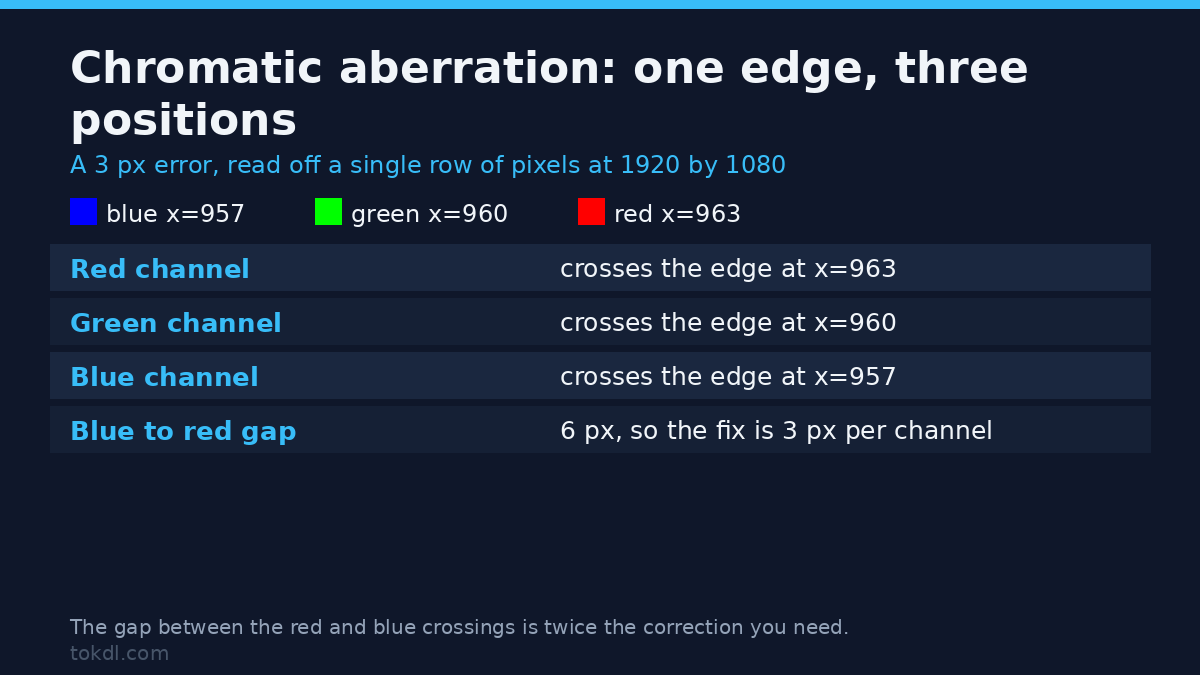
ffmpeg -v error -i frame.png -vf "format=rgb24,crop=40:1:940:540" -frames:v 1 -f rawvideo - | od -An -tu1 -w3 -vEach line is one pixel: red, green, blue. Run it on a PNG grab rather than the compressed video, because 4:2:0 chroma smears the numbers: the same row from an encoded file reads 0 0 112 where the clean grab reads 0 0 255. Keep the format filter before the crop if you point it at a video: a one-pixel crop fails on 4:2:0 input and still exits 0 with no output. With a 3 pixel error in the red and blue channels, the nine pixels around one vertical line printed this.
0   0   0
0   0 255
0   0 255
0   0   0
0 255   0
0 255   0
0   0   0
255   0   0
255   0   0
That’s the whole defect in nine pixels: blue line, gap, green line, gap, red line. Each channel thinks the edge lives somewhere else. On a clean frame all three cross at column 960. With a one-pixel error the blue starts at 959 and the red at 961; with six pixels of error, 954 and 966.
The gap between the blue and red crossings is twice the chromatic aberration correction you need, and the direction tells you which way to push. If the chromatic aberration grows toward the corners, the error is radial. If it leans one way across the whole frame, a constant shift can cancel it.
When a global shift cancels chromatic aberration
FFmpeg’s rgbashift (filter reference) moves each color plane by a whole number of pixels. Correcting the three-pixel error above means pushing red back to the left and blue back to the right by the same amount:
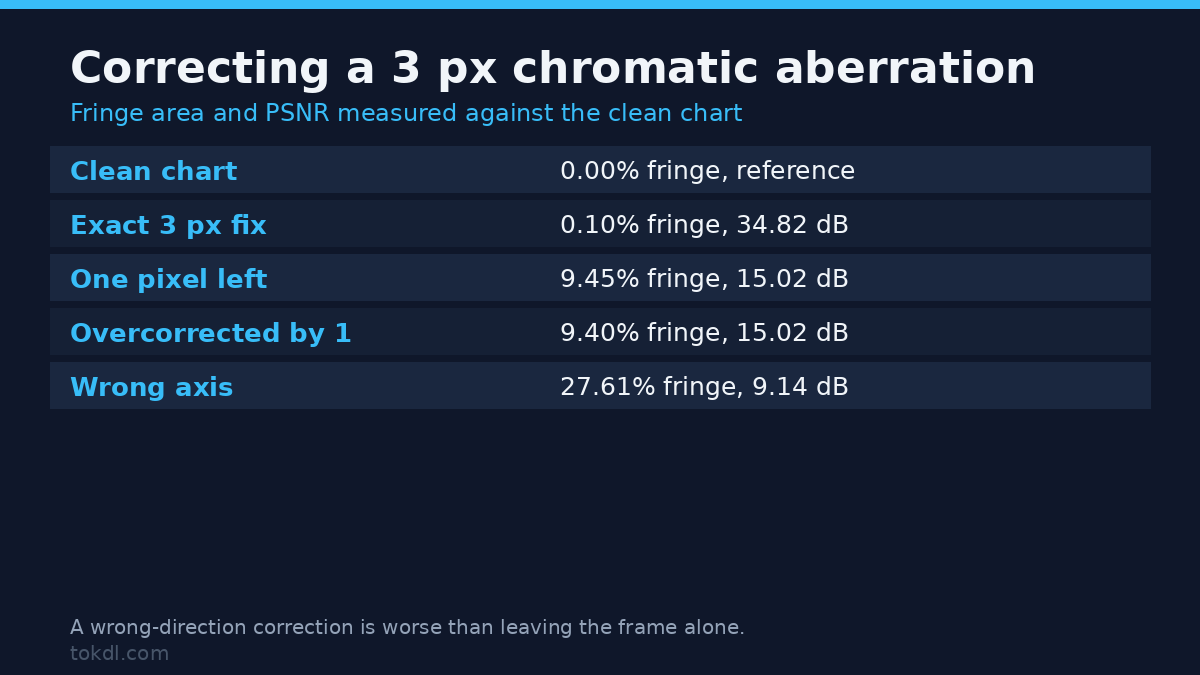
ffmpeg -i fringed.mp4 -vf "format=rgb24,rgbashift=rh=-3:bh=3" -c:v libx264 -crf 18 -pix_fmt yuv420p fixed.mp4Fringe area counts pixels whose red or blue channel differs from green by more than 60 levels. Mean divergence is the average size of that gap, and PSNR compares the frame against the original.
| Case | Fringe area | Mean divergence | PSNR vs clean |
|---|---|---|---|
| Clean chart | 0.00% | 0.0 | reference |
| 1 px channel error | 9.40% | 23.97 | 15.04 dB |
| 2 px | 14.15% | 36.09 | 12.03 dB |
| 3 px | 14.20% | 36.21 | 12.02 dB |
| 6 px | 14.35% | 36.59 | 11.98 dB |
| 3 px, corrected by 3 | 0.10% | 0.25 | 34.82 dB |
| 3 px, corrected by 2 | 9.45% | 24.10 | 15.02 dB |
| 3 px, overcorrected by 4 | 9.40% | 23.97 | 15.02 dB |
| 3 px, corrected on the wrong axis | 27.61% | 70.41 | 9.14 dB |
The exact correction recovers 34.82 dB against a clean reference of infinity, with one tenth of one percent of the frame still flagged. That’s as close to free as a repair gets: a whole-pixel shift doesn’t resample anything, so no softness, no ringing, just data moved. The edges are the cost. rgbashift smears the border, and my corrected frame’s first three columns carried color from the edge pixel, so crop four pixels off each side.
Three failure modes matter. Correcting by one pixel less than the error leaves 9.45 percent of the frame carrying chromatic aberration, nearly as bad as no correction. Overcorrecting by one measures the same, but the fringe lands on the other side of the edge. Correcting on the wrong axis is worse than doing nothing here: 27.61 percent fringe area and 9.14 dB, below the untouched frame. If a fix makes the edges look busier, you corrected in the wrong direction.
Why one shift can’t fix real chromatic aberration
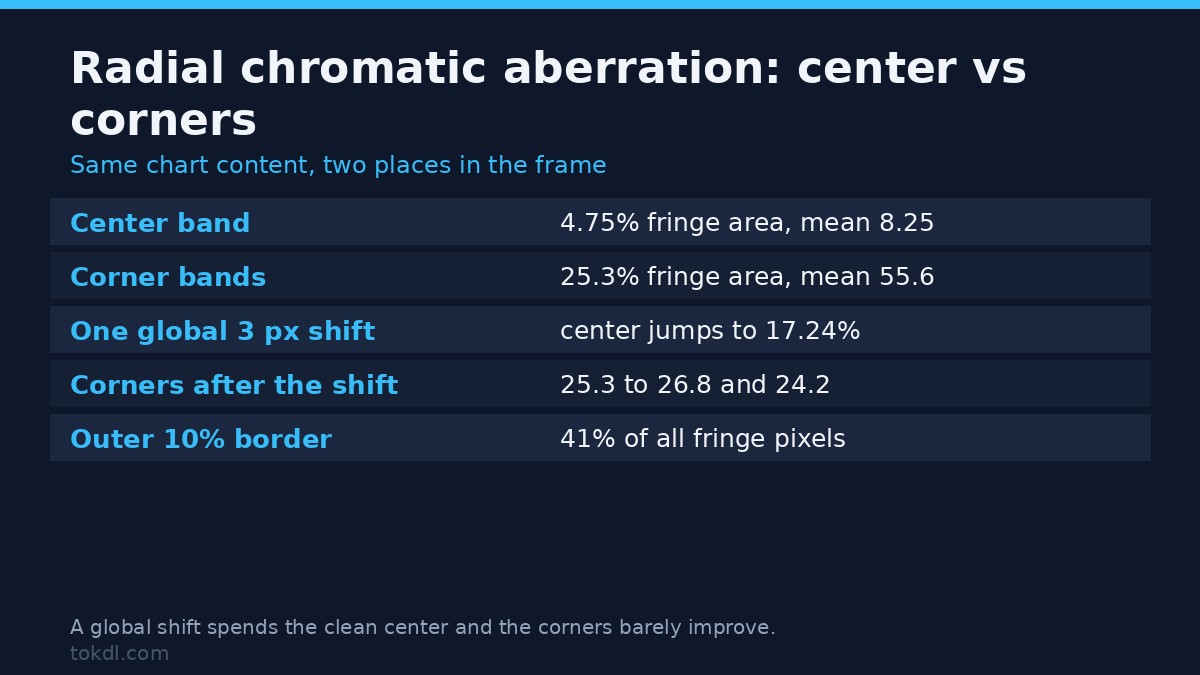
Lateral chromatic aberration grows with distance from the optical center. My chart models that by scaling the red plane up, the blue plane down, then cropping back to frame, which is what a real lens does at the corners and not at the middle.
The corners carried 25.3 percent fringe area with a mean divergence of 55.6, while the center band carried 4.75 percent and 8.25. That’s 5.3 times more fringe area and 6.7 times more amplitude at the corner, on identical chart content.
Now apply one global three-pixel correction to that frame. The center goes from 4.75 percent to 17.24 percent fringe, and the corners barely move: 25.3 to 26.8 in two corners, 24.2 in the other two. Overall the frame gets worse, 18.89 to 23.30 percent. The clean center paid for corners that needed more than three pixels.
That’s the trap with radial chromatic aberration: a global shift only works when the error is roughly constant, which happens with some adapters and cheap wide converters. On a real lens the correction has to scale with radius, and FFmpeg has no per-channel radial filter. I tried building one by scaling the red and blue planes differently:
ffmpeg -i fringed.png -filter_complex "format=rgb24,extractplanes=r+g+b[r][g][b];[r]scale=1916:1076,pad=1920:1080:2:2[rs];[b]scale=1924:1084,crop=1920:1080:2:2[bs];[bs][g][rs]mergeplanes=0x001020:gbrp,format=rgb24" -frames:v 1 -update 1 -y fixed.pngIt failed. The corrected frame measured 25.30 percent fringe area against 25.32 before, and PSNR fell from 12.84 to 12.67 dB. The two resamples nearly cancel, and whatever gain the rescale buys is eaten by the half-pixel phase shift the scaler adds.
What does work is a lens profile in an editor that models distortion per channel, or the crop. The outer ten percent border of my chart held 41 percent of all fringe pixels while covering 36 percent of the frame, so trimming that band removes the worst of it for a small reframe.
Chroma blur when chromatic aberration won’t shift
If the chromatic aberration is radial and you can’t re-render, the remaining option is cosmetic: blur the color so the stripes stop being stripes. FFmpeg’s gblur can be restricted to the two chroma planes, which leaves luma exactly as it was.
ffmpeg -i fringed.mp4 -vf "format=yuv444p,gblur=sigma=2:planes=6" -c:v libx264 -crf 18 -pix_fmt yuv420p softened.mp4| Chroma blur | Mean divergence | Fringe over 60 levels | Fringe over 20 levels |
|---|---|---|---|
| None (3 px error) | 36.21 | 14.20% | not scored |
| Sigma 1 | 28.43 | 14.20% | 19.15% |
| Sigma 2 | 19.71 | 14.21% | 21.53% |
| Sigma 4 | 11.48 | 0.25% | 21.44% |
Read the last two columns together. At sigma 4 the strong fringes collapse to 0.25 percent, which looks like a cure. Lower the threshold to 20 levels and the fringe area rises to 21.44 percent, higher than at sigma 1. The stripes didn’t move. They got wide and pale, and a metric tuned to strong fringes always flatters a blur.
The luma proof is clean: the Y plane of all three blurred versions has the same checksum as the unblurred frame, so brightness is untouched and only color bleeds. That’s also the cost. Fine colored detail, a red logo or a checked shirt, loses its edge at sigma 2 and is mushy at sigma 4. Use it on landscapes and skies, not on frames where color carries information.
Stopping chromatic aberration at the lens
The cheapest fix happens before recording. Lateral chromatic aberration is strongest at the wide end of a zoom and through cheap adapters, so one step of zoom or a native lens removes a lot of it (the optical side is here). Longitudinal fringing shrinks fast as you stop down: two stops from wide open usually turns a violet halo into a thin line.
Delivery makes it worse. When I encoded the fringed chart to 4:2:0, the format every social platform re-encodes to, fringe area rose from 14.20 to 23.55 percent, because chroma at half resolution spreads the colored band over a wider area (the 4:2:0 trade is here). The same thing happens to a correction: the exact RGB fix left 0.10 percent of the frame fringed, and the same fix on a 4:2:0 file left 4.75 percent, because chroma had already been averaged across two-by-two blocks. Fix the frame before you compress, not after.
Common chromatic aberration mistakes
1. Correcting on the wrong axis. It looks like a repair and measures 9.14 dB, worse than the untouched frame.
2. Leaving a pixel behind. A two-thirds correction still leaves 9.45 percent of the frame fringed.
3. Using a global shift on radial chromatic aberration. The center pays for the corners and the corners don’t improve.
4. Judging from the player preview. A fringe that looks gone at 50 percent zoom is often two pixels wide at 200.
5. Blurring until the metric reads zero. The chromatic aberration is still there, spread over 21 percent of the frame.
Questions I get about chromatic aberration
Does correcting chromatic aberration soften the picture? A whole-pixel shift doesn’t touch sharpness, because nothing is resampled. My corrected frame came back at 34.82 dB, and the only damage was a smeared three-pixel border. A per-channel rescale does resample, and mine lost 0.17 dB.
Why does it only show on some edges? Fringing is a displacement, and a displacement is invisible on a smooth gradient. Window frames and bare branches against a bright sky are the usual examples.
Is purple fringing the same thing? Usually it’s the longitudinal kind, defocus per wavelength on a highlight. Stopping down is the fix, and channel shifting won’t help because the color isn’t displaced, it’s out of focus.
Can compression create fringing? It can widen existing fringes. My 4:2:0 encode raised the fringed area by two thirds, and sharpening after compression makes it more obvious.
Should I fix it at all? On a wide shot with tiny fringes, no. On a product shot with a purple rim, yes: it reads as cheap optics, and the fix costs nothing but a crop.
The short version
Chromatic aberration is geometry, so measure it before you treat it. Dump a row of pixels, read where each channel crosses the edge, and you’ll know the size and direction of the error. If the error is constant, shift the channels back with rgbashift and get within 0.1 percent of clean at 34.82 dB. If it grows toward the corners, a global shift trades a clean center for corners that never improve, so use a lens profile or crop the outer band. When you’re stuck with chroma blur, read the fringe count at two thresholds before you believe it.