
How to Fix Lens Distortion in Video: Barrel, Fisheye and the Crop Tax
Your horizon curves up at the edges, the doorframe in the corner leans, and the wide shot looks like it was filmed through a marble. That’s lens distortion, and it’s the one problem every phone, action camera and wide lens adds for free. I spent a day measuring what FFmpeg does when you correct it, and two results changed how I shoot: the lens distortion fix always costs frame area, and the value most tutorials recommend overshoots by about 25%.
The part nobody warns you about: the lens distortion filter doesn’t just bend the image back. Push it the wrong way and it paints up to 28% of a 1080p frame with fill colour. Zoom in first to make room for the correction, and nothing changes at all, not one pixel.
What you’ll learn
- Which direction k1 has to go, and why the sign isn’t obvious
- How much of the frame a lens distortion correction eats, measured at four strengths
- The command I ran on a real clip, and why the zoom has to come after it
What lens distortion is
Every lens bends light more at the edges than the middle. Barrel distortion pushes straight lines outward at the frame edge, which is what a wide lens does; pincushion pulls them in, which is what a long zoom does at its close end. A fisheye isn’t a stronger barrel: it’s a different projection, and that distinction decides which tool you need.
FFmpeg models barrel and pincushion with a radial polynomial. For each output pixel it computes r² from the distance to the centre, normalised so r² = 1 at the frame corner, then samples the input at centre + (1 + k1*r² + k2*r⁴) * offset. That last detail is what people miss. The polynomial runs on the output pixel’s radius, not the source’s, which is why a lens distortion correction isn’t the negative of the distortion.
Which way the lens distortion correction has to go
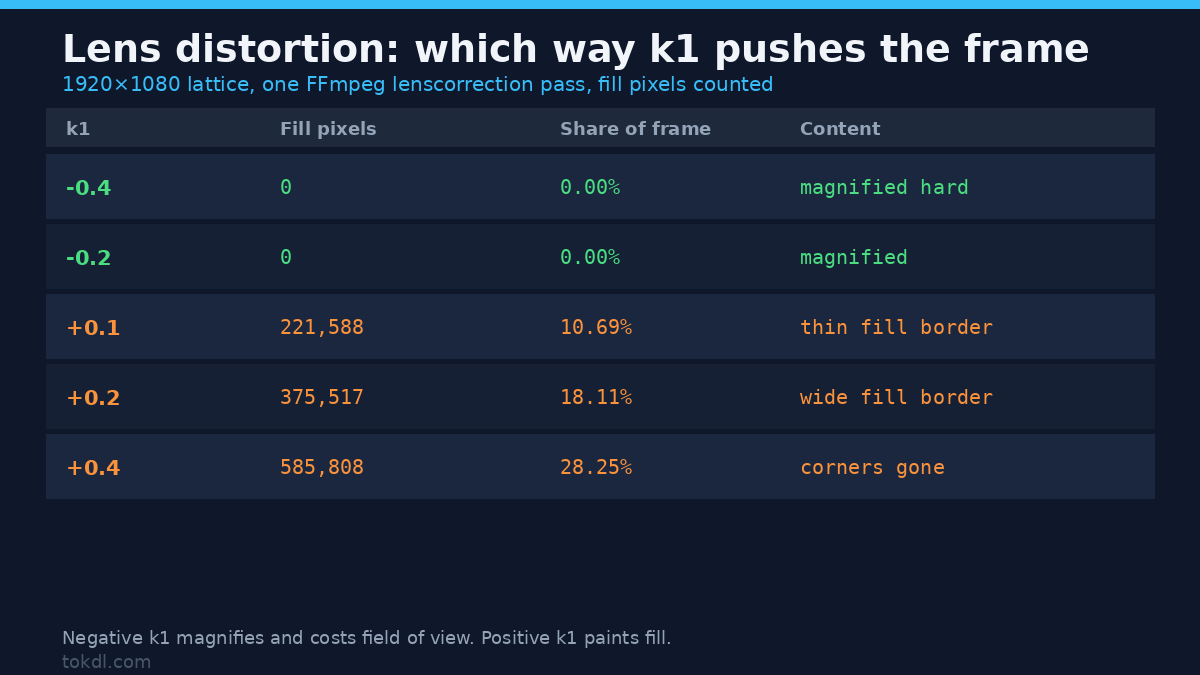
I put a 1920×1080 lattice on a flat grey field, one line every 240 pixels, and ran the filter at nine strengths. The results are unambiguous, and they’re the opposite of what “negative for barrel” suggests if it sounds like a strength dial.
| k1 | Fill pixels | Share of frame | What happens to the content |
|---|---|---|---|
| -0.4 | 0 | 0.00% | zoomed in hard, corners pushed off frame |
| -0.2 | 0 | 0.00% | zoomed in, whole frame still filled |
| +0.1 | 221,588 | 10.69% | image shrinks, fill appears at the edges |
| +0.2 | 375,517 | 18.11% | more shrink, thicker fill border |
| +0.4 | 585,808 | 28.25% | the corners are gone |
Negative values magnify. Positive values shrink and leave a border. So for a barrel-distorted wide shot, where the image already spreads outward at the edges, you want the negative direction and you pay in field of view. A lens distortion correction at the frame edge always costs frame area, because you’re asking for content the sensor recorded closer to the border.
One number makes it concrete. At k1 = -0.2 the sampling multiplier is 0.848 at the middle of the left edge and 0.800 at the corner. The filter reads source pixels 15% to 20% closer to the centre than the output pixel it fills, so every corrected frame is a slightly different framing. Cut against an uncorrected angle and it jumps.
k2 is the corner term, not a second strength
The two terms of a lens distortion model don’t do the same job at different volumes. Because k2 multiplies r⁴, it barely touches the middle and hits the corners hardest. Measured at matched magnitudes, k1 and k2 leave the corner in nearly the same place (0.850 against 0.851), but k1 pulls the mid-edge much further in (0.886 against 0.914):
| Setting | Mid-edge | Corner | Corner ÷ edge |
|---|---|---|---|
| k1 = -0.15 | 0.886 | 0.850 | 0.959 |
| k2 = -0.15 | 0.914 | 0.851 | 0.931 |
| k2 = -0.30 | 0.828 | 0.702 | 0.848 |
If only the corners bend, move k2. If the whole edge bows, move k1. Most lenses want a small mix, and most tutorials hand you a single value and stop.
The crop tax, and the order that decides it
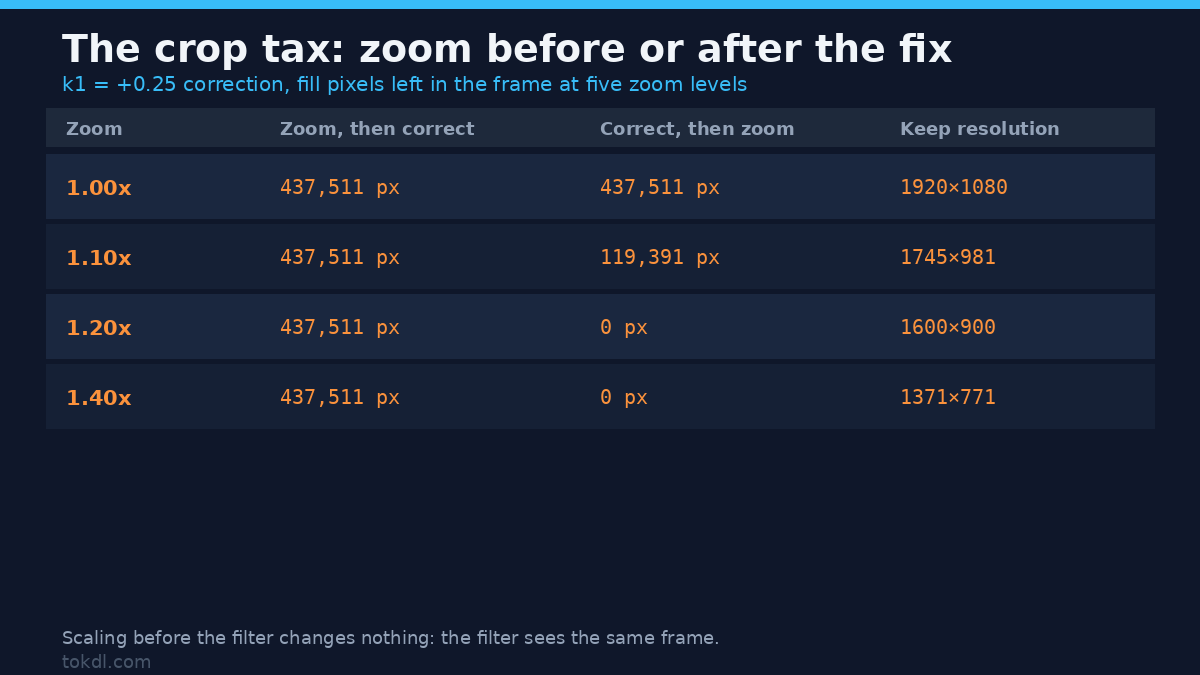
A correction that magnifies has to give something back, and that something is the corners. You can hide the fill by zooming into the corrected frame, but only if the zoom happens on the right side of the filter. I tested both orderings at five zoom levels.
| Zoom | Scale, crop, then correct | Correct, then scale and crop | Resolution after |
|---|---|---|---|
| 1.00x | 437,511 fill px | 437,511 fill px | 1920×1080 |
| 1.10x | 437,511 fill px | 119,391 fill px | 1745×981 |
| 1.20x | 437,511 fill px | 0 fill px | 1600×900 |
| 1.40x | 437,511 fill px | 0 fill px | 1371×771 |
The left column doesn’t move by one pixel across all five levels. Scaling up and cropping back to the same size before the filter hands it exactly the frame it would have had, so the fill is identical. The lens distortion correction has to come first, then the scale, then the crop. At 1.2x the fill is gone and you’re left with the centre 1600×900 of a 1080p frame, which is the honest price. That’s also the argument for shooting wider than you need, and the crop guide covers the same arithmetic.
Finding the right lens distortion value without a profile
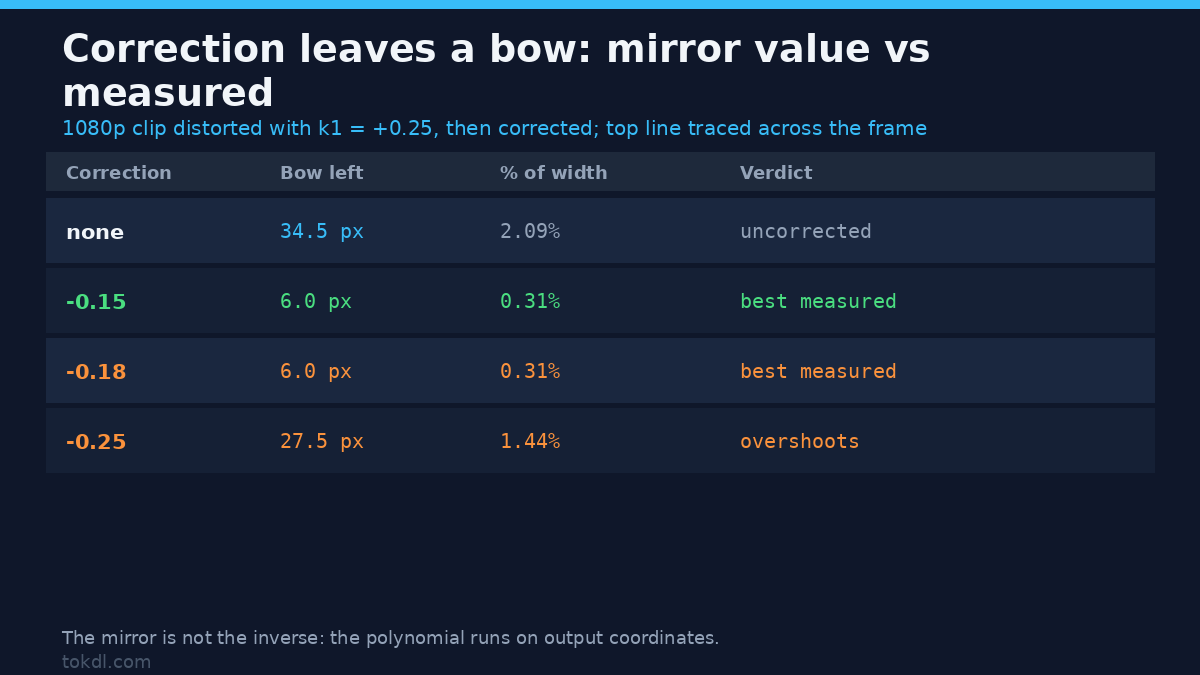
Without a lens profile you estimate by sweeping and watching a straight edge. I built a grid, distorted it with k1 = +0.25 to stand in for a wide lens, then swept the correction in nine steps and traced the top line column by column.
The uncorrected clip bowed 34.5 pixels across 1,655 pixels of width, 2.09% of the frame. The best corrections, at k1 = -0.15 and -0.18, brought that to 6.0 pixels, a drop of 83%. The mirror value, -0.25, left 27.5 pixels: it overshoots and reverses the bow at the ends instead of flattening it. That’s the trap in one line. A lens distortion correction isn’t the negative of the distortion, because the polynomial is evaluated on output coordinates, so you’re solving a different equation than the one that made the mess.
The still grid agreed: +0.25 corrected with -0.25 left a 27.5 pixel offset, where -0.20 left 4.0. Start near 80% of the mirror, then sweep in steps of 0.02 against a horizon.
The command I ran, and what it produced
This is the exact command, on a 5 second 1080p30 clip with AAC audio rather than a single frame. Correction first, then a 1.12x scale, then the crop back to 1920×1080.
ffmpeg -i distorted.mp4 -vf "lenscorrection=cx=0.5:cy=0.5:k1=-0.20:k2=0:i=bilinear,scale=2150:1210:flags=lanczos,crop=1920:1080" -c:v libx264 -crf 20 -preset medium -c:a copy fixed.mp4It returned exit code 0, kept the audio through -c:a copy, and the delivered file measured 5.000 seconds with a 1920×1080 H.264 stream. Read the filter order, because it carries the lesson from the table above: lenscorrection, then scale, then crop. Reversing the first two leaves the bow at 33.62 pixels against 6.0 in the correct order, which is within a pixel of doing nothing. The scale target is 2150×1210 because 1920×1.12 is 2150.4 rounded to even numbers.
nearest vs bilinear, measured
The default interpolation is nearest, and the gap between the two modes isn’t cosmetic. I checked what each does with no warp at all, k1 = 0, where an ideal resampler should pass the frame through untouched. Nearest is a pixel-exact identity: zero pixels changed. Bilinear changed 15,120 pixels, shifted the whole frame half a pixel toward the top left (a line centred on column 240.0 came back at 239.5) and moved values by up to 64 levels at line edges. So a bilinear pass at zero strength already softens one-pixel features and nudges the frame.
On one-pixel lines the trade reverses. At k1 = -0.5, nearest kept every line at full 255 brightness but resampled them into uneven widths, while bilinear spread each line wider and dropped the dimmest peak to 135, with a mean of 215. Nearest protects thin highlights; bilinear protects smooth gradients. For a lens distortion pass on footage with fine detail, bilinear is the right default, and it costs 3.01 to 3.05 seconds per 300 frames of 1080p against 1.30 to 1.32 for nearest on a 2 CPU quota. Roughly 2.3x the filter time for the mode you want.
Fisheye is a different problem from lens distortion
Barrel distortion is a radial bend, and a polynomial can undo it. A fisheye is a projection: the geometry differs at every radius, and no lens distortion value turns it into a rectilinear frame. FFmpeg has a separate filter, v360, which converts between projections. The command needs d_fov:
ffmpeg -i gopro.mp4 -vf "v360=input=fisheye:output=flat:d_fov=120:w=1920:h=1080:interp=lanczos" -c:v libx264 -crf 20 -c:a copy defished.mp4Set h_fov and v_fov together on the fisheye output and the frame collapses: on my test grid only the centre column of pixels survived. d_fov, the diagonal field of view, is the parameter that produces a real fisheye. If a defish gives you a blank frame, change that first.
Then the resolution news, which is worse than most guides admit. A 120° fisheye built from a 1920×1080 grid put its content in 1,652×827 pixels, not the full frame. Converting back to full rectilinear upscales about 0.5 megapixels of real detail into 2.07 megapixels of canvas, and the round trip measured 17.93 dB against the original. Defishing redistributes detail rather than restoring it.
Running a lens distortion polynomial on a fisheye frame confirms it can’t do the job. Across k1 from -0.6 to +0.6, the best match against the flat original sat at 18.61 dB at k1 = -0.4, with every other value between 10.8 and 18.5. The filter bends the frame; it never resolves the projection.
Which tool for which job
Picking a tool for lens distortion is picking a projection, and the cost column is the part that matters:
| Problem | Tool | Cost | What to set |
|---|---|---|---|
| Barrel from a wide lens | lenscorrection | 1.2x crop | negative k1, 80% of the mirror |
| Corners only | lenscorrection | same crop | small k2, k1 near zero |
| Fisheye (GoPro, DJI) | v360 | up to 2x upscale | d_fov, interp=lanczos |
| Stacked fixes | one combined pass | one generation | never chain two corrections |
Two bilinear passes shift the frame a full pixel between them. Combine the values instead.
Common mistakes
Using the mirror value. Measured above: -0.25 against a +0.25 distortion left 27.5 pixels of bow where -0.20 left 4.0. A lens distortion correction isn’t symmetric because the polynomial runs on output coordinates.
Zooming before the filter. The fill stayed at 437,511 pixels at every zoom level from 1.0x to 1.4x. Correction comes first.
Leaving interpolation on nearest. It’s the default. On diagonals you get alternate-column shimmer that survives compression and looks like a codec problem.
Correcting before you cut. A lens distortion correction changes the framing, so cut first if you’re matching shots, or apply the same values to every angle.
FAQ
Does lens distortion correction reduce quality?
Yes, twice over. It resamples every pixel once, and cropping out the fill keeps 69% of the frame area at 1.2x, which is 1600×900 from a 1080p source.
Can I fix lens distortion without cropping?
Only if the correction shrinks instead of magnifying, which means positive k1 and a fill border. At k1 = +0.2 that border is 18.11% of a 1080p frame. You either crop or you keep it.
The short version
Lens distortion correction is a radial resample, and every number above came from measuring it rather than repeating a recipe. Negative k1 magnifies and costs field of view. Positive k1 shrinks and paints fill, up to 28% of the frame at +0.4. The correction goes before the zoom. The inverse sits near 80% of the mirror, not at it. A fisheye needs v360, because no polynomial turns a projection into a rectilinear frame.
If you take one thing away, take the ordering. Most “the filter did nothing” reports are a zoom on the wrong side of the filter, and it’s a one-word fix. The edge-darkening cousin of this problem behaves the same way: the vignette measurements show a default that looks gentle and a setting that quietly eats a seventh of the frame.
For reference, the lenscorrection filter page lists the options and the optics article explains why barrel and pincushion exist. If you’re resampling for delivery rather than repair, the upscaling guide covers what a 1.2x crop does to perceived sharpness, and the flip guide covers the other geometric transform that has to happen before the crop.