
Sharpening Video Without Halos: What Amount and Radius Do (2026)
You shoot a clip, export it, and the result looks softer than the preview did. The obvious fix is a sharpen control, and every editor has one. The trouble is that sharpening is the most oversold slider in video editing. It can’t recover detail that was never recorded, and it makes noise worse at almost exactly the rate it makes edges crisper.
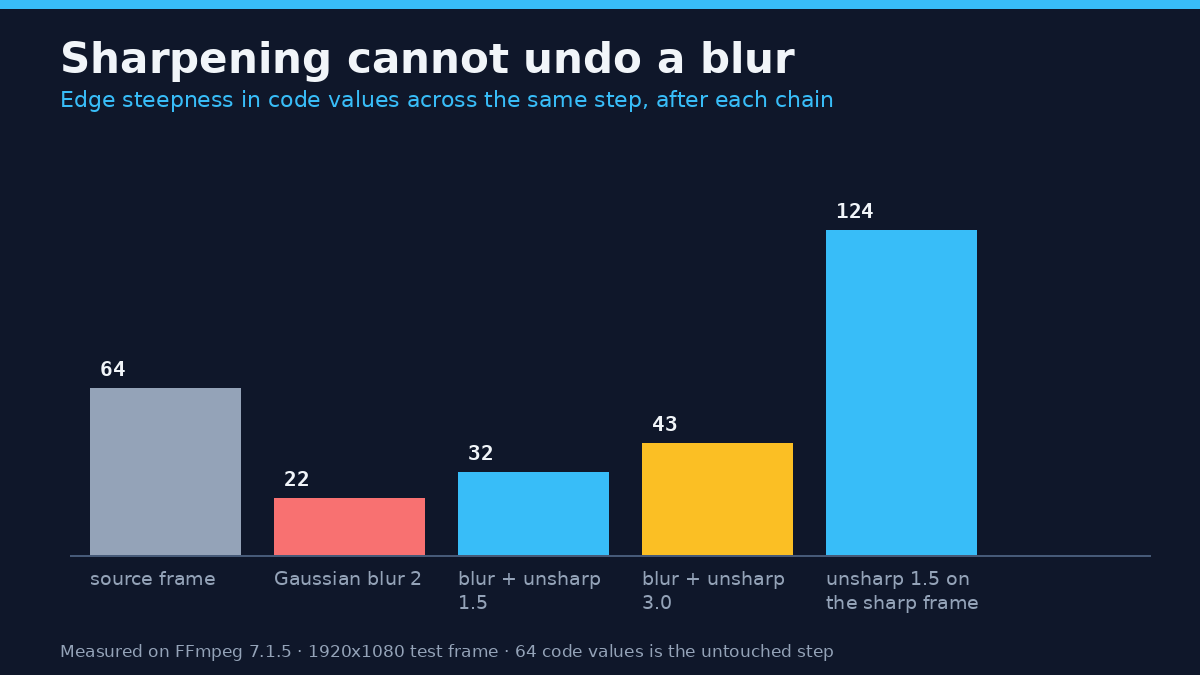
I put numbers on that trade on this machine, with FFmpeg 7.1.5. A synthetic 1920×1080 frame went through the unsharp and cas filters at a range of settings, and every output frame was read back pixel by pixel. The result worth knowing first: on a blurred source, a strong pass recovered less than half the edge steepness the original frame had. A 64 code-value step flattened to 22 by a Gaussian blur came back as 32 at amount 1.5, and only 43 at amount 3.0. Sharpening the untouched frame pushed the same edge to 124.
That’s the honest framing. Sharpening doesn’t create detail. It re-steepens the edges you already have and charges you in halos, noise and bitrate. Here’s what each costs and which of FFmpeg’s three numbers to touch first.
What a sharpen pass changes
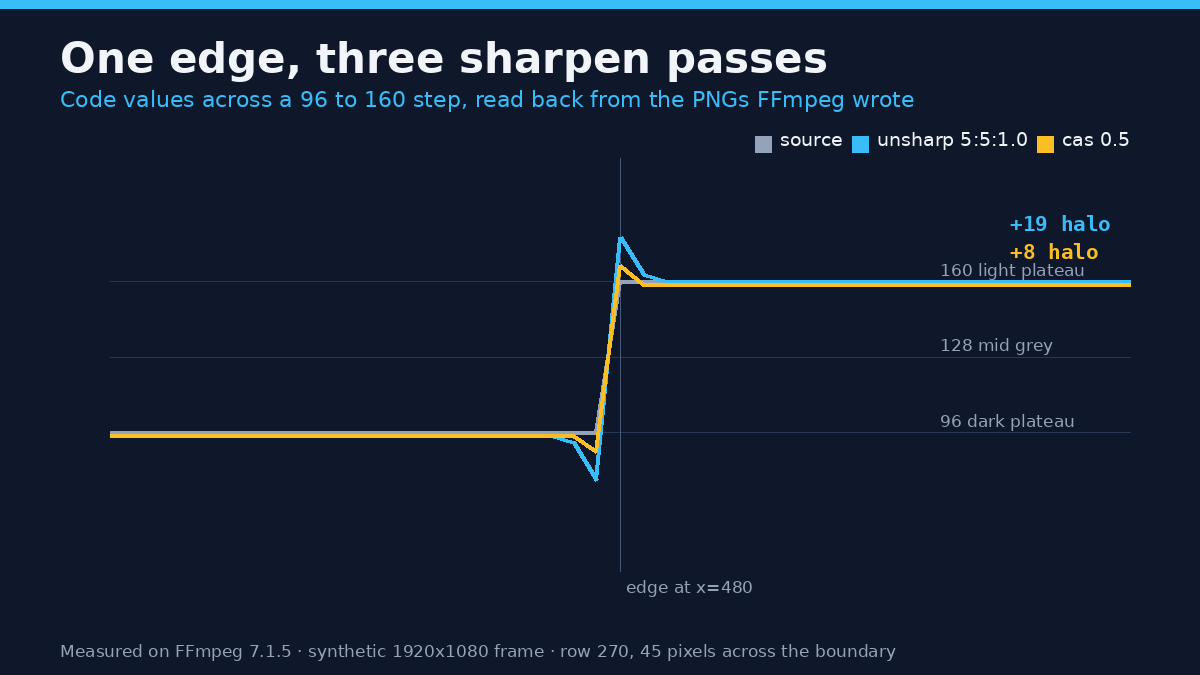
An unsharp mask builds a blurred copy of the frame, subtracts it from the original, and adds the difference back. Flat areas cancel out and boundaries survive, so what’s left is an edge map. Multiply that map by the amount and add it to the original, and the step across a boundary gets steeper than the source had it. The overshoot on each side is the halo.
FFmpeg’s version takes six numbers plus three alpha ones, and ffmpeg -h filter=unsharp lists them all (the filter documentation covers the same six): luma matrix width and height (3 to 23, default 5), luma amount (-2 to 5, default 1), and the same pair for chroma, whose amount defaults to 0. There’s no threshold control, unlike Photoshop’s unsharp mask, so every flat, noisy area gets sharpened as hard as every real edge.
One default is worth pinning down before you copy a recipe: a bare unsharp is the same as unsharp=5:5:1.0. I ran both and the PNGs came back byte-identical.
Amount: what each step buys and costs
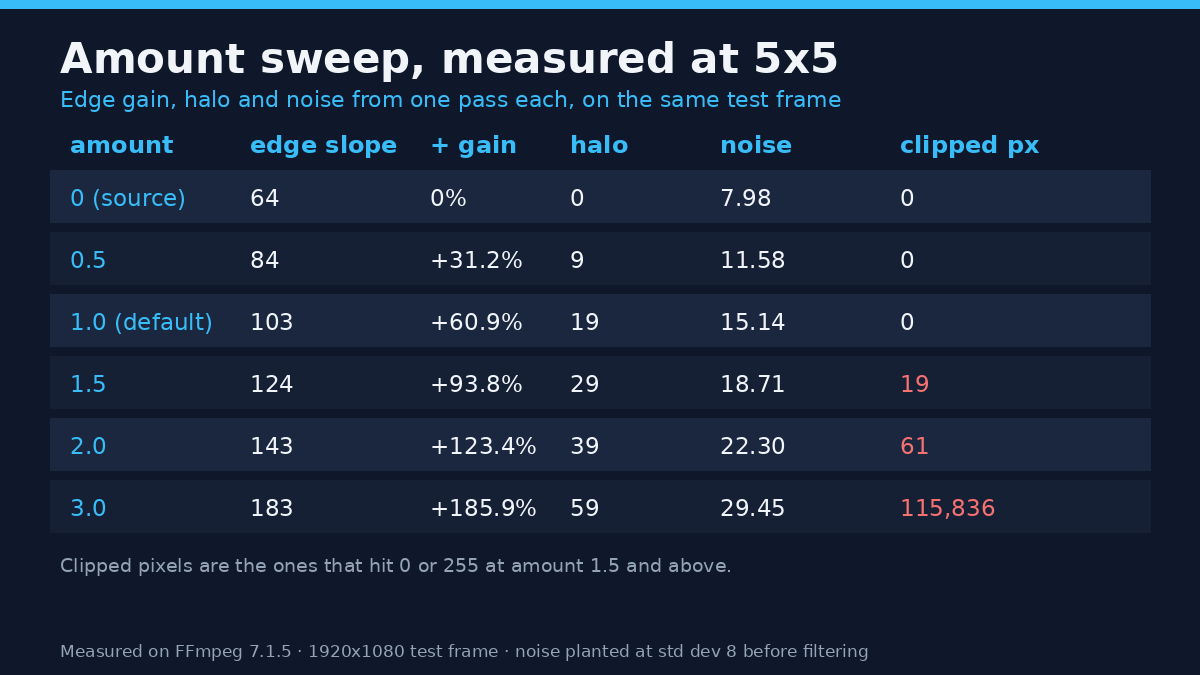
I ran amount from 0.25 to 3.0 at the default 5×5 matrix on a 1920×1080 test frame: a 96 to 160 step edge, a band of 4-pixel lines, bold text and a flat patch with noise at a standard deviation of 8. Each row is one PNG the filter wrote.
| Amount (5×5) | Edge slope | Gain | Overshoot | Noise (std dev) | Clipped px |
|---|---|---|---|---|---|
| 0 (source) | 64 | 0% | 0 | 7.98 | 0 |
| 0.25 | 74 | +15.6% | 4 | 9.84 | 0 |
| 0.5 | 84 | +31.2% | 9 | 11.58 | 0 |
| 0.75 | 93 | +45.3% | 13 | 13.36 | 0 |
| 1.0 (default) | 103 | +60.9% | 19 | 15.14 | 0 |
| 1.25 | 114 | +78.1% | 24 | 16.93 | 0 |
| 1.5 | 124 | +93.8% | 29 | 18.71 | 19 |
| 2.0 | 143 | +123.4% | 39 | 22.30 | 61 |
| 2.5 | 163 | +154.7% | 48 | 25.87 | 2,171 |
| 3.0 | 183 | +185.9% | 59 | 29.45 | 115,836 |
Read the noise column before the slope column. At amount 1.0 the edge gains 61% of its steepness and the planted noise nearly doubles, from 7.98 to 15.14. Gain per unit of noise stays roughly constant, so “just a little more” is never free. The last column is the other tell: the frame stayed clean up to 1.25, picked up 19 clipped pixels at 1.5, and lost 115,836 at 3.0. Those pixels hit 0 or 255 and stay there.
For compressed footage from a phone or a screen recorder, start at 0.5: a setting that looks mild in a preview can be double what the source can carry.
Radius: how wide the halo gets
The matrix size sets how far the blurred copy spreads, so it sets the width of the halo. I held amount at 1.0 and moved the matrix from 3 to 13. Width counts pixels on the bright side that sit more than 2 code values above the plateau.
| Matrix | Edge slope | Gain | Overshoot | Halo width |
|---|---|---|---|---|
| 3 | 97 | +51.6% | 16 | 1 px |
| 5 | 103 | +60.9% | 19 | 2 px |
| 7 | 109 | +70.3% | 22 | 2 px |
| 9 | 111 | +73.4% | 23 | 2 px |
| 11 | 113 | +76.6% | 24 | 3 px |
| 13 | 113 | +76.6% | 24 | 3 px |
Sharpening radius buys much less than amount, and it buys it as width rather than brightness. Going from 3 to 11 takes the gain from +51.6% to +76.6% while the halo grows from one pixel to three. A wide radius is what draws a bright line along a horizon against the sky, because a 3-pixel halo on a 1080p frame is visible at normal viewing distance while a 1-pixel one mostly isn’t. For most footage, 5 is the right compromise.
CAS: fewer halos, and a default that isn’t off
cas, the contrast adaptive sharpen filter, boosts local contrast while holding back where the neighbourhood is already high-contrast. That design is meant to keep halos down, and here it did.
| CAS strength | Edge slope | Gain | Overshoot | Halo | Noise |
|---|---|---|---|---|---|
| 0.25 | 73 | +14.1% | 4 | 1 px | 11.12 |
| 0.5 | 79 | +23.4% | 8 | 1 px | 12.61 |
| 0.75 | 89 | +39.1% | 13 | 1 px | 16.84 |
| 1.0 | 171 | +167.2% | 53 | 1 px | 82.23 |
| no arguments | 71 | +10.9% | 3 | 1 px | 10.36 |
At the same edge gain, CAS produces a narrower halo than unsharp: 0.75 gives +39.1% with a 1-pixel halo, while unsharp at 5×5 needed amount 0.5 for +31.2% and paid 9 code values of overshoot over two pixels. The cost is noise. CAS at 0.75 lifted the planted noise to 16.84 against unsharp’s 13.36 for less edge gain. On clean footage CAS is the friendlier filter. On noisy footage it isn’t.
Then there’s the trap. The option’s documented default strength is 0, which reads as off. It isn’t. A bare -vf cas came back with an edge slope of 71 against 64 for the untouched frame and noise at 10.36 against 7.98, so it behaved like roughly strength 0.2. A control run at strength 0 reproduced those numbers exactly. Strength 1.0 isn’t a gentle top end either: it clipped 180,887 pixels and pushed noise to 82.23.
Sharpening amplifies noise, so denoise first
Sharpening treats noise as detail, because noise is detail: small high-contrast differences between neighbours. On a two-second clip with temporal noise, a flat patch measured 4.65 before filtering and 10.82 after unsharp at amount 1.5. That’s a 2.3x increase from one filter, and it’s why a clip that looked fine gets a crawling texture afterwards.
The fix is order, not strength. Running hqdn3d=4:3:6:4.5 first brought the patch to 2.89. Denoise then a 1.5 sharpen landed at 6.47, 40% less noise than sharpening alone (10.82) with the same edge gain. Sharpen first and you spend the denoiser undoing the sharpener’s noise instead of removing the sensor’s. The guide to reducing video noise covers which strengths are worth using.
Order matters: resize first, sharpen last
Sharpening before a resize wastes most of the work. I took the frame down to 960×540 with lanczos and measured the edge in the output: a plain downscale left a slope of 58, sharpening before it gave 73 with a 4 code-value overshoot, and sharpening after the downscale gave 93 with 15. The resample averages neighbours, so a halo made before it gets partly averaged away and partly baked in as a soft ring. Upscaling can’t add detail either, which is why the guide to upscaling video puts the sharpen last and says plainly what it can’t do.
Keep chroma out of your sharpening
The default chroma amount of 0 is a feature. To prove it I built a red and dark green pair with the same luma (76 on both), read the V plane at the boundary, and compared three passes. The untouched plane stepped 240 to 80. Luma-only sharpening at 1.5 returned the identical profile, with no ringing at all. Adding chroma amount 1.5 turned the same edge into 255, 255, 5, 65, 80: a clipped red fringe and a deep green undershoot right where the colour changes.
Colour edges are lower resolution than luma in 4:2:0 footage, so sharpening chroma means sharpening a plane that was already upsampled. Leave the last two numbers at 0 unless a shot needs it.
What sharpening costs when you export
Sharpening adds high-frequency energy, and the encoder has to spend bits on it. I encoded a four-second 1080p test clip with libx264 at CRF 20 and 23, plain and sharpened, then measured each file and its error against that filter’s own output frame.
| Encode | File size | vs plain | PSNR | SSIM |
|---|---|---|---|---|
| Plain, CRF 20 | 4,271,725 B | baseline | 46.50 dB | 0.99826 |
| unsharp 1.0, CRF 20 | 5,442,029 B | +27.4% | 41.33 dB | 0.99282 |
| cas 0.5, CRF 20 | 5,174,141 B | +21.1% | 43.37 dB | 0.99656 |
| Plain, CRF 23 | 3,226,686 B | -24.5% | 45.06 dB | 0.99726 |
| unsharp 1.0, CRF 23 | 4,283,053 B | +0.3% | 40.70 dB | 0.99193 |
| cas 0.5, CRF 23 | 4,110,750 B | -3.8% | 42.50 dB | 0.99571 |
At matched CRF, one 1.0 sharpen pass costs 27% more bytes. To stay inside the plain file’s size you drop to CRF 23 on the sharpened version, and there its error against its own input is 40.70 dB against 46.50 dB. The comparison isn’t symmetric, because the sharpened frame has more detail to lose, but the direction is the point: bits for edge contrast come out of the same budget as everything else. If your platform caps upload size, sharpen less rather than lowering quality, and set the CRF with the constant quality and bitrate trade-off in mind.
A worked recipe you can run
These are the commands I ran here. Change the numbers for your footage, not the order.
ffprobe -v error -select_streams v:0 -show_entries stream=width,height,r_frame_rate,pix_fmt -of default=nw=1 input.mp4That prints width, height, frame rate and pixel format and nothing else, the same fields the ffprobe walkthrough explains. Write them down, because an amount that suits 1080p overshoots on 4K.
ffmpeg -ss 12 -i input.mp4 -frames:v 1 -vf "unsharp=5:5:1.0" -y sharpened.png
ffmpeg -ss 12 -i input.mp4 -frames:v 1 -y plain.png
Pull the same frame twice, sharpened and plain, and compare at 100%. The seek before -i is accurate by default on this build, so both files hold the same frame. If the halo shows as a bright outline on a horizon, drop to 0.5.
ffmpeg -i input.mp4 -vf "scale=1920:1080:flags=lanczos,unsharp=5:5:1.0:5:5:0" -c:v libx264 -crf 18 -preset slow -pix_fmt yuv420p -c:a copy output.mp4Scale first, sharpen last, keep chroma at 0. If the source is noisy, put hqdn3d=4:3:6:4.5, in front of the unsharp. Then compare size and duration against the input and confirm the frame count matches. An exit code of 0 doesn’t prove the file is complete.
Common mistakes
- Sharpening twice. A second pass at 1.0 took the edge from 103 to 177, the overshoot from 19 to 55, and clipped pixels from 0 to 115,111.
- Sharpening before denoising. Denoise then sharpen ends at 6.47 noise; the other order spends the denoiser undoing the sharpener.
- Sharpening before a resize. More than half the edge gain disappears into the resample; the rest becomes a soft ring.
- Turning chroma up. The fringe isn’t subtle: 255 and 5 on a plane that should read 240 and 80.
- Judging on a scaled preview. A player that fits 1080p into a small window averages the halo away, so the setting looks clean until it’s watched full screen.
Questions that come up
Can sharpening rescue out-of-focus footage?
No. A blurred edge scored 22 against 64 for the sharp original, and amount 3.0 brought it to 43. Sharpening raises contrast across an edge that exists; it can’t reconstruct where the edge should have been.
What sharpening amount should I start with?
0.5 for compressed or noisy footage, 1.0 for a clean source delivered at the same size, and 1.25 at most before checking a frame. Here 1.25 was the last setting with zero clipped pixels.
Is CAS better than unsharp?
For clean footage with visible edges, yes: less halo for the same gain. For noisy footage, no: at 0.75 it lifted the planted noise to 16.84. Whichever you pick, name the strength, because a bare cas still sharpens.
The short version
Sharpening re-steepens edges and charges for it: halos that grow with amount, noise that doubles, and about 27% more bytes at the same CRF. Denoise first, resize first, sharpen last, keep chroma at 0, and measure one frame before committing to a timeline. Sharpening can make a good frame look crisper. It can’t make a soft capture sharp, and the numbers above are the reason to stop asking it to.