
Color Match Two Clips: Make Different Cameras Look Alike
Two cameras, one room, and a clip from each that looks like it came from a different planet. One is warm and yellow, the other cool and flat. Drop them next to each other on the timeline and the cut screams. That’s when most editors grab a saturation slider and end up with two shots that still don’t agree.
A color match isn’t a preset. It’s a measurement: compare the clips on values you know, work out which channel moved and by how much, then correct that channel. Done in that order, it’s a ten minute job in FFmpeg with no paid app.
I tested this on a chart of known patches, pushed one copy through a deliberate wrong-camera transform, and measured how close each filter gets. Every number below is in 8-bit levels per channel.
What you’ll learn
You’ll learn how to plan a color match from measurements, which filter fixes white balance and which fixes the tone curve, and where each one stops working.
Why two clips from the same scene drift apart
Three things separate two cameras.
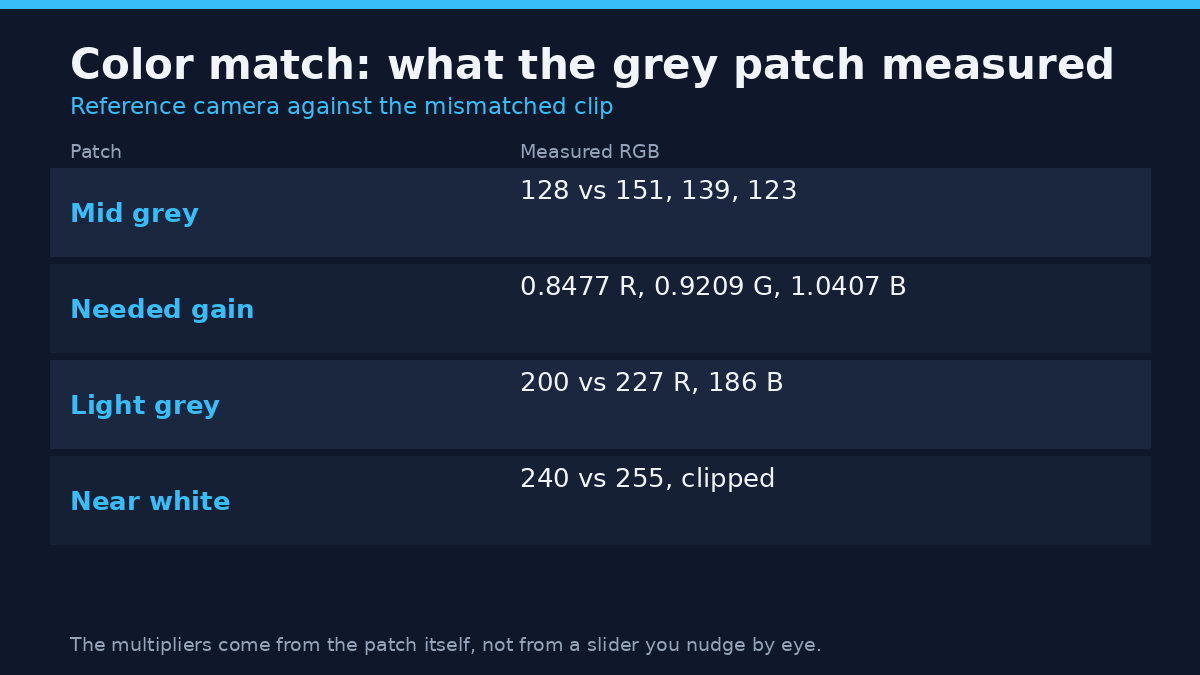
White balance comes first, and it’s where most color match attempts should have started. A sensor plus its manufacturer profile renders the same white as slightly different ratios of red, green and blue. In my rig I pushed a copy with plus 10 percent red, plus 2 percent green, minus 10 percent blue, a small offset per channel, then a 0.94 gamma. That’s a mild cast, and it still moved the light grey patch from 200 to 227 in red while blue fell to 186, a 41 level spread across one patch.
Second, the tone curve. Cameras bake in contrast, so midtones and highlights don’t move in proportion, and a gain per channel can’t fix that.
Third, clipping. If a channel hits 255 on the way in, the data is gone.
Here’s the trap. The two clips look far apart, yet their frame averages are nearly identical: signalstats read luma 123.4 against 127.3, chroma 3.5 and 2.4 levels apart. Those numbers suggest a match while patches inside the frame sat 27 levels apart. Build the color match from a neutral patch, never from the average.
Step 1: measure both clips before you color match
Put something neutral in both shots: a grey card is ideal, and a white wall works if it’s the same wall.
Rule out one thing first. If one clip is tagged full range and the other limited, every channel number lies. That’s a color range mismatch no color match survives.
The quick check is a crop plus signalstats, which prints the average luma and chroma of one region:
ffmpeg -i cameraB.mp4 -vf "crop=160:120:100:130,signalstats,metadata=print" -frames:v 1 -f null -On my grey patch that returned YAVG=40, UAVG=126 and VAVG=130. Signalstats talks in YUV, so use it as a quick yes or no: two levels off neutral chroma. For the per-channel numbers a color match needs, dump a frame and read the pixels:
ffmpeg -i cameraB.mp4 -frames:v 1 frameB.pngHere’s what my eight patches measured: reference camera, mismatched camera, then the same patches after the correction described below.
| Patch | Reference RGB | Second camera RGB | After correction |
|---|---|---|---|
| Shadow | 20, 20, 20 | 31, 27, 24 | 24, 19, 19 |
| Dark grey | 60, 60, 60 | 77, 70, 62 | 56, 59, 60 |
| Mid grey | 128, 128, 128 | 151, 139, 123 | 123, 127, 128 |
| Light grey | 200, 200, 200 | 227, 210, 186 | 203, 200, 199 |
| Near white | 240, 240, 240 | 255, 248, 221 | 234, 239, 240 |
| Skin | 200, 150, 120 | 227, 161, 116 | 203, 150, 120 |
| Red | 200, 40, 40 | 227, 49, 43 | 203, 40, 39 |
| Blue | 40, 60, 200 | 54, 70, 186 | 39, 59, 199 |
The mid grey is the patch your eye trusts, and it was off by 23 in red, 11 in green and 5 in blue. The near white shows the other problem: red is pinned at 255, so that patch is gone for any color match. What’s left there is damage control.
Step 2: fix white balance first
Get the neutrals neutral before anything else. Every curve you fit afterwards assumes the channels tell the truth, so a curve fitted to a cast bakes the cast in. White balance is the first half of a color match. If the two clips differ in exposure rather than colour, run a color correction pass first and come back.
The one-flag version: colortemperature
FFmpeg’s colortemperature filter shifts the image toward a Kelvin value, the closest thing to the slider you know from an editor:
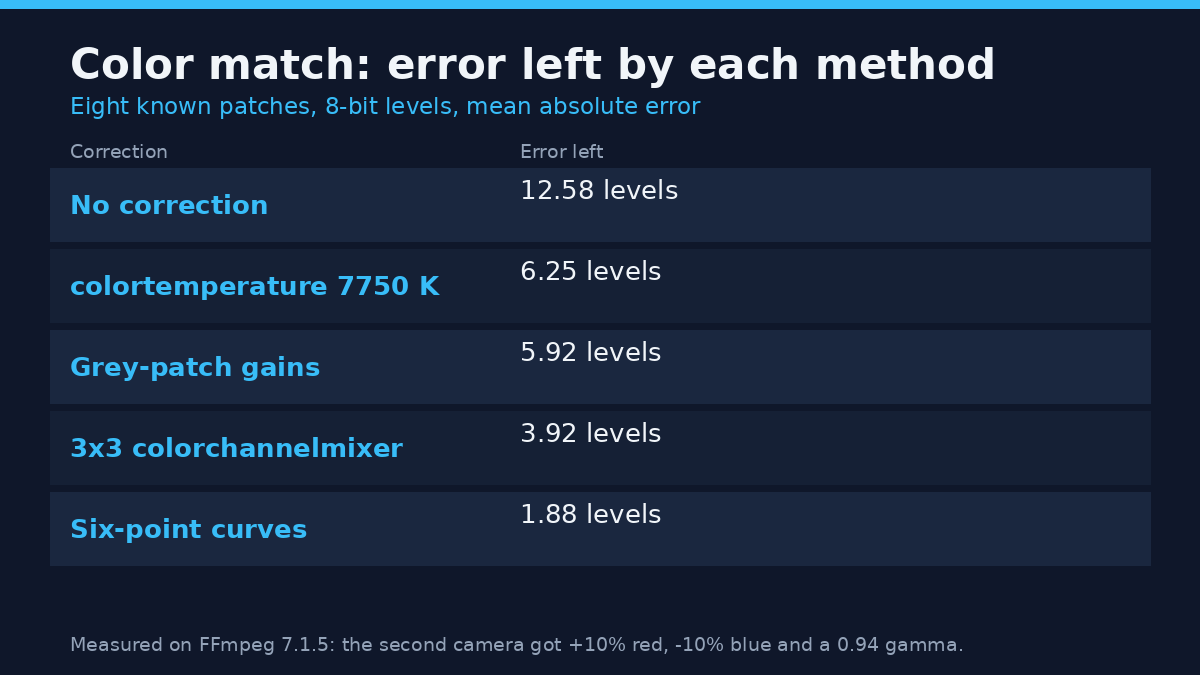
ffmpeg -i cameraB.mp4 -vf "colortemperature=temperature=7750" -c:v libx264 -crf 18 -c:a copy temp.mp4A sweep from 4500 to 9000 in 250 K steps peaked at 7750 K: 12.58 levels down to 6.25 on the still and 6.83 on the encoded clip. It kills the cast in one line.
The measured version: scale each channel from a grey patch
A temperature slider moves all three channels in a fixed relationship. When the cast is uneven, scale each channel by the ratio the grey patch needs. My mid grey read 151, 139 and 123 instead of 128, giving multipliers of 0.8477, 0.9209 and 1.0407:
ffmpeg -i cameraB.mp4 -vf "lutrgb=r='clip(0.8477*val,0,255)':g='clip(0.9209*val,0,255)':b='clip(1.0407*val,0,255)'" -c:v libx264 -crf 18 -c:a copy grey.mp4That landed at 5.92 levels, a better color match than the temperature route, and it stays honest when the content changes: with a bright window added the error only moved to 6.14, because a grey card doesn’t care what else is in frame.
Compare that with matching on the frame average, which is what a histogram does. The averages gave multipliers of 0.9456, 0.9712 and 1.0168. Against the grey-patch ratios, red was off by 0.098, nearly ten points of gain, and the error came out at 8.98 levels.
What not to use: automatic white balance
FFmpeg’s colorcorrect filter has an analyze mode that balances on its own. On my chart, analyze=minmax made the color match worse than doing nothing, at 15.29 levels against a 12.58 baseline. analyze=average got to 10.12, analyze=median to 12.75. Auto balance guesses what’s neutral from the pixels, and my chart is a frame where you can watch the guess go wrong.
Step 3: finish the color match with a curve
With the neutrals fixed, what’s left is the curve shape. The cheapest tool is a 3×3 matrix:
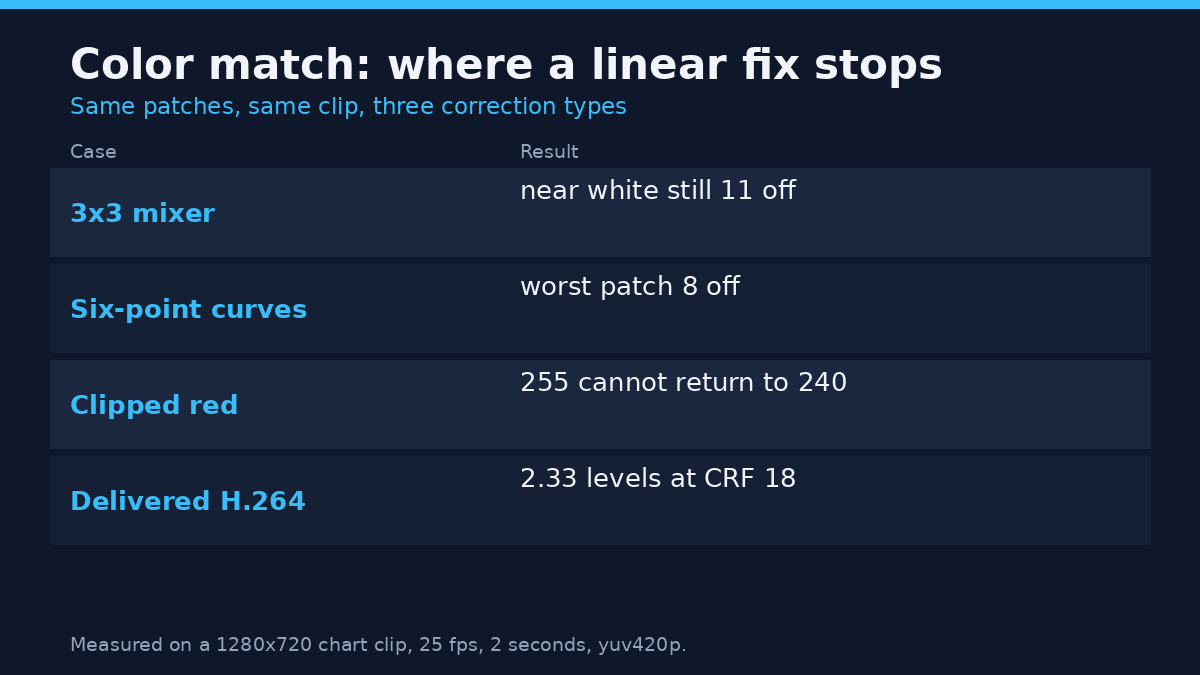
ffmpeg -i cameraB.mp4 -vf "colorchannelmixer=rr=0.86581:rg=0.08845:rb=-0.06524:gr=-0.04242:gg=1.04188:gb=-0.05496:br=-0.03838:bg=0.03373:bb=1.07563" -c:v libx264 -crf 18 -c:a copy mixer.mp4I fitted those nine coefficients to the eight patches by least squares. It took the error to 3.79 levels on the clip and 3.92 on the still, and it has a ceiling: the near white stayed 11 levels off, because a linear mix can’t bend a curve. It fixes crosstalk between channels, not gamma. Every option is in the FFmpeg filter reference.
The curve finishes the color match. Take the ratio the patch needs at several brightness levels and hand those points to the curves filter:
ffmpeg -i cameraB.mp4 -vf "curves=r='0.00000/0.03727 0.12549/0.09673 0.25098/0.18368 0.50196/0.39778 0.75294/0.64799 1.00000/0.92045':g='0.00000/0.00000 0.12549/0.09588 0.25098/0.21276 0.50196/0.45814 0.75294/0.71265 1.00000/0.96918':b='0.00000/0.00000 0.12549/0.11051 0.25098/0.24524 0.50196/0.52420 0.75294/0.81054 1.00000/1.00000'" -c:v libx264 -crf 18 -c:a copy matched.mp4Six points per channel brought the still to 1.88 levels and the encoded clip to 2.33. The worst patch, 8 levels out on the still, is the clipped one. What’s left is the encoder.
| Method | Still, error in levels | H.264 clip | Fails where |
|---|---|---|---|
| No correction | 12.58 | 11.83 | Everywhere |
| colorlevels from patch points | 12.54 | 12.04 | Crushed the shadow to 0 |
| normalize | 12.92 | 11.46 | Stretched both ends to 0 and 255 |
| Automatic colorcorrect | 15.29 | not run | minmax guess is worse than nothing |
| Frame-average gain | 8.98 | not run | Light patch off by 23 |
| colortemperature at 7750 K | 6.25 | 6.83 | Uneven casts across channels |
| Grey-patch gains | 5.92 | 6.42 | Curve shape, clipped highs |
| 3×3 colorchannelmixer | 3.92 | 3.79 | Near white still 11 off |
| Six-point curves | 1.88 | 2.33 | Clipped highlights |
Error is the mean absolute difference per channel across the eight patches, in 8-bit levels. The stills are lossless; the second column is H.264 at CRF 18.
What no color match can fix
Clipping is permanent. The second camera’s near white pushed red to 255 when the reference sat at 240, so 15 levels of highlight detail don’t exist in the file. Even the best fit left that patch at 234, six levels short. Protect both cameras’ highlights when shooting; when editing, match the rest and accept the blown patch.
Chroma subsampling sets a floor on any color match too: the power-curve fit measured 1.58 levels on the lossless chart, 2.58 when the source was a yuv420p file and 3.62 after the CRF 18 encode, because 4:2:0 keeps a quarter of the colour resolution the fit was made on. Chasing a two level residual is chasing encoder noise.
A color match workflow for a whole sequence
Do the work once per camera, then check each cut. A color match across a sequence is discipline, not a filter choice.
- Pick one reference shot per camera, ideally the one with a grey card or a neutral surface.
- Measure three patches in both: a shadow, a mid grey and a highlight.
- Fix white balance with the per-channel ratios, or colortemperature when the cast is even.
- Fit the curve on those patches and apply the chain to every clip from that camera.
- Check each new shot with a scope, not your eye. A parade makes a drifting channel obvious in a second.
- Match before you grade. A creative LUT on an unmatched pair just makes two different looks.
The order matters more than the filters. Match at the front of the chain and the grade, the LUT and the export all inherit one starting point. Match at the end and every later change pulls the shots apart again. For log footage, convert to Rec.709 first, because matching in log space fits a curve to the wrong transfer function.
Six color match mistakes that keep two shots apart
- Matching the frame average. A bright window pulled my ratios nearly ten points off and left the light patch 23 levels out. Average the neutral, not the frame.
- Using your darkest subject as the black point. colorlevels set from the shadow patch (31) and the near white (255) mapped that shadow to 0 and left the error at 12.54, no better than no correction. The black point belongs to the container floor, not your subject.
- Trusting automatic white balance. The analyze=minmax mode scored 15.29 against a 12.58 baseline. It sees pixels, not a neutral.
- Chasing a clipped highlight. Red at 255 will not return to 240. Fit everything else and leave it.
- Matching a still and shipping the video. My lossless fit read 1.58 and the delivered file read 3.62. Judge the encode, not the frame you exported to check.
- Grading before matching. A LUT on two different starting points gives you two different looks.
FAQ
Can I do a color match for free? Yes. colortemperature, lutrgb, colorchannelmixer and curves cover every step above, and signalstats gives you the measurement.
What’s the fastest reliable color match? Grey-patch gains plus a six-point curve. The gains fix the cast, the curve fixes the shape, and both come from measured patches instead of a slider you nudge by eye.
How close is close enough? Within 3 or 4 levels per channel counts as a finished color match on delivered footage. Below that you’re matching encoder noise. Above 6 levels on a mid grey, a cut between the shots still reads as a jump.
Does a color match fix exposure or noise? No. It moves values that already exist. If one clip is two stops darker or much noisier, fix that first; a curve can’t solve it.
The short version
Measure a neutral in both clips, fix the channels with ratios or a temperature, then finish with a curve fitted to the same patches. That color match took my test clip from 12.58 levels of error to 2.33 on the delivered file. The filters are free and the cut stops screaming.