
Convert Video to DVD Format: What a DVD Player Accepts (2026)
A client hands you a disc. It plays on your laptop, opens fine in VLC, and the DVD player under the television says no disc, or shows a black screen and stops. The burner worked and the file is intact. What failed is the DVD format. It isn’t a container you can pour any video into; it’s a short list of allowed codecs, picture sizes and bit rates, and a player that doesn’t find them gives up before it decodes a frame.
I rebuilt that failure with FFmpeg 7.1.5 and a 20-second 1080p clip, then measured what the DVD format accepts.
By the end you’ll know the limits of the DVD format, what -target dvd changes without asking, how many minutes fit on a disc, and why a clean exit code says nothing about whether a player will take the file.
What the DVD format allows
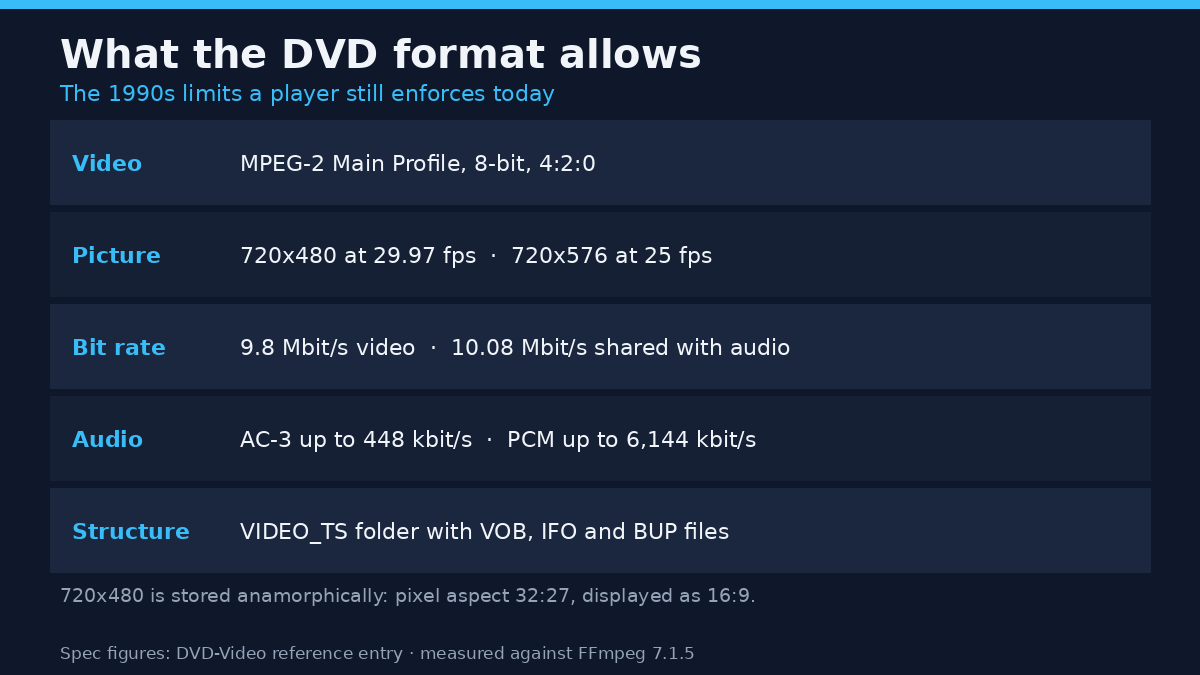
The DVD format was frozen in the late 1990s and never moved again. Every commercial disc meets the same list, which is why an H.265 export fails on a player built in 2003.
| Part | What the DVD format allows |
|---|---|
| Video codec | MPEG-2 (H.262), Main Profile at Main Level, 8-bit, 4:2:0 chroma |
| Picture size at 29.97 fps | 720×480, 704×480, 352×480, 352×240 |
| Picture size at 25 fps | 720×576, 704×576, 352×576, 352×288 |
| Frame rate | 29.97 or 25, interlaced or progressive |
| Video bit rate | 9.8 Mbit/s for video alone, 10.08 Mbit/s shared with audio, 11.08 Mbit/s raw including overhead |
| Audio | AC-3 at 48 kHz up to 448 kbit/s, PCM up to 6,144 kbit/s, MP2 up to 912 kbit/s |
| Disc structure | A VIDEO_TS folder holding VOB, IFO and BUP files |
Those figures come from the format’s own reference entry, worth reading once: DVD-Video on Wikipedia.
The picture size hides a trap. 720×480 isn’t widescreen video; it’s a 3:2 frame of rectangular pixels that a player stretches to 16:9. The disc stores a pixel aspect ratio of 32:27 and the player expands it, which is the same mechanism that makes anamorphic footage look squeezed when the flag goes missing. I measured that stretch in detail when I checked pixel aspect ratios, and it’s why a file made for the DVD format can look right on a disc and stretched on a computer.
What FFmpeg’s DVD target writes
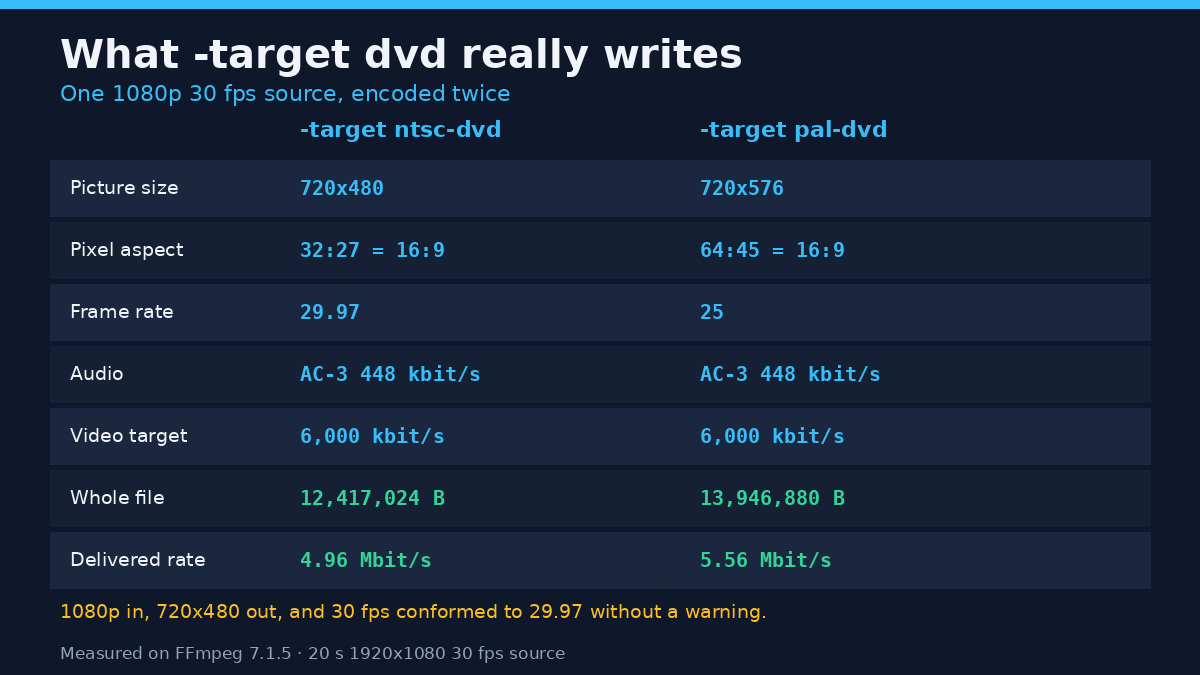
FFmpeg has two presets, -target ntsc-dvd and -target pal-dvd. Both set codec, picture size, frame rate, bit rate and audio codec in one flag. Here’s what came out of a 1920×1080, 30 fps, 20-second source encoded twice.
| Measured on the output | -target ntsc-dvd | -target pal-dvd |
|---|---|---|
| Codec and profile | mpeg2video, Main profile | mpeg2video, Main profile |
| Picture size | 720×480 | 720×576 |
| Pixel aspect ratio | 32:27, displayed as 16:9 | 64:45, displayed as 16:9 |
| Frame rate | 29.97 | 25 |
| Audio | AC-3, 48 kHz, 448 kbit/s | AC-3, 48 kHz, 448 kbit/s |
| Video bit rate requested | 6,000 kbit/s | 6,000 kbit/s |
| Whole file | 12,417,024 bytes | 13,946,880 bytes |
| Average total rate | 4.96 Mbit/s | 5.56 Mbit/s |
| Keyframes | 34 in 600 frames, one every 0.6006 s | one every 0.6 s |
The 1080p source never asked to be resized. The preset rescaled it to 720×480 and conformed 30 fps to 29.97 without a warning. That’s convenient, and it’s where a conversion goes wrong: you can believe you produced a high-definition disc because you started from one.
Frame-rate conformance works on 25 fps sources too. A 502-frame clip came out as 600 frames at 29.97, so the encoder duplicated frames to fill the gap. Nothing breaks.
Keyframe spacing is the setting to know before blaming a player for slow seeking. 34 keyframes across 600 frames is one every 18 frames, exactly 0.6 seconds, the longest interval the DVD format allows. Set a longer GOP and some players stutter on chapter jumps even though the file probes as valid.
The 6,000 kbit/s in the log is a target, not a ceiling
Look at the two rate columns again. The preset asked for 6,000 kbit/s and delivered 4.96 and 5.56 Mbit/s on an easy synthetic clip. That’s normal: MPEG-2 rate control spends what the picture needs up to the target.
It goes the other way too, and that’s what costs discs. On a deliberately hostile 10-second clip built from random noise, the same preset produced a 21,393,408-byte file, an average of 17.09 Mbit/s, and the muxer printed buffer underflow warnings while it did. The file plays locally. A player enforcing the DVD format’s ceiling will choke on it, and a burner that trusts the encoder hands you a disc that stutters halfway.
Check the output instead of the flag:
ffprobe -v error -show_entries format=duration,size,bit_rate -of default=nw=1 output.mpgDivide size by duration when the bit rate line comes back empty, which happens for MPEG program streams. That quotient is the number a DVD player cares about.
How many minutes a 4.7 GB disc holds
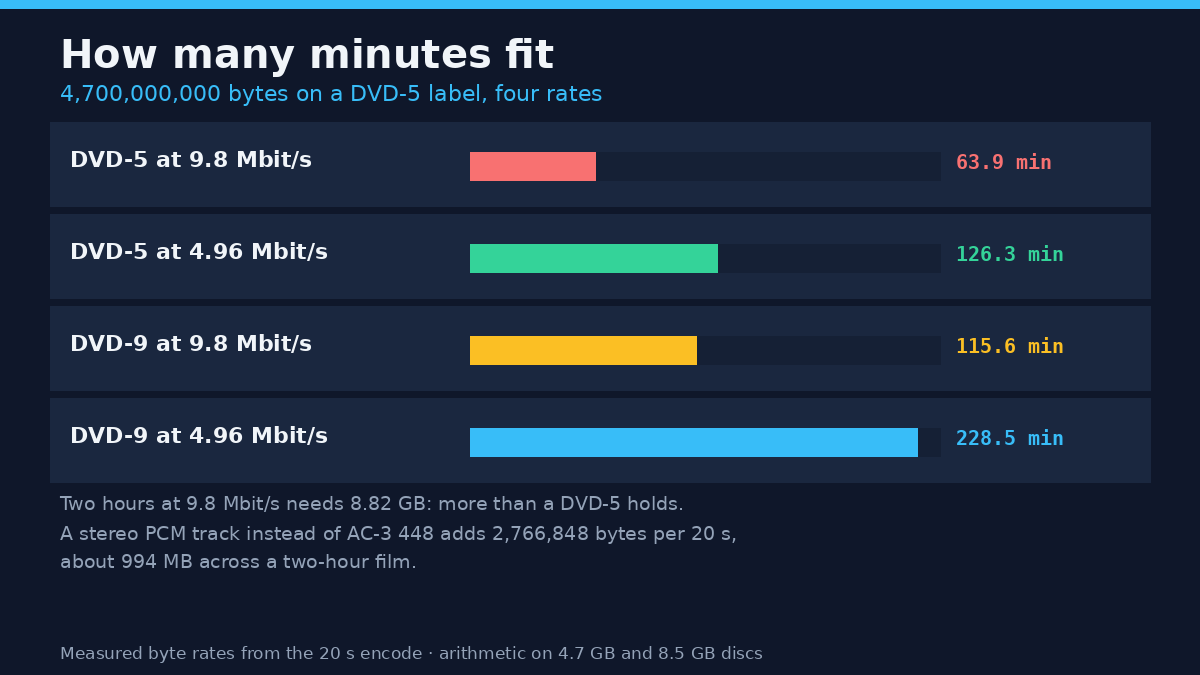
This arithmetic decides whether a project fits, and it’s the step people skip. A DVD-5 holds 4,700,000,000 bytes on the label. At the DVD format’s 9.8 Mbit/s video ceiling that’s 63.9 minutes. At the 4.96 Mbit/s my clip averaged, it’s 126 minutes, which is how a two-hour film fits on one layer without ever approaching the ceiling.
| Disc and rate | Bytes available | Minutes of video |
|---|---|---|
| DVD-5 at 9.8 Mbit/s | 4,700,000,000 | 63.9 |
| DVD-5 at 4.96 Mbit/s | 4,700,000,000 | 126.3 |
| DVD-9 at 9.8 Mbit/s | 8,500,000,000 | 115.6 |
| Two hours at 9.8 Mbit/s | needs 8,820,000,000 | doesn’t fit a DVD-5 |
Two hours at the ceiling needs 8.82 GB, more than a dual-layer disc holds once you allow for the file system. That’s why commercial two-hour films run nearer 4 to 7 Mbit/s, and why a 90-minute home video encoded at the ceiling won’t burn.
What a stereo PCM track costs
The DVD format allows uncompressed PCM audio, and the option tempts anyone told it beats AC-3. It’s lossless, and enormous. I encoded the same 20-second clip three times with only the audio changing.
The video payload stayed at 11.035 MB in all three runs. Audio grew from 0.481 MB at AC-3 192 kbit/s to 1.122 MB at AC-3 448 kbit/s to 3.848 MB at stereo PCM 1,536 kbit/s, and the whole file went from 11,765,760 bytes to 12,417,024 to 15,183,872. The gap between AC-3 448 and stereo PCM is 2,766,848 bytes over 20 seconds, about 994 MB across a two-hour film. That’s a gigabyte of picture budget spent on audio most televisions fold to stereo anyway.
Why a converted file won’t play in a DVD player
The three encodes above carry video that meets the DVD format, and none of them is a DVD. The preset writes a single MPEG program stream with a navigation packet inside, the payload a VOB holds, but it doesn’t create a VIDEO_TS folder, an IFO index or the backup files a player navigates. None of the encodes above created a VIDEO_TS folder; each one wrote a single .mpg.
Standalone players don’t scan a disc for MPEG streams. They open VIDEO_TS, read the IFO, follow navigation commands and play the VOB cells those commands point at. Put a compliant .mpg at the root of a burned disc and an older player shows nothing.
The muxer is also far less picky than the DVD format it’s named after, which makes “it encoded, so it’s valid” a dangerous test:
| Test | Exit code | What the file contains |
|---|---|---|
| H.264 video in the dvd muxer | 0 | H.264 in an MPEG program stream, not DVD-Video |
| 1920×1080 MPEG-2 with -target ntsc-dvd | 0 | 1080-line MPEG-2, six times the allowed pixel area |
| AAC audio in the dvd muxer | 234 | Nothing written; the error lists pcm_dvd, pcm_s16be, ac3 or dts |
Audio is checked and video isn’t. That asymmetry is worth remembering the next time a conversion succeeds and the disc doesn’t.
The command sequence that works
Start by reading the source, since the preset fixes whatever it finds.
ffprobe -v error -show_entries stream=codec_name,width,height,r_frame_rate,pix_fmt -of default=nw=1 input.mp4Then encode. This is the exact command I ran, with the source name changed:
ffmpeg -y -i input.mp4 -target ntsc-dvd output.mpgFor a 25 fps source and a European player, swap in -target pal-dvd. Don’t mix them in one project; a player handed 29.97 content on a 25 fps disc either refuses or shows it at the wrong speed.
Then verify the delivered file:
ffprobe -v error -show_entries stream=codec_name,width,height,sample_aspect_ratio,r_frame_rate,bit_rate -of default=nw=1 output.mpgYou want mpeg2video, the DVD format’s 720×480 or 720×576, 32:27 or 64:45, 29.97 or 25, and AC-3 at 448 kbit/s. If the width reads 1920, the preset never applied and you’re holding a file no player will take.
Finally, author the disc. That step builds the VIDEO_TS structure and sits outside FFmpeg’s job. Hand the .mpg to a DVD authoring tool, add menus and chapters there, and let it lay out the folder. Skip it, burn the .mpg as data, and you’ve made an archive disc rather than a video DVD.
Mistakes that cost you a disc
One: assuming the preset keeps your resolution. It overwrites -s, and a size passed after it wins with only a warning. A 1080p file labelled with the DVD format is a file, not a disc.
Two: trusting exit code 0. H.264 and 1080p both encoded cleanly inside the muxer named for the DVD format, so check codec and size every time.
Three: burning the .mpg at the root of the disc. Without VIDEO_TS and an IFO, most players see an empty disc.
Four: encoding at the 9.8 Mbit/s ceiling because it’s allowed. Two hours won’t fit, and hard content can overshoot even that, as the noise run showed.
Five: choosing PCM audio and wondering where the picture went. A gigabyte over two hours is a real cost, and the gain is inaudible on a television speaker.
Six: picking NTSC or PAL by where you live rather than by the source. Frame rates get conformed by duplicating frames, so a 25 fps source forced to 29.97 gains 98 frames and slightly uneven motion.
FAQ
Is MP4 the same as the DVD format?
No. MP4 is a container that usually holds H.264 or H.265 with AAC audio. The DVD format is MPEG-2 with AC-3, PCM or MP2 audio inside a VOB file, wrapped in a VIDEO_TS folder. Renaming an MP4 to .vob converts nothing.
What resolution is the DVD format?
720×480 at 29.97 fps or 720×576 at 25 fps, stored anamorphically. Both are standard definition, so a 1080p source loses about 83% of its pixels when the preset rescales it.
Can I put a file in the DVD format on a USB stick?
Some players read MPEG program streams from USB, and some only read the VIDEO_TS folder. If the file has to play anywhere, author the folder onto the stick.
Does converting to the DVD format always lower quality?
It lowers resolution and bit rate, so yes for anything shot above standard definition. How much depends on the rate: at 6 Mbit/s and 720×480 a clean source survives, and at 4 Mbit/s fast motion smears.
What to do with this
The DVD format rewards checking before burning. Probe the source, encode with the right preset, probe the output, run the minutes arithmetic, and hand a compliant stream to an authoring tool. Four of those steps take seconds; the arithmetic needs planning, because a disc that doesn’t fit is the only failure you can’t fix afterwards.
For the reverse direction the same checks apply, and the ffprobe walkthrough covers reading a file’s real specs. My notes on constant quality versus average bitrate explain why that 6,000 kbit/s figure behaves like a budget rather than a wall, and when a file made for the DVD format looks stretched on a computer, the container and aspect-ratio primer is the place to start, because the picture is probably fine and the flag isn’t.