
ffprobe: Check a Video File’s Real Specs Before You Convert It (2026)
Two files sit in my test folder with the same 180 frames inside them. The MP4 says it runs for 6.000 seconds. The MKV, made by remuxing that same MP4 with the picture copied byte for byte, says 6.021 seconds. Neither file is damaged. The containers store different things, and only one keeps a per-stream duration at all.
That gap is why I keep ffprobe open whenever I touch a video. Your editor’s info panel and your phone’s playback app both show a summary somebody else computed. ffprobe shows the fields the file itself carries, and the fields it refuses to carry. The second half of that sentence is where people get burned.
I ran ffprobe against nine files on FFmpeg 7.1.5 and wrote down every value it returned. Six of those values contradict what a careful person would assume. By the end you’ll read a file’s real specs in about four seconds and know which numbers to disbelieve.
You’ll get the one command worth memorising, the six cases where its output misleads, and the five checks I run before any conversion.
What ffprobe reports, layer by layer
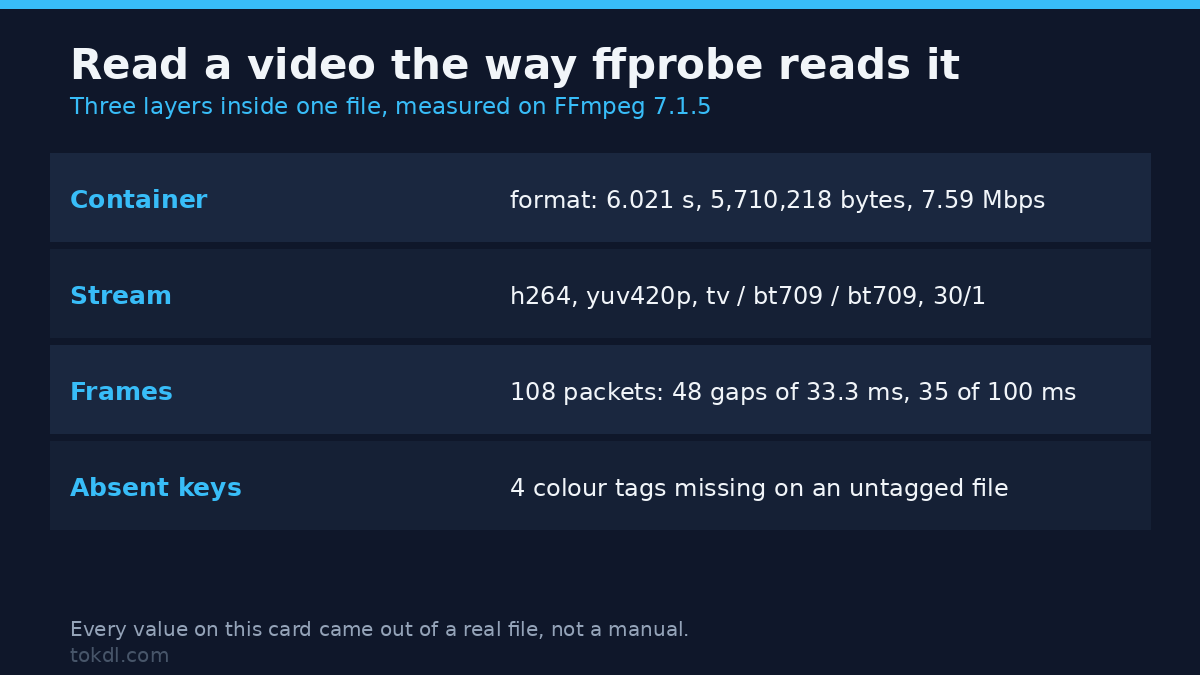
A video file is three things stacked on top of each other, and ffprobe reads all three. The container (ffprobe calls it format) holds duration, file size, bitrate and tags. Each stream describes one track: codec, resolution, pixel format, colour tags, frame rate, language. Packets and frames hold the data, and you ask for those by name because reading them means walking the file.
By default ffprobe prints a human summary and sends it to stderr. I tested the obvious first attempt: ffprobe video.mp4 | grep Video: returned zero matches on a file that plainly has a video stream. Redirect stderr and it appears:
ffprobe -hide_banner input.mp4 2>&1 | grep "Video:"ffmpeg -i input.mp4 prints the same summary, writes 829 bytes to stderr, and exits with code 1 because no output was named. Fine for a glance, useless in a script.
The ffprobe command worth memorising
This one line answers about eighty percent of the questions I ever have about a file:
ffprobe -v error -select_streams v:0 -show_entries
  stream=codec_name,profile,pix_fmt,width,height,r_frame_rate,avg_frame_rate,bit_rate,color_range,color_space,color_transfer,color_primaries
  -of json input.mp4
Four flags do the work. -v error hides the banner and the chatter so warnings stand out. -select_streams v:0 takes the first video track. -show_entries stream=... names the fields, which keeps the output small enough to read. -of json writes to stdout, so the result pipes cleanly into jq or Python.
For a human answer, swap the last flag for -of default=noprint_wrappers=1 and you get plain key=value lines, which is also the only form that shows a missing tag.
The fields that answer real questions
Every value in the right-hand column came out of ffprobe 7.1.5 today, not out of a manual.
| Field | Question it answers | Measured value |
|---|---|---|
codec_name |
What codec is inside? | h264, hevc |
profile / level |
Which profile must the player support? | Constrained Baseline / 31; Main 10 / 63 |
pix_fmt |
8-bit or 10-bit, and how is chroma stored? | yuv420p, yuv420p10le, yuvj420p |
color_range |
Limited (tv) or full (pc)? | tv, pc, or absent |
color_space |
Which matrix decodes the chroma? | bt709, bt2020nc, bt470bg |
color_transfer |
Is this HDR? | bt709, smpte2084 |
color_primaries |
Which colour gamut? | bt709, bt2020 |
r_frame_rate |
Nominal frame rate | 30/1 |
avg_frame_rate |
Frames divided by duration | 30/1, and 1620/89 on a VFR file |
nb_frames |
How many frames? | 180 in MP4, N/A in MKV |
bit_rate |
How heavy is the stream? | 7479348 in MP4, N/A in MKV |
field_order |
Interlaced or progressive? | progressive, tt |
Where the output lies to you
“unknown” is a value. A missing key isn’t.
On a file encoded with no colour flags, the text output prints four lines: color_range=unknown, color_space=unknown, color_transfer=unknown, color_primaries=unknown. Ask for the same four as JSON and the keys are gone. No null, no empty string, nothing to compare against.
That difference breaks naive scripts. My one liner, streams[0]['color_transfer'], died with KeyError: 'color_transfer'. The safe version, streams[0].get('color_transfer', 'unknown'), returns unknown. Test for presence, not for a string: an absent tag means the file never declared its colour handling, and every player downstream gets to guess.
The three colour flags that write two tags
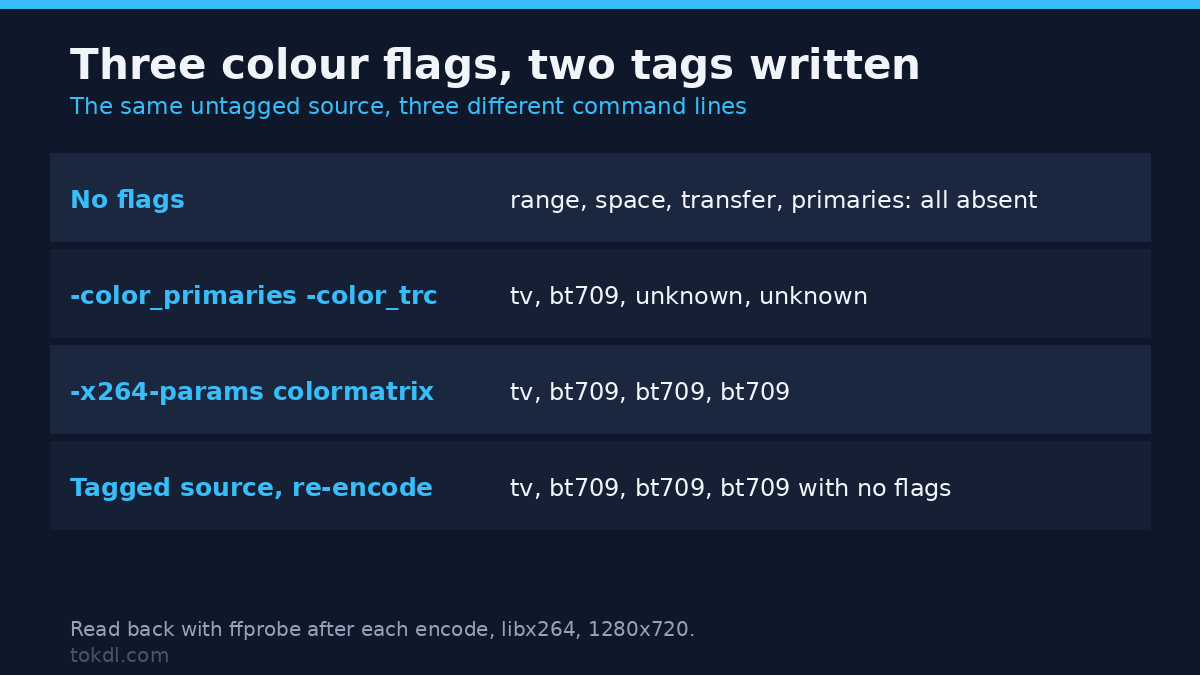
I re-encoded the same untagged source twice. With -color_primaries bt709 -color_trc bt709 -colorspace bt709, the delivered file reported range tv, space bt709, then color_transfer=unknown and color_primaries=unknown. Two of the three tags I asked for were never written.
| How the file was made | range | space | transfer | primaries |
|---|---|---|---|---|
| Untagged source, no flags | absent | absent | absent | absent |
| Untagged source, three output flags | tv | bt709 | unknown | unknown |
Untagged source, -x264-params colorprim=bt709:transfer=bt709:colormatrix=bt709 |
tv | bt709 | bt709 | bt709 |
| Re-encode of an already tagged source, no flags | tv | bt709 | bt709 | bt709 |
Two lessons. Output options like -color_primaries and -color_trc don’t reach libx264’s headers, so write them through -x264-params or a setparams filter. And a source carrying all three tags hands them to a plain re-encode for free.
A JPEG source overrides your pixel format
I built a clip from a single JPEG with -pix_fmt yuv420p written into the command, the way every slideshow recipe does it. The delivered file reported pix_fmt=yuvj420p, color_range=pc and color_space=bt470bg. Full range, and an SD-era BT.601 matrix on a 1280×720 picture.
None of it came from my flag. The JPEG is full range, the filter chain passed the range through, and the encoder tagged what it saw. The file plays fine in a browser, which is why nobody notices until a TV handles the levels differently. If limited-range BT.709 is what you intend, say so with scale=...:out_range=tv, then check with ffprobe. The washed-out export guide diagnoses the picture when it already looks wrong.
A field that doesn’t exist returns nothing, quietly
Plenty of guides tell you to read pkt_duration_time for the real spacing between frames. On FFmpeg 7.1.5 that field isn’t populated. Ask for it alone in JSON and you get three empty objects with exit code 0. Ask for it as the first CSV column next to pts_time and the column silently disappears:
ffprobe -v error -select_streams v:0 -show_entries packet=pkt_duration_time,pts_time
  -of csv=p=0 -read_intervals %+#3 input.mp4
# 0.000000
# 0.033333
# 0.066667
Read that the way a parser does and 0.033333 looks like a frame duration. It’s a timestamp. The numbers are plausible, monotonic and wrong, and nothing warns you, because ffprobe treats an unrequestable field as a typo it can ignore. What works is frame=duration_time, or measuring the gaps yourself from pts_time deltas.
On my VFR file both agree: 73 frames at 0.033333 s, 35 at 0.1 s, matching a gap histogram of 48 at 33.333 ms, 24 at 33.334 ms and 35 at 100 ms.
CSV columns don’t arrive in the order you asked for
I asked for format=size,duration and got 6.021000,5710218. I asked for format=duration,size and got the same string. Order is fixed internally, not by your request. Streams behave the same way: stream=index,codec_type,codec_name printed 0,h264,video.
Matroska stores less per stream than MP4 does
My MKV reported bit_rate=N/A, nb_frames=N/A and duration=N/A at stream level. Not a defect, just the container: Matroska keeps those numbers once, in the file header.
So the answers move. Total duration comes from format=duration, which read 6.021000 against the MP4’s 6.000000 for the same 180 frames. Frame count needs -count_frames, which added nb_read_frames=180. Video bitrate needs arithmetic, and that number drags the audio along: 5710218 bytes × 8 ÷ 6.021 s = 7,587,069 bps for the whole file. The MP4 gives you the split, and the split is worth seeing: video 7,479,348 plus audio 127,915 lands at 7,607,263 while the container claims 7,616,513. The extra 9,250 bps is muxing overhead.
Five checks worth running
Is this file HDR?
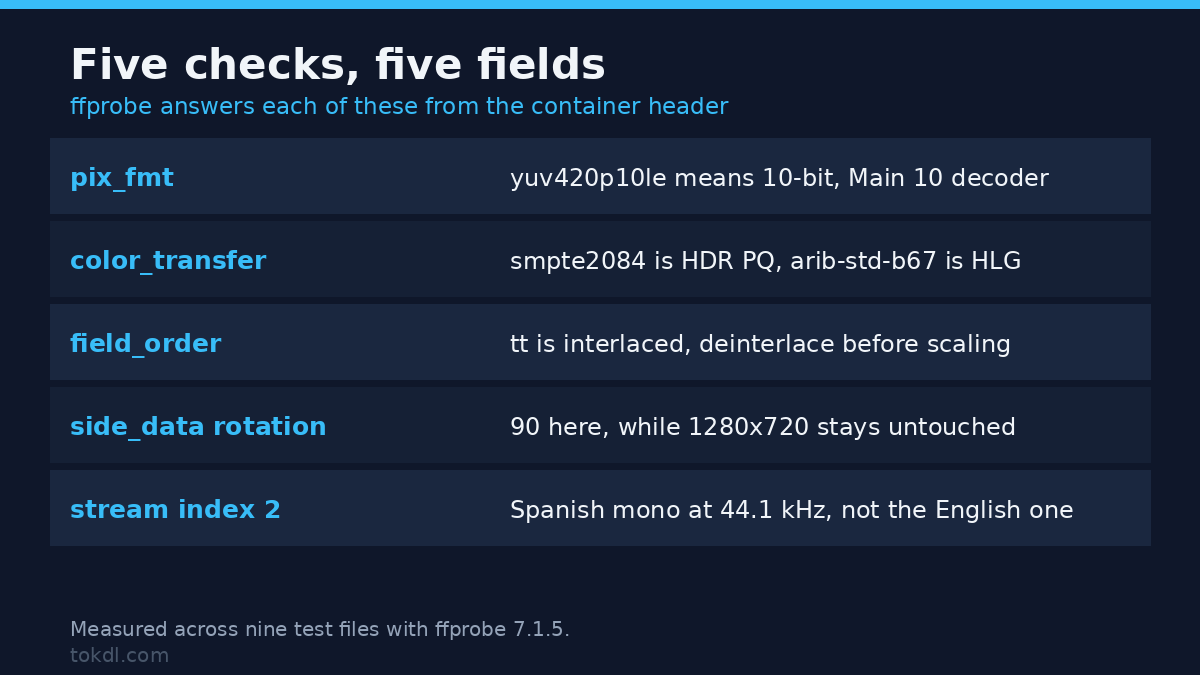
Three tags answer it. Mine reported color_transfer=smpte2084 (PQ), color_primaries=bt2020 and color_space=bt2020nc, with pix_fmt=yuv420p10le, profile Main 10 and the hev1 codec tag. HLG material shows arib-std-b67 instead. If transfer says bt709, it’s SDR whatever the filename claims.
Is it 8-bit or 10-bit?
pix_fmt ends in 10le for 10-bit, and bits_per_raw_sample=8 confirms 8-bit elsewhere. A Main 10 HEVC needs a decoder that handles it, a different compatibility question from H.264 versus H.265. The bit-depth comparison covers when the extra bits earn their size.
Is it interlaced?
field_order read progressive on the normal encode and tt on a deliberately interlaced copy. Two letters, and you know whether to deinterlace before scaling. Interlaced footage scaled without one combs, and no amount of sharpening fixes that.
Is it rotated?
My rotated copy still reports width=1280 and height=720, because the picture was never re-encoded. The rotation lives in side data:
ffprobe -v error -select_streams v:0 -show_entries stream_side_data=rotation
  -of json input.mp4
# "side_data_list": [ { "rotation": 90 } ]
That’s the flag a phone writes when you shoot vertically, and it’s why a clip looks sideways in one player and upright in another. Fixing it for good means a re-encode, which the rotation guide walks through.
Which audio track is which?
Drop -select_streams and ffprobe lists everything: 0,h264,video, 1,aac,audio, 2,aac,audio, 3,subrip,subtitle. Add -show_entries stream=index,channels,sample_rate:stream_tags=language and mine separated cleanly: index 1 English stereo at 48 kHz, index 2 Spanish mono at 44.1 kHz. From there -select_streams a:1 targets the Spanish track alone. Get it wrong and you extract the wrong language, which is a quiet way to lose an afternoon.
What to do with each answer
| What ffprobe says | What it means for you | Where to go next |
|---|---|---|
codec_name=hevc, Main 10 |
Older hardware and some browsers won’t decode it | Convert HEVC to H.264 |
avg_frame_rate a strange fraction |
Variable frame rate; expect sync drift in an editor | VFR to CFR conversion |
color_transfer=unknown |
Nothing declared; players may guess differently | Tag it, then verify |
color_range=pc |
Full-range video headed for a limited-range pipeline | Fix the colour range |
field_order=tt |
Interlaced source, deinterlace before scaling | Deinterlace first, then resize |
nb_frames N/A |
Matroska; ask for -count_frames |
Costs a full read |
One note on the last row: stream fields come from the header, while -count_frames walks the actual data.
Six mistakes worth avoiding
- Trusting the player’s info panel. Playback software builds a friendly summary, often from guesses. It isn’t the file’s own claim.
- Parsing CSV by column position. Columns don’t arrive in your order, and one can vanish without an error. Use JSON.
- Ignoring the exit code. A truncated MP4 gave exit code 1,
moov atom not foundon stderr and{}on stdout. A script reading only stdout sees a valid document describing a file with no streams. - Assuming the colour keys exist. They’re omitted when unknown. Presence is the test, not the word.
- Reading
r_frame_rateas the frame rate. Yours may say 30/1 whileavg_frame_ratesays 1620/89, which is 18.2 fps, and the real gaps come in three lengths. Neither field is the answer; the timestamps are. - Expecting MKV to behave like MP4. Per-stream bitrate, frame count and duration come back N/A. Reach for
format=and-count_framesinstead of deciding the file is broken.
FAQ
Is ffprobe a separate program? It ships with FFmpeg. On my Debian box dpkg -S /usr/bin/ffprobe answers ffmpeg: /usr/bin/ffprobe, and the version string matches (7.1.5) because it’s the same build.
What’s the difference between ffprobe and ffmpeg? ffprobe reads and reports and never writes a file. ffmpeg converts. The related ffplay just plays. If you only want to know what’s inside, ffprobe can’t overwrite your source by accident.
Why does bit_rate show N/A? The container doesn’t store a per-stream bitrate. Take the container bitrate, remembering it includes audio and muxing overhead, or remux to MP4 where the per-stream numbers survive.
Conclusion
The method fits in one habit: ask ffprobe for the fields you need, as JSON, and check the exit code before you look at the numbers. Four of the six traps above show up as a missing key or a silent absence rather than an error, and the two that show up as wrong numbers look reasonable until you compare them with a second source.
I still get caught, which is why the check comes first now. Before converting anything I run the one-liner, confirm the codec, pixel format, three colour tags and frame rate, and only then decide what the file needs. It takes seconds, and it has saved me from shipping full-range BT.601 footage more than once.
Full flag reference lives in the official ffprobe documentation. The field names matter more than the flags do, and now you know which ones to distrust.