
How to Cross-Post TikTok to Reels and Shorts in 2026
Posting the same video to TikTok, Reels, and Shorts should take five minutes. For most people it takes forty, and the version that lands on two of those platforms performs badly for reasons nobody explains. If you’re planning to cross-post TikTok to Reels and Shorts in 2026, the workflow below is the one that survives contact with the real platforms.
I watched a friend do this the slow way for months. Export from TikTok, upload to Instagram, watch it flop, blame the algorithm. The algorithm wasn’t the problem. She was handing Instagram a file with a competitor’s logo burned into the corner, in the wrong aspect ratio, with a caption written for a different audience.
Here’s the workflow that fixes all three at once.
Why Cross-Posting Fails More Often Than It Works
Each platform wants to keep you on it. That’s the entire explanation, and everything else follows from it.
Instagram’s own creator guidance says Reels carrying visible watermarks from other apps get shown to fewer people. YouTube treats recycled Shorts the same way. Neither platform announces this loudly, but both are consistent about it: content that visibly came from somewhere else gets less reach than content that looks native.
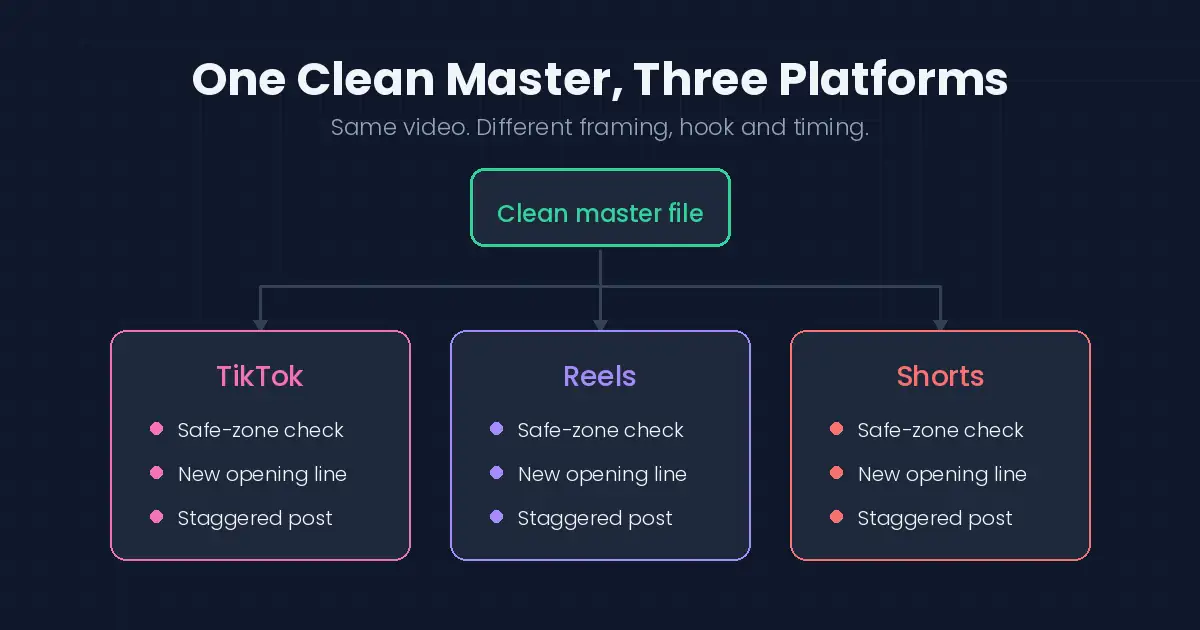
So the goal isn’t to move one file around. It’s to end up with three files that each look like they were made for where they’re posted.
Step One: Keep a Clean Master
Before anything else, you need a version with no overlay on it.
On TikTok’s final editor screen, the one with the caption box, turn on Save to device. That writes a clean copy to your camera roll as you publish. If you’ve already posted and skipped this, open the video in Drafts and export from there; drafts hold the pre-watermark version.
If neither exists, your original clips are still in your camera roll. Rebuilding from source takes longer but gives you the best result anyway. Our guide to saving your TikToks cleanly walks through all three routes in detail.
One rule that saves you every time: the clean master comes from your account, not from a downloader. Anything that produces a stripped copy of someone else’s video is a different activity with different consequences.
Step Two: Match the Format to the Platform
All three are vertical, which lulls people into thinking one file fits everywhere. It doesn’t.
| Platform | Ratio | Length sweet spot | Safe zone gotcha |
|---|---|---|---|
| TikTok | 9:16 | 21–34 seconds | Right edge crowded with buttons |
| Reels | 9:16 | 15–30 seconds | Bottom ~15% covered by caption UI |
| Shorts | 9:16 | Under 60 seconds | Title overlays the top on some devices |
The practical fix: keep anything you actually need people to read inside the middle 70% of the frame. Text placed comfortably in TikTok’s layout regularly ends up half-buried under Instagram’s caption bar, and you won’t notice until it’s live.
A quick pre-flight check before uploading: watch the export with subtitles or captions on. If your captions clip at the edges, nudge the whole composition inward by 5%. That one adjustment prevents most “why is my text cut off” posts from ever happening.
Step Three: Rewrite the Hook, Not Just the Caption
This is where most cross-posting effort gets wasted, because people rewrite the caption and leave the first two seconds alone.
TikTok audiences tolerate a slower open; they’ll give you a beat before deciding. Reels viewers are scrolling faster and harder. Shorts sits somewhere between, with a viewership that skews toward search intent rather than pure browsing, which means a clear subject in the opening frame does more work there than a clever tease.
You don’t need three edits. You often need three different first sentences on the same edit. That’s a two-minute change with a disproportionate effect.
Hooks that work per platform
- TikTok: a strong visual beat or a question that stops the scroll.
- Reels: a direct promise in the first second (“Here’s the shortcut nobody shows you”).
- Shorts: a keyword-rich opening line, because Shorts ranks in search results like YouTube videos.
Step Four: Post on a Stagger
Dropping identical content everywhere within the same minute is the pattern that looks most like recycling.
Give it a few hours between platforms. Some creators go a full day. Beyond looking less automated, staggering gives you real information: if a video does well on TikTok and dies on Reels, you learn something about the format difference instead of blaming luck.
The analytics loop
After a week, compare the three versions side by side. Look at completion rate rather than raw views, because it tells you where the hook failed. If Reels viewers drop off at the same second every time, that’s your opening line, not the algorithm. Feed that learning back into the next video, and the whole process gets cheaper every round.
What About Tools That Do This Automatically?
Scheduling tools that connect through each platform’s official API are fine. They’re authorized integrations, they don’t touch your password, and they publish through supported channels.
Tools that scrape videos off one platform and push them to another are a different category entirely. They break the terms of service on both ends, they usually want login credentials they have no business holding, and when they’re used on other people’s content they turn into a content-theft problem rather than a workflow one.
The difference is simple: does the tool work with your account, or does it work around it? And when you do need to pull reference clips or your own archives back from a platform, our roundup of the best video downloader apps keeps the download side of the toolkit trustworthy.
Troubleshooting Common Cross-Post Problems
- Reels look soft after upload. Instagram re-encodes aggressively. Export your master at the highest quality your phone offers before uploading.
- Shorts get no views. Check the title and description for searchable keywords; Shorts discovery is heavily search-driven.
- Watermark still visible. You exported the watermarked version. Go back to the draft or your source clips, not to a stripping tool.
- Audio missing on one platform. Licensed music doesn’t transfer between platforms. Use a platform-native sound or an original audio track.
Frequently Asked Questions
Does Instagram actually detect TikTok watermarks?
Yes. Reels reduces distribution for content carrying visible logos from other platforms, and Instagram states this in its creator resources.
Can I cross-post without re-editing at all?
You can, and it’ll work adequately if your clean master already sits inside the safe zones. Rewriting the opening line is still worth the two minutes.
How long should I wait between platforms?
A few hours is enough. Some creators wait a day so each platform sees fresh engagement rather than a simultaneous dump.
Does reposting old TikToks to Shorts still work?
It works better than most people expect, because Shorts pulls heavily from search. Evergreen how-to content in particular keeps performing long after it stopped moving on TikTok.
What if I only have the watermarked version?
Check Drafts first, then your camera roll for the source clips. If both are gone, rebuilding is genuinely faster than trying to cover the overlay, and it looks better.
Can I cross-post audio the same way?
Licensed music rarely carries across platforms cleanly, since each has its own catalog and rights. Our guide on TikTok audio covers what does and doesn’t transfer.
Should I delete and repost a flopped Reel?
Rarely. One flop is data, not a verdict. Change the hook, stagger it again, and compare; deleting hides the information instead of using it.
What This Means for You
Cross-posting isn’t a copy-paste job, but it isn’t a full re-edit either. One clean master, three quick adjustments, staggered posting. Call it ten minutes once you’ve done it twice.
The creators who make this look effortless aren’t working harder than you. They just turned on Save to device before they needed it, and stopped handing Instagram a file with someone else’s logo on it.
Managing content across more platforms? Our guides on saving your Instagram videos and exporting Snapchat Memories follow the same principle: keep your own masters, always. And when a finished clip deserves a second life as a looping reaction, our video to GIF converter guide turns any master into a lightweight GIF in under a minute.
[…] get a cleaner file by finding it on the platform where it was originally published. Our guides for downloading TikTok videos without a watermark and saving Instagram videos cover exactly […]
[…] by the platform, so there’s less headroom. Our guides on saving your own TikToks cleanly and cross-posting between platforms cover why keeping the original master matters so […]
[…] spent three hours re-editing the same video. She’d posted it to TikTok, then wanted it on Reels and Shorts, but the only copy she still had was the one she’d downloaded back from the app, watermark […]
[…] videos. The same tools work with a Shorts URL. If you are saving Shorts for reposting, our guide to cross-posting between TikTok, Reels and Shorts explains the format requirements for each […]
[…] other formats — the same approach you’d use to save TikTok videos without a watermark or cross-post short video applies here: save clean, edit deliberately, publish with […]
[…] story even expires. From there, you can edit, repost, or upload to YouTube, TikTok, or Shorts using our guide to cross-posting TikTok content as a reference for the multi-platform […]
[…] version — you can always downscale later, but you can never recover detail you threw away. Our guide to cross-posting TikTok to Reels and Shorts walks through the full […]
[…] Repost your TikToks to Reels and Shorts the right way […]