
How to Deinterlace Video: Fix Combing Artifacts Without Softening Detail
Why interlaced footage combs on a modern screen
You scroll one frame at a time and the edges of everything that moved turn into a zipper. Static shots look clean. Anything that pans looks like it was shot through a broken blind. The file isn’t corrupt. It’s interlaced video, and your monitor is showing you two pictures that were never meant to appear at the same instant.
An interlaced frame packs two half pictures, called fields, into one frame. Each field carries every other line of the image, and the two fields were captured about a fiftieth of a second apart. A CRT drew them one after the other and your eye did the blending. A progressive panel shows both halves at once, so movement between the fields lands as a row of false edges. The settings that deinterlace video are one filter away, and getting them wrong leaves the picture worse than doing nothing. That’s why I measured the common ones here instead of repeating the usual advice.
Two decisions matter more than the filter you pick: the order in which you deinterlace video, and the field order the file carries.
For numbers instead of opinions I built a 4 second test clip at 1280×720 and 50 fps with FFmpeg’s testsrc2 generator, wrote it losslessly as FFV1, then wove it into a 25 fps interlaced file with tinterlace=interleave_top. Every result is graded against the original frames with PSNR and SSIM, and each output was read back with ffprobe rather than trusted from a filter’s log. The box reports 64 CPUs while its cgroup quota is 2, on a host near load average 50, so treat the timings as indicative and the sizes as solid.
What interlacing does to a frame, measured
I checked the weave instead of assuming it. In a gray test clip where even source frames are white (235) and odd frames are black (16), every woven frame measured row 0 at 235 and row 1 at 16: the top field comes from the current frame, the bottom field from the next one. One frame, two moments.
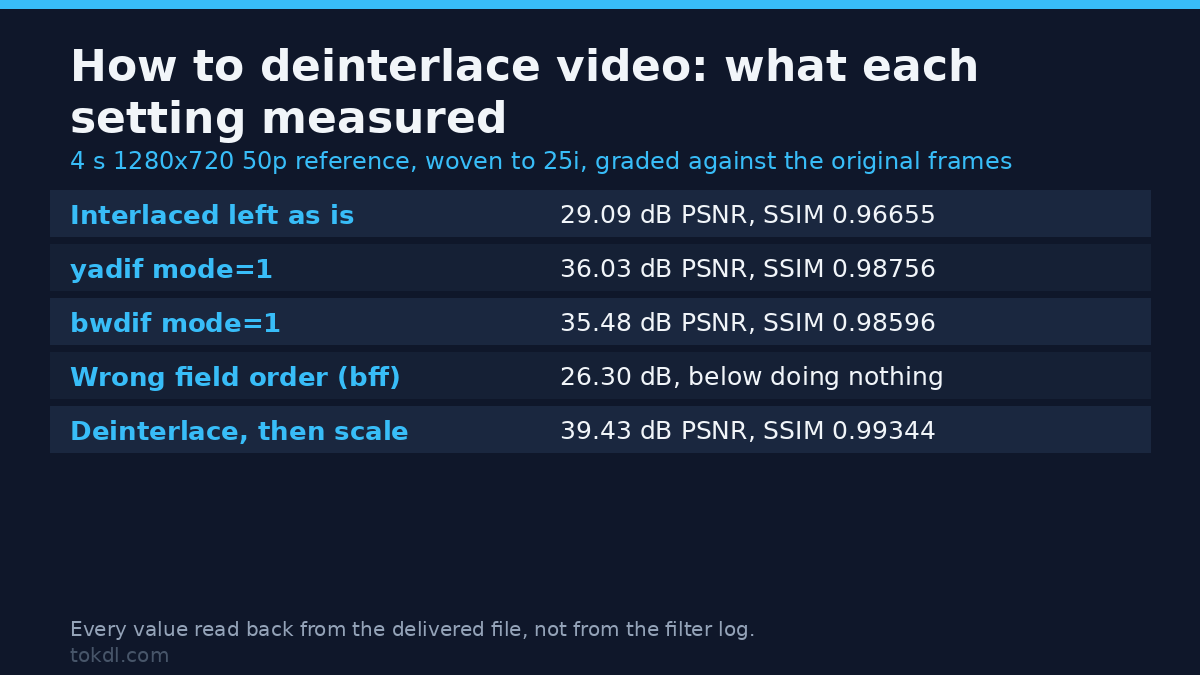
Against the progressive original, the untouched interlaced copy scored 29.09 dB PSNR and 0.96655 SSIM, and its frames change more from one to the next than the truth does (mean pixel delta 2.737 against 1.687). That gap is combing, not compression, and no bitrate fixes it.
Step 1: check before you deinterlace video
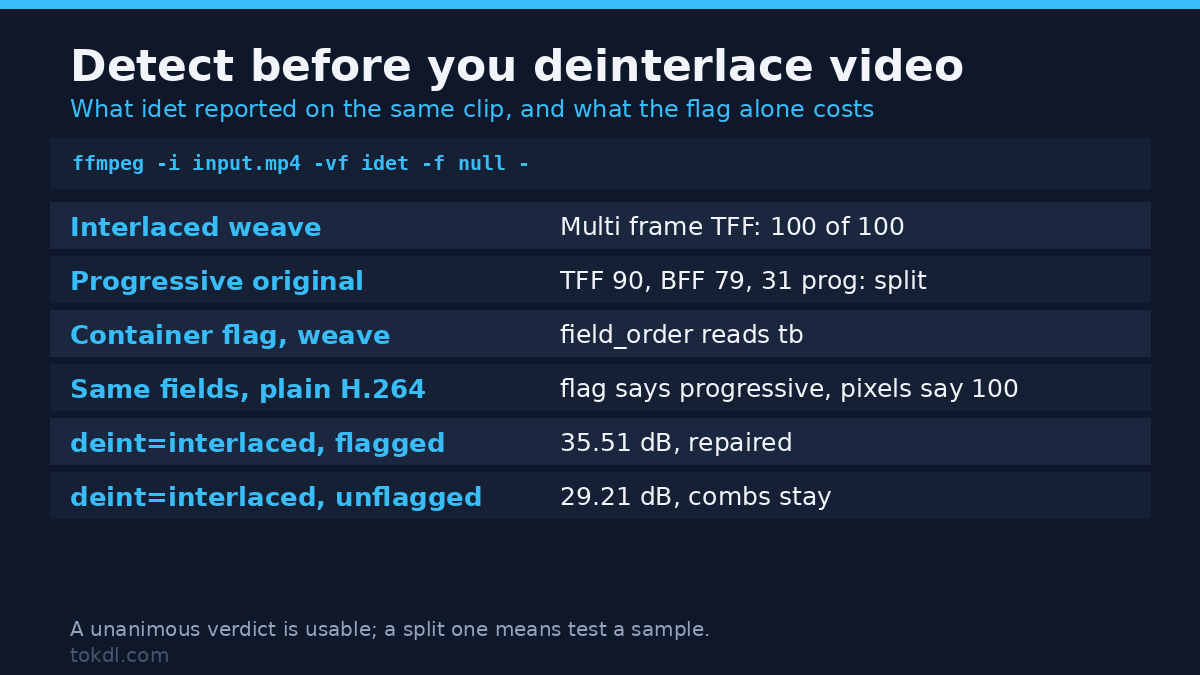
ffmpeg -i input.mp4 -vf idet -f null -Read the last “Multi frame detection” line. My interlaced file came back as “TFF: 100 BFF: 0” across 100 frames, a unanimous verdict. The progressive original didn’t: it came back “TFF: 90 BFF: 79 Progressive: 31” across 200 frames, because testsrc2’s scrolling pattern creates the same row-to-row jumps that real combing does. That’s the honest limit of the tool: a unanimous verdict is worth trusting, and a split one means deinterlace video in a ten second sample and check it by eye. And you never want to deinterlace video that was never interlaced, since the filter only softens detail you already had.
The container flag is a hint, not proof. On my lossless weave, ffprobe -show_entries stream=field_order reported “tb”, but an H.264 copy of the same fields written without the interlaced flags reported field_order=progressive while idet still counted all 100 frames as interlaced. That mismatch has teeth. Running bwdif with deint=interlaced, the mode that only touches frames marked as interlaced (what several players do), scored 35.51 dB on the flagged file and 29.21 dB on the unflagged one. The second file was never fixed at all.
Step 2: how to deinterlace video with one command
ffmpeg -i interlaced.mkv -vf "bwdif=mode=1" -c:v libx264 -crf 18 -preset slow -c:a copy deinterlaced.mp4bwdif is the newer of the two filters people reach for when they deinterlace video, and mode=1 (send_field) is its default: one frame per field, so a 25 fps interlaced file comes out at 50 fps. My 100 frame test came out as 200 frames. With mode=0 you get your 100 frames back. The filter documentation lists the rest of the options.
Audio can be copied; video can’t. FFmpeg stops with “Filtering and streamcopy cannot be used together” and exit code 218 when you filter and copy the same stream. To deinterlace video you decode it, filter the pixels and re-encode, which is why the export takes as long as it does.
mode=1 or mode=0
Both remove the combs, and they differ in motion. mode=0 keeps 25 fps, so half the moments in your footage are gone: measured motion step 2.659, back at the 2.737 of the raw interlaced file, while the reference sits at 1.687. mode=1 measured 1.609, closer to the truth than the interlaced file ever was.
Per-frame quality barely separates them, so this isn’t a sharpness choice. yadif mode=1 scored 36.03 dB and 0.98756 SSIM against the 50 fps reference; mode=0 scored 36.02 dB and 0.98761 against a 25 fps reference cut from the same clip. If you can’t decide, deinterlace video with mode=1 and judge the motion yourself; you can drop every second frame later. Sports and handheld footage deserve the double rate; an interview on a tripod won’t notice.
yadif vs bwdif vs the rest, measured
| What you asked for | Frames out | PSNR vs the 50p original | SSIM |
|---|---|---|---|
| Nothing (interlaced left as is) | 100 | 29.09 dB | 0.96655 |
| yadif, mode=1 (send_field) | 200 | 36.03 dB | 0.98756 |
| yadif, mode=3 (send_field_nospatial) | 200 | 36.06 dB | 0.98767 |
| bwdif, mode=1 (send_field) | 200 | 35.48 dB | 0.98596 |
| w3fdif, complex / field | 200 | 34.90 dB | 0.98114 |
| estdif (edge slope tracing) | 200 | 34.79 dB | 0.98398 |
| bwdif run twice over the same file | 400 | 34.90 dB | 0.98345 |
| bwdif with the wrong field order (bff) | 200 | 26.30 dB | 0.94692 |
| yadif with the wrong field order (bff) | 200 | 26.31 dB | 0.94707 |
Nine ways to deinterlace video, one clip. Read the last two rows first: they show what happens when you deinterlace video with the wrong field order. 26.3 dB is three decibels below leaving the combs in the picture. On my synthetic clip yadif edged bwdif by about half a decibel, and I wouldn’t hang a decision on that: testsrc2 is full of hard synthetic edges, and grainy film can rank the two the other way. What reproduced every run is the size of the traps, not the crown.
Filter cost, FFmpeg’s own rtime over three runs of the same 100 frame 720p input, median shown:
| Filter | Median filter time | Frames out |
|---|---|---|
| No filter (baseline) | 0.21 s | 100 |
| yadif mode=1 | 0.46 s | 200 |
| yadif mode=0 | 0.33 s | 100 |
| bwdif mode=1 | 0.37 s | 200 |
| bwdif mode=0 | 0.30 s | 100 |
| w3fdif complex | 0.29 s | 200 |
| estdif | 5.76 s | 200 |
estdif is the outlier: 5.76 seconds of work for 4 seconds of footage, so it can’t keep up with a live 720p capture here. yadif, bwdif and w3fdif land between 0.29 and 0.46 seconds, a spread too small to matter next to decoding and encoding.
Field order: worse than doing nothing
Field order says which half of the picture arrived first. Get it wrong and the filter weaves the lines back in the wrong sequence, doubling the motion offset instead of cancelling it. Measured on my top field first file: bwdif with parity=bff scored 26.30 dB and 0.94692 SSIM, yadif with parity=bff scored 26.31 dB and 0.94707, against 29.09 dB for the untouched file.
Let idet tell you the order before you deinterlace video. Its “Single frame detection” line counts how many frames look top field first versus bottom field first; my weave reported “TFF: 100 BFF: 0”, and setting parity=tff reproduced the good result. If the detector splits its vote on a mixed file, leave parity=auto and check the output again.
Deinterlace video before you scale or crop
Scaling reads neighbouring lines to invent new ones. On interlaced frames those neighbours come from two different moments, so the resampler smears the combing across the picture instead of removing it. Same clip, downscaled to 854×480, graded against a progressive downscale of the original:
| Order of operations | PSNR | SSIM |
|---|---|---|
| Deinterlace first, then scale | 39.43 dB | 0.99344 |
| Scale first, then deinterlace | 31.89 dB | 0.97614 |
That’s a 7.5 dB gap for swapping the order of two filters, the biggest single number here. It applies to crops with an odd offset too, because half your lines land on the wrong side of the new grid. So deinterlace video first and resample after, which is also why an upscale from a small master goes wrong; our walkthrough on downscaling 4K to 1080p covers that direction.
What deinterlacing costs in file size
Sizes below are what x264 delivers after you deinterlace video: CRF 20, preset veryfast, yuv420p, no audio, from the same 4 second clip:
| File | Bytes | Frames | Bytes per frame |
|---|---|---|---|
| Interlaced 25i kept as is | 2,096,599 | 100 | 20,966 |
| yadif mode=0, 25p out | 1,691,747 | 100 | 16,917 |
| bwdif mode=0, 25p out | 1,670,501 | 100 | 16,705 |
| bwdif mode=1, 50p out | 2,430,529 | 200 | 12,153 |
| yadif mode=1, 50p out | 2,551,373 | 200 | 12,757 |
When you deinterlace video to 25p the file comes out about 19% smaller than the interlaced original, because the encoder stops spending bits on detail that only exists as a comb. Doubling the frame rate does the opposite to the total: bwdif mode=1 came out 16% larger than the 25i file, yadif mode=1 22% larger, while both dropped to roughly 12,000 bytes per frame, about 40% cheaper frame for frame. If a platform is fighting you over size, that’s the trade to know; our guide to fitting an upload size limit covers the cap side.
One more size fact: encoding interlaced content with the proper flags (-flags +ilme+ildct on libx264) cost 2,645,910 bytes against 2,458,451 for the same fields written without them, about 7% more. Fields can’t share motion prediction efficiently, so interlaced coding always costs a little more than progressive coding of the same picture.
Mistakes you can reproduce in five minutes
Deinterlacing twice. Running bwdif mode=1 over an already deinterlaced file gave me 400 frames at 100 fps, 34.90 dB and 0.98345 SSIM, and idet then flagged 200 of those frames as interlaced again. The second pass invents the combing it repairs. Deinterlace video once, with one filter.
Filtering without telling the encoder. The pixels still comb, the flag says progressive, and anything that trusts the flag skips the repair: the 35.51 versus 29.21 dB pair measured earlier.
Reaching for -c:v copy. Filters need decompressed frames, so the copy fails with exit code 218. To deinterlace video you’ll have to re-encode, so copy the audio and encode the picture.
Forcing parity because a forum said tff. Two rows in the big table are worse than doing nothing, and both are wrong-parity runs you can reproduce on your own file.
Deinterlacing after the crop or resize. That habit costs the 7.5 dB above, and the damage is in the picture before the deinterlacer sees it.
Deinterlacing footage that never needed it. idet usually answers that in one command, though mine split 90 to 79 on synthetic content, which is the signal to test a short sample first.
FAQ: how to deinterlace video
Does deinterlacing lose quality?
It always reconstructs something that isn’t there, so a small loss is unavoidable. The best result here still sat 36 dB from the original frames, and the worst wrong-parity run sat 3 dB below the untouched file. That’s the trade you accept when you deinterlace video at all, and it’s cheap next to leaving combing in a progressive export.
Do I need to deinterlace video before uploading?
If the platform re-encodes to progressive, yes. Interlaced frames can’t be shown on a progressive display, so combing either gets baked into the new file or triggers a deinterlace you don’t control. Doing it yourself means you choose the field order.
Does this apply to an old 4:3 tape capture?
That’s exactly the footage the check exists for, since DV and miniDV are interlaced by design. If you keep editing, an intermediate codec holds the 25p or 50p result without further loss.
Should I keep the doubled frame rate?
Keep it when the motion is the subject. The measured cost was 16% to 22% more bytes, and the benefit is a motion step of 1.609 instead of 2.659, near the 1.687 of the true 50p original. If you’ll cut into a 25p timeline later, the checked settings in our variable frame rate fix keep the timing intact.
Your checklist before you deinterlace video
- Run idet and read the “Multi frame detection” count. Zero means stop.
- Read the “Single frame detection” line and set the field order to match, or leave parity=auto when the counts are mixed.
- Deinterlace before scaling, cropping or rotating, not after.
- Pick mode=1 when motion matters, mode=0 when it doesn’t.
- Encode once. Never run a deinterlacer over its own output.
- Exporting interlaced on purpose? Set the flags so the next tool knows.
Run the detector first, respect the field order, and deinterlace video before anything touches the geometry of the frame. Do that and the zipper edges disappear for about half a decibel of quality, which nobody watching will notice.