
HLS Streaming: Build Segments and a Bitrate Ladder (2026)
A viewer on a train gets 800 kbps. Your export is one 5 Mbps 1080p file. The player stalls, or drops to audio, or gives up, and the video you spent a week on dies in the first tunnel. HLS streaming is the fix: the same footage, cut into short segments at several qualities, with the player fetching whichever one fits the connection.
You don’t need HLS streaming for a file you hand to one person. You need it when the video lives on your own server or CDN and gets watched over connections you can’t predict.
What follows builds an HLS streaming package by hand with FFmpeg, checks it before anyone sees it, and separates the failures that belong to the manifest from the ones that belong to the server.
What an HLS Streaming Package Actually Contains
Three things land in an HLS streaming output folder: the segments, one media playlist per quality, and a master playlist that lists those playlists.
HLS streaming segments are ordinary video files, usually 4 to 10 seconds long, numbered in order. A media playlist is a text file ending in .m3u8 that names each segment and its duration. The master playlist names every quality with a bandwidth figure and a resolution, and that’s the file you hand to a player.
The player reads the master, picks a variant that fits current throughput, and re-checks every few segments. Your manifest offers choices; the player makes them, and that’s the whole point of HLS streaming. The exact grammar is in RFC 8216 if you need it.
An HLS streaming package contains no player and no analytics. It’s a directory of files with a text index, which is why the same output plays on an iPhone, a smart TV and a browser tab with a compatible player loaded.
Setup: Four Things You Need First
- A master file you have the right to publish, exported at the highest quality you hold.
- FFmpeg built with libx264 and aac. Confirm with
ffmpeg -versionbefore anything else. - Disk space, since the ladder usually ends up 1.5 to 2 times the source size.
- A static host or CDN serving over HTTPS. HLS needs no application server, only files.
Time is the constraint people forget. An HLS streaming ladder encodes the video once per rung, so a 20-minute 1080p source can take 20 to 40 minutes on a laptop CPU. The 12-second clip I measured here took 35.5 seconds on a 2-CPU container, which puts a 20-minute source near an hour, and real footage encodes slower than a test pattern. Hardware encoding cuts that sharply at a small quality cost.
Normalise the audio before packaging: 48 kHz, stereo, AAC. HLS streaming variants that disagree on sample rate or channel count produce audible glitches when a player switches between them mid-stream. You’ll hear the join.
Method 1: Package a Single Quality
Start with one rung. When something breaks, one playlist is far easier to debug than six.
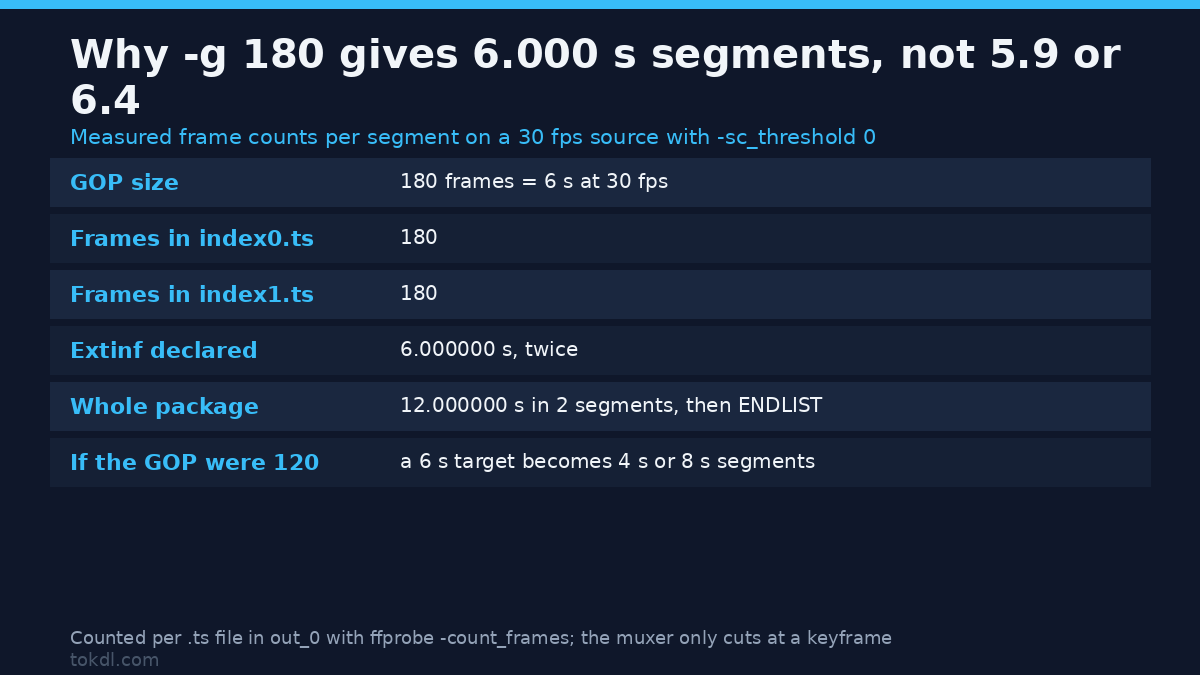
Pick a segment length, then make the keyframe interval divide it exactly. At 30 fps with 6-second segments the GOP must be 180 frames. Count the frames afterwards and every segment in a clean HLS streaming package reports 180. The muxer can only cut where a keyframe sits, so a 4-second GOP turns your 6-second target into 8-second segments.
ffmpeg -i source.mp4
  -c:v libx264 -preset slow -crf 21 -profile:v high -level 4.1
  -g 180 -keyint_min 180 -sc_threshold 0
  -c:a aac -b:a 128k -ac 2 -ar 48000
  -f hls -hls_time 6 -hls_playlist_type vod
  -hls_segment_filename "v0/seg_%03d.ts" v0/index.m3u8
Setting sc_threshold to 0 stops the encoder inserting extra keyframes at scene changes, which is what keeps HLS streaming segment durations even. hls_playlist_type vod writes the end marker a player needs before it will show a seek bar. The arithmetic behind -g gets a fuller treatment in the keyframe interval guide.
Then measure the result instead of trusting it. ffprobe reads a playlist directly:
ffprobe -v error -show_entries format=duration -of default=nw=1 v0/index.m3u8Compare that number with the source duration. A few tenths of a second of drift is normal. Ten seconds means the keyframes are misaligned, not that ffprobe is wrong. A clean HLS streaming package reports the source duration exactly, to the millisecond.
Method 2: The Whole Ladder in One Command
This is where the ladder earns its keep. With several rungs, a player can move a struggling viewer down to 480p instead of letting the video stall.
One command encodes every variant, writes the playlists and generates the master:
ffmpeg -i source.mp4
  -map 0:v -map 0:v -map 0:v -map 0:a -map 0:a -map 0:a
  -filter:v:0 scale=1920:1080 -filter:v:1 scale=1280:720 -filter:v:2 scale=854:480
  -c:v libx264 -preset slow -profile:v high
  -b:v:0 5000k -maxrate:v:0 5350k -bufsize:v:0 7500k
  -b:v:1 2800k -maxrate:v:1 3000k -bufsize:v:1 4200k
  -b:v:2 1400k -maxrate:v:2 1500k -bufsize:v:2 2100k
  -g 180 -keyint_min 180 -sc_threshold 0
  -c:a aac -b:a 128k -ac 2 -ar 48000
  -f hls -hls_time 6 -hls_playlist_type vod
  -hls_flags independent_segments
  -master_pl_name master.m3u8
  -var_stream_map "v:0,a:0 v:1,a:1 v:2,a:2"
  "out_%v/index.m3u8"
Reasonable starting numbers for an HLS streaming ladder, to be adjusted against your own footage:
| Variant | Resolution | Video bitrate | Audio |
|---|---|---|---|
| 1080p | 1920×1080 | 4500-5500 kbps | 128 kbps |
| 720p | 1280×720 | 2500-3000 kbps | 128 kbps |
| 480p | 854×480 | 1200-1500 kbps | 96-128 kbps |
| 360p | 640×360 | 700-900 kbps | 96 kbps |
Two rungs cover a talking-head video; four handle almost everything else. Ladders with eight variants mostly cost storage, because the player’s switching logic knows nothing about your content and often skips the middle steps anyway. You’ll pay storage for rungs nobody plays.
Spacing matters more than count. Keep roughly a 1.7x to 2x step between rungs, so a step down is visible but not jarring. Watch the total as well: estimate the file size first, or a 60-minute 1080p rendition at 5 Mbps (about 2.2 GB) will surprise you on a metered host.
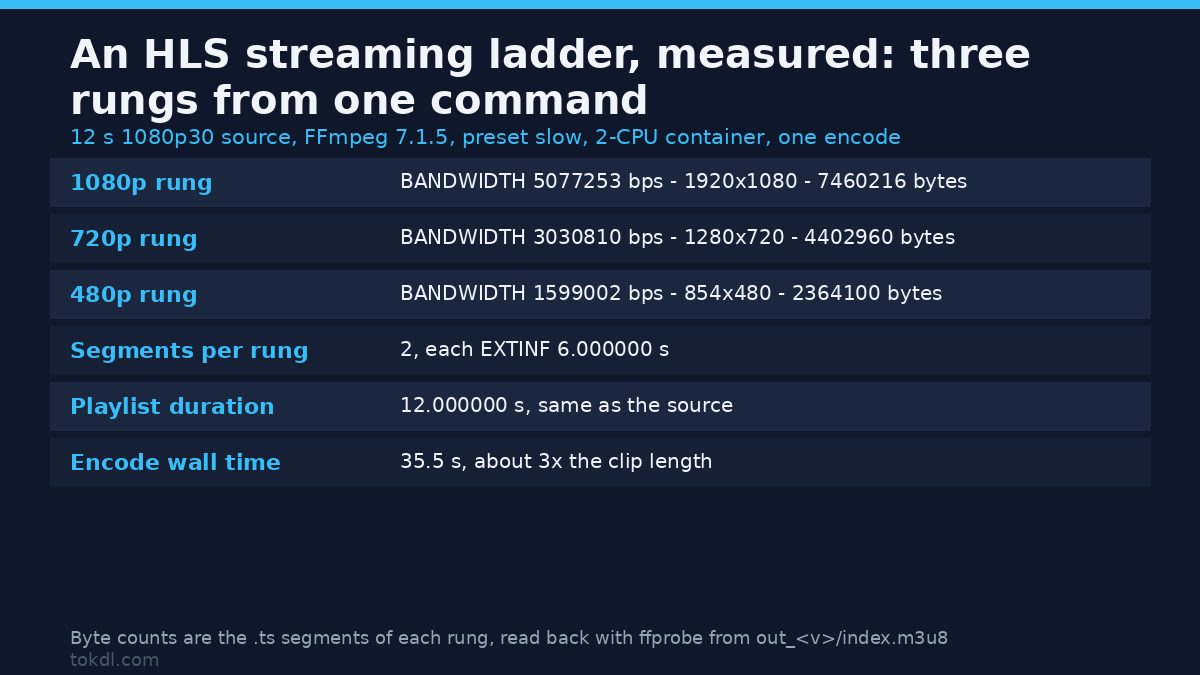
The master playlist FFmpeg actually writes looks like this, measured on 7.1.5 with your own numbers:
#EXTM3U
#EXT-X-VERSION:6
#EXT-X-STREAM-INF:BANDWIDTH=5077253,AVERAGE-BANDWIDTH=4973477,RESOLUTION=1920x1080,CODECS="avc1.640032,mp4a.40.2"
out_0/index.m3u8
#EXT-X-STREAM-INF:BANDWIDTH=3030810,AVERAGE-BANDWIDTH=2935306,RESOLUTION=1280x720,CODECS="avc1.64001f,mp4a.40.2"
out_1/index.m3u8
#EXT-X-STREAM-INF:BANDWIDTH=1599002,AVERAGE-BANDWIDTH=1576066,RESOLUTION=854x480,CODECS="avc1.64001f,mp4a.40.2"
out_2/index.m3u8
That’s the real output, not a template: 7.1.5 wrote EXT-X-VERSION:6 because independent_segments needs it, added an AVERAGE-BANDWIDTH beside every BANDWIDTH, and chose the H.264 level per rung, so the 1080p line reads avc1.640032 (Level 5.0) while the two smaller ones read avc1.64001f (Level 3.1). A hand-written HLS streaming master with VERSION:3 still plays on most players, but it isn’t what your encoder produced, and copying it over a real manifest throws away the average figures a player uses to estimate startup cost.
On a Mac you can skip the command and let Apple’s Compressor export an HLS preset with the same layout. Either way, run Apple’s mediastreamvalidator against the finished master. It reports conformance problems a browser won’t tell you about.
What the Tools in This Space Do, and What They Won’t Fix
Every tool in the HLS streaming category does three jobs: encode the renditions, cut them on keyframes, and write the playlists. Some add encryption, ad markers or caption tracks. None of them improve the picture.
The limits are worth knowing before you pay for anything. A dark, noisy recording stays dark and noisy at every rung. A mislabelled aspect ratio survives packaging untouched. A file with a broken audio track packages cleanly and plays wrong.
Encryption is the sharpest limit. HLS supports AES keys and FairPlay, and that work belongs to a streaming platform with key management, not to a one-line FFmpeg call. This guide covers unencrypted packages of files you own.
Rights and Responsible Use
Packaging multiplies files. Each rendition is a complete copy at a different size, so a three-rung ladder turns one video into hundreds of segments, and none of them changes who owns the work.
For your own footage an HLS streaming package is bookkeeping. For anything else it isn’t: serving segments of a broadcast you didn’t make is redistribution, however short the segments and however public the playlist looks. Watching something yourself and publishing copies are different acts, and a file you can reach grants no licence to host it.
Check the terms of the source platform before republishing anything, and treat password-protected or token-based streams as off limits. Apple’s rules for the format are useful reading regardless: Apple’s HLS documentation.
Troubleshooting: Six Failures and Their Causes
Segments are longer than the hls_time value
The GOP doesn’t divide the segment length, and every HLS streaming segment has to start on a keyframe. Set -g to frames-per-second times segment length and keep -sc_threshold 0, or force the cuts with a keyframe expression.
The manifest loads and nothing plays
The server’s sending the wrong MIME type. An .m3u8 file needs application/vnd.apple.mpegurl and a .ts file needs video/mp2t; a default server config usually guesses wrong.
Safari plays it, Chrome shows a blank frame
You packaged HEVC. Apple platforms decode it, while Chrome only manages it with operating-system support. Ship an H.264 variant as the baseline rung if your audience isn’t entirely on Apple hardware.
The quality never changes during playback
You opened a media playlist instead of the master, or every variant declares a similar BANDWIDTH. Identical bandwidth values leave the switching logic nothing to rank, so it stays where it started.
Every segment 404s after the upload
The media playlists use paths relative to their own folder. Move the segments to a different directory or bucket prefix and you’ll break those paths. Keep the folder structure intact, or rebuild the package with a base URL set.
Audio clicks at segment joins
The variants disagree on audio parameters, or the audio track runs slightly longer than the video. Re-encode audio to 48 kHz stereo AAC across every rung and trim it to the video duration.
Frequently Asked Questions
Is HLS streaming the same as an MP4 file?
No. HLS is a folder of short segments plus text playlists, while an MP4 is a single file. An MP4 is simpler to send; HLS lets a player adapt quality as the connection changes.
Why did I get a text file when I opened the .m3u8?
Because a playlist is a text file. Opening master.m3u8 in a browser shows a list of paths, not video. A player is what turns that list into playback.
How long should each segment be?
Four to six seconds suits most video on demand; that’s where most HLS streaming packages land. Shorter segments switch quality faster but multiply the number of requests, and longer ones cut overhead at the cost of slower adaptation.
Can HLS play in a normal browser tab?
Yes, with a player library. Safari plays an HLS streaming package natively, while Chrome, Firefox and Edge need a JavaScript player that feeds the segments to the browser’s media pipeline.
Does HLS support HEVC or AV1?
HEVC works in fragmented MP4 packages on Apple platforms. AV1 support is narrower. H.264 in transport streams remains the combination with the widest reach.
How much bandwidth does an HLS stream need?
Whatever rung the player settles on. A viewer on a 720p variant uses about 3 Mbps, and one on 480p uses roughly 1.5 Mbps, which is why the ladder exists in the first place.
Do I need a CDN to serve these files?
Not at first. A static host handles a small audience fine. A CDN starts paying off when the same segments get requested from several regions at once.
Which Method Should You Use?
Take the single quality if you’re publishing to a fixed audience on a known network: an internal review page, a kiosk, a classroom. The ladder is worth the extra encode when anyone outside that room will watch, because stepping down is the entire benefit.
And if you only ever hand the file to one person, publish the MP4 and skip HLS streaming. That’s the right answer more often than most guides admit.