
LinkedIn Video Size and Specs: Get the Upload Right First Time (2026)
Your 90-second case study leaves the editor at 1080p and 28 Mbps, inside every number LinkedIn publishes, and still lands in the feed looking softer than the file sitting on your laptop. That gap between the master you made and the video your connections see is what LinkedIn video size is really about.
Most upload problems are export problems wearing a different hat. The file is too tall, too long, or encoded in a way the platform will accept and then fail to process. Get the LinkedIn video size right in the export dialog and the upload is three clicks.
The LinkedIn video size limits, in one table
These are the numbers from LinkedIn’s own published video requirements. Everything below is built on them, so it’s worth checking your file against the table before reading further.
| Limit | Accepted range |
|---|---|
| Maximum file size | 5 GB |
| Minimum file size | 75 KB |
| Maximum duration | 15 minutes |
| Minimum duration | 3 seconds on desktop, 2 seconds in the mobile app |
| Resolution | 256×144 up to 4096×2304 |
| Aspect ratio | 1:2.4 to 2.4:1 |
| Frame rate | 10 to 60 fps |
| Bit rate | 192 Kbps to 30 Mbps |
Supported containers include MP4, MOV, AVI, WebM, MKV, WMV, MPEG-1 and MPEG-2, VC1, DVVIDEO, QTRLE and TSCC2. ProRes is absent from that list, and it’s the single most common reason a professional export fails the LinkedIn video size check before it starts.
What those numbers actually constrain
Read the table as two independent ceilings, not one. Size and duration don’t scale together: a full 15-minute upload at the 30 Mbps maximum comes to roughly 3.3 GB, so the duration cap arrives long before the 5 GB cap does. For nearly every creator, 15 minutes is the LinkedIn video size limit that matters, and the 5 GB figure never comes up.
The aspect ratio range is looser than people assume. Anything from 9:16 vertical to 2.4:1 widescreen passes. What fails is content outside that window, such as a 32:9 super-ultrawide export or a phone clip cropped taller than 9:16. If your editor offers a set of preset ratios, 16:9, 1:1, 4:5 and 9:16 all land inside the LinkedIn video size window.
Resolution runs down to 256×144, which tells you the LinkedIn video size spec is written for tolerance rather than quality. That matters when you choose a deliverable: a 1080p file at a sane bitrate usually looks better in the feed than a 4K file squeezed under the same 30 Mbps ceiling, because the extra pixels leave fewer bits for each of them.
Set the export before you touch the uploader
A handful of decisions cover almost every LinkedIn video size problem, and all of them happen in the export dialog. None of them requires a paid tool, and they’re all worth setting once as a preset.
| Setting | Use this | Why it matters |
|---|---|---|
| Container | MP4 | Processed reliably on every client LinkedIn supports, and it avoids the MOV quirks that trip older Android devices. |
| Codec | H.264 High profile, 8-bit, yuv420p | The supported list is made of older codecs; an unlisted combination is exactly where processing stops. |
| Bitrate | 8 to 12 Mbps at 1080p, up to 16 Mbps for fast motion | Comfortably under the 30 Mbps ceiling, which is the number that decides whether the file is accepted. |
| Audio | AAC, 128 to 192 Kbps, 48 kHz | Keeps stereo separation without spending bits that the picture needs more. |
| Frame rate | 25 or 30 fps, matching the source | Forcing 30 on a 25 fps source duplicates frames, and duplication survives every re-encode. |
Source footage at 60 fps is fine to publish as it stands, since 60 is the ceiling. Expect a noticeably larger file at the same quality setting, and check the duration again after the encode rather than trusting the timeline: 15 minutes is the LinkedIn video size cap that catches most long recordings.
Method 1: encode to LinkedIn video size with ffmpeg
One command handles the container, the codec, the pixel format, the resolution and the flag that lets processing start before the last byte arrives. Nothing in it is LinkedIn-specific, so the same encode clears the LinkedIn video size limits and any other platform’s upload caps.
ffmpeg -i input.mov
  -c:v libx264 -profile:v high -pix_fmt yuv420p
  -vf "scale=1920:1080:force_original_aspect_ratio=decrease,pad=1920:1080:(ow-iw)/2:(oh-ih)/2"
  -r 30 -b:v 10M -maxrate 12M -bufsize 24M -g 60
  -c:a aac -b:a 192k -ar 48000
  -t 00:15:00 -movflags +faststart out.mp4
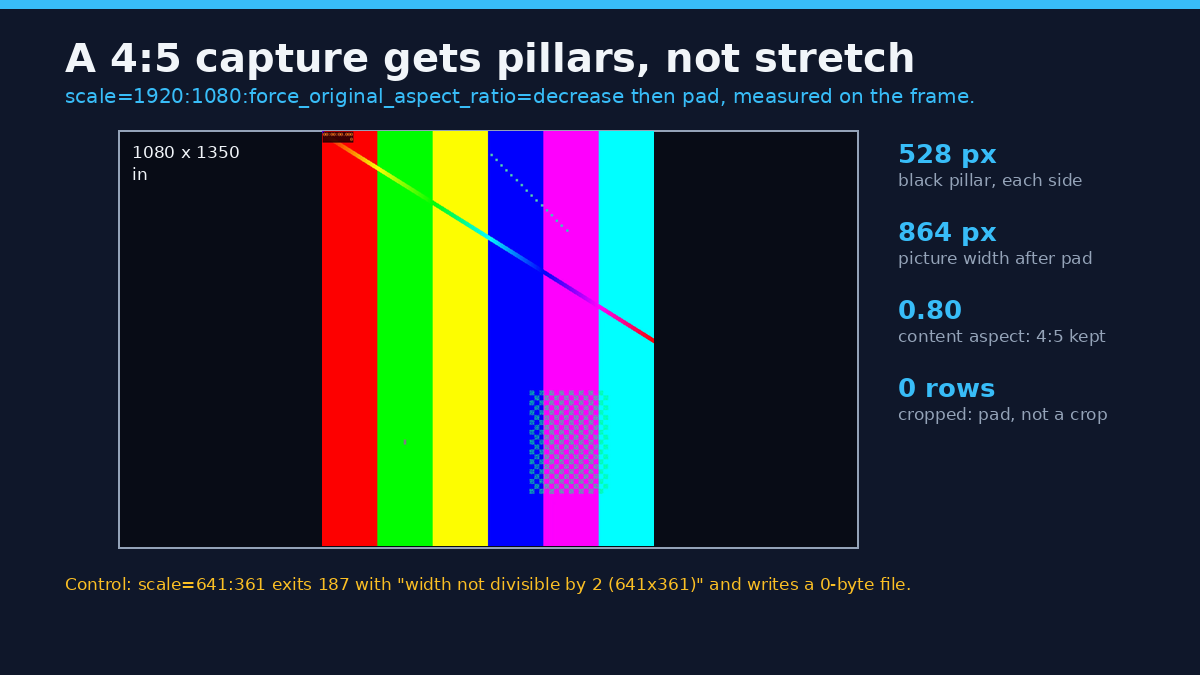
The scale and pad pair letterboxes instead of stretching, so a 4:5 phone capture ends up centred in a 16:9 frame with black pillars rather than a distorted face. On a 1080×1350 capture the picture keeps 864 px of width and each pillar measures 528 px, so 4:5 survives instead of stretching. The -g 60 sets a keyframe every two seconds at 30 fps, which gives the platform clean points to cut on.
-t 00:15:00 is the part people forget. It hard-trims at the duration cap, so a 19-minute recording becomes a 15-minute file instead of a rejected upload. If you want the tail of the recording rather than the head, pair it with -ss and trim the front first.
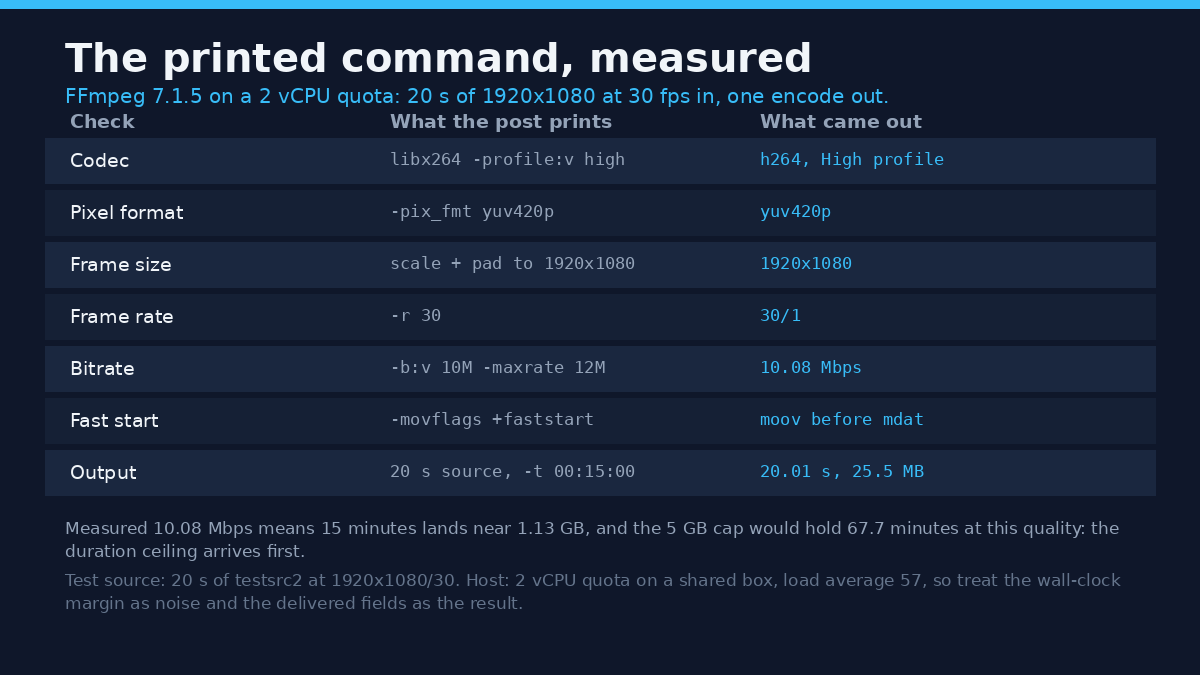
Check the result before uploading rather than after. A two-second ffprobe read tells you whether the encode hit the LinkedIn video size you aimed for, which is cheaper than a failed upload.
ffprobe -v error -show_entries stream=codec_name,width,height,r_frame_rate,bit_rate -of default=nw=1 out.mp4If the reported width or height is odd, the encode won’t start at all on yuv420p sources: a 641×361 scale exits 187 with width not divisible by 2 and leaves a 0-byte file, which is why the scale filter ends in a fixed even number rather than -1. Odd dimensions and chroma subsampling don’t mix, and this bites hardest on cropped vertical footage.
Method 2: use LinkedIn’s own uploader features
The uploader is more capable than its one-button reputation suggests, and it answers most LinkedIn video size questions up front. On desktop, open the share box, pick the video icon, and upload from your computer, or drag the file straight into the box. Before you continue you can set a custom thumbnail, add captions, or delete the video and start again.
Captions are the feature worth using. LinkedIn generates auto-captions in 10 languages, lets you review them before publishing, or accepts a caption file you supply. If you already have a subtitle file from captioning the video yourself, the upload route is faster and far more accurate with names, product terms and jargon than anything automatic.
On mobile the app adds trim, stickers and text overlays, and the minimum duration drops to 2 seconds. That gap is why a two-second loop posts from a phone and gets refused from a laptop.
One thing the uploader can’t do is post directly into the full-screen vertical video feed. LinkedIn states that any video you publish may be eligible to appear there based on relevance and performance, but there’s no dedicated route in.
What happens to the file after you press Post
LinkedIn processes the upload, and the video becomes viewable when processing finishes. From that moment you’re watching the platform’s version, not your master. Whatever LinkedIn video size you uploaded isn’t the file your viewers get. The file has been transcoded for delivery at a bitrate chosen for streaming, which is why “it looked fine on my laptop” and “it looks soft in the feed” are both true at once.
Safe zones matter as much as resolution. LinkedIn asks creators to keep text and logos away from the top, bottom and sides of the frame so the interface doesn’t cover them. In practice the player controls sit low in the frame and any caption overlay lands near the bottom too, so place titles higher than instinct suggests.
Captions uploaded as a separate file can be switched off by the viewer. Captions burned into the picture can’t. Choose based on where else the file will live: a sidecar travels badly, a burned-in version travels everywhere.
Rights and responsible use
A video on LinkedIn belongs to whoever made it. Publishing it on your own profile doesn’t transfer ownership, and a reshare isn’t a licence. Re-uploading a conference talk you didn’t record, or a competitor’s launch film, is a rights question long before it is a marketing decision.
A short clip quoted for comment or criticism is a different act from reposting a whole video, and commercial use is different again from a private bookmark. Keeping a personal copy of something you didn’t make grants no rights over it whatsoever.
LinkedIn’s own rules decide what may be posted and how it may be used. Start with the LinkedIn User Agreement before you publish anything you didn’t create.
Troubleshooting: five failures with known causes
Processing never finishes
The file type was accepted but can’t be decoded. ProRes is the standard example: it uploads and then stalls indefinitely. Transcode to H.264 in an MP4 and upload again.
An iPhone upload stalls partway
The app went to the background. LinkedIn’s guidance is to stay in the app while an iOS upload runs, and a file stored in iCloud has to be moved to local storage before it can be attached at all.
Rejected for length
The LinkedIn video size cap is 15 minutes. Trim or split the recording rather than looking for a workaround, and use the -t flag so the trim happens before the upload begins.
Under 5 GB and still failing
Check the bitrate and resolution ceilings instead. A 4096-pixel-wide export at 45 Mbps breaks two published rules at once, and the uploader won’t tell you which one it minded.
Text hidden behind the interface
Safe zones again. Text can’t be repositioned after posting, so the fix is a re-upload with the overlays moved toward the centre of the frame.
Frequently asked questions
What is the maximum LinkedIn video size?
5 GB, with a 15-minute duration cap: that’s the whole LinkedIn video size ceiling. In practice the duration cap arrives first: 15 minutes at the 30 Mbps ceiling is about 3.3 GB, so a compliant file almost never reaches 5 GB.
What aspect ratio should a LinkedIn video be?
16:9 for standard feed posts, 9:16 for anything you want considered for the vertical feed. Both sit inside the LinkedIn video size window of 1:2.4 to 2.4:1, so neither is refused.
Does LinkedIn re-encode my video?
Yes. LinkedIn re-encodes every upload, so the LinkedIn video size you sent isn’t the file people watch: that’s why a clean 1080p master often survives better than an aggressive 4K one.
Can I upload a video longer than 15 minutes?
Not as a single post. The duration cap is fixed at 15 minutes, so longer recordings have to be split into parts or trimmed down before publishing.
Is 4K worth uploading to LinkedIn?
Rarely. Resolution goes up to 4096×2304, but the bitrate ceiling doesn’t move, so a 4K export at 30 Mbps gives each pixel fewer bits than a 1080p export at the same ceiling and can look worse once processed.
Why does my uploaded video look blurry?
Usually because of compression before the upload, not during it. A 1080p talking-head clip exported at 3 Mbps has already lost its detail, and no amount of platform processing will bring it back.
Does LinkedIn support vertical video?
Yes, 9:16 sits comfortably inside the accepted range. Vertical posts are also the shape most likely to be surfaced in the full-screen video feed, though that selection is made on relevance and performance rather than on aspect ratio.
Which route should you use?
If your file already sits inside the LinkedIn video size table above, skip the command line and use LinkedIn’s uploader directly. Spend the saved time on the thumbnail and the captions, which change how the post performs far more than two extra megabits of bitrate ever will.
If the file fails, or if the same clip is going to three platforms, encode once with the ffmpeg command and keep that master. One compliant file reused beats three rushed exports.
Free web converters that promise to prepare a clip for LinkedIn add a generation loss you don’t need, since the platform accepts up to 5 GB. If the number you’re fighting is the size ceiling rather than the duration cap, the real fix is upstream: a smaller master file solves it everywhere at once.
LinkedIn video size stops being a problem the day you export to spec by default.