
360 Video to Flat: Turn Equirectangular Footage Into a Normal Clip (2026)
A 360 camera doesn’t record a picture. It records a sphere and squeezes it into one rectangular frame. Open that file in a player that doesn’t know it’s 360 and you get the mess you’ve seen before: a curved horizon, streaks at the top and bottom, and the thing you filmed sitting small in the middle.
The file isn’t broken, and the cure isn’t a converter with a 360 button. You re-project the sphere into a flat frame, the way a normal lens would have seen it. FFmpeg does that with one filter, v360, and it’ll run faster than real time on a laptop.
Every number below comes from a 3840×1920 test sphere with markers at known angles, so you can check the geometry against your own file instead of trusting a screenshot. The short version: two settings that look optional decide whether your 360 video comes out correct or 36 percent too tall.
What you’ll learn:
- Why a 360 video looks like a ball, and what a 2:1 frame holds
- The command that turns 360 video into a normal clip
- How to pick the field of view and output size from your file
- Why cropping the middle isn’t the same thing
- The silent failures, including one that writes a 0-byte file
What’s inside a 360 video file
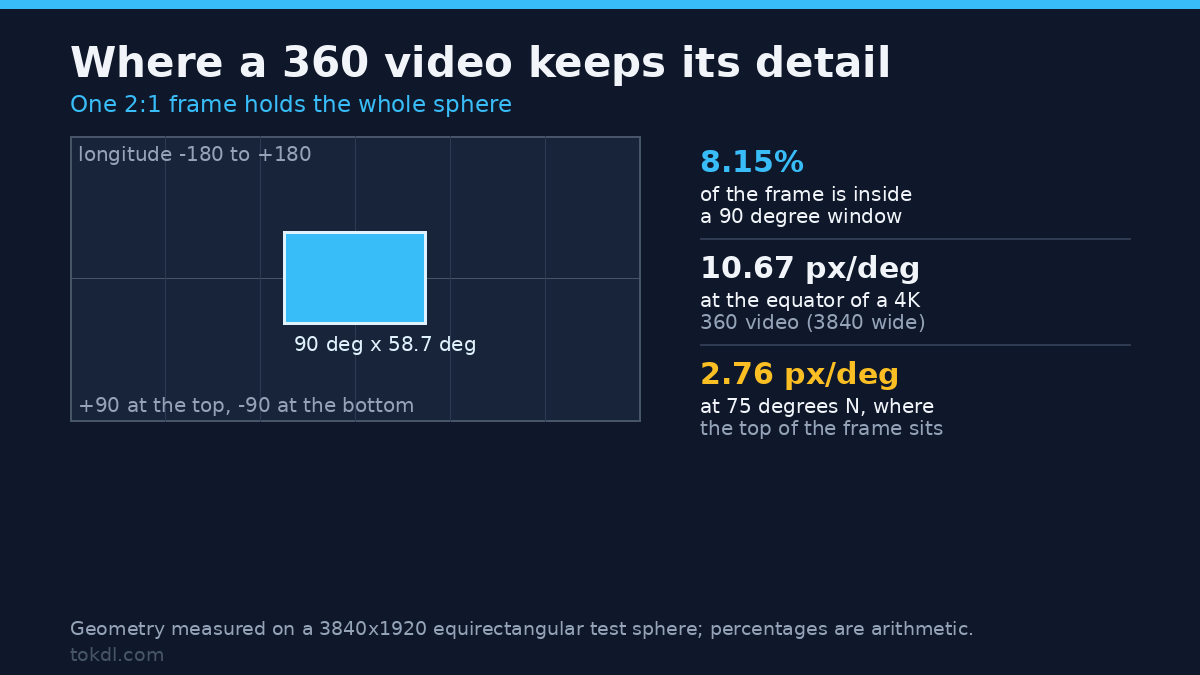
Consumer 360 cameras hand you an equirectangular file: a 2:1 rectangle where the horizontal axis is longitude, from -180 to +180 degrees, and the vertical axis is latitude, from +90 down to -90. Every pixel is a direction. It’s the same equirectangular map cartographers have used for centuries, with the same distortion built in.
That promise costs you resolution, and you can measure it. ffprobe a 4K 360 video and you’ll see 3840×1920. Divide 3840 by 360 and you get 10.67 pixels per degree of longitude. A 1080p camera pointed at a 60 degree scene spends 1920 pixels on those 60 degrees, which is 32 per degree. The 360 file spreads its detail around the whole sphere, so one direction holds about a third of the sharpness.
Near the poles it gets worse, because the full width still covers 360 degrees while the true angular width shrinks with latitude. That’s the geometry of an equirectangular 360 video, not a fault in yours:
| Source file | Equator | 60 degrees N | 75 degrees N | 80 degrees N |
|---|---|---|---|---|
| 3840×1920 (4K) | 10.67 px/deg | 5.33 | 2.76 | 1.85 |
| 5760×2880 (5.7K) | 16.00 px/deg | 8.00 | 4.14 | 2.78 |
| 7680×3840 (8K) | 21.33 px/deg | 10.67 | 5.52 | 3.70 |
Read the last column and the smearing at the top of your frame makes sense. At 80 degrees of latitude an 8K 360 video has 3.7 pixels per degree. That’s a thumbnail, not a picture, and no output resolution fixes it. A window 90 degrees wide and 58.7 degrees tall covers about 8 percent of the frame area, so pick that slice on purpose.
The command that flattens a 360 video
v360 converts between projections. Equirectangular in, rectilinear out, with the direction and the field of view spelled out:
ffmpeg -i input_360.mp4 -vf "v360=e:flat:h_fov=90:v_fov=58.716:w=1920:h=1080"
  -c:v libx264 -crf 20 -pix_fmt yuv420p flat.mp4
Four options carry the weight, and skipping one is how you’ll notice:
| Option | What it sets | Leave it out and |
|---|---|---|
e |
Input projection: equirectangular | v360 assumes a cubemap and the clip turns to noise |
flat |
Output projection: rectilinear, like a normal lens | the default output is c3x2, a six-face cubemap |
h_fov, v_fov |
How much of the sphere the frame covers | the vertical field is guessed, and the picture is squashed |
w, h |
Output pixel size | the input size is kept, so you get a 2:1 flat frame |
The abbreviations you’ll need are in the FFmpeg filter reference, along with 20 other projections, from cubemap to fisheye to something called a truncated square pyramid.
Set the vertical field, or your 360 video is 36 percent too tall
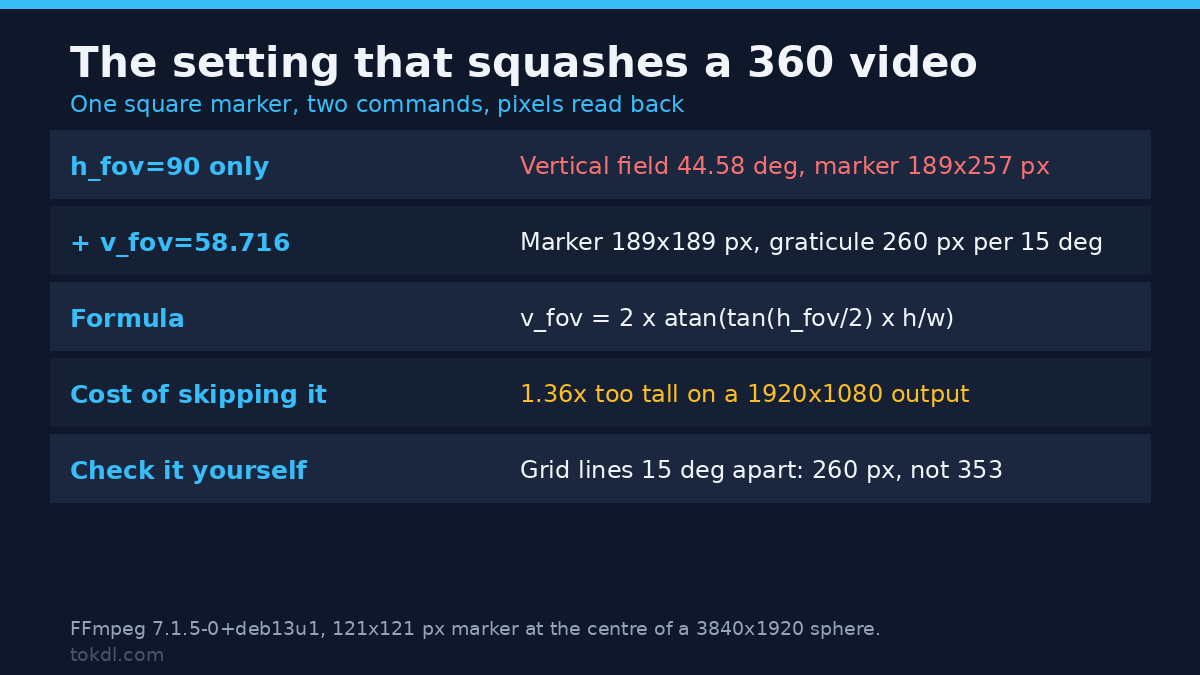
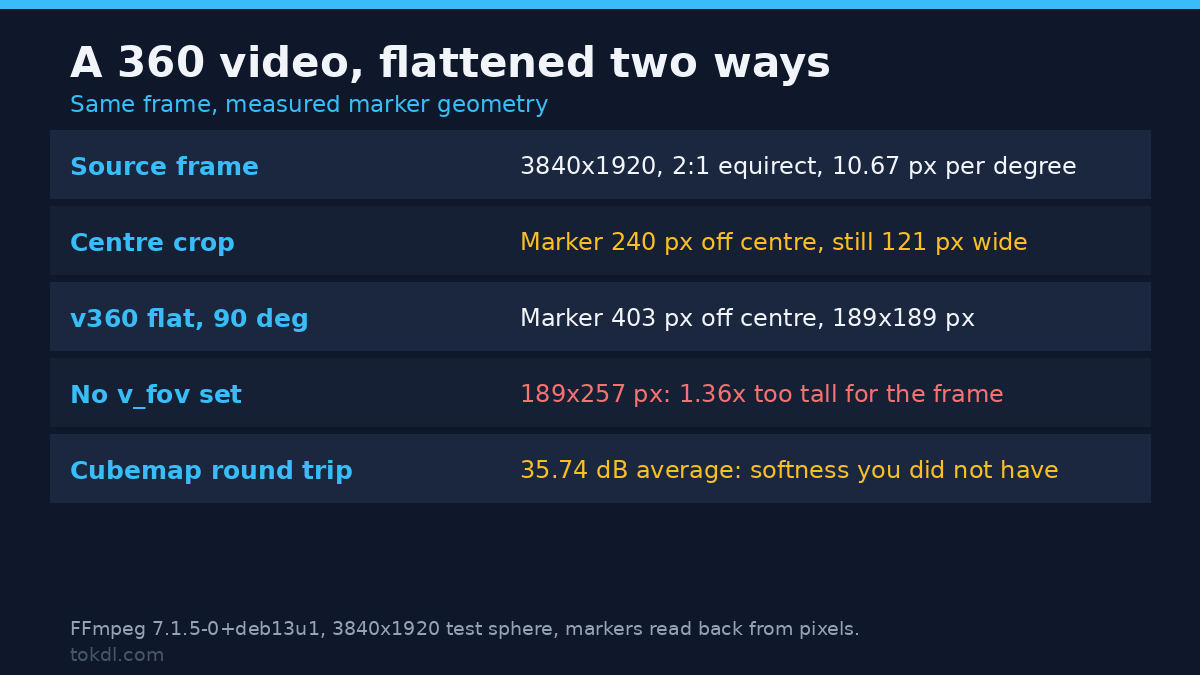
Here’s the trap. With only h_fov=90 on a 1920×1080 output, v360 picked an effective vertical field of 44.58 degrees. I fitted that from the graticule: grid lines sit 15 degrees apart and landed 353 pixels apart, which pins the vertical scale. A marker that’s a 121×121 square in the source came out 189×257 pixels, so it’s 1.36 times taller than wide.
Set v_fov=58.716 and that marker came out 189×189, with the graticule at 260 pixels per 15 degrees. One setting, same source, no stretching.
The number isn’t arbitrary: v_fov = 2 x atan( tan(h_fov/2) x height/width ), which gives 58.72 degrees for 90 and 1080/1920. Go too wide and your 360 video comes out letterboxed with dead space top and bottom.
Choose the output width from the source
Rendering a 90 degree window from a 3840-wide sphere at 1920 gives 21.3 pixels per degree where the source holds 10.67. I checked whether that detail is real: the same view at 960×540, the native width for 90 degrees of a 3840 sphere, upscaled to 1920×1080 with lanczos, compared against the direct 1920 render. They agree at 42.67 dB, so the bigger render is an upscale with interpolation on top.
Widths that match the source for a 90 degree view: 960 to 1280 for a 4K 360 video, about 1440 for 5.7K, 1920 for 8K. Need a 1080p delivery from 4K? That’s the same trade as our 4K to 1080p downscale guide.
Cropping the middle isn’t the same as flattening
Most people try a centre crop first, and in a still it looks close enough. It isn’t. A cropped 360 video keeps the warped geometry and calls it flat.
I cropped 1920×1080 out of the middle of the sphere and compared it with a v360 render of the same view. A marker 22.5 degrees off centre landed 240 pixels from the middle in the crop and 403 in the render. Every marker in the crop stayed 121 pixels wide, while the render widened it to 190 at the centre and 223 at the sides. That’s perspective: a rectilinear frame stretches things as they leave the axis, and a crop has no axis.
So a crop keeps the sphere’s warped geometry, compresses the sides and leaves verticals leaning. On a still nobody notices. On moving footage it reads as a fisheye with no fisheye lens, which is the look you wanted to escape. Crops are still right for a thumbnail, and our frame extraction guide uses them that way.
Three ways out of a 360 video
| Method | What it does | Measured result | Use it for |
|---|---|---|---|
| Centre crop | Cuts a rectangle, no re-projection | Markers 121 px wide at every angle, a 22.5 degree marker 240 px off centre instead of 403 | A still, a thumbnail, a fast preview |
| v360 to flat | Gnomonic re-projection through a virtual lens | Markers 189×189 at v_fov 58.716, positions within 6 px of the tangent prediction across 1920 px | Anything you deliver |
| v360 to cubemap | Six faces instead of one frame | Round trip back to equirectangular: 35.74 dB average (r 36.02, g 36.02, b 35.22) | Editing rigs that bake their own angles |
The cubemap row deserves a second look. A round trip through six faces costs about 35.7 dB, which is visible softness you didn’t have. Use it when your editor needs faces, not as a lossless middle step, and keep the sphere.
Two camera angles from one take
Because the sphere holds every direction, one 360 video take can produce several normal clips. Add yaw and render again:
ffmpeg -i input_360.mp4 -vf "v360=e:flat:h_fov=90:v_fov=58.716:w=1920:h=1080:yaw=90"
  -c:v libx264 -crf 20 -pix_fmt yuv420p flat_right.mp4
On the test sphere, yaw=90 moved the marker that sat at 90 degrees longitude to the centre at x=961 of 1920, and pushed the 45 degree marker to the left edge. That’s a second camera position from the same 360 video, which is why you keep the sphere after the first flatten. Each angle is its own encode, so write down the yaw values you like before you start.
If the clip needs movement inside the frame, that’s a separate job: our Ken Burns guide covers the stutter you get when you animate a still.
Stereo 360 files
Some 360 cameras write stereoscopic video as two equirectangular frames stacked top and bottom, so a 5.7K stereo file is 5760×5760. Flatten that 360 video as one sphere and half your picture becomes a hemisphere.
The filter knows the layout. in_stereo=tb:out_stereo=tb keeps both eyes through the re-projection. On the test file, w=1920:h=1080 produced 1920×2160, because width and height apply per eye, and the two eyes’ markers landed at x=961 and x=1523, thirty degrees apart as built. With the default in_stereo=2d the stacked frame reads as one sphere, which puts the horizon in the wrong place and halves the resolution.
Check the layout before you guess, because you can’t fix it afterwards: 2:1 is mono, 1:1 is usually top-bottom, and a doubled-width 2:1 file is side by side. A seam across the middle means you picked wrong.
Four silent mistakes
- No
v_fov. Your 360 video comes out 1.36 times too tall. Set both fields. - No
wandh. v360 keeps the input size, so a 3840×1920 sphere becomes a 3840×1920 flat frame. The square marker came out 379×460, an aspect of 0.824. - An odd output width. 1281×721 through libx264 exits with code 187 and writes a 0-byte file, with “Nothing was written into output file” buried in the log. Round to even numbers and check the file size.
- Feeding a crop back in. v360 can’t tell that your 16:9 crop was cut from a sphere, so it treats 180 degrees as the whole 360. The 22.5 degree marker landed at x=1761 instead of 1364, markers came out 383×347, and no warning is printed for a non-2:1 input.
360 video questions I get
Can I re-project a 360 video without re-encoding?
No. Re-projection moves every pixel, so there’s nothing you can copy. Encode at CRF 18 to 20 and keep the original. Two seconds of 1280×640 equirectangular footage came out as 1280×720 at 16,675 bytes from a 13,113-byte source, with the frame count and the 2.000 second duration unchanged.
What field of view should I use?
60 to 75 degrees looks like a normal lens. 90 reads as a wide shot that keeps lines straight. Past 110 the edges stretch: the marker that measured 385 pixels wide at 60 shrank to 128 at 120, because 1920 pixels now cover twice the angle.
Why does my flattened 360 video look soft?
Because 90 degrees of a 4K sphere is 960 pixels wide, and rendering at 1920 upscales it, as the 42.67 dB comparison shows. Render at the native width, or shoot 8K if delivery needs 1080p.
Does the output keep its aspect ratio?
Yes, when you set w and h. That’s why the pixel aspect check in our stretched video guide is worth running on the result: a flat render with a wrong sample aspect ratio looks stretched for a different reason.
What to do with your 360 footage
Your 360 video workflow is four steps. Probe the file and confirm it’s 2:1 (or 1:1 stereo). Pick the angle with yaw and pitch, then the field with h_fov and its matching v_fov, then an output width the sphere can fill. Encode once, at a quality target, and keep the sphere.
If you remember one thing, make it the vertical field. A well-aimed 360 video that’s 36 percent too tall looks like a bad camera, and the fix is a number you can do in your head: 58.72 degrees for a 90 degree view at 16:9. Everything else here follows from the fact that a sphere has no edges, so choosing them is the job.