
Audio Compressor Settings: What Each Control Really Does (2026)
You’ve cut a video and the audio won’t sit still. The presenter is loud, the guest is quiet, and every time the room tone comes back the volume lurches. Turn the track up and the loud words clip. Turn it down and the quiet words vanish. That’s the job an audio compressor does, and it’s the first tool I reach for before any EQ or limiter.
I didn’t want to write another preset list, so I measured it. With FFmpeg 7.1.5 I ran a 1 kHz sine sweep at three ratios, timed attack and release on a level step, and pushed a 24 second programme through four chains while reading EBU R128 before and after. Every figure here comes from those runs. The box reports 64 CPUs but its quota is 2, so treat millisecond figures as repeatable to a few tenths.
What you’ll learn: what each control on an audio compressor does, the measured gain-transfer curve at 2:1, 4:1 and 8:1, the real attack and release times behind the labels, a dialogue chain to paste into FFmpeg, and why a loudness normaliser isn’t a substitute.
Why dialogue needs an audio compressor
Speech carries a big level range inside one take. A laugh, a plosive or a chair scrape can sit 25 dB above the average sentence, and no single fader handles both. If the room is live, that range gets worse, which is why I start with a clean take and treat the recording chain before dynamics.
Normalising to a loudness target doesn’t fix it. That moves the average and leaves the spread alone. An audio compressor changes the spread: it turns loud parts down while they’re loud, so you can raise everything afterwards without hitting the ceiling. You’re buying “steadier”, not “louder”.
What an audio compressor actually controls
Five numbers decide everything, and one filter exposes all of them. The sixth, makeup gain, is the one people forget.
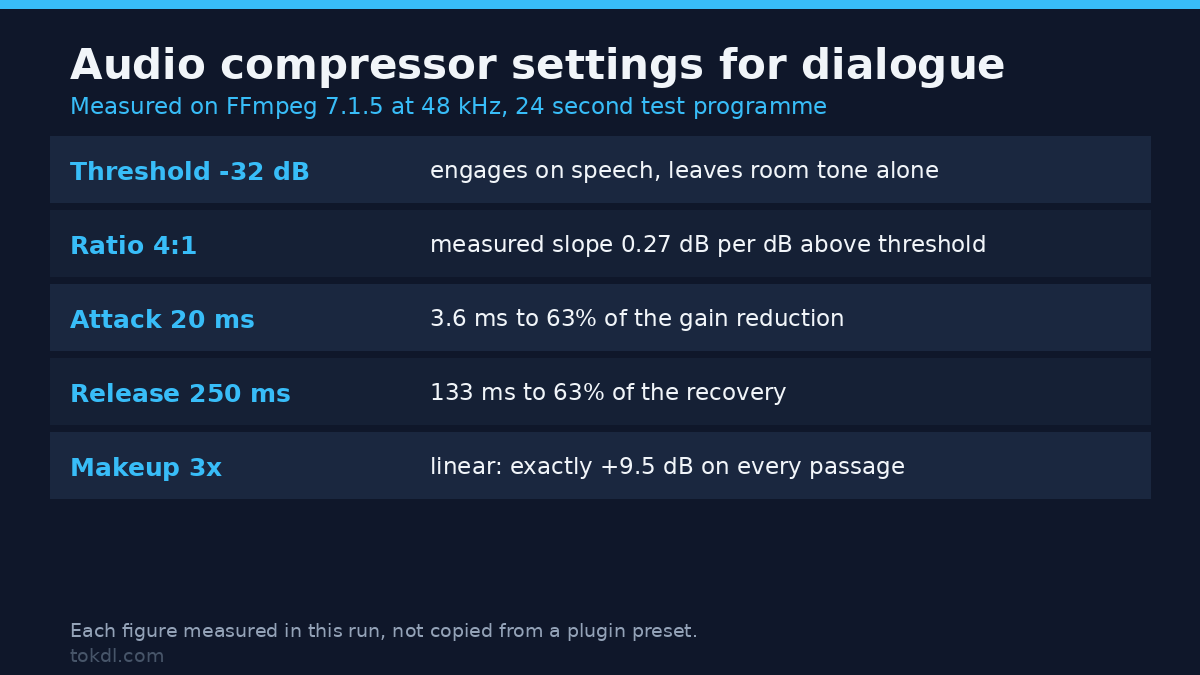
- Threshold is where compression starts, and below it the signal passes untouched. FFmpeg takes it as a fraction of full scale, so
threshold=-32dBbeats0.025. - Ratio sets how much of the excess above the threshold gets removed. At 4:1, 12 dB of signal above the threshold comes out 3 dB above it.
- Knee softens the corner. FFmpeg’s range is 1 to 8, default 2.83, and there’s no true hard knee: 1 is as close as you get.
- Attack and release are the speeds at which gain reduction arrives and leaves.
- Makeup is a linear multiplier applied after compression, not a dB value, which trips people up constantly.
If you’ve shaped the tone with an equalizer, put the audio compressor after it: EQ changes what the detector sees.
The measured gain transfer: 4:1 is a slope, not a fixed cut
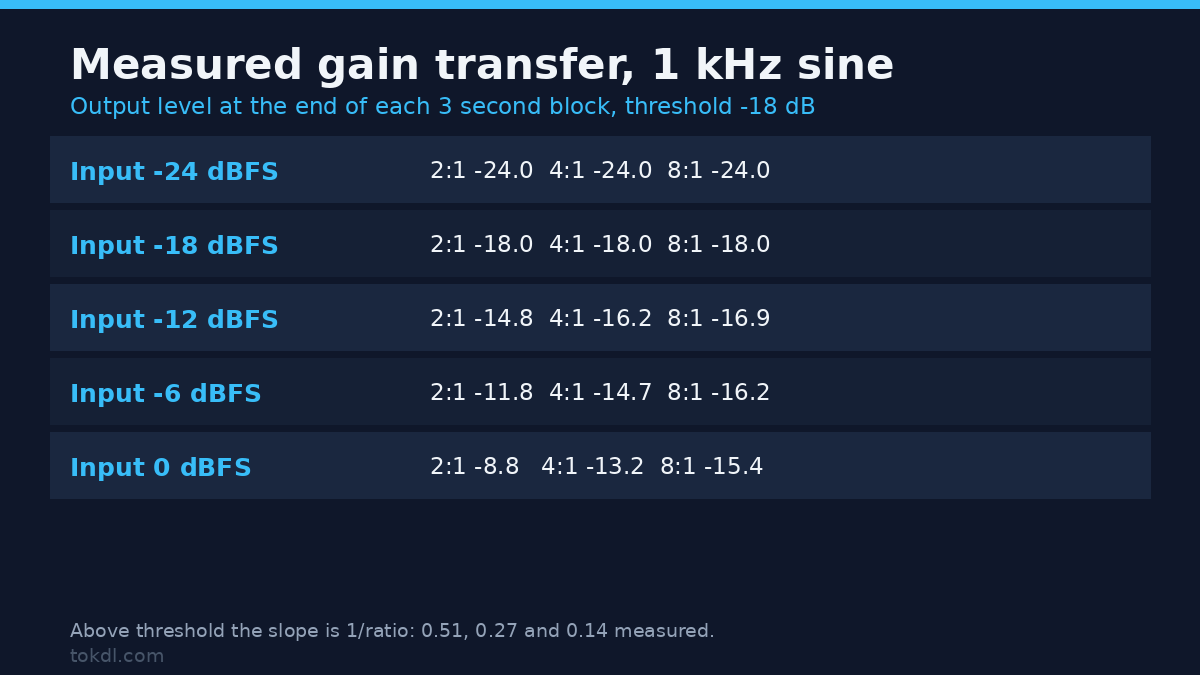
I fed a 1 kHz sine at eight levels from -48 to 0 dBFS, three seconds each, and read the peak of the final second of every block. The table keeps the five levels that matter. Below the threshold the output equals the input at any ratio. The surprise is the slope.
| Input | 2:1 | 4:1 | 8:1 |
|---|---|---|---|
| -24 dBFS | -24.0 | -24.0 | -24.0 |
| -18 dBFS (threshold) | -18.0 | -18.0 | -18.0 |
| -12 dBFS | -14.8 | -16.2 | -16.9 |
| -6 dBFS | -11.8 | -14.7 | -16.2 |
| 0 dBFS | -8.8 | -13.2 | -15.4 |
The measured slopes were 0.511 for 2:1, 0.266 for 4:1 and 0.143 for 8:1, against the ideal 0.5, 0.25 and 0.125. So the ratio label survives a steady tone: a 4:1 audio compressor behaves like 3.76:1. What the label never tells you is the size of the cut. Into a -18 dB threshold, 4:1 removed 13.2 dB at 0 dBFS, 8.7 dB at -6 dBFS and 4.2 dB at -12 dBFS. Compression is a fixed slope, not a fixed reduction, and that is the number people expect and never get.
Lowering the threshold to -30 dB and keeping 4:1 gave 0.250, exactly on paper, because every level then sat well above the corner. The knee moves that corner: at knee 6 the -18 dBFS input, sitting on the threshold, came out at -19.32, and the slope above it rose to 0.339. If your audio compressor measures “wrong”, check the threshold and the knee before you blame the ratio.
Attack and release: the labels are half the story
I built a step: 300 Hz at -45 dBFS, a jump to -3 dBFS, held, then back down. With threshold -18 and ratio 8 that’s 12.8 dB of gain reduction.
| Setting | To 63% (RMS) | To 63% (peak) | Recovery to 1 dB (RMS) |
|---|---|---|---|
| attack 5 ms | 1.4 ms | 3.1 ms | n/a |
| attack 20 ms | 3.6 ms | 6.8 ms | n/a |
| release 250 ms | 133 ms | 67 ms | 188 ms |
| release 1000 ms | 539 ms | 272 ms | 778 ms |
The nominal value is a time constant, not a duration: a 250 ms release was 63% recovered at 133 ms, back within 1 dB at 188 ms, and a 20 ms attack did most of its work inside 4 ms. The detector changes both numbers too: with detection=peak, that 250 ms release recovered in 67 ms.
For dialogue I run an audio compressor at 20 ms attack and 250 ms release: consonants pass without being clamped, and the gain doesn’t pump between sentences. Under music, 400 to 600 ms usually sounds cleaner.
A dialogue chain that works, measured end to end
Here’s the command I ran on a 24 second 720p clip with 192 kbps AAC. The video is copied, never re-encoded.
ffmpeg -i dialogue.mp4 -af "acompressor=threshold=-32dB:ratio=4:attack=20:release=250:knee=2.82843:makeup=3" -c:v copy -c:a aac -b:a 192k dialogue-compressed.mp4Measured on the delivered file: integrated loudness went from -32.5 to -32.2 LUFS, true peak from -9.7 to -9.6 dBFS, and the video stream’s MD5 stayed identical (f0417482...) while the file grew 41 KB, all of it audio. Loudness barely moved because makeup and gain reduction cancelled out, which is the point of makeup: it decides where the signal sits, not how compressed it is.
That neutrality is measurable. The same audio compressor with makeup 1, 2 and 3 left the loudest-to-quietest gap at 24.1 dB in all three cases, while integrated loudness moved from -41.7 to -35.6 to -32.1 LUFS. Makeup is a plain multiplier: 2 is +6.02 dB, 4 is +12.04 dB.
That’s where trouble starts. Makeup applies after the detector finishes, so it lifts peaks past full scale with no error. On a signal with a 5 ms burst at 0 dBFS, an audio compressor at attack=100 with makeup=4 peaked at +12.32 dBFS, 240 samples over. FFmpeg exited 0 and printed nothing alarming.
Add the limiter, then check the encode
One more filter fixes it, verified on that exact case: appending alimiter=limit=0.891:level=false brought the render to -1.0 dBFS with zero samples over. The limiter sits after the audio compressor because it catches what makeup lets through.
Then check the encode, because AAC overshoots a sample-peak ceiling: a render limited to -1.0 dBTP measured -0.6 dBTP at 128 kbps and -0.8 at 192 and 256. Aim the limiter at -1.5 dBFS and measure the delivered file with ebur128=peak=true. Filtering also can’t coexist with stream copy: -c:a copy beside a filter returns code 218.
Audio compressor vs dynaudnorm vs loudnorm
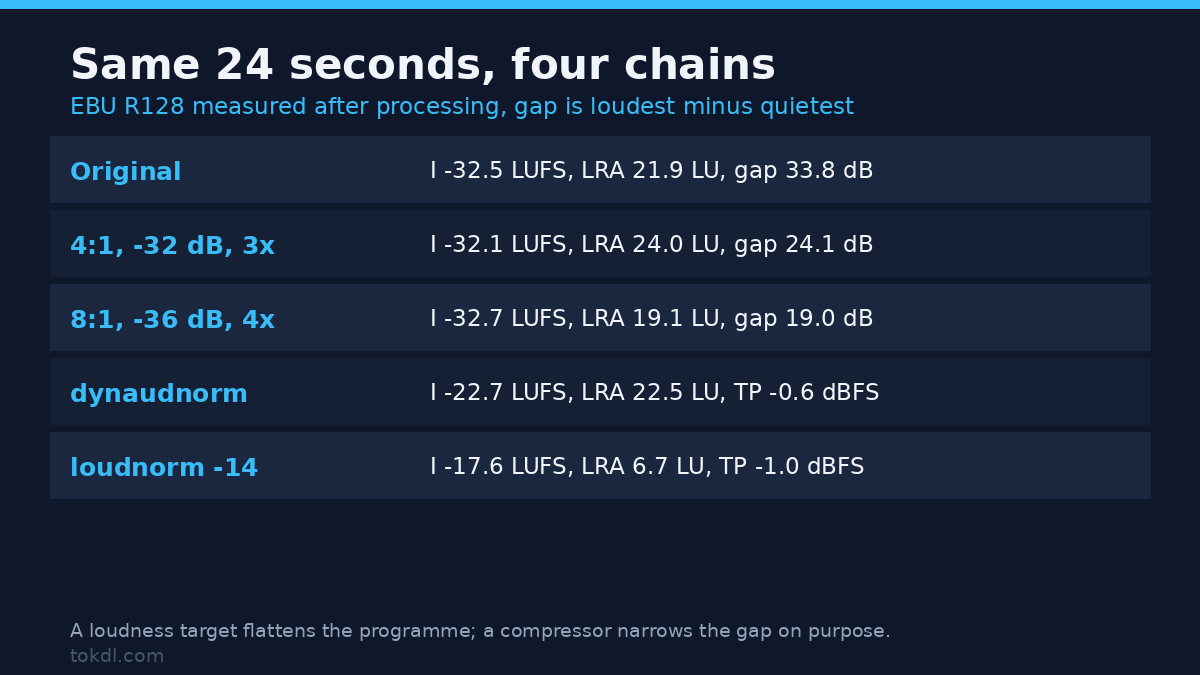
FFmpeg ships three tools that make quiet things louder, and they aren’t interchangeable. I ran each over the same 24 second programme: five level steps from -42 to -8 dBFS, gated pink noise shaped like speech.
| Chain | Integrated | LRA | True peak | Gap |
|---|---|---|---|---|
| Original | -32.5 LUFS | 21.9 LU | -9.7 dBFS | 33.8 dB |
| 4:1, -32 dB, makeup 3 | -32.1 LUFS | 24.0 LU | -9.6 dBFS | 24.1 dB |
| 8:1, -36 dB, makeup 4 | -32.7 LUFS | 19.1 LU | -7.2 dBFS | 19.0 dB |
| dynaudnorm f=200 | -22.7 LUFS | 22.5 LU | -0.6 dBFS | 24.9 dB |
| loudnorm I=-14 TP=-1 | -17.6 LUFS | 6.7 LU | -1.0 dBFS | flattened |
The audio compressor narrowed the gap and left the shape alone. 8:1 at the lower threshold cut it to 19.0 dB, which is what I’d use on wild handheld audio where the guest wanders off-mic.
dynaudnorm lifted everything about 10 dB and kept the gap near where it started, but it landed at -0.63 dBFS sample peak and -0.6 dBTP. Its p=0.95 setting is a fraction of full scale, not a true-peak target, so it leaves nothing for the encoder to overshoot into.
loudnorm is a delivery normaliser, and here it missed its own target: asked for -14 LUFS, it delivered -17.6 and crushed LRA to 6.7 LU. linear=true changed nothing, and I can prove it: the two renders were byte-identical. Linear mode shifts the whole file by one gain, and this file needs +19.7 dB, which puts a -9.66 dBTP peak at +10 dBTP, so FFmpeg fell back to dynamic mode and logged "normalization_type" : "dynamic".
So: an audio compressor for control, dynaudnorm for levelling speech-only tracks, loudnorm last for the delivery target. Steady levels with the wrong average is a normalization job, not the compressor’s.
Six mistakes that make an audio compressor sound worse
1. Setting makeup before the threshold. Makeup lifts whatever survived, peaks included, and the +12.32 dBFS render above is what that looks like. Set threshold and ratio first, then raise the level, with a limiter as insurance.
2. Asking an audio compressor for a hard knee of zero. knee=0 fails with code 222, “Numerical result out of range”, and the minimum is 1. The same code appears for ratio=25 (max 20), threshold=0, attack=0 and makeup=0. Ratio 1 is accepted and does nothing, so a typo there leaves a filter that runs clean and changes no gain.
3. Trusting a soft knee to leave sub-threshold audio alone. At knee 6 the -18 dBFS input came out 1.32 dB down and a -24 dBFS input lost 0.05 dB, so the “untouched below the threshold” assumption fails as soon as the knee widens. Keep the knee at 1 when you want a predictable corner.
4. Using a 5 ms attack on dialogue. That setting reached 63% of its gain reduction in 1.4 ms, fast enough to clamp the front of a consonant. Twenty milliseconds suits speech better.
5. Reading LRA as a compression score. The gentle 4:1 chain narrowed the audible gap by 9.7 dB and LRA went up, from 21.9 to 24.0 LU, while 8:1 brought it to 19.1. LRA measures the spread of gated short-term loudness, and lifting quiet passages above the gate brings them back in. Judge compression by the gap.
6. Compressing a clipped recording. An audio compressor changes levels, not waveforms. If the peaks are already flat-topped, the distortion is baked in, and the repair path is fixing the clipping first. Compression afterwards makes the damage louder. If you can hear the room, treat the echo before dynamics too.
FAQ
What ratio should an audio compressor use for dialogue? 4:1 with a threshold near -32 dB covers most speech and leaves everything below -32 dB alone. The cut grows with the input: the same ratio removed 4.2 dB at -12 dBFS and 13.2 dB at 0 dBFS in my sweep. Go to 8:1 when the source swings more than 30 dB.
Does an audio compressor make the file quieter? Without makeup, yes: 4:1 at -32 dB with makeup 1 dropped integrated loudness from -32.5 to -41.7 LUFS. Makeup 3 brought it back to -32.1 with the same gain reduction.
Do I need a plugin? No. The audio compressor built into FFmpeg is the filter measured here, and the five controls map onto CapCut, Premiere Pro, DaVinci Resolve and OBS, though some call ratio “amount” or “strength”.
Why does my compressed file sound pumped? Usually a release shorter than the gaps in speech. A 250 ms release was 63% recovered at 133 ms, so it lets go between words. Try 400 to 600 ms under music.
Conclusion
An audio compressor doesn’t make audio louder, it makes it steadier, and every control can be measured. Threshold decides where it starts, ratio decides the slope (0.266 measured at 4:1, not 0.25), attack and release are time constants the detector can halve, and makeup is a plain multiplier that pushes peaks past full scale without a warning.
The chain I keep coming back to: an audio compressor at -32 dB and 4:1, 20 ms attack, 250 ms release, makeup to taste, a limiter at -1.5 dBFS, then a true-peak check on the encoded file. The FFmpeg filter documentation lists every option, and the background on dynamic range compression explains why the ear prefers a narrower range.
Measure your own file before and after. Two ebur128 passes cost ten seconds and tell you more than any preset name will.