
How to Remove Echo From Video: What Actually Works
You recorded in a room with bare walls, or you left the laptop speakers on during a call. Play it back and the voice sounds distant and hollow, every sentence trailing off into a smeared copy of itself. You try the denoiser, then a high-pass filter, then a compressor. Nothing touches it, and you still need to remove echo from the video before it goes anywhere.
Those tools weren’t built for this job. A denoiser works on a steady bed of hiss. Echo is your own voice arriving late, and it lands across the same frequencies as the voice. So we’ve built reverberant test files, run every filter a forum thread would suggest, and measured what each did to the echo, the voice and the room tone. Most didn’t change a thing.
What you’ll learn in this guide to remove echo from a video:
- How to tell a room tail from a single speaker echo in a few seconds.
- Which filters measurably cut a tail, and by how many decibels.
- Why a gate fixes one recording and does nothing on the next.
- How far to push a gate before it chews the ends of words.
- The one setup where software cancels an echo properly, and why a finished file rarely matches it.
Why a plain filter can’t remove echo
An echo is a late copy of audio you already have. It arrives as a few distinct bounces (a bare wall, a speaker feeding back into a microphone) or as thousands of tiny reflections that blur into a tail (any normal room). Either way the copy overlaps the original in time and in frequency.
That overlap is the problem. A high-pass filter removes rumble. A notch filter removes a hum at one frequency. Neither can take out a copy of a voice sitting in the same octaves as the voice, so any honest attempt to remove echo starts by accepting that you’re reducing it rather than deleting it.
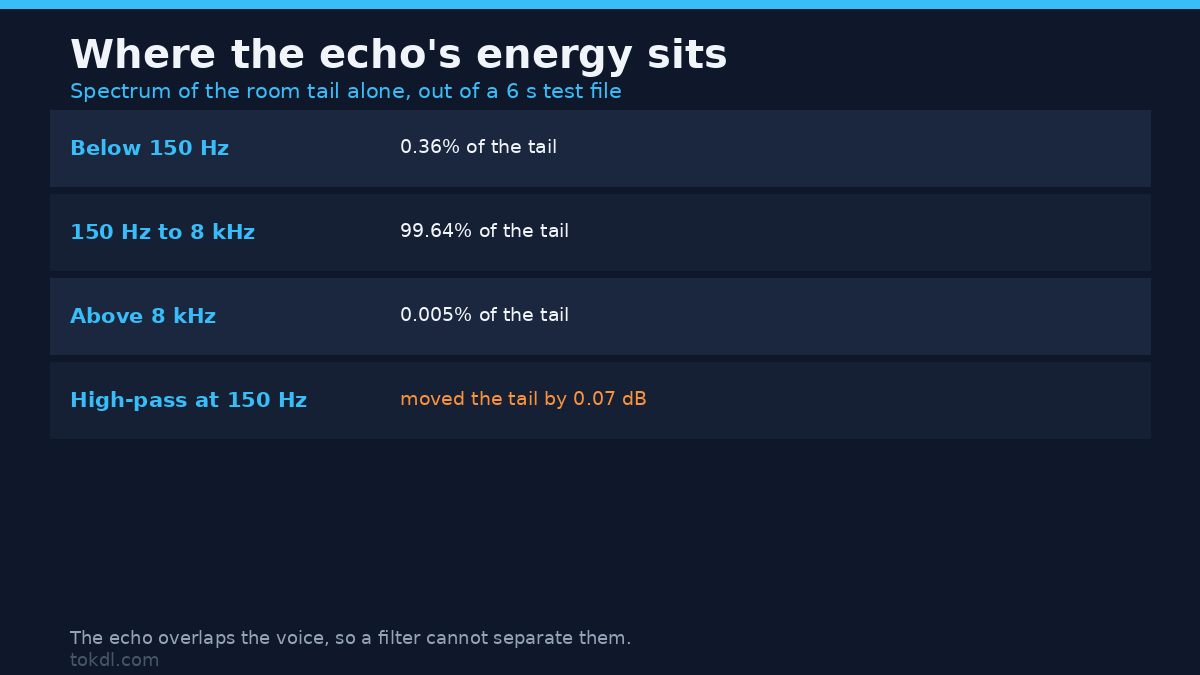
We measured the overlap rather than assuming it. The test file is a six-second clip of short bursts, convolved with a synthetic room response whose tail decays over roughly 0.7 seconds. Here’s what the tail alone is made of:
| Band | Share of the tail’s energy |
|---|---|
| Below 150 Hz | 0.36% |
| 150 Hz to 8 kHz | 99.64% |
| Above 8 kHz | 0.005% |
Under four tenths of one percent of the tail lives below 150 Hz. The rest sits in the speech band, right where the voice is. That’s why a high-pass filter is a wasted step: on the same file it moved the tail by 0.07 dB, a change you can’t hear.
First, work out which echo you have
Clap once, hard, in the room where the recording happened. One clear repeat apart means a single dominant delay, the speaker-feedback shape: the sound left the speakers and came back to the mic 100 to 300 ms later. A smear with no separate repeat means a room tail, and the two need different fixes.
How to remove echo with a gate
The gate, which FFmpeg calls agate, is the only filter in a plain chain that measurably cut our room tail. Your voice crosses the threshold and the gate opens; the tail that follows a phrase stays under it, so the gate closes on the echo.
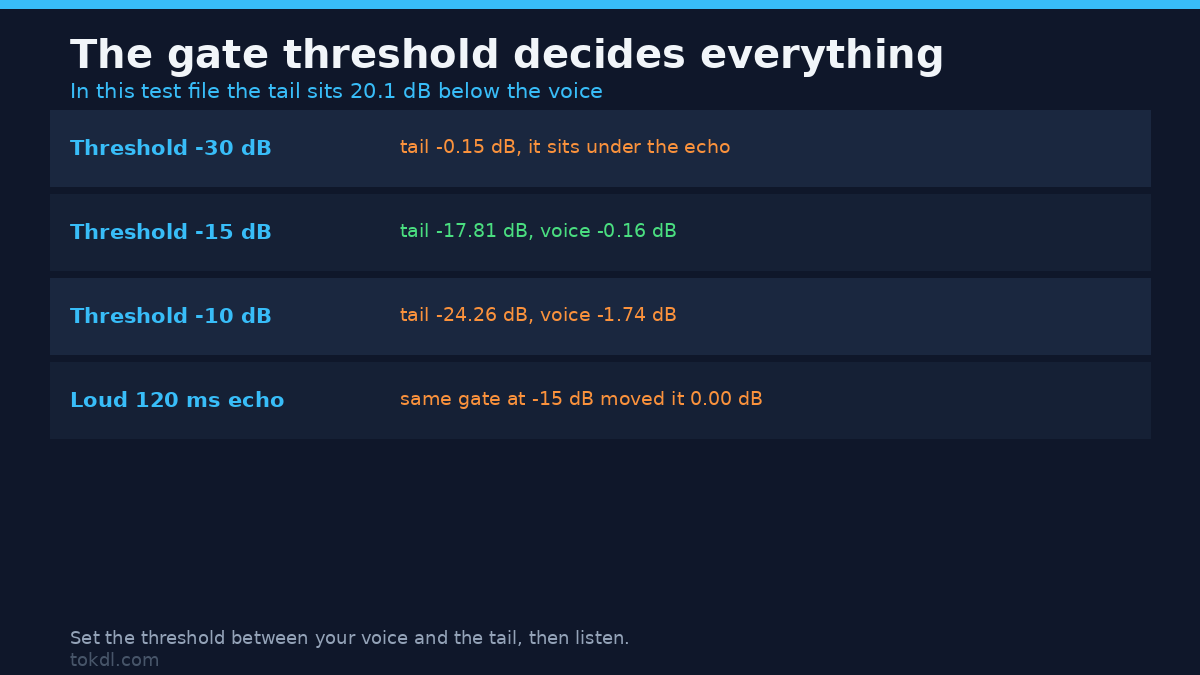
It works only when the threshold lands in the gap between your voice and the tail, so that gap is the number to know before you remove echo with a gate. In our test room the voice burst measured -13.55 dBFS and the tail sat 20.1 dB below it, at -33.63 dBFS. If your own levels jump around, normalize the audio first, because an even voice makes that gap easier to see. Here’s the sweep, run as the exact command you’d type:
ffmpeg -i echo_clip.mp4 -c:v copy -af "agate=threshold=-15dB:ratio=6:attack=5:release=150" -c:a aac fixed.mp4| Gate threshold | Tail change | Voice change | What it sounds like |
|---|---|---|---|
| -30 dB | -0.15 dB | 0.00 dB | Identical to the original |
| -15 dB | -17.81 dB | -0.16 dB | Room gone, voice intact |
| -10 dB | -24.26 dB | -1.74 dB | Quieter tail, shorter word ends |
Start with the middle row, where the tail drops 17.8 dB and the voice loses 0.16 dB. Push the threshold to -10 dB and the tail falls 24.3 dB, but the voice loses 1.74 dB and the ends of the bursts shorten. Set it to -30 dB and the gate does nothing at all, because it now sits below the echo it was meant to catch.
That last row is the trap, and it’s where a lot of people give up on their attempt to remove echo from a video. A threshold under the echo level produces a file that sounds just like the original, and the filter reports no error.
Where the gate stops helping
A loud echo. The second test file carries one 120 ms repeat only 9.35 dB below the voice, the shape you get when a speaker feeds back into a mic. The same gate at -15 dB moved that echo by 0.00 dB. At -10 dB it managed 0.54 dB while cutting 1.96 dB out of the voice’s own decay.
Continuous speech. The third file runs syllables back to back, the way a person talks. There the tail sat only 3.7 dB below the syllables, so a gate at -15 dB did nothing again. At -10 dB the inter-syllable gaps moved 0.4 dB and the spread between the loud and quiet parts grew from 3.4 dB to 6.4 dB. That widening spread is what pumping sounds like, room tone breathing in and out between words.
A gate can remove echo when the tail sits 15 to 20 dB below the voice and the pauses run long enough to close it. If you’ve already removed silence from a video, the pauses your gate depends on are now much shorter, so expect the threshold to need retuning. It can’t fix a loud echo, and on dense speech it buys a fraction of a decibel before it pumps.
The fixes that don’t remove echo, measured
All of these ran on the same reverberant file.
| Method | Tail change | Voice change | Verdict |
|---|---|---|---|
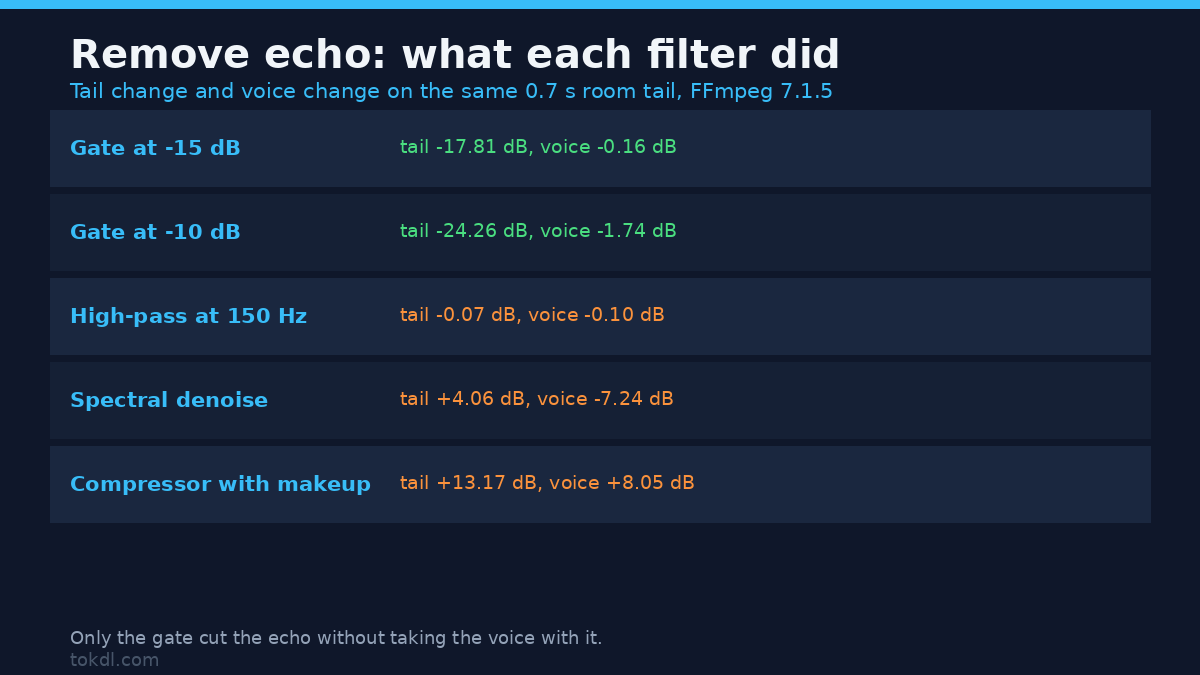
| High-pass at 150 Hz | -0.07 dB | -0.10 dB | No effect on the echo |
| EQ, -3 dB at 3 kHz | -0.06 dB | -0.07 dB | No effect on the echo |
| Gate at -15 dB | -17.81 dB | -0.16 dB | Cuts a quiet tail |
| Gate at -10 dB | -24.26 dB | -1.74 dB | Cuts deeper, costs voice |
| Spectral denoise | +4.06 dB | -7.24 dB | Wrong tool, damages the voice |
| Non-local means denoise | +1.40 dB | -1.22 dB | Same class of mistake |
| Compressor with makeup gain | +13.17 dB | +8.05 dB | Echo 5.1 dB worse relative to the voice |
| Delay, then subtract | +9.70 dB | 0.00 dB | FFmpeg’s mixer adds, it doesn’t subtract |
A spectral denoiser isn’t a de-reverb. afftdn took 7.24 dB off the voice, and the tail measured 4.06 dB louder relative to it. It’s the right tool for hiss, the job it was written for, and the wrong one here. Keep it for removing background noise from a video instead.
A compressor makes the echo worse. With makeup gain the voice rose 8.05 dB and the tail rose 13.17 dB, so the echo ended up 5.1 dB louder relative to the voice than it started. Compression flattens the difference between the loud part and the quiet part, and the echo is the quiet part. Fix any audio clipping before you add makeup gain, because that gain lifts whatever already sits at the ceiling.
Delay-and-subtract doesn’t build in FFmpeg. The first thing most people try when they remove echo is to delay it by 120 ms and subtract it. FFmpeg’s mixer adds, and the weights option didn’t reach a subtraction: our attempt came back with the echo 9.29 dB louder. The echo filter refuses a negative decay outright, with exit code 234 and the message decay[0]: -0.500000 is out of allowed range: (0, 1]. No filter in FFmpeg’s filter list has “reverb” in its name.
One more trap. While building the test material we ran the convolution filter with its dry path set to zero and its wet path to one. It returned exit code 0 and wrote six seconds of pure digital silence, twice. An exit code only tells you the command didn’t crash, so check the level of anything a filter writes.
The one setup where software can remove echo properly
FFmpeg ships an adaptive filter called anlms, and it takes two streams: the audio you want to clean, and a reference. Handed a clean copy of what the loudspeaker played, its output came back matching that reference to 44.7 dB. That result is the point rather than a bug.
A real echo canceller, the kind inside a video call, needs the far-end signal: the exact audio the speaker plays at that moment. It subtracts a filtered copy of that reference from the mic signal and adapts as the room changes. A file you recorded last week holds no such reference, which is why live echo cancellation works in a call and why no plugin can remove echo from a finished recording the same way.
You can sidestep it instead. Turn the speakers off and wear headphones, so the sound never leaves them.
The paid option: de-reverb modules
Nothing in a plain FFmpeg chain is trained on the sound of a voice in a room. Editing suites ship modules that are. DaVinci Resolve, Adobe Audition and iZotope RX each carry a de-reverb built on a model of speech and reverb, so none of them needs a reference signal, which is the gap the FFmpeg path leaves open.
Listen for a metallic edge on the S sounds, where heavy de-reverb leaves a mark, and keep the untouched original.
Fix the recording so you never remove echo at all
- Get the mic closer. The direct sound follows the inverse square law: halving the distance adds about 6 dB to the voice while the room’s reverberant field stays put. The echo doesn’t get quieter, it stops competing.
- Soften the room with curtains, a rug, a bookshelf or a duvet behind the mic.
- Wear headphones on every call, so the speaker path never exists.
- Record five seconds of silence first. If you can hear the room on playback, the recording contains it, and no filter fixes that later.
- Recording narration? The same room rules apply when you add a voiceover to a video.
Common mistakes when you remove echo
Denoising before you remove echo. A denoiser costs you voice detail and leaves the tail in place. If you use one at all, run it after the gate.
Trusting a preset name. A preset labelled for echo removal is usually a gate with a fixed threshold, and a fixed value won’t match your recording, so it’s a coin flip.
Running the chain twice. Every audio pass costs quality, so chain the filters in one command and copy the video stream.
Questions people ask
Can I remove echo from a video for free? Yes, with a gate you set by hand, and only when the echo sits well below the voice. The measured limits are in the tables above.
Which filter should I try first to remove echo? A gate set about 15 dB below your voice peaks. Then listen to the ends of your words.
Will a denoiser remove echo from the room? No. It took 7.24 dB off the voice in our test and left the tail louder relative to it.
Why did my gate fail to remove echo? Its threshold sat below the echo, so it never closed. Lower the number until the tail starts dropping, then stop before the voice does.
What if the echo comes from the speakers? Fix it live with headphones, because a 120 ms echo only 9.35 dB below the voice is out of reach for a gate.
The short version
You can remove echo from a video when the tail sits 15 to 20 dB below the voice and the pauses run long enough for a gate to close: that bought 17.8 dB of tail reduction for 0.16 dB of voice. Nothing in a plain filter chain can remove a loud discrete echo, and a denoiser or a compressor leaves the balance worse than it found it. Get the mic closer next time, and wear headphones on the call.