
AV1 Encoding vs H.264 and H.265: Which Should You Export With?
You exported a five-minute clip and the file came back at 1.2 GB. The edit is done, the footage looks fine, and now the upload bar crawls. Most people answer that with a heavier compression setting and hope the picture holds up. There’s a better lever, and it’s the codec itself. AV1 encoding can cut the same footage to roughly half the size at the quality you already accept, and on FFmpeg you switch to it with one flag.
I spent this week measuring that claim instead of repeating it, because the numbers quoted online almost never say what they were tested on. Below are the sizes, the speed cost, and the exact commands, so you can decide whether AV1 encoding belongs in your export settings or stays a curiosity.
Here’s what you’ll learn:
- How much smaller AV1 gets at matched measured quality, on two different clips
- What AV1 encoding costs in encode time, and how the SVT-AV1 presets move that number
- The software decode penalty, which matters more than encode time for playback
- The exact FFmpeg commands, tested on FFmpeg 7.1.5, plus the tags that trip up Apple devices
What AV1 is, in one paragraph
AV1 is a video codec from the Alliance for Open Media, and it’s royalty-free, which is why YouTube, Netflix and most browsers now serve it. It’s the successor to VP9 and the sibling of H.265, and AV1 encoding is what most of the web is quietly moving toward. The pitch is simple: better compression at the same picture quality, with no licensing fee. The catch is just as simple. It needs more compute to encode, and older devices can’t decode it.
For the older comparison, my H.264 vs H.265 breakdown covers where those two sit. This article is about the third option, the one most editors still ignore.
How I tested AV1 encoding
Claims about codecs are cheap, so here’s the setup, and you can repeat every step. I used FFmpeg 7.1.5 with SVT-AV1 v2.3.0, alongside libx264 and libx265. Each source was a 5-second, 1280×720, 25 fps clip stored losslessly with FFV1, so any quality loss I measured came from the encoder and nothing else.
I used two clips on purpose: one synthetic graphics clip full of hard edges and text-like detail, and one continuous-detail clip (a fractal animation) that behaves more like camera footage. Codecs don’t fail evenly across content, so one clip punishes what another flatters.
Each encoder ran at its own quality setting, and I compared them at matched quality rather than matched settings, because a CRF of 35 doesn’t mean the same thing across three encoders. I measured quality with PSNR and SSIM against the lossless source, and pinned every encoder to two threads. That machine reports 64 CPUs, but its container is capped at 2 and the host load sat between 42 and 48, so treat the speed numbers as “busy two-core box.” The sizes reproduce. The times don’t.
How much smaller is AV1 encoding?
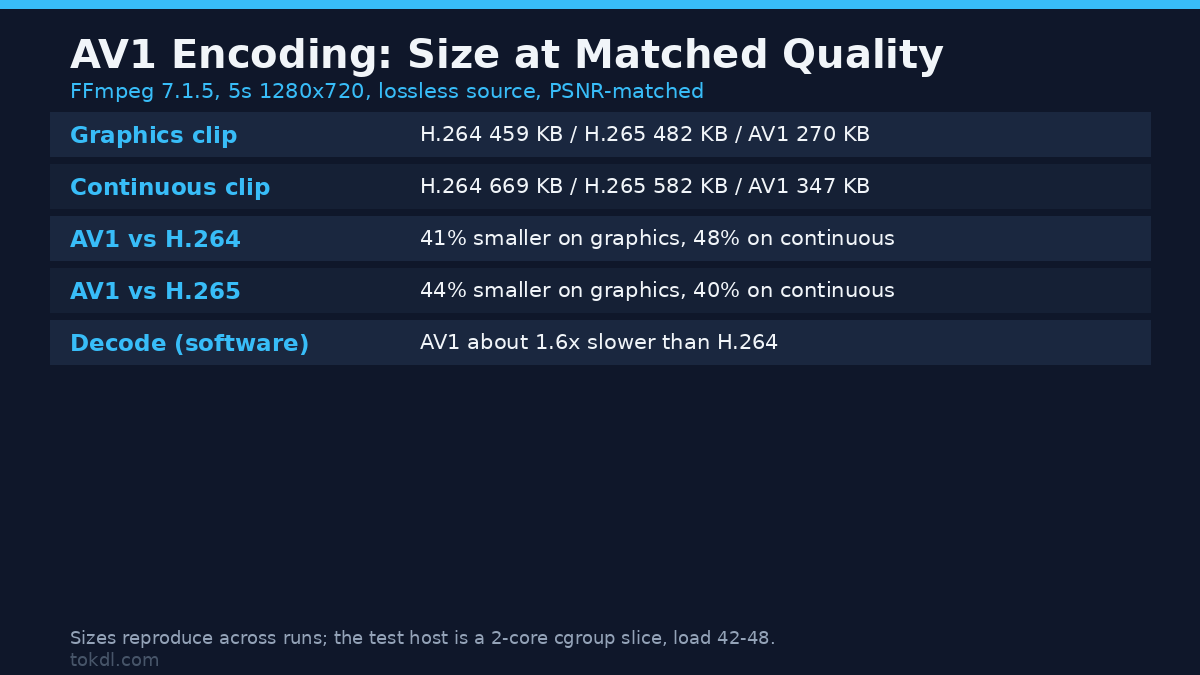
This is the number that matters. For each clip I found the sizes at a matched PSNR target, interpolating between measured points inside the range where all three encoders overlap.
| Test clip | Target quality | H.264 (medium) | H.265 (medium) | AV1 (preset 8) |
|---|---|---|---|---|
| Graphics, hard edges | 37.7 dB PSNR | 459 KB | 482 KB | 270 KB |
| Continuous detail | 34.6 dB PSNR | 669 KB | 582 KB | 347 KB |
Read the last row as a ratio and AV1 encoding lands 48 percent smaller than H.264 and 40 percent smaller than H.265 at the same quality. On the graphics clip the gap is 41 percent against H.264 and 44 percent against H.265. The headline you keep seeing, “about half the size,” holds up, with the caveat that the figure swings with the content.
There’s a second result hidden in that table, because a single clip would miss it. H.265 didn’t beat H.264 on the graphics clip. It was 5 percent larger at matched quality, then 13 percent smaller on the continuous clip. Hard-edged synthetic graphics are a known weak spot for H.265’s bigger transforms, so testing only on screen recordings would wrongly convince you that HEVC was pointless. That’s why my guide to VMAF, SSIM and PSNR exists, and why any “best codec” claim needs more than one clip.
One caveat though: PSNR is a mathematical error score, not a picture score, and AV1 encoding’s edge on perceptual metrics is often larger. I’m reporting what I measured and nothing more.
The speed cost of AV1 encoding
Size is half the story. The other half is the clock, and here AV1 has a reputation it partly deserves.
| Encoder | Encode time, continuous clip (best of 3) | Relative |
|---|---|---|
| libx264, preset medium | 3.4 to 4.9 s | 1.0x |
| libx265, preset medium | 4.3 to 4.5 s | about 1.0x |
| libsvtav1, preset 8 | 9.6 to 9.8 s | about 2.2x |
So on this box, AV1 encoding took roughly 2.2 times as long as H.264 for a five-second 720p clip. That’s far better than AV1’s old reputation for being absurdly slow, and the reason is SVT-AV1: it’s the encoder built for speed, and it’s what FFmpeg’s libsvtav1 gives you.
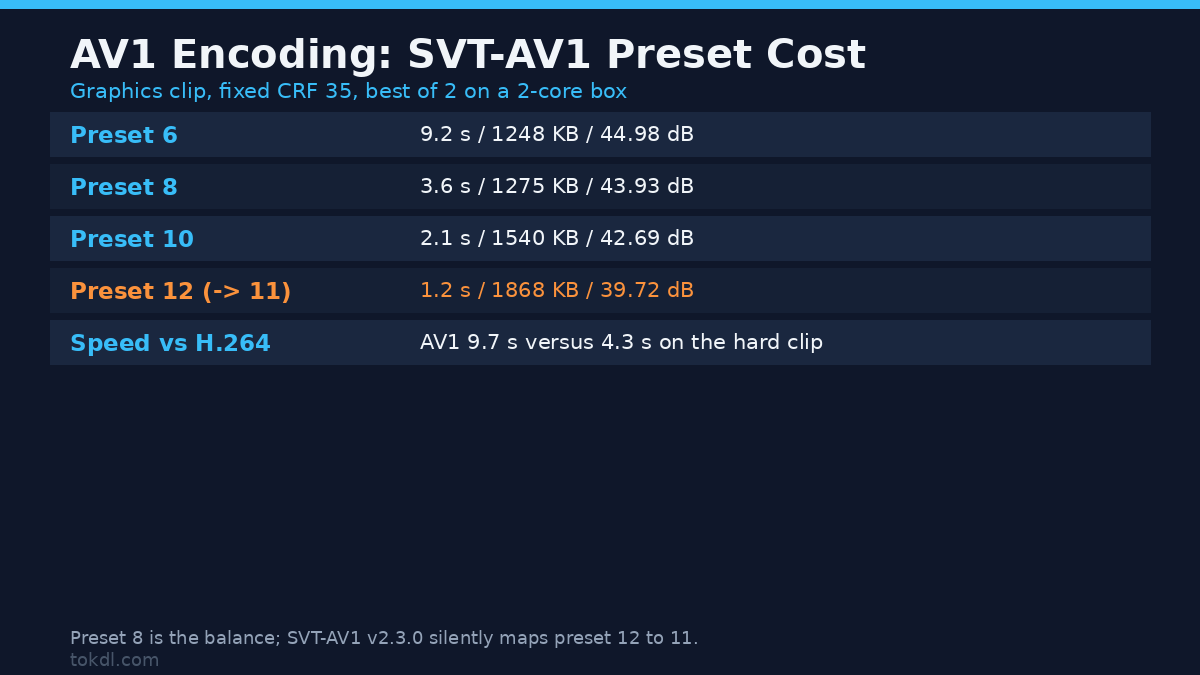
The preset matters more than the codec. SVT-AV1 presets run from 0 (slowest, smallest) to 13, and lower is slower and better. Here’s that curve on the graphics clip at a fixed CRF of 35:
| SVT-AV1 preset | Encode time | File size | PSNR |
|---|---|---|---|
| 6 | 9.2 s | 1248 KB | 44.98 dB |
| 8 | 3.6 s | 1275 KB | 43.93 dB |
| 10 | 2.1 s | 1540 KB | 42.69 dB |
| 12 (mapped to 11) | 1.2 s | 1868 KB | 39.72 dB |
Preset 8 is the sweet spot for most people: stepping down to preset 6 bought about 2 percent in size and a single decibel of quality for almost three times the wait. And preset 12 doesn’t exist in SVT-AV1 v2.3.0. Ask for it and the encoder quietly maps it to 11. You’ll only see the line Preset M12 is mapped to M11 if you watch the log, and nothing in the file tells you.
Start at preset 8. Drop to 6 only for a final export you’ll keep, and jump to 10 when you need speed more than the last few percent. If encode time is your real bottleneck, the honest fix is hardware, which my hardware vs software encoding comparison covers. Whichever way you go, AV1 encoding is a CPU decision as much as a codec one.
Don’t ignore the decode side
Everyone measures encode time and forgets the other direction, but decode is what your viewer feels. I decoded each output to nothing and timed the software path. The files sit at their own quality settings, so their sizes differ too.
| File (its own quality setting) | Software decode time |
|---|---|
| H.264, 698 KB | 198 ms |
| H.265, 256 KB | 237 ms |
| AV1, 764 KB | 325 ms |
AV1 decoded about 1.6 times slower in software than H.264 here. On a modern phone or GPU that cost disappears, because AV1 hardware decode is standard in recent chips. On an old laptop, a cheap TV stick or a five-year-old phone it doesn’t, and an AV1 file can stutter where H.264 plays fine. That’s the real reason AV1 encoding isn’t the default everywhere.
The exact AV1 encoding commands
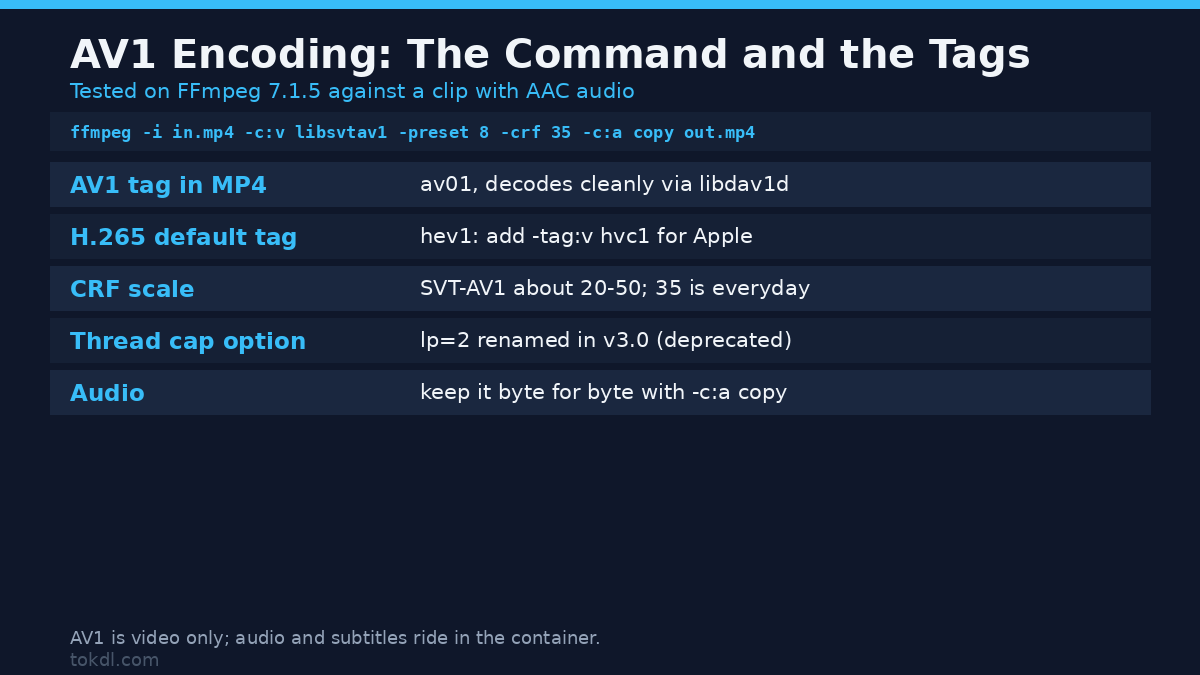
All three of these ran clean on FFmpeg 7.1.5, on a clip with audio, and each kept the audio with -c:a copy. The FFmpeg AV1 encoding notes have more if you want it.
# H.264, the safe default
ffmpeg -i input.mp4 -c:v libx264 -crf 23 -preset medium -c:a copy output.mp4

# H.265, about a quarter smaller, same caution list
ffmpeg -i input.mp4 -c:v libx265 -crf 28 -preset medium -x265-params log-level=error -c:a copy output.mp4

# AV1 encoding, roughly half the size of H.264 at matched quality
ffmpeg -i input.mp4 -c:v libsvtav1 -preset 8 -crf 35 -g 250 -c:a copy output.mp4
AV1 encoding is close to a drop-in, but the numbers aren’t. The CRF scales differ, so don’t carry a 23 across from H.264: SVT-AV1’s useful range is roughly 20 to 50, and 35 is a solid everyday value. The -g 250 sets the keyframe interval, and the flag lands. A separate probe with -g 25 on a 125-frame clip delivered exactly the five keyframes that spacing predicts. To cap the thread pool, note that FFmpeg passes it as -svtav1-params lp=2, which returns a deprecation warning because v3.0 renames the option to level_of_parallelism.
One container detail bites Mac users. When libx265 writes to MP4 it tags the stream hev1 by default, and QuickTime and Safari want hvc1. Add -tag:v hvc1 and the same command plays everywhere. AV1’s tag is av01, and it worked in MP4 with no help, decoding cleanly through libdav1d. If you’re unsure which container fits your target, my MP4 vs MKV vs WebM comparison walks through that choice.
Common mistakes with AV1 encoding
Comparing at equal CRF instead of equal quality. A CRF of 30 means nothing across encoders. Fix the quality with a metric, then compare sizes, or you’re only measuring the settings.
Testing on one clip. My own data flips the H.265-versus-H.264 ranking between two clips. One source tells you about that source.
Judging AV1 encoding by libaom. If your test felt painfully slow, check which encoder you used. libaom-av1 is slow by design. libsvtav1 is the one you want.
Re-encoding when the file already fits. If it meets your limit, the better move is often a plain remux into a fitter container, which my compress-without-losing-quality guide and the constant quality vs average bitrate piece both cover. Re-encoding always costs something.
AV1 encoding vs H.264: which should you export?
| You want to | Pick | Why |
|---|---|---|
| Upload to a platform that re-encodes anyway | H.264 | Your file is a master; the platform picks the delivery codec |
| Smallest file for playback on modern browsers | AV1 | Roughly half the size at matched quality, and browsers decode it |
| Hand the file to any editor or old device | H.264 | It plays everywhere, with no decode gamble |
| Archive footage you’ll re-use for years | AV1 or H.265 | Size matters and you control the playback rig |
| Save a few percent and keep Apple happy | H.265 with -tag:v hvc1 |
Smaller than H.264, and the tag fixes QuickTime |
FAQ
Is AV1 always smaller than H.265?
No. It beat H.265 on both clips here, by 44 percent on graphics and 40 percent on continuous detail, but “always” is too strong. Noisy footage can close the gap, and a badly tuned preset can lose to a well-tuned H.265 encode.
Why is AV1 encoding so slow?
It searches a much bigger space of block shapes and prediction modes to find those savings. SVT-AV1 tames that with faster presets, and on this two-core box preset 8 ran about 2.2 times H.264, not the ten-times figure the old libaom encoder left in people’s heads.
Does AV1 encoding support audio and subtitles?
AV1 is video only. Your audio stays AAC or Opus beside it, and subtitle tracks ride in the container. That’s why every command above carries -c:a copy to keep your audio exactly as it was.
What CRF should I use for AV1 encoding?
Start at 35 with preset 8. Want smaller files? Raise the CRF toward 45; the range runs 0 to 63, and I confirmed that 63 still writes a valid, tiny file. Want more quality? Lower it and test on a short cut first.
The bottom line
AV1 encoding earns its reputation. In a controlled test it produced files 40 to 48 percent smaller than H.264 and 40 to 44 percent smaller than H.265 at matched quality, and SVT-AV1 makes it practical rather than a science project. That’s a real, measurable saving on every upload, archive and delivery.
What it won’t do is play everywhere. If your target is a modern browser, a platform that accepts AV1, or your own archive, AV1 encoding is the right default now. If your target is a client’s old laptop or a device you can’t control, H.264 is still the safe answer, and picking it isn’t a failure, it’s a correct read of the destination.
Start with one flag. Change -c:v libx264 to -c:v libsvtav1, set -preset 8 -crf 35, and see what your own clips do.