
Camcorder Video Won’t Open? Convert AVCHD to MP4 Without Losing Detail
Your camcorder recorded the whole thing, you pulled the card, and your phone won’t open a single file. The names end in .MTS, and the folder is called BDMV. That’s an AVCHD card, the format Sony, Panasonic and Canon put on consumer camcorders for a decade, and it’s why a 2012 birthday is still sitting unedited on a hard drive.
I converted a card’s worth of AVCHD footage this week to see what each method costs. Most camcorder video can become a normal MP4 without touching a single pixel, and the method most guides recommend leaves the file interlaced, anamorphic and carrying audio half your devices won’t play. Neither problem needs a paid converter.
Here’s what you’ll learn: what’s inside an AVCHD file, remux versus re-encode, why 1440×1080 is really 1920×1080 on screen, which deinterlace setting to pick, and how to join the pieces your camcorder split.
What an AVCHD camcorder actually wrote
What landed on the card is an MPEG transport stream holding H.264 video and AC-3 audio, inside a fixed folder layout that every camcorder of that era used:
PRIVATE/AVCHD/BDMV/STREAM/00000.MTS
PRIVATE/AVCHD/BDMV/CLIPINF/00000.CPI
PRIVATE/AVCHD/BDMV/PLAYLIST/00000.MPL
The .MTS files are the footage. The .CPI and .MPL files are the camera’s own index, written so it can seek and resume playback; no converter needs them, and once a file leaves that folder ffprobe reads it like any other video.
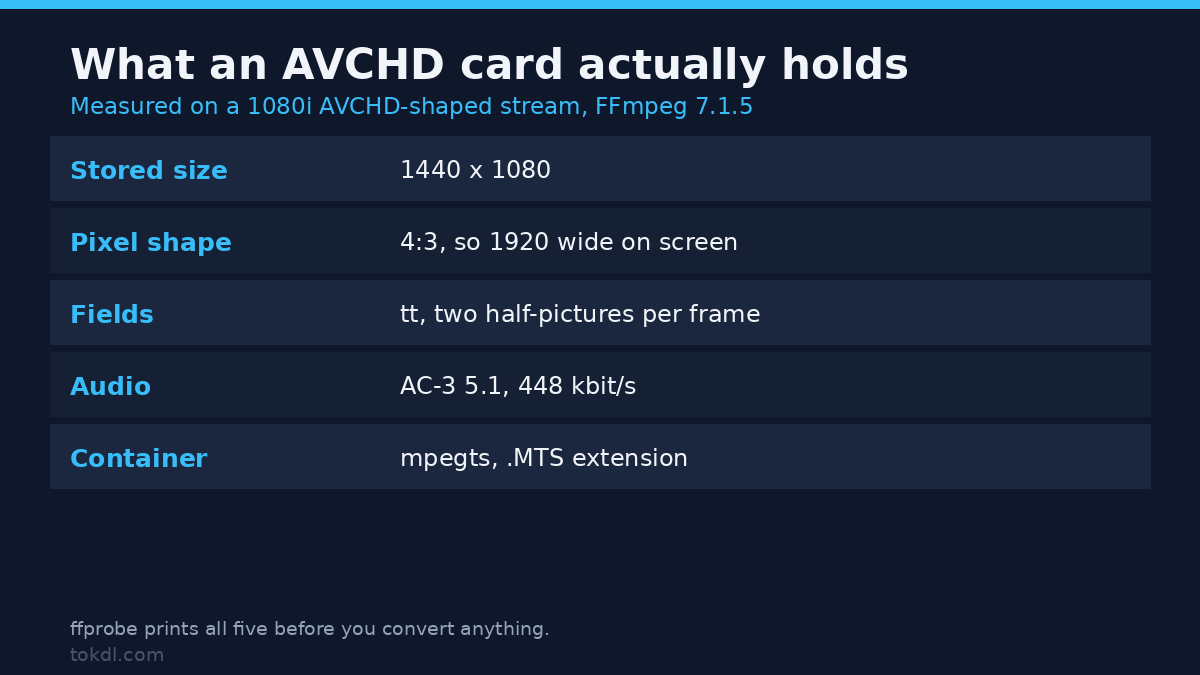
I built a 1080i AVCHD-shaped stream with FFmpeg 7.1.5 and measured what it holds: 1440×1080, 25 frames per second, interlaced top-field-first, H.264 High profile, AC-3 5.1 at 448 kbit/s, in a transport stream with an .MTS extension. These are the fields you’ll find on your own card:
| Field | What mine reported | Why it decides everything |
|---|---|---|
| Stored size | 1440 x 1080 | Not 1920. The pixels get stretched on playback. |
| Sample aspect ratio | 4:3 | 1440 x 4/3 = 1920 wide on screen. Ignore it and the picture is narrow. |
| Field order | tt (top field first) | Each frame holds two half-pictures from two moments in time. |
| Audio | ac3, 6 channels, 448 kbit/s | Fine on a TV, missing on an iPhone. |
| Container | mpegts | Phones don’t register the extension, so they won’t offer to open it. |
Newer AVCHD camcorders store 1920×1080 with square pixels, so check before you assume. This prints the four values that matter:
ffprobe -v error -select_streams v:0
  -show_entries stream=width,height,sample_aspect_ratio,display_aspect_ratio,field_order
  -of default=noprint_wrappers=1 00000.MTS
Path one: remux, and change nothing
If you just need a file that opens in a modern player, you don’t convert anything. You change the wrapper. Stream copy rewrites the container from transport stream to MP4 and leaves both bitstreams alone:
ffmpeg -i 00000.MTS -c copy -movflags +faststart family.mp4On my 8-second clip that turned 7,780,192 bytes of transport stream into 7,559,012 bytes of MP4. Both hold 200 video packets, and the decoded pictures were bit-identical: frame hashes matched on all 200 frames, and the AC-3 audio matched byte for byte. FFmpeg printed one warning, track 1: codec frame size is not set, which means the MP4 muxer has no frame size to advertise for AC-3. The file plays.
Why the file hash changes when nothing was re-encoded
Checksums won’t match before and after, and that isn’t a re-encode. In a transport stream, H.264 parameter sets travel inline with the pictures; MP4 stores them once in the sample description, so the muxer rewrites the framing: 218 extra bytes across 200 packets, 7,104,392 against 7,104,610, with the decoded output unchanged.
Prove a lossless copy with frame hashes, not file hashes. A GUI tool that promises “lossless conversion” and returns a file half the size re-encoded something.
What the remux leaves alone
The output is still 1440×1080 with a 4:3 pixel shape, still flagged tt, still carrying 448 kbit/s of AC-3 in 5.1. idet counted 120 of 120 frames as top-field-first afterwards: the container changes nothing about the picture.
The AVCHD 1440×1080 trap
1440 times 4/3 is 1920: the camcorder stored fewer pixels than it displayed and the player stretches them back. When that works the AVCHD file looks like ordinary 1080p, and when it doesn’t you get footage that looks shot through a letterbox. Pixel aspect ratio is the field that carries the instruction, and it’s the one that gets lost.
Running setsar=1 on the 1440×1080 stream produced a file that probes as 1440×1080, sample aspect 1:1, display aspect 4:3: the same picture squeezed to 75% of its proper width, with the anamorphic instruction deleted.
Scaling does the opposite, and you usually don’t need setsar at all. My scale=1920:1080 output came back with a 1:1 pixel shape and a 16:9 display aspect, because scale recomputes the pixel shape to preserve the display shape. The danger is applying setsar=1 to a file you never scaled.
Path two: deinterlace, and choose 25p or 50p
Interlaced AVCHD is 50 half-pictures a second, and each frame holds two of them from different moments. On a screen that doesn’t deinterlace, every moving edge shows a comb. Re-encode without deinterlacing and you bake that comb into the new file: my no-filter AVCHD test probes as progressive while still carrying the combing of the original. The flag says progressive; the pixels say otherwise. Deinterlacing has its own traps, and this is the expensive one.
ffmpeg -i 00000.MTS -vf "bwdif=mode=send_frame"
  -c:v libx264 -preset medium -crf 20 -pix_fmt yuv420p
  -c:a aac -b:a 192k -ac 2 family.mp4
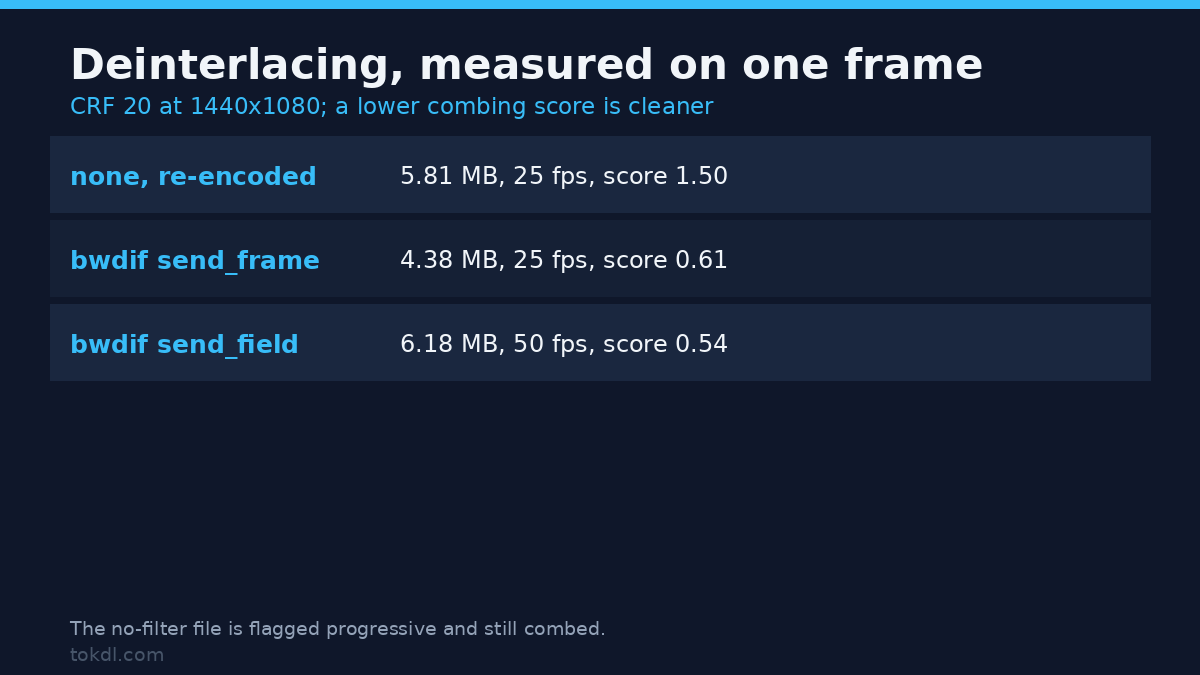
To compare the options I measured a row-to-row luma jump on the same frame, a decent proxy for combing: clean progressive frames differ little between neighbouring rows, interlaced ones jump wherever something moved. All three encodes are CRF 20 at the native 1440×1080, from the same AVCHD source:
| Filter chain | Output | Size | Combing score |
|---|---|---|---|
| none, re-encoded as-is | 25 fps, 200 frames | 5.81 MB | 1.50 |
| bwdif, send_frame | 25 fps, 200 frames | 4.38 MB | 0.61 |
| bwdif, send_field | 50 fps, 400 frames | 6.18 MB | 0.54 |
Two things fall out of that. send_frame gives one clean frame per original frame, which is right for archive material and anything going to a phone. send_field keeps 50 real frames a second for sports and hand-held footage, at 41% more bytes and twice the frames. yadif is a fair substitute if your build lacks bwdif (the filter documentation lists both), though it measured slightly noisier on the same frame.
Path three: re-encode for a smaller file
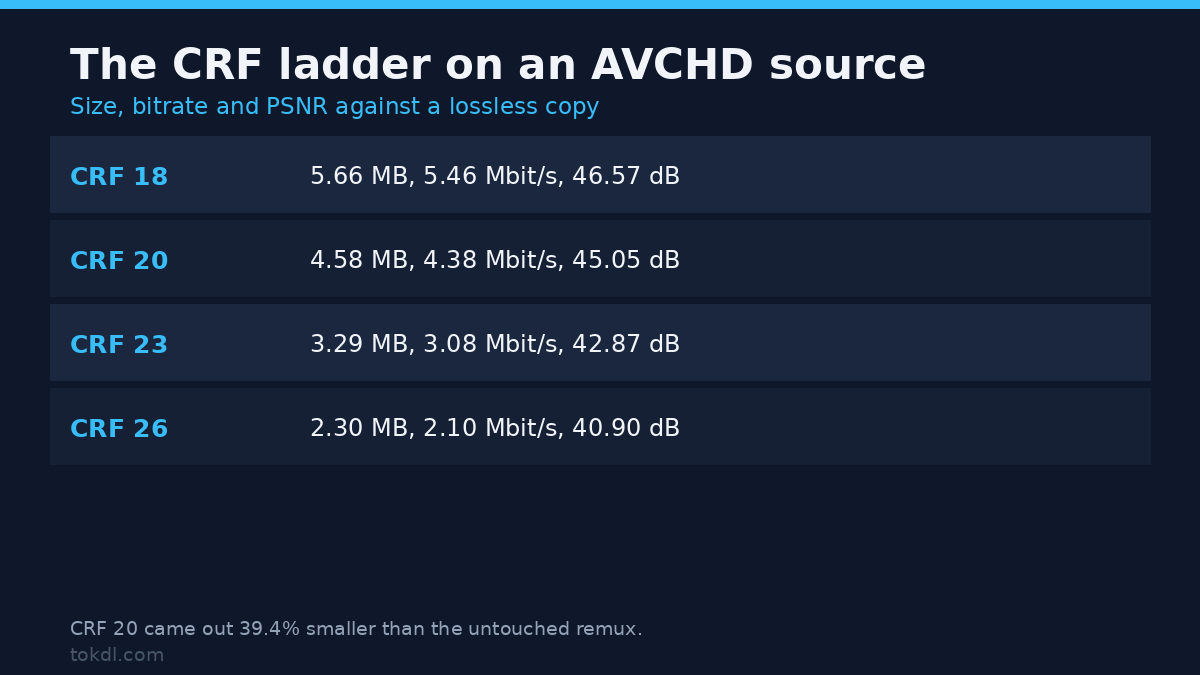
Remuxing keeps the original size. If you want something you can email or upload, you re-encode, and the only question is how much picture you’ll trade. I encoded the AVCHD fixture at four CRF values, deinterlacing first, and compared each against a lossless deinterlaced copy of the same frames:
| CRF | File size | Video bitrate | PSNR vs lossless |
|---|---|---|---|
| 18 | 5.66 MB | 5.46 Mbit/s | 46.57 dB |
| 20 | 4.58 MB | 4.38 Mbit/s | 45.05 dB |
| 23 | 3.29 MB | 3.08 Mbit/s | 42.87 dB |
| 26 | 2.30 MB | 2.10 Mbit/s | 40.90 dB |
CRF 20 came out 39.4% smaller than the untouched remux at 45 dB, a difference you won’t see on a phone. CRF 23 is where I’d stop for fine texture, CRF 26 for previews. The figures come from a synthetic pattern with hard edges, which compresses worse than real footage, so your card will land lower at the same setting.
The AVCHD pieces your camcorder split
Cards in that era were FAT32, which caps a file just under 4 GiB. A long recording arrives as 00000.MTS, 00001.MTS, 00002.MTS, each starting on a keyframe. At the format’s typical 17 Mbit/s that cap arrives after about 34 minutes; at 24 Mbit/s it’s closer to 24.
Joining them is one command over a text file listing the parts in order:
ffmpeg -f concat -safe 0 -i parts.txt -c copy joined.MTSTwo details matter. The pieces don’t split at the time you ask for: I asked FFmpeg’s segmenter for 2.7-second chunks of an 8-second AVCHD clip and got 2.885, 2.949 and 2.309 seconds, because cuts land on keyframes that sat 0.48 seconds apart. Second, the join can come out longer than the source: my three parts added up to 8.144 seconds and produced an 8.139-second file against 8.005 for the original, 1.7% longer. That’s the trailing partial group of pictures on each piece, and it’s normal.
Sort by filename, not by modification date. The camera writes them in order, and a card copied between drives can have timestamps that disagree with the numbering.
The AVCHD audio decision
AVCHD records AC-3, often 5.1. A remux keeps it, which is right if the destination is a TV or receiver: my copied stream was bit-identical at 448 kbit/s with a 5.1(side) layout. It’s wrong for a phone, a social platform or a bare media player, where AC-3 support is patchy.
The same clip, with the video copied in all three cases, came out at 7,559,012 bytes with AC-3, 7,368,527 with AAC 5.1 at 256 kbit/s, and 7,308,362 with AAC stereo at 192 kbit/s. Every byte of difference is audio and container overhead. Keeping the surround mix costs about 190 KB more here; if you only have stereo speakers, the downmix math is worth reading before a tool guesses for you.
Six things that go wrong
1. Renaming the extension. It doesn’t work: I copied an .MTS file to .mp4 and ffprobe still reported mpegts, because the extension was never what the file was. Some players refuse it, and the ones that open it seek badly.
2. Believing the “lossless” preset in a GUI converter. Most re-encode at a fixed bitrate regardless of the label. A file that dropped from 17 Mbit/s to 8 was re-encoded, whatever the button promised.
3. Squeezing the picture with setsar=1. This is the usual cause of “it looks correct in one player and stretched in the next”, because stored size and pixel shape disagree. Scale to 1920×1080 or leave the shape alone; don’t strip it.
4. Deinterlacing twice. Run an already progressive file through a deinterlacer again and you soften every edge for nothing. The reverse is worse: a file flagged progressive that still has combing, which is what a plain re-encode gives you.
5. Converting each piece separately. You end up with three MP4s and a gap at every join. Join the AVCHD transport streams first with -c copy, then convert the single result.
6. Editing the originals directly. A 1440×1080 interlaced long-GOP stream is the worst possible editing source: every scrub decodes from the last keyframe and half the frames are fields. For a real project, convert once to a square-pixel progressive copy, or work from proxies.
Questions I get about AVCHD
Does converting MTS to MP4 lose quality? Not if you remux: a stream copy leaves the decoded frames identical, which I verified frame by frame. A re-encode always loses something, but at CRF 18 to 20 the loss sits above 45 dB and you won’t find it by eye.
Why does my converted file look stretched? The pixel aspect ratio didn’t survive the trip. Check sample_aspect_ratio and display_aspect_ratio on the output: 1440×1080 with a 4:3 pixel shape is correct, and 1440×1080 with 1:1 is a squeeze.
Can I do this on a phone? Some editors read an .MTS file if you import it from Files rather than Photos, but most won’t. Convert once on a computer at full quality and keep that as the master.
Is AVCHD the same as .M2TS? Related, not identical. Sony’s variant uses .M2TS for the same kind of transport stream, and the same commands work; only the extension changes. 4K from a newer camcorder is a different format, usually XAVC S in an MP4 wrapper, so none of the anamorphic advice applies.
What I’d do with a card full of AVCHD
Copy the whole PRIVATE folder off the card before you touch anything, then work on the copy. Join the split AVCHD files with -c copy, remux the result to MP4 the same way, and keep that as the archive master: the original picture in a container everything opens. Then make one delivery copy with bwdif, a scale to 1920×1080 and AAC audio for phones, uploads and editing.
Two files, ten minutes, no re-encode of the master. The camcorder did its job a decade ago; only a container nobody supports anymore stands between you and that footage.