
Countdown Timer Video: The Proven, Easy FFmpeg Method
A ten second countdown looks like the easiest overlay in video. Drop a number in the corner, let it tick, done. Then I measured one on FFmpeg 7.1.5 and found two defects no preview shows: the number 10 appeared for a single frame, 33 milliseconds, and the bar under it stopped 4 pixels short of the edge. Both came from the expression. A countdown timer is the one overlay where a frame of error is visible, because the number is the only thing on screen that changes. Here’s the fix, with the frame counts to prove it.
What you’ll learn
- How to build a countdown timer video overlay in one FFmpeg pass.
- Which rounding mode to pick, and what it does to the first and last second.
- Why
drawboxcan’t animate on time, and the two-filter bar that can. - What happens to the countdown timer when you trim or seek.
Before the filter: know the real length
drawtext has no duration variable. There’s no %{duration} to lean on, so the number your countdown timer counts from has to come from the file. Probe it first:
ffprobe -v error -show_entries format=duration -of default=nw=1:nk=1 input.mp4That prints seconds with decimals. A 47.6 second clip is a 47 second countdown if the last frame should read 0, and 48 if it should read 1. Write it down, because it goes into the expression literally.
If the clip gets retimed afterwards, do the timer last. A countdown timer burned in before a speed change or a loop stops matching the runtime, and the number then disagrees with the scrub bar. One that ends at 0 is useless in a loop, so drop it or count up instead.
The countdown timer in one filter
drawtext can evaluate an expression on every frame, and %{eif:...:d} is the integer form. The expression 10-t subtracts the frame timestamp from 10, so the countdown timer steps down once a second with no keyframes to place. The drawtext documentation lists the rest of the variables.
There’s one trap first. Inline, the colons inside the expansion get eaten by the filtergraph parser as option separators. The command dies with No option name near '10-t:d}' and exit code 234. The fix is to keep the expression out of the filter line, in a file:
printf '%s' '%{eif:10-t:d}' > timer.txtThen point drawtext at the file. The content is read after parsing, so its colons survive:
ffmpeg -i input.mp4 -vf "drawtext=fontfile=/usr/share/fonts/truetype/dejavu/DejaVuSans-Bold.ttf:textfile=timer.txt:fontsize=120:fontcolor=white:x=(w-text_w)/2:y=(h-text_h)/2" -c:a copy out.mp4On a 10 second 1280×720 test clip that produced a file byte for byte the same size as the escaped inline version, 781,018 bytes, so the text file isn’t a workaround with side effects. Thin text still needs a border or a shadow, the same text overlay decision every title runs into.
Pick the rounding your countdown timer needs
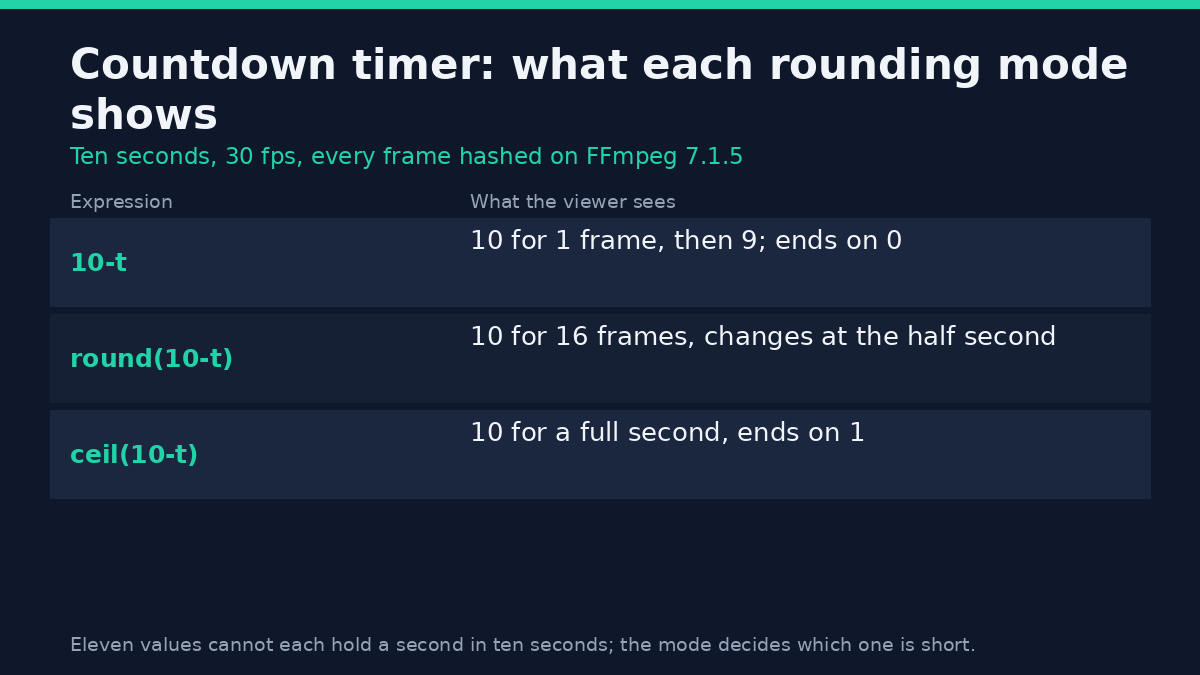
Every countdown timer faces the same arithmetic. A ten second countdown from 10 shows eleven numbers: 10 down to 0. Eleven values can’t each hold a full second inside ten seconds; the average is 0.909. Something has to give, and the expression decides what. I rendered all three at 30 fps and counted frames per image:
| Expression | First number | Last number | Frames per value | Distinct images |
|---|---|---|---|---|
10-t |
10, for 1 frame (0.03 s) | 0 | 30 frames, 29 for the 0 | 11 |
round(10-t) |
10, for 16 frames (0.53 s) | 0 | 30 frames, 14 for the 0 | 11 |
ceil(10-t) |
10, for 30 frames (1.00 s) | 1 | 30 frames each | 10 |
Plain truncation flashes 10 for one frame, then jumps to 9, which reads as a glitch. ceil holds every number for a clean second but never reaches 0, so the clip ends on 1 and looks frozen. round splits it by moving every change to the half second, which looks smooth and leaves the number half a second out of step with the clock.
For a steady feel, use ceil and accept that the last second reads 1. If the zero matters, use round. If you need both, give the countdown timer eleven seconds and count from 10 at ceil(11-t), so the zero gets its own second.
The countdown timer jumps sideways when it loses a digit
The recipe centres text with x=(w-text_w)/2, and text_w is recomputed on every frame. That’s right for a fixed string and wrong for a countdown timer, because the string gets shorter. At 1280×720 the two digits of 10 spanned 148 pixels while the single digit 9 spanned 70, so the number jumps 34 pixels the moment the count drops below 10, and 44 pixels at 1080p, where the type is larger.
Two fixes. Zero-pad with %{eif:10-t:d:2}, which keeps two digits and moved the width only from 148 to 154 pixels, or pin the text to a fixed x, which is what I do over a moving subject.
Why drawbox can’t draw a moving bar
The obvious tool for a progress bar is drawbox, and the obvious expression is w=iw*t/10, width as a fraction of elapsed time. It doesn’t work, and it fails silently: in drawbox, t is the thickness of the border.
I proved it by setting the thickness. With t=5, the same expression produced a 640 pixel wide box drawn as a 5 pixel border; with t=fill, which parses as zero, the width collapsed and drawbox fell back to the full 1280 pixels, at every timestamp I sampled. There’s a parser trap in the same line: a comma inside the expression, as in min(t/10,1), splits the option list and the command dies before it encodes a frame.
The naive repair is one drawbox per second, each with its own enable window. It stutters: at 1280 wide the bar stepped in 128 pixel jumps and reached full width at 9.0 seconds, a full second early.
A progress bar under the countdown timer
Time belongs to overlay, whose x position is evaluated per frame. Feed it a solid colour clip the width of the frame and slide it in from the left, which looks exactly like growing:
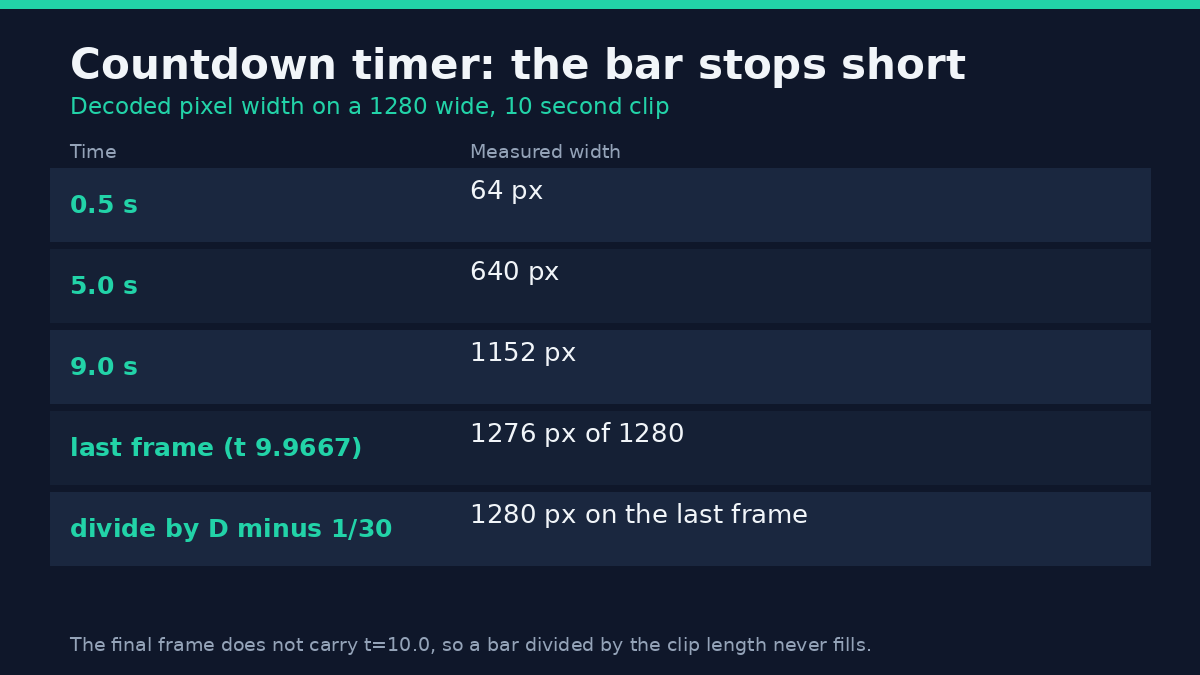
ffmpeg -i input.mp4 -f lavfi -i "color=c=0x22D3A8:s=1280x48:r=30" -filter_complex "[0:v][1:v]overlay=x='-W+W*(t/(10-0.0333))':y=H-48:shortest=1" -c:a copy out.mp410 is the probe length, 0.0333 one frame at 30 fps; swap both for your clip. shortest=1 ends the endless colour source with the real clip; without it the encode keeps pasting the bar onto frozen frames. Measured on a 10 second clip at 30 fps: 0 pixels at 0 s, 64 at 0.5 s, 320 at 2.5 s, 640 at 5 s, 960 at 7.5 s, 1152 at 9 s, and 1276 on the last frame. The overlay filter is where the rest of the timing expressions live.
That last number is the second defect. Dividing by the clip length assumes the final frame carries a timestamp of 10.0, and it doesn’t: at 30 fps the last timestamp is 9.9667, so the bar stops 4 pixels short and the file ends with a sliver of background. Dividing by the length minus one frame fixes it and pushes the mid clip position 2 pixels ahead, 642 instead of 640 at 5 seconds. That gap is invisible; the missing sliver isn’t.
Both overlays in one pass
Chain the countdown timer and the bar in one filtergraph so the clip is encoded once. Map the audio and copy it, since neither filter touches sound:
ffmpeg -i input.mp4 -f lavfi -i "color=c=0x22D3A8:s=1280x48:r=30" -filter_complex "[0:v]drawtext=fontfile=/usr/share/fonts/truetype/dejavu/DejaVuSans-Bold.ttf:textfile=timer.txt:fontsize=120:fontcolor=white:x=(w-text_w)/2:y=(h-text_h)/2[txt];[txt][1:v]overlay=x='-W+W*(t/(10-0.0333))':y=H-48:shortest=1[out]" -map "[out]" -map "0:a?" -c:a copy -c:v libx264 -crf 18 -pix_fmt yuv420p out.mp4The audio came through untouched: the MD5 before and after the overlay was the same, 791497ac8fde6d97113ccb2e5ef2521e on a clip carrying a 330 Hz tone. On a 1920×1080 twelve second version the bar measured 482 pixels at 3 s, 962 at 6 s, 1444 at 9 s and 1910 at 11.9, within a pixel of the elapsed fraction.
Then check the delivered file, because the preview isn’t what ships. I encoded the timer at CRF 18 and matched each burned number against reference renders: 0.05 to 0.3 levels of difference at every sample, against 4.2 or more for the next closest digit.
After a cut, the countdown timer can restart
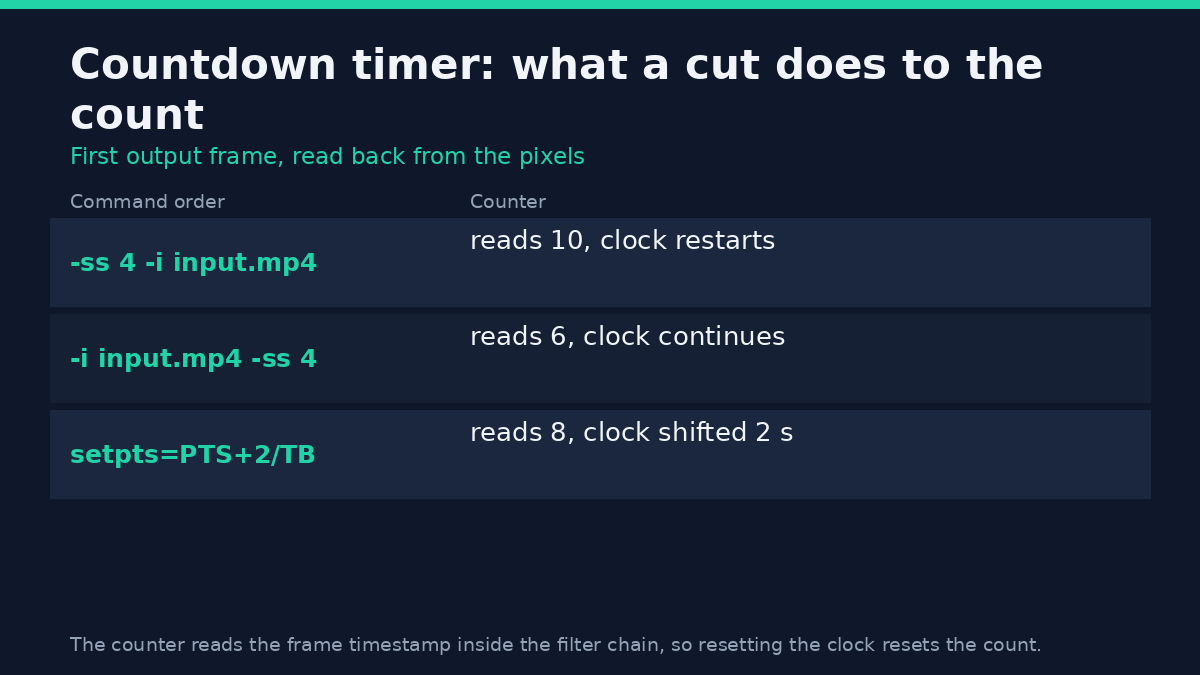
The countdown timer reads the timestamp of the frame in the filter chain, so whatever resets that timestamp resets the count. I tested three orderings and read the number on the first output frame:
| Command order | First frame reads | What happened |
|---|---|---|
-ss 4 -i input.mp4 |
10 | Timestamps reset, the count starts over |
-i input.mp4 -ss 4 |
6 | Timestamps kept, the count continues |
setpts=PTS+2/TB |
8 | Clock shifted 2 seconds, the count follows |
That’s a choice, not a bug. A countdown timer over a highlight reel usually wants the reset, because it belongs to the new edit. One burned into a clip you’re only trimming wants the original clock, because it’s counting to something in the footage. If you need the reset, trim and overlay in one pass. The same clock rules govern burned timecode, which is why the two guides agree.
Interval countdown timers for workout clips
The same expression handles a repeating countdown timer with mod: put %{eif:20-mod(t,20):d} in the text file and the number counts 20 to 0, restarting every twenty seconds. On a 60 second clip at 30 fps that produced 21 distinct images and 63 holds, and the frame at 5 seconds matched the one at 25 seconds position for position, so the loop is exact.
Six mistakes that make a countdown timer look broken
- Writing the colons inline. The parser eats them, the command exits 234, and the reason hides in a line that says
No option name. - Using
drawboxfor the bar. Itstis thickness, so the box never moves and never errors. - Dividing by the full clip length. The bar ends 4 pixels short at 30 fps, and worse at a lower frame rate.
- Centring a counter without padding. The number slides sideways when it loses a digit.
- Re-encoding the audio to change the picture.
-c:a copycosts nothing and leaves the samples identical. - Burning the timer before a retime. A speed ramp or a loop changes the runtime and the number stops matching.
Questions I get about countdown timers
Can I add a countdown timer without FFmpeg?
Yes. CapCut, Canva and most mobile editors ship countdown stickers, and they’re faster for a one-off. What they rarely give you is control over the first and last value, so the flash and the missing zero still show up. FFmpeg earns its setup when the countdown timer has to be exact across many clips.
Why does my countdown show the first number for a blink?
Because the expression truncated. 10-t is 10 only at exactly zero seconds and 9.97 on the next frame, so the top value holds for one frame. Switch to ceil, or start one value higher than the seconds you have.
Why does my timer never reach zero?
That’s what ceil does at the end: it rounds 0.03 up to 1. Accept the clip ending on 1, or use round and let the zero have the last half second.
Does the timer survive a platform re-encode?
Large white text does, and I verified it at CRF 18. Thin text over busy footage doesn’t: the platform softens it until it reads as a smudge on a phone. Bold, 100 pixels or more at 1080p, with a dark shadow, is the safe combination.
The short version
Probe the length, keep the expression in a text file, and pick the rounding on purpose. ceil makes every second feel the same; round gives you the zero. Pad the number or pin its x so it doesn’t jump. Build the bar with overlay, not drawbox, and divide by the length minus one frame so it fills the frame on the last picture. Then watch the delivered file, because that’s the only place to see whether the countdown timer is finished.