
Timecode in Video: Drop Frame, 29.97 and Burn-In
You shoot a two-camera interview at 29.97 fps. The reviewer emails a note that says “fix the boom shadow at 01:00:12;14”, you open the file, and the burned-in number at that moment reads 01:00:08;19. Nobody made a mistake. The camera, the editing app and the review page are each counting something slightly different, and one of them is counting frames while the clock counts seconds.
This guide is about that gap. You’ll see what the four fields of a timecode count, why 29.97 fps makes the labels drift from the wall clock, how drop frame repairs it, how to attach a timecode track without re-encoding a single frame, how to burn one into the picture with FFmpeg, and how to verify the number that landed instead of trusting the flag you typed. Every figure below was measured on FFmpeg 7.1.5 on this machine, with the labels read back from the rendered pixels rather than from the command’s own report.
What a timecode counts
A timecode is a label, not a clock. The four fields are hours, minutes, seconds and frames: HH:MM:SS:FF. The last field counts frames inside the current second, so at 30 fps it runs from 00 to 29 and then the seconds field ticks over. At 25 fps it runs 00 to 24. That sounds trivial until you remember that frames don’t arrive at exactly 30 per second in most video.
Two files can carry the same timecode and show different pictures at the same moment if they were made at different frame rates. And a timecode can be perfectly consistent with itself while sitting several seconds away from real elapsed time. That second failure is the one that breaks review notes, and it has a name.
Why 29.97 exists, and the 3.6 seconds it costs
When color arrived, the NTSC frame rate had to move a little to keep the color subcarrier out of the audio band. The rate went from 30 fps to 30/1.001, which is 29.97 fps, a slowdown of about one part in a thousand. Broadcasters kept counting 30 frame labels per second anyway, because the counting gear was already built.
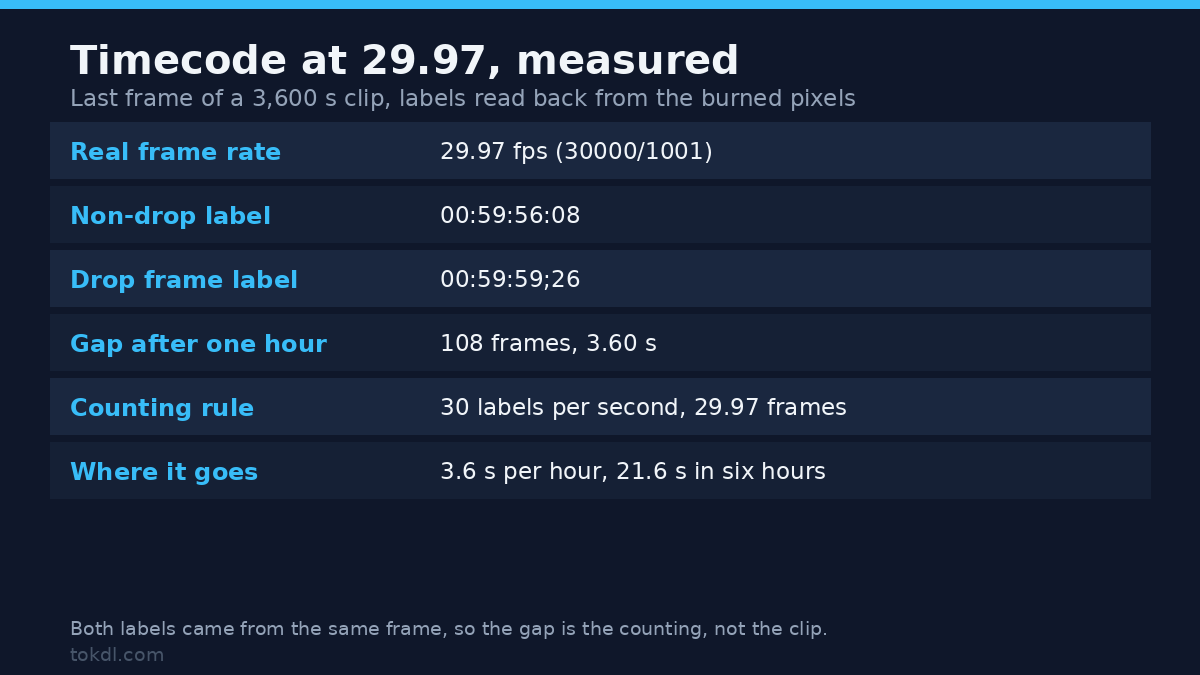
So the labels run slightly fast against the picture. One hour of real time at 29.97 fps is 107,892 frames. Divide that by the 30 labels per second we hand out, and you get 3,596.4 seconds of label time: 3.6 seconds short of the hour you just lived through.
I encoded a one-hour clip at 29.97 and burned a non-drop timecode into it, then read the last frame. The label said 00:59:56:08 on a clip whose real duration is 3,600 seconds. The same frame in the drop-frame version read 00:59:59;26. That’s the whole problem in one measured pair, and it gets worse the longer the take.
| Real elapsed time | Frames at 29.97 | Non-drop label | Drop frame label | Gap |
|---|---|---|---|---|
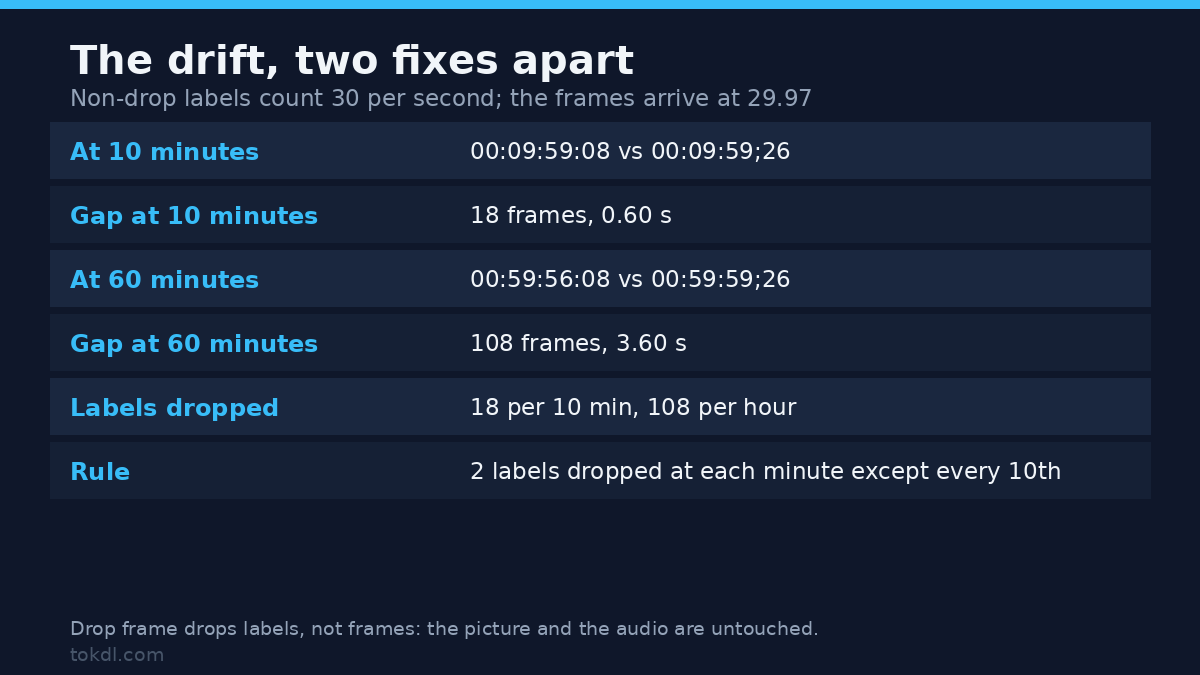
| 10 minutes | 17,978 | 00:09:59:08 | 00:09:59;26 | 18 frames, 0.60 s |
| 60 minutes | 107,888 | 00:59:56:08 | 00:59:59;26 | 108 frames, 3.60 s |
| 6 hours | 647,330 | 05:59:38 | 06:00:00 | 21.6 s |
The two long rows were read off burned pixels. The six-hour row is arithmetic from the same rule, not a render.
Drop frame vs non-drop: the semicolon rule
Drop frame timecode fixes the drift by skipping two labels at the start of every minute, except at minutes divisible by ten. It skips labels, not frames. No picture is thrown away, no audio is cut; the numbering just jumps from 00:00:59;29 to 00:01:00;02. Eighteen labels disappear every ten minutes, which is 108 per hour, which is the 3.6 seconds we measured.
The separator tells you which counting scheme you’re looking at. A colon in the seconds field means non-drop. A semicolon means drop frame, and some tools write it as a period instead. If you see 01:00:12;14 in a note, the sender is working drop frame, and that single character is worth checking before you go hunting for a two-second offset that isn’t there.
Drop frame only exists for the 29.97 family. It’s meaningless at 25, 24 or 50 fps, because those rates count whole frames per second. FFmpeg will tell you that if you ask, but only at warning level, and it still exits 0. On a 25 fps file, -timecode 01:00:00;00 ran through with the message Drop frame is only allowed with multiples of 30000/1001 FPS, wrote nothing at all, and returned a clean exit code. That’s the first place a script can lie to you.
Two ways to add timecode, and they aren’t interchangeable
A track that survives a copy
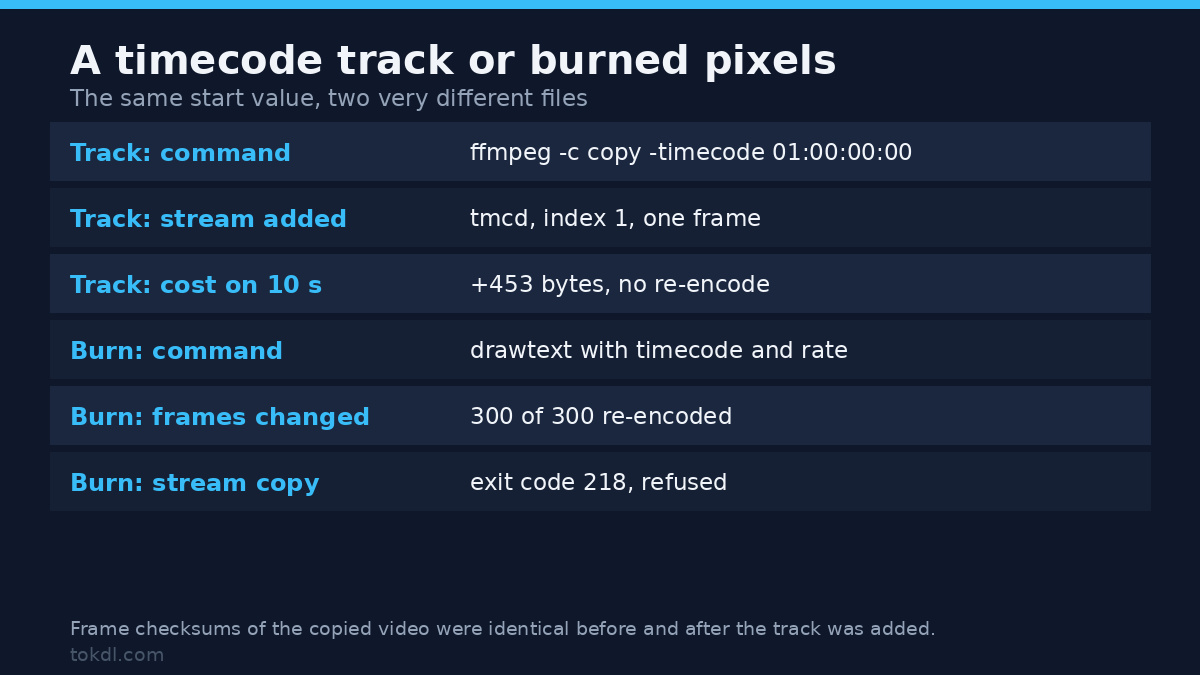
The first way attaches a real timecode track to the file. Nothing in the picture changes. FFmpeg writes a tmcd data stream into an MP4 or MOV, and the video packets are copied untouched:
ffmpeg -i in.mp4 -c copy -timecode 01:00:00:00 out.mp4On a ten-second 640×360 test clip, the video stream’s frame checksums were identical before and after (300 of 300 frames matched), the file grew by 453 bytes, and a second stream appeared: index 1, type data, tag tmcd, one frame, carrying 01:00:00:00. Read it back with:
ffprobe -v error -select_streams d -show_entries stream=codec_tag_string:stream_tags=timecode -of default=nw=1 out.mp4codec_tag_string=tmcd
TAG:timecode=01:00:00:00Two things to know before you rely on that. In an MKV the same command writes a format level TIMECODE tag and no tmcd stream, so a tool that looks for the track finds nothing. The container formats documentation lists which muxers take the option at all. And once a file carries a tmcd stream, a later ffmpeg -i out.mp4 -map 0 -c copy copy.mp4 fails with exit code 234 and Could not find tag for codec none in stream #1. Map the video stream explicitly and the remux goes through. That’s the kind of thing you discover halfway through a delivery, so test the remux once on a short clip before the real one.
Burned into the picture
The second way draws the numbers onto the frames. It’s permanent, every player shows it, and it survives screenshots, streaming and re-compression. It also re-encodes the video, because you’re changing pixels. Adding a filter and asking for a stream copy in the same command fails with exit code 218 and Filtering and streamcopy cannot be used together. The audio can still be copied, and its checksum stays identical.
| Timecode track | Burned-in timecode | |
|---|---|---|
| What changes | one new tmcd stream |
every frame |
| Video re-encoded | no, -c copy |
yes |
| Cost on a 10 s test clip | +453 bytes | a full encode |
| Visible to a viewer | no | yes |
| Survives a re-wrap | usually, verify with ffprobe | always, it’s pixels |
| Right for | review notes, multicam alignment | client previews, archive copies |
The burn-in command, including the escaping that works
FFmpeg parses a filter graph in two passes, and each pass eats one level of escaping. That’s why the obvious command fails. One backslash before each colon gives you exit code 234 and a parse error that points at an option that looks fine. You need two backslashes for each colon, one for each pass.
ffmpeg -i in.mp4 -vf 'drawtext=fontfile=/usr/share/fonts/truetype/dejavu/DejaVuSansMono-Bold.ttf:timecode=00\\:00\\:00\\:00:rate=30000/1001:fontsize=48:fontcolor=white:box=1:boxcolor=black@0.7:boxborderw=10:x=40:y=40' -c:v libx264 -crf 20 -pix_fmt yuv420p -c:a copy out.mp4Keep the single quotes around the filter string and keep both backslashes; the shell strips one level if you drop them. The rate option is what makes the labels count correctly at a fractional frame rate, so write 30000/1001 rather than rounding to 30.
Drop frame changes one character and one escape. The semicolon is a graph separator, so it needs a single backslash, not two:
ffmpeg -i in.mp4 -vf 'drawtext=fontfile=/usr/share/fonts/truetype/dejavu/DejaVuSansMono-Bold.ttf:timecode=01\\:00\\:00\;00:rate=30000/1001:fontsize=48:fontcolor=white:box=1:boxcolor=black@0.7:boxborderw=10:x=40:y=40' -c:v libx264 -crf 20 -pix_fmt yuv420p -c:a copy out.mp4With that line the clip starts at 01:00:00;00 and reads 01:00:05;00 five seconds in. I checked both by pulling a still and reading the digits:
ffmpeg -ss 5 -i out.mp4 -frames:v 1 -update 1 tc_check.pngOne caveat on that check: on FFmpeg 7.1.5 a seek placed before -i is frame accurate, because accurate seek is on by default, so the still you pull is the frame you asked for. Add -noaccurate_seek and it snaps back to the previous keyframe instead, which puts a different number on screen and reads like a burn-in bug when it’s really a seek flag.
If you want a timestamp that isn’t a frame count at all, a wall clock burned into security or dashcam footage, that’s the localtime form of the same filter and it’s a different job. Everything here counts frames at a declared rate, which is what an editor needs when a note says frame 14.
Common mistakes
Burning too early. A burn-in is pixels. Once it’s there, the only way to change it is to re-encode from the original. Burn after the edit, never before.
Expecting the track to be visible. -timecode adds metadata. Players don’t draw it. If the client wants to see numbers, you need the drawtext route.
Writing drop frame with a colon. 01:00:00:00 and 01:00:00;00 look almost the same and mean different counting. A colon tells the reader the file drifts 3.6 seconds per hour.
Assuming drop frame works at any rate. It exists for 29.97, 59.94 and their multiples. At 25 fps the request is accepted with a warning, and nothing is written.
Trusting the frame rate label in a menu. “30p” in a camera menu is often 29.97. Check the file with ffprobe before you convert, because the whole drop-frame question is decided by the real rate.
Confusing timecode with sync. A timecode labels a frame; it doesn’t align two recordings. If audio drifts out of step with picture, the fix is a sync correction, not a timecode. For multi-camera work, the labels are what let you line takes up in the first place, which is why multicam sync depends on them being right.
FAQ
Does burning timecode change the audio? No. With -c:a copy the audio stream came out with an identical MD5 to the source. Only the video is re-encoded.
Why does my burned label start at zero when the source starts at 01:00:00:00? The timecode option sets the label for the first frame of the input, and the filter counts from there. If you trimmed the clip, the label follows the trimmed timeline unless you offset it.
Can I remove a burn-in later? Not cleanly. Cropping it out costs you picture, and a blur or clone is visible in motion. Keep the original.
Do I need drop frame for a 20-minute video? At 20 minutes the gap is 0.72 seconds. If anyone works to frame numbers, yes; if the video is for a general audience, the burn-in is decoration and the choice barely matters.
Does the tmcd track survive editing apps? Premiere, Resolve and Avid read it on import, and most write it on export. Converters that re-wrap the file may drop it silently, so check with ffprobe after any conversion.
The short version
Timecode labels frames, and at 29.97 fps the labels drift from the clock by 3.6 seconds every hour unless you count drop frame. Use -timecode when you want a track that costs 453 bytes and no re-encode, and use drawtext when the numbers have to be visible. In both cases the flag isn’t the proof: set the value, then read the track or the pixels back.
The escaping is the part that stops most people, and it’s mechanical once you know the rule. Colons take two backslashes because two parsers each take one. The semicolon takes one because it’s a graph separator and only the graph parser cares. Write it once, save it as a shell alias, and stop retyping it at 2 a.m.
One last habit worth building: after every delivery, run the probe command above against the file you’re about to send, and confirm the label matches the frame rate you think you’re using. It takes four seconds and it catches the one class of error that no player will ever show you.
If you’re adding captions alongside, the drawtext filter also handles burned-in titles, and the metadata route pairs well with editing MP4 tags in the same copy pass. The FFmpeg documentation for drawtext covers the remaining options.