
Freeze Frame Video: Hold a Moment Without Breaking Sync
A freeze frame looks like the easiest edit in the world: stop the picture, let the moment sit, move on. Then you try the freeze frame on your own file and three things go wrong. The clip ends before the audio does, the frame you held isn’t the one you picked, and the hold reads as a glitch.
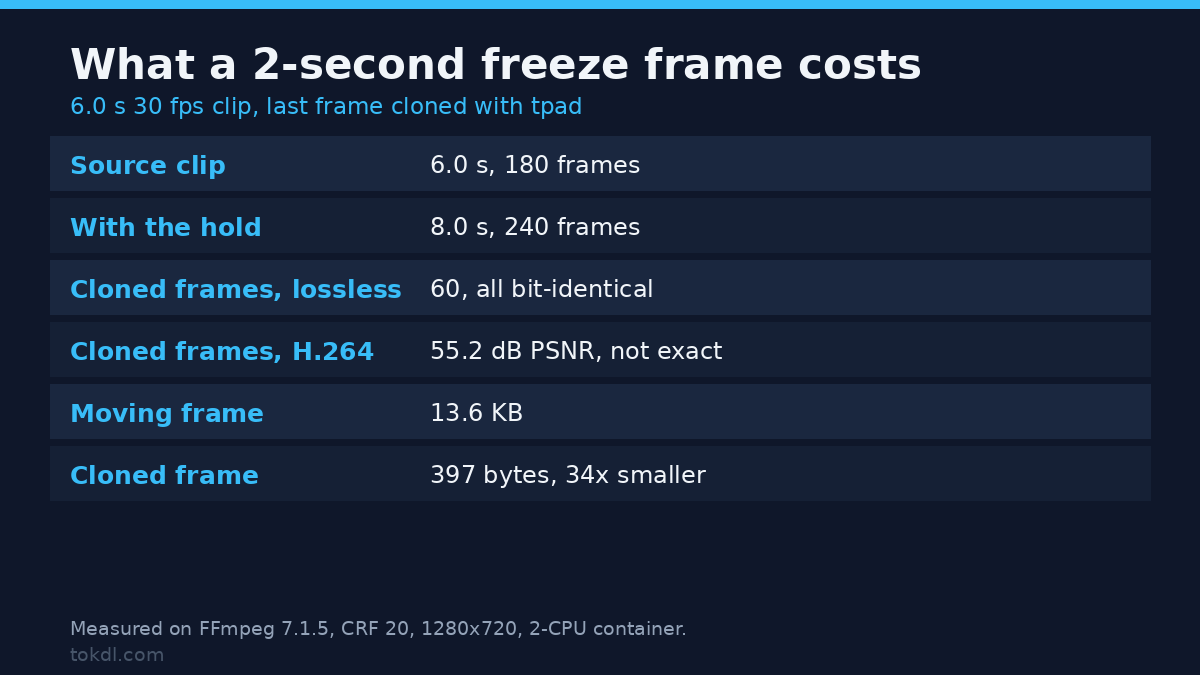
I spent a day measuring this on a 6 second, 30 fps, 1280×720 clip with FFmpeg 7.1.5, on a container limited to 2 CPUs. The numbers explain all three failures and turn a fiddly edit into arithmetic. A freeze frame is a timing problem wearing a picture problem’s clothes. Count the frames you add, keep the audio in step, and the rest is bookkeeping.
What you’ll learn
- How to grab the exact frame, and why a seek can land two frames early.
- Three ways to hold that frame, and the duration and frame count each one produces.
- What happens to the audio under a freeze frame, and how to find a hold in a file somebody else delivered.
What a freeze frame really is
A freeze frame is one decoded picture repeated for a known number of frames. That’s it. The picture doesn’t pause and the player keeps stepping through time exactly as before. You’re adding frames, not removing time, which is why the clip gets longer instead of staying the same length.
That definition settles the usual confusion. Hold a frame for 2 seconds at 30 fps and you need 60 frames of that picture. Add 60 frames while the audio still runs 6 seconds and you’ve got 8 seconds of picture with 6 seconds of sound, and every player will show a hole at the end. The freeze frame isn’t broken. The timeline is.
It settles the second confusion too: which frame. Hold the wrong one and the pause lands half a beat after the action, which viewers read as a mistake.
Method 1: pull the exact frame
Start by taking the still you want. Seeking before the input is fast, and on FFmpeg 7.1.5 it’s accurate by default, so you get the frame at the timestamp you asked for.
ffmpeg -ss 3.000 -i clip.mp4 -frames:v 1 -update 1 still.pngI checked that rather than trusting it. Frame 90 of a 30 fps clip sits at exactly 3.000 seconds, so I extracted it twice, once with the seek above and once by frame number with select='eq(n,90)', then hashed the raw YUV planes of both. The hashes matched, and frames 89 and 91 did not. Seeking after the input gave the same bytes, so either order works here.
Two caveats. Add -noaccurate_seek and the same command returned frame 88, two frames early, because the decoder starts at the previous keyframe. And for a frame number rather than a timestamp, select is the only way to ask.
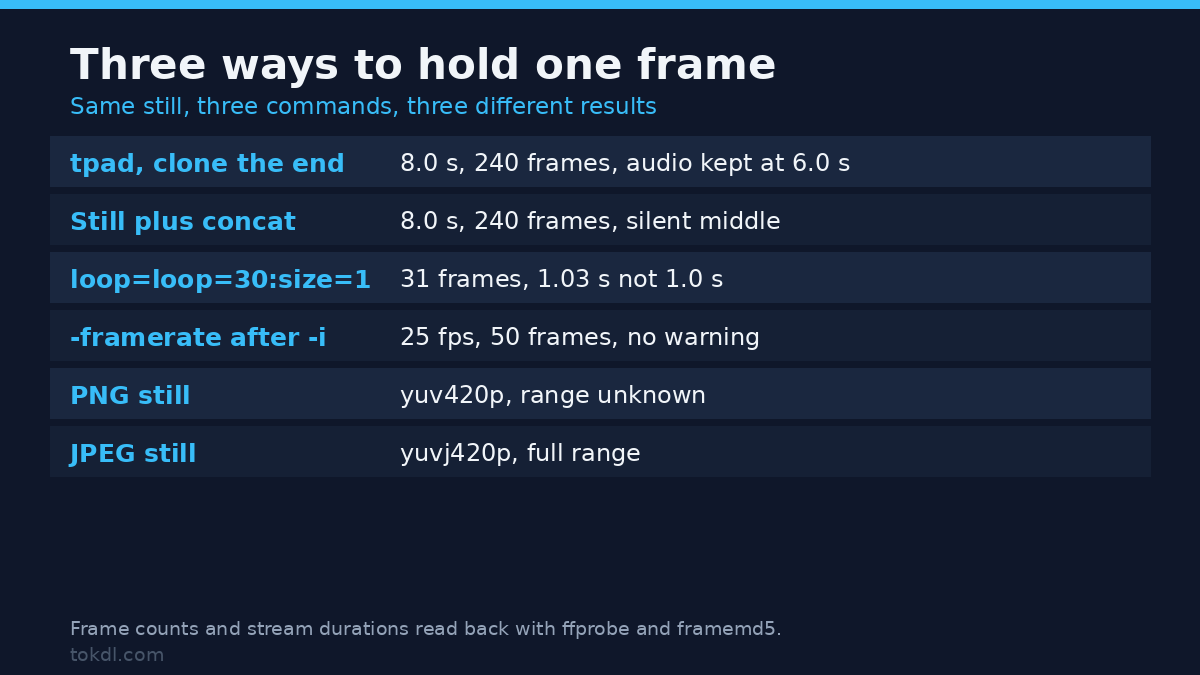
Prefer PNG for the still. A JPEG is full range by design, and when I built a clip from a JPEG still and forced -pix_fmt yuv420p, ffprobe still reported yuvj420p with color_range=pc. The PNG version came back as yuv420p with the range unknown. Same command, different colour pipeline, visible only in ffprobe.
Method 2: clone the last frame with tpad
When the freeze frame belongs at the end of a clip, the cleanest tool is tpad. It clones the final frame for as long as you ask, inside the filter chain, so you don’t need a temporary file.
ffmpeg -i clip.mp4 -vf "tpad=stop_mode=clone:stop_duration=2" -af "apad=pad_dur=2" -c:v libx264 -crf 20 -c:a aac hold_end.mp4Measured: 6.0 seconds and 180 frames in, 8.0 seconds and 240 frames out, so the freeze frame added exactly 60 frames. The audio, padded with apad, came back at 8.016 seconds, the extra 16 ms being AAC frame granularity rather than a mistake.
Is the clone exact? I encoded the same graph losslessly with FFV1 and counted hashes: 240 frames decode, 180 unique, and the last 61 identical, which is the final real frame plus its 60 copies. In H.264 the answer is subtler. Frames 180 and 239 scored 55.2 dB PSNR against each other, which looks frozen without being bit-exact, while a genuinely different pair 60 frames apart scored 16.0 dB. A lossy encoder re-quantises the copies slightly. You’ll never see it on screen, and it’s why freeze detection uses a tolerance instead of a checksum.
The hold is nearly free to store. Moving frames averaged 13,604 bytes; the clones averaged 397, a factor of 34, and all 60 together cost about 23 KB. A freeze frame is mostly a skip macroblock, which is why a 2 second hold barely moves the file size.
Method 3: hold a frame in the middle
For a freeze frame in the middle of a clip, build it as its own piece and join three parts. First turn the still into a short clip. The -framerate flag has to come before -i, because after the input it’s accepted and ignored: I put it after -i and got 25 fps, 50 frames, and no warning at all.
ffmpeg -loop 1 -framerate 30 -t 2 -i still.png -f lavfi -t 2 -i anullsrc=r=48000:cl=mono -c:v libx264 -crf 20 -c:a aac -shortest hold.mp4That gives precisely 2.000 seconds and 60 frames, with a silent audio track so the join has something to work with. Then cut around the hold and concatenate:
ffmpeg -i clip.mp4 -t 3 -c:v libx264 -crf 20 -c:a aac part1.mp4
ffmpeg -i clip.mp4 -ss 3 -c:v libx264 -crf 20 -c:a aac part3.mp4
echo "file 'part1.mp4'" > list.txt
echo "file 'hold.mp4'" >> list.txt
echo "file 'part3.mp4'" >> list.txt
ffmpeg -f concat -safe 0 -i list.txt -c copy joined.mp4
The joined file measured 8.0 seconds and 240 frames, with audio at 8.037 seconds. Cut the parts with -c copy instead and the first frame of each cut snaps back to the previous keyframe. Re-encoding two short pieces keeps the join frame accurate.
Method 4: repeat one frame with loop
If the hold happens inside a longer graph, loop does the job without leaving the command line. Its loop option counts repeats, not total frames, and that off-by-one is worth memorising.
ffmpeg -i clip.mp4 -vf "select='eq(n,90)',loop=loop=30:size=1:start=0" -c:v libx264 -crf 20 looped.mp4I asked for 30 repeats at 30 fps and expected 30 frames. The file measured 31 frames and 1.033 seconds, so loop=30 means the original plus 30 copies. For a clean 1 second hold, ask for 29.
The audio under the freeze frame
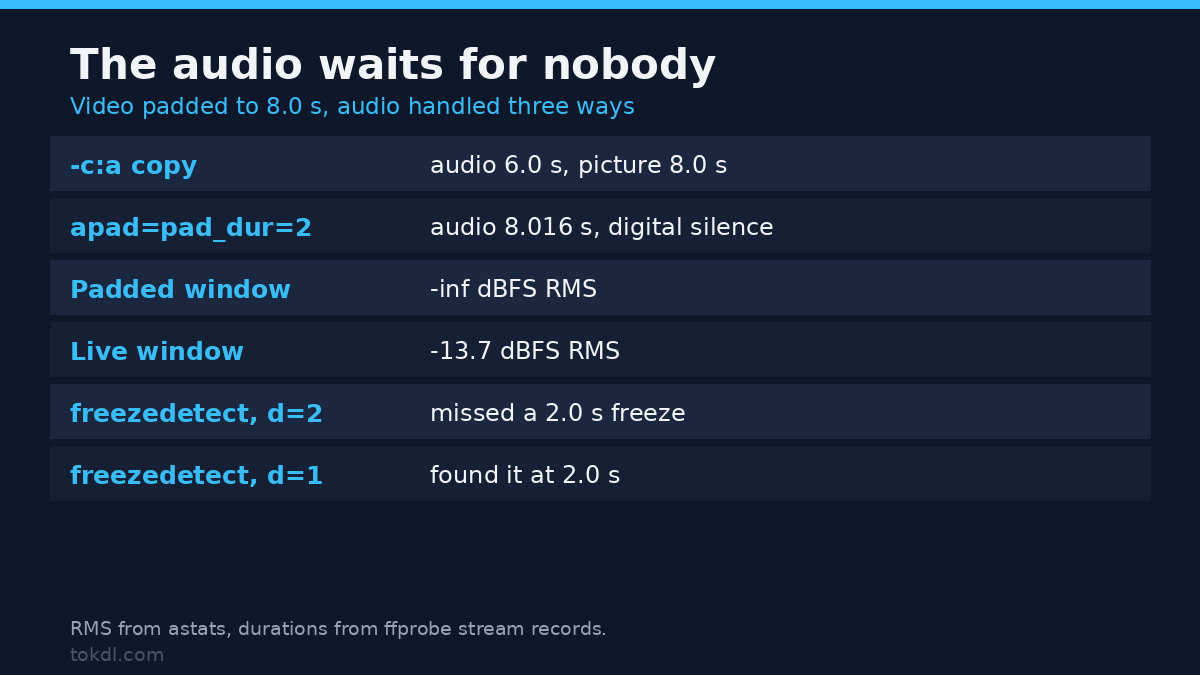
This is where most freeze frame tutorials stop, and it’s the part viewers notice. Padding the picture does nothing to the sound. With -c:a copy on the same graph, ffprobe reported a video stream of 8.0 seconds and an audio stream of 6.0 seconds. Some players stop at 6, some show 2 seconds of black, and the file looks corrupt when it isn’t.
Three honest options for the audio under a freeze frame, depending on the moment you’re holding.
| What you want | Filter | Measured result |
|---|---|---|
| Silence under the hold | apad=pad_dur=2 |
audio 8.016 s, RMS -inf dBFS in the padded window |
| Ambience continues | no pad, original audio | audio 6.0 s against 8.0 s of picture, so shorten the hold |
| Room tone, no jump | append 2 s of room tone | continuous noise floor, no digital silence |
That silence is measurable and audible. A 1.5 second window inside the padded section read -inf dBFS RMS, against -13.7 dBFS for a live window earlier in the same file. A hold followed by true silence reads as a dropout. If the freeze frame is a dramatic pause, that’s what you want. If it’s a comic beat over room tone, cut two seconds of room tone you already have and append it instead.
Which method to use
| Method | Duration and frames | Audio | Use it when |
|---|---|---|---|
tpad |
8.0 s, 240 frames | needs apad or a shorter hold |
the freeze frame is the last shot |
| still plus concat | 8.0 s, 240 frames | silent clip built alongside | the hold is mid-clip |
loop filter |
31 frames from loop=30 |
untouched, so watch the tail | it sits inside a longer graph |
All three produced the same picture on my fixture. They differ in where the extra time comes from and what happens to the sound.
What goes wrong, and why
The hold zooms, and it isn’t a freeze any more
A moving freeze is a nice look, but it stops being a freeze the moment the pixels change. I tried the obvious version, zoompan=z='zoom+0.0015':d=1, over the padded clip. Under d=1 the zoom doesn’t accumulate, so every frame got the same value and the tail stayed frozen. Freeze detection found it immediately. Driving the zoom from the output frame number instead, z='if(gte(on,180),1+0.25*(on-180)/60,1)', gave 60 distinct frames in the tail and the detector went quiet. If you want movement inside the hold, drive it from on.
The hold lands on the wrong frame
Two causes, both boring. A JPEG still carries full range colour, so the held section shifts slightly against the footage around it. And a stream copy cut starts at the previous keyframe, which on a 2 second GOP can be 2 seconds early. Extract the still by timestamp, then verify it against a frame number before you build a freeze frame on top of it.
The clip is 2 seconds longer and the audio isn’t
Compare the two stream durations, not the container duration. ffprobe -show_entries stream=codec_type,duration prints both, and the mismatch jumps out.
Check a freeze frame you didn’t create
The same numbers work in reverse. freezedetect walks a delivered file and reports where a hold begins, which is how you find a dropped recording or confirm a freeze frame survived a transcode.
ffmpeg -i hold_end.mp4 -vf "freezedetect=n=-60dB:d=1" -an -f null -Two things about it aren’t in the manual. It printed freeze_start: 5.966667 for a hold that starts at 6.000, because it dates the freeze from the last moving frame rather than the first copy. And on this build it prints the start and nothing else: no end, no duration, at info, verbose or debug level. Compute the end yourself by finding the next frame that differs.
The threshold matters more than it looks. A freeze that runs exactly 2.0 seconds was missed at d=2 and found at d=1, so set the minimum below the shortest hold you care about, or the freeze frame stays invisible. Going the other way is worse: at n=-30dB the detector reported three freezes, two of them in sections that were moving normally. A noisy frozen frame isn’t detected at all, because the comparison is a tolerance, not an equality test.
FAQ
How long should a freeze frame last?
Long enough to read, short enough to feel intentional. On a 30 fps timeline, 15 to 30 frames covers a comic beat, and 45 to 60 covers a title or a score reveal. Past 2 seconds you invite the viewer to look for what changed, and nothing does.
Can I freeze a frame without re-encoding?
Not the hold itself. A freeze frame changes the frame count, so the video stream has to be encoded again. You can copy the audio if its length already matches the new picture, which is rare.
Why does my freeze frame look softer than the footage?
Usually because the still was saved as a JPEG and encoded twice. Save it as PNG and the hold keeps the detail it came from.
Conclusion
A freeze frame is arithmetic plus one decision. Pull the exact frame, decide how many frames it should last, then handle the audio as a separate problem, because padding the picture never touches it. The numbers here are small and repeatable: 60 frames for 2 seconds at 30 fps, 397 bytes per clone, and a padded window that reads as pure silence.
If you remember one thing, remember the last one. A freeze frame that ends in digital silence sounds like a dropout, and a hold that ends with room tone sounds like a choice. For clean stills, see how to extract frames from a video, and for the opposite move, looping a video repeats a whole section rather than one frame. The docs for tpad and freezedetect are short and worth a read. When a hold lands on the wrong beat, check the keyframe interval before blaming the editor, and use ffprobe to read the real stream durations.