
How to Add Chapters to a Video: YouTube Timestamps That Work (2026)
YouTube won’t show chapters unless your list has at least three entries, each one at least ten seconds long, and the first starts at 0:00. Miss any of those three conditions and the progress bar stays a plain grey line with no segments on it.
That hard rule is why how to add chapters to a video is mostly a formatting question rather than an editing one. Nothing gets re-encoded and nothing gets cut. You write timecodes in the right place and the platform does the rest.
There are two honest places to put them. One is the description field on the platform, where only the uploader can write. The other is inside the file itself, as chapter metadata that travels with the MP4 or MKV wherever it’s played.
The Direct Answer: What Chapters Are
A chapter is a labelled time marker. On the platform it lives in the video description. In a file it lives in a metadata track that sits alongside the video and audio streams.
Chapters aren’t captions. One helps a viewer jump around the timeline; the other makes the audio readable, and the free caption tools guide covers that separate job.
Writing chapters on the platform takes a couple of minutes and works on any upload you own. The file route needs FFmpeg, and it matters when the video will be played somewhere that ignores platform features entirely: a media server, a USB stick, a set-top box.
| Requirement | Value |
|---|---|
| Minimum number of chapters | 3 |
| First chapter must start at | 0:00 |
| Minimum length of each chapter | 10 seconds |
| Where they’re written | The video description |
| Who can write them | The uploader only |
Nothing in that table involves touching the video file. The timestamps are text the platform parses when you save the description.
Before You Start: Timecodes and a Player
You need the video already uploaded, or the file on disk, plus a way to read exact timecodes. Don’t estimate chapter points from the scrollbar. A chapter that opens four seconds early drops the viewer mid-sentence, which is worse than having no chapter at all.
Open the clip in a player that shows the current time to the second. VLC, mpv, QuickTime and the platform’s own watch page all do. Pause at the moment a topic changes, note the timecode, move on. For a one-hour recording this costs about ten minutes.
If you’re working on the file itself, install FFmpeg first and confirm it responds before going further. Paste this into a terminal and check that a version line comes back:
ffmpeg -versionIf the shell answers that the command wasn’t found, install it through your package manager or from the official FFmpeg site. The everyday FFmpeg commands reference covers installation and the flags you’ll meet below, if you would rather keep it in one tab.
How to Add Chapters to a Video With YouTube Timestamps
This is the route to use for anything you publish to a platform, because it needs no extra software and no re-upload. It’s also the faster of the two.
Open the video in YouTube Studio and edit the description. Type each chapter on its own line in the form 0:00 Label, using minutes and seconds for clips under an hour and hours, minutes and seconds for anything longer. The first line must be 0:00, and you need at least three lines before the progress bar will segment.
A description written this way ends up looking like the block below. The labels are yours to choose; the timecodes carry the structure.
0:00 Intro
0:45 What chapters actually are
2:10 Finding your timecodes
6:32 Writing the file metadata
11:05 Troubleshooting
Save the description. Chapters usually appear within a few minutes, though a longer video can take a re-index before the segments show. Keep the labels short enough to read at a glance on a phone; a label that wraps to three lines in the chapter list defeats the point.
One setting deserves a look while you’re in Studio: automatic chapters. The platform can generate its own chapter list from speech pauses on some uploads. If you’ve written your own, turn the automatic option off, or you’ll end up arguing with a second list you didn’t write.
How to Add Chapters to a Video Inside the File (FFmpeg)
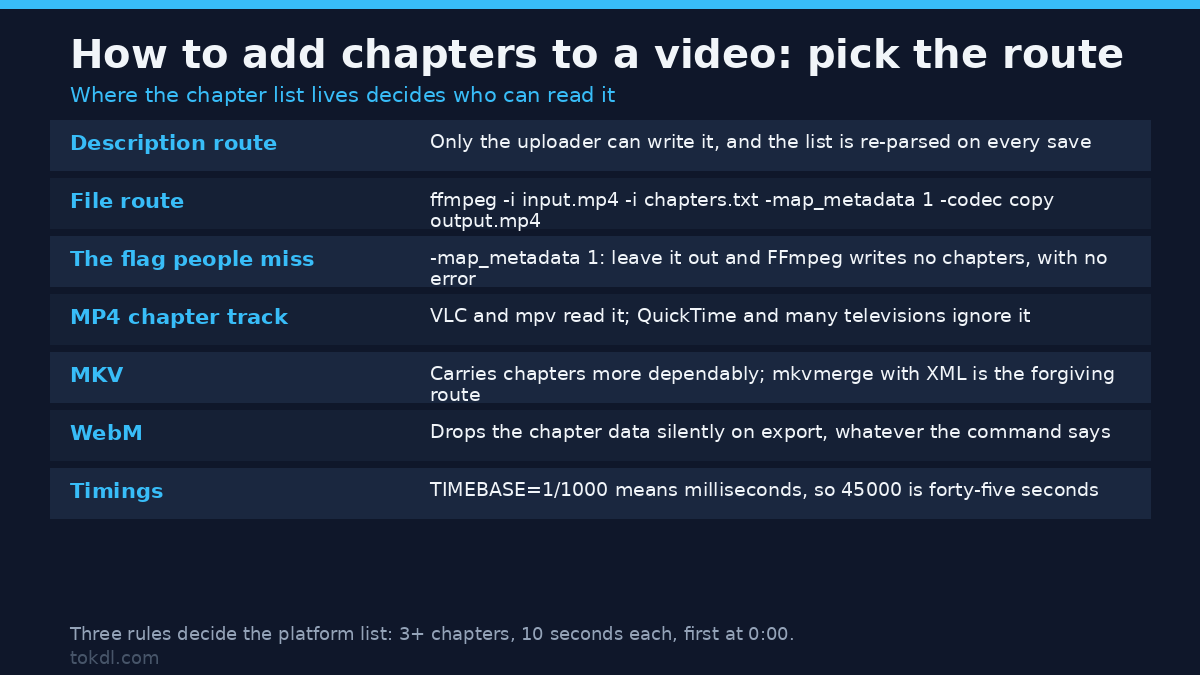
File-level chapters survive outside the platform. Write a plain text metadata file first, using milliseconds for the timebase:
;FFMETADATA1
[CHAPTER]
TIMEBASE=1/1000
START=0
END=45000
title=Intro

[CHAPTER]
TIMEBASE=1/1000
START=45000
END=130000
title=Finding your timecodes
With TIMEBASE=1/1000 the numbers are milliseconds, so 45000 is forty-five seconds. Each END should match the next START; a gap or an overlap is either ignored or handled inconsistently, depending on the player.
Then mux the file with stream copy, so the video and audio streams are moved rather than re-encoded. The command itself is short:
ffmpeg -i input.mp4 -i chapters.txt -map_metadata 1 -codec copy output.mp4The -map_metadata 1 flag is the part people miss. Without it FFmpeg writes an output file with no chapters and reports no error, because it has simply copied metadata from the first input instead of the second. This runs in seconds on a large file, since nothing is being decoded.
Container choice decides who can read the result. MP4 stores chapters in an optional text track that VLC and mpv read; QuickTime and many televisions ignore it. MKV carries chapters more dependably across players. WebM doesn’t support them, and an FFmpeg export to WebM drops the chapter data silently.
For an MKV you can also use mkvmerge with an XML chapter file. That route is the more forgiving one when the timings come from a spreadsheet.
What Chapter Tools Actually Do, and Where They Stop
Every editing application lets you drop markers on a timeline. Whether those markers survive the export depends on a setting most people never open.
Resolve writes them when you enable the right option on the render page. Premiere keeps them for some output containers and discards them for others. A marker that exists in your project file and nowhere else helps nobody.
Tools that guess chapter points from silence or scene changes are a first pass, not an answer. They tend to place a marker wherever the audio dips, which is often halfway through a sentence. Treat the suggestion as a rough draft and retime it by hand.
The limit that matters most is ownership. Timestamps are labels on someone’s work, and labels don’t move ownership of the work. Chapter text typed under a video you didn’t upload is a comment; it isn’t a feature, it isn’t shown by the player, and it disappears if the comment does.
Rights and Responsible Use
If the video is yours, chapter it as much as you like. The timestamps, the file metadata, the labels: all of it describes your own material, and none of it needs anyone’s permission.
If the video belongs to another creator, the description route is closed to you by design, because the platform only parses chapters written by the uploader. Adding a helpful timestamp in a comment is fine and often welcome. Re-uploading someone else’s video with cleaner chapter markers isn’t, and a timecode isn’t a licence.
Keeping your own copy for personal reference sits in a different place from republishing or commercial reuse, and writing chapter metadata into a file doesn’t change which of those you’re doing. Saving a video grants no rights to it. The rules that govern what you may do with someone else’s upload are the ones in the platform’s terms of service and in the official chapters help page.
Troubleshooting: Chapters That Don’t Appear
Nothing happens after you save. Almost always the list failed one of the three rules: fewer than three chapters, a first line that isn’t 0:00, or a chapter shorter than ten seconds. Remove the offending line and save again.
The first chapter works, the second is skipped. A chapter shorter than ten seconds gets discarded, and the one after it is renumbered. Check the gap between each pair of timecodes and stretch anything under ten seconds.
Chapters vanished after a later edit. The description is re-parsed every time you save it. A stray blank line inside the list, a full stop on a line of its own, or a bullet character pasted from a notes app will break the parse. Type the list in plain text.
VLC shows chapters, the television doesn’t. MP4 chapter tracks are an optional feature, and plenty of hardware players skip them. Remuxing the file to MKV, with a stream copy, usually brings the chapter list back on the devices that ignored it.
The FFmpeg output has no chapters at all. The -map_metadata 1 flag was left out, the chapter file has a typo in a section header, or the output container doesn’t support chapters. Check the container first: WebM will always drop them.
Chapters disappeared after trimming. Some trimmers re-encode and rebuild the container from scratch, leaving the chapter track behind. Cut with a stream copy instead, so the original tracks survive, then re-add the chapter file if the markers shifted. The trimming guide shows the stream copy method.
Frequently Asked Questions
How to add chapters to a video for free?
Both routes are free. The description method costs nothing beyond an upload, and the file method uses FFmpeg, which is open source and has no paid tier.
How many chapters does YouTube require?
Three is the minimum. Two timestamps won’t trigger the chapter display, no matter how well spaced they are.
Can I add chapters to someone else’s video?
No. Only the uploader’s own description is parsed, so comments and third-party edits have no effect on the chapter list.
Do chapters work on Shorts?
No. Chapters aren’t available on Shorts, and timestamp lines in a Short’s description are ignored.
Do chapters improve watch time?
Usually they help retention, because a viewer hunting for one section can jump there instead of scrubbing or leaving. The effect depends on the video: chapters matter most on long recordings with distinct sections.
Do chapters show up in embedded players?
Usually yes for chapters written in the description, since the embed inherits them from the platform. Chapters written into the file follow whichever player opens it, and many embedded players ignore them.
What is the difference between chapters and a timestamp in a comment?
A chapter is part of the player interface and can only be written by the uploader. A timestamp in a comment is plain text, useful to readers, and invisible to the player.
Which Method Should You Use?
If the video only ever lives on one platform, use the description. It takes two minutes, it needs no software, and it’s the only route the player reads. Everything about how to add chapters to a video on a hosted platform comes down to getting three lines of text right.
Reach for FFmpeg when the file leaves the platform: a home media server, a drive handed to a client, an archive you plan to keep for years. Chapters in the container outlive the upload.
Do both if the video is going to be published and distributed. The description list drives the player, the metadata file keeps the same structure for anyone who plays the download. The two lists should use identical timecodes, and it’s worth building them in the same sitting while the timings are still fresh in your head.
And if the clip is nine minutes long with one continuous subject, skip the whole exercise. Chapters exist to separate things that are genuinely separate. Used on a video that doesn’t need them, they add clutter and change nothing.