
Image Sequence to Video: Turn Numbered Frames Into a Clip (2026)
You render 48 frames out of Blender, or export a PNG sequence from After Effects, and you want a two second clip. You run one FFmpeg line, and the file comes back at 1.92 seconds. Nothing errored. Nothing warned you. The frames were all there, the encoder did its job, and the clip is still wrong because the image sequence was read at a frame rate you never chose.
I hit that exact mismatch this week while testing an image sequence on this machine, and it took six encodes to see what happened. The same trap has a second half: one missing file stops the read at that frame, and FFmpeg still exits 0 while writing a clip that ends early. If your image sequence came out short, silent or fast, the cause is usually one of those two things.
What you’ll learn
- Which flag sets the clock of an image sequence, and where it sits on the command line.
- What the default 25 fps does to your timing, measured on 48 frames.
- How to survive a gap in the numbering and names that sort like text.
- How to mix a title card into the same image sequence, and what it costs.
One command, and the flag that has to come first
Here’s the line that produced an exact two second clip from 48 PNG frames on FFmpeg 7.1.5:
ffmpeg -framerate 24 -i frame_%04d.png -c:v libx264 -crf 18 -pix_fmt yuv420p clip.mp4Three parts matter. -framerate 24 goes before -i, because it belongs to the input side: it tells the image2 demuxer how long each still is held. frame_%04d.png lets FFmpeg count through frame_0001.png to frame_0048.png without listing every file. -pix_fmt yuv420p keeps the output playable in browsers, since the PNG source is RGB and H.264 wants 4:2:0.
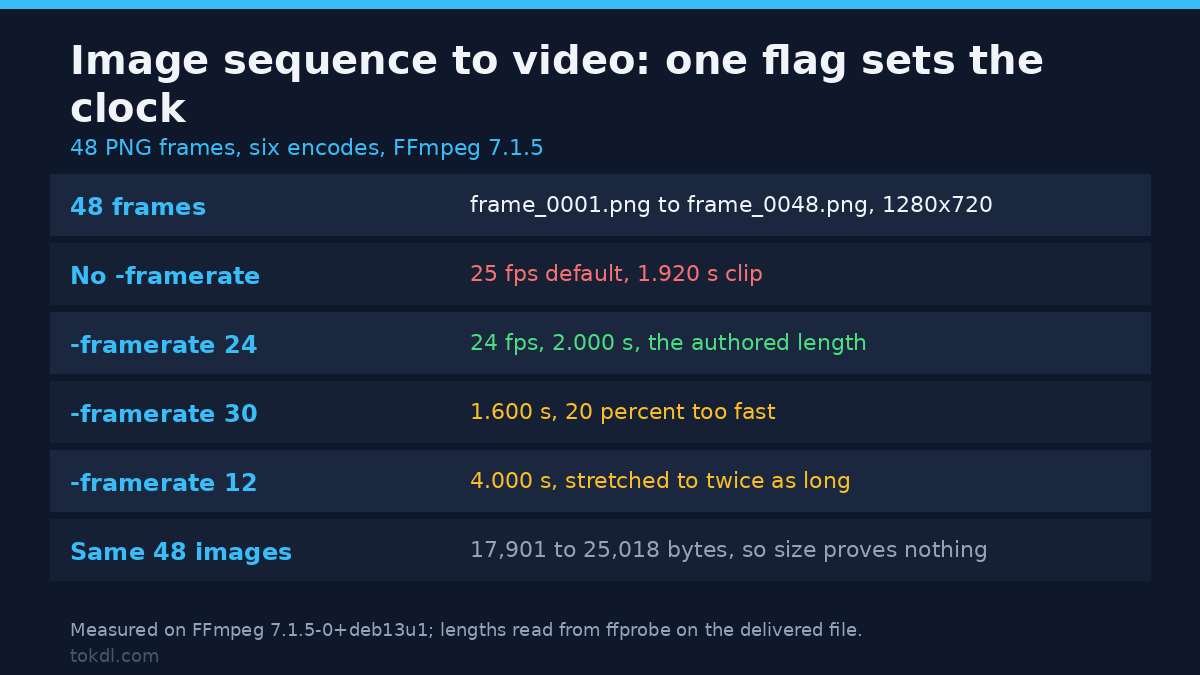
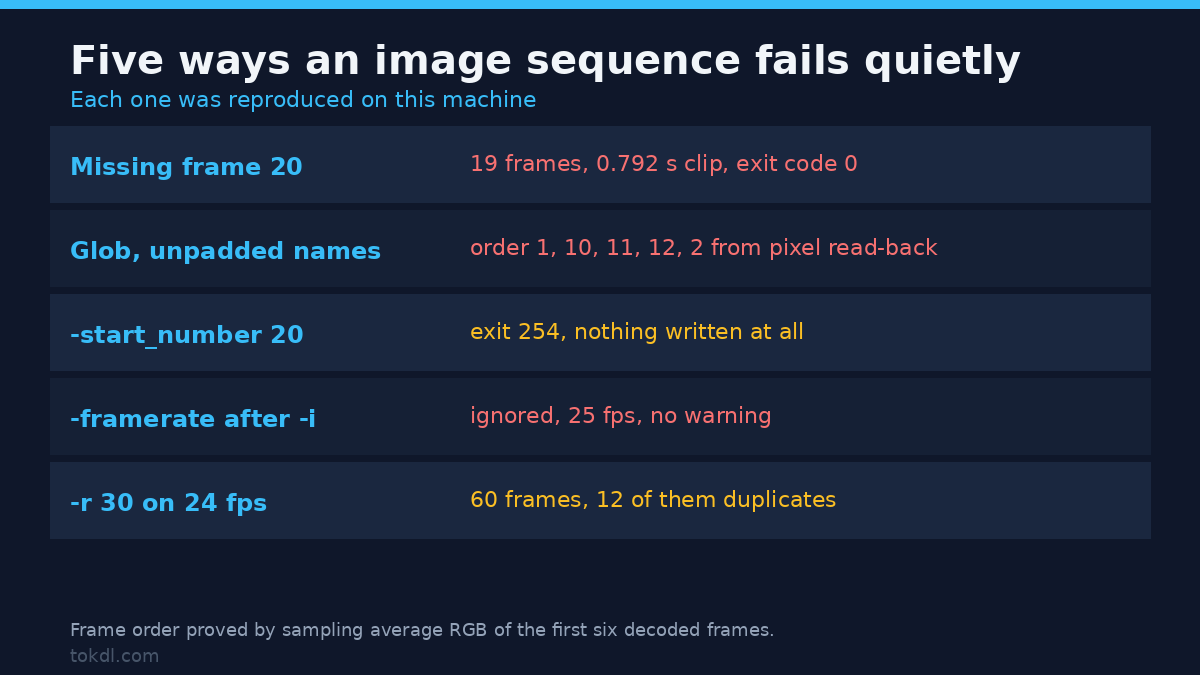
Move that flag after the input and the image sequence falls back to 25 fps. I tested it, and the same 48 frames came out at 1.920 seconds. Worse, FFmpeg printed no warning at all, not even at -v warning. The flag looks accepted and does nothing.
What the 25 fps default does to your timing
The image2 demuxer assumes 25 frames per second when you don’t say otherwise. That’s a European broadcast rate, and it’s a sensible default for exactly nobody exporting from an animation tool. The table below is 48 frames of the same image sequence encoded six ways on this container.
| Input frame rate | Frames read | Clip length | File size |
|---|---|---|---|
| none (default) | 48 | 1.920 s | 21,588 B |
-framerate 12 |
48 | 4.000 s | 25,018 B |
-framerate 24 |
48 | 2.000 s | 21,770 B |
-framerate 24000/1001 |
48 | 2.002 s | 21,769 B |
-framerate 30 |
48 | 1.600 s | 20,838 B |
-framerate 60 |
48 | 0.800 s | 17,901 B |
Every row holds the same 48 images. Only the clock changes, and the length follows it exactly: 48 divided by the rate. At 30 fps your two second animation plays in 1.6 seconds, 20 percent fast, and at 12 fps it stretches to four. The size column moves too, so a file that looks plausible in Explorer says nothing about whether the image sequence was read correctly. Check the duration, not the bytes.
For 23.976 material, write the rate as a fraction. -framerate 24000/1001 gave 2.002 seconds, matching 48 frames at that rate to the millisecond, while a rounded 23.98 drifts.
-framerate sets the clock, -r resamples the frames
These two flags get used as if they were interchangeable, and they aren’t. -framerate says how much time each input still occupies. -r on the output asks for a different number of frames per second, so the encoder has to invent or drop frames.
I encoded the 48 frame image sequence at 24 fps with -r 30 on the output and counted the decoded frames in a lossless copy so the check couldn’t be fooled by compression. The clip held 60 frames, of which 48 were unique and 12 were duplicates. That’s one duplicated frame in five. The length stayed at exactly 2.000 seconds, and the file grew by 52 bytes against the same encode without -r. Duplicated frames are nearly free to store, so the cost of a wrong -r shows up as judder, not as size.
My rule after this: set -framerate to the rate the animation was authored at, and leave -r off unless you’ve got a delivery spec that demands something else. If you do need the conversion, do it after the clip exists, where you can see the result.
Numbering is the half of the job that fails quietly
An image sequence is a numbered set of files, and FFmpeg reads it as a count, not as a folder listing. Three numbering problems account for most of the broken exports I’ve seen.
A gap stops the read and still exits 0
I deleted frame_0020.png from a 48 frame image sequence and ran the same command. FFmpeg printed Could not open file : frame_0020.png and then Error during demuxing: Input/output error. The exit code was 0. The output file existed and played, and it held 19 frames and 0.792 seconds.
So a 48 frame image sequence came out as a three quarter second clip, with a success code and an error message buried in the scroll. If you script this, compare the frame count you expect against ffprobe -count_frames, because the exit code won’t tell you.
A start number that isn’t 1
Sequences that begin at f_01.png read fine without help on this build, so a start number of 1 is the one you don’t have to declare. Ask for a start number that doesn’t exist and it fails hard: -start_number 20 against a 12 frame sequence returned exit code 254 with
Could find no file with path 'seq2/f_%02d.png' and index in the range 20-24That one is the good failure. It stops, names the range it searched, and writes nothing, which is what you want from a tool holding your render.
Names that sort like text
Now the trap that produces a clip that plays perfectly and is still wrong. If your files are named frame_1.png through frame_12.png, with no zero padding, and you read them with -pattern_type glob -i 'frame_*.png', the glob sorts them alphabetically. I built twelve frames as graduated greys and read the average pixel value of the first six frames of the output: 16, 160, 176, 192, 30, 47. Frame 10 came second.
The same twelve files read with -i frame_%d.png came out 16, 30, 47, 64, 79, 95, which is frame order. Two fixes, one habit: pad the numbers to a fixed width, or use the pattern form and never a glob on unpadded names. If you can’t rename, check the first second of the output, because nothing in the pipeline will flag it.
Mixing a title card into the image sequence
A title held for two seconds plus 24 frames at 24 fps isn’t one image sequence, so a single pattern can’t express it. The concat demuxer can, because each entry carries its own duration:
file 'title.png'
duration 2.0
file 'f001.png'
duration 0.041667
Building that list for one title card and 24 frames produced 26 frames in 3.040 seconds, and the container reported an average rate of 26/5. In plain terms, the clip is variable frame rate: the title sits for two seconds, then frames tick by at 24 fps. That’s correct, and it’s also why some editors re-time the file on import. If you need constant frame rate, encode the title as its own clip and join the two, which is the approach in converting a variable frame rate clip to constant frame rate.
The colour and size traps in the same command
Three more defects travel with the image sequence and none of them raise an error.
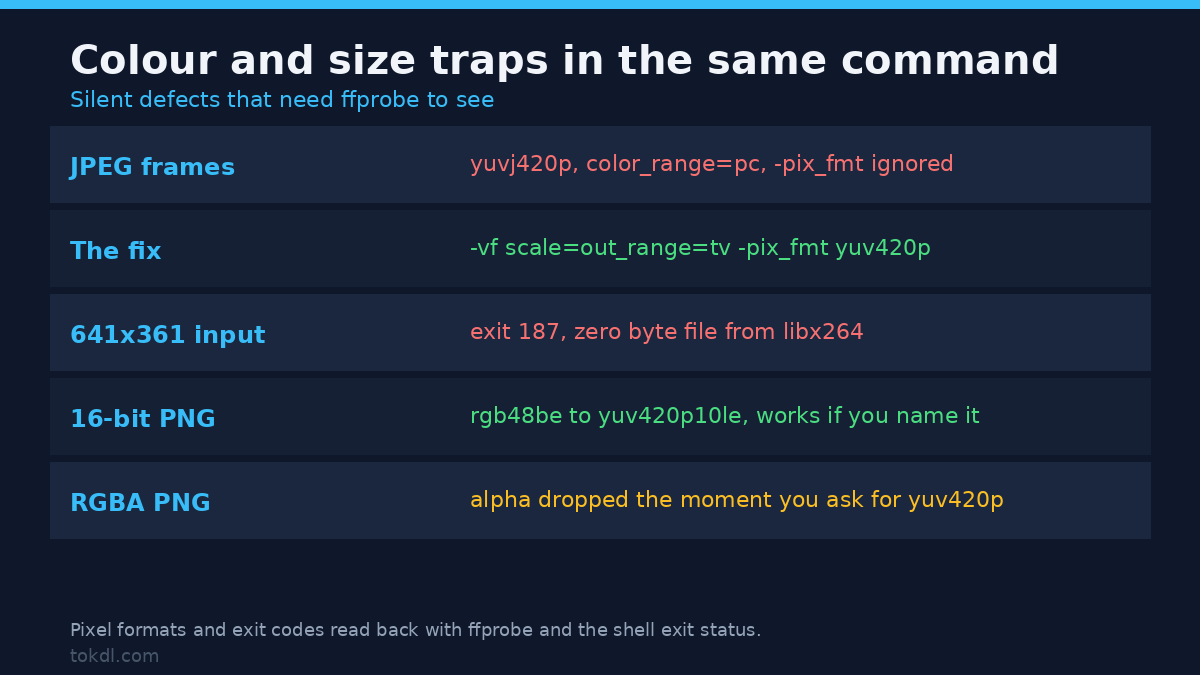
JPEG frames ship full range. A JPEG decodes as yuvj420p, and passing -pix_fmt yuv420p didn’t change the delivered file: it still probed as yuvj420p with color_range=pc. Same result with -vf format=yuv420p. The combination that worked was -vf scale=out_range=tv -pix_fmt yuv420p, which delivered yuv420p with color_range=tv. If your stills are JPEGs and you care about range, drive it with the scale filter and keep the pix_fmt flag.
Odd dimensions fail at the encoder. A 641×361 PNG went through the sequence path and came back with exit code 187 and a zero byte file, because libx264 wants even dimensions for 4:2:0. Scaling to 640×360 in the same command fixed it. Check your render resolution before you queue a long export.
Alpha disappears without a word. A transparent PNG reads as rgba, and the moment you ask for yuv420p the alpha channel is gone from the delivered file. Transparency needs a codec that carries it, which is a different delivery decision than this article covers.
Bit depth is the friendly exception. A 16 bit PNG read as rgb48be and encoded cleanly to yuv420p10le, so a 10 bit image sequence works as long as you name the format.
Which method to use
| Method | Use when | What breaks |
|---|---|---|
-i frame_%04d.png |
Files are padded and start at a known number | Any gap truncates at that frame, exit code 0 |
-pattern_type glob |
Names are messy but all in one folder | Alphabetical order puts frame_10 before frame_2 |
-f concat with durations |
Variable holds, title cards, mixed lengths | Output is variable frame rate; some editors re-time it |
-f image2pipe |
Frames arrive from another program | Pipe closes early on a crash and reads as a short clip |
Mistakes I’d fix before the next export
- Leaving
-framerateout and accepting the 25 fps default. Your 48 frame image sequence becomes 1.92 seconds. - Putting
-framerateafter-i. It’s ignored with no warning, so the command looks right and the timing is still wrong. - Trusting the exit code. A missing frame returns 0 and writes a short clip.
- Using a glob on unpadded names. You get a clip in alphabetical order and nothing complains.
- Assuming
-pix_fmt yuv420pfixes JPEG range. It didn’t here; the scale filter without_range=tvdid. - Exporting at an odd resolution, then queueing a batch that writes zero byte files at exit code 187.
Questions I get asked
Why did my image sequence come out too fast?
Because the input rate was higher than the rate the frames were authored at. 48 frames at 30 fps give 1.6 seconds, and the same 48 at 24 fps give 2. Divide your frame count by the rate in the command and compare.
Can I play an image sequence at a different speed without re-rendering?
Yes, and -framerate is the cheap way, since it changes the clock without touching a pixel. Re-encoding is only needed if you change codec, resolution or quality.
What frame rate should an image sequence use?
Whatever the animation was authored at. A 24 fps render played at 24 fps is the only combination that holds its intended timing, and 23.976 material needs the fraction form.
Does file order matter if the numbers are sequential?
With the pattern form, no, FFmpeg counts. With a glob, yes, because the shell sorts names as text. That difference explains most “my animation is scrambled” reports.
Wrap-up
An image sequence is simple until the clock and the numbering disagree with what you intended, and both failures happen without an error you’d notice. Set -framerate before the input to the rate you authored at, keep the numbers padded, count the frames you got, and probe the delivered file for pixel format and range. Those four checks catch every defect this article measured. The reverse trip, pulling stills out of a finished clip, is covered in extracting frames from a video, and if you’d rather build a clip from loose photos than a rendered image sequence, the slideshow route and the timelapse route each handle that differently. The FFmpeg side is documented in the image2 demuxer reference, and the encoder options live in the FFmpeg manual. For frame rate changes on a clip that already exists, the timing rules in frame rate conversion apply the same way.