
Moov Atom: Why Your MP4 Buffers Before It Plays (2026 Guide)
You export a 40-second clip, hand it to a client, and the page they open sits on a grey rectangle before a single frame appears. The same file starts instantly at home. Nothing about the picture changed, so the hosting gets blamed, and sometimes the hosting is at fault. Often it’s the file: the index that tells a player where every frame lives sits behind fourteen megabytes of picture data, and a reader that walks the file from the front has to swallow all of it before it knows what it’s looking at.
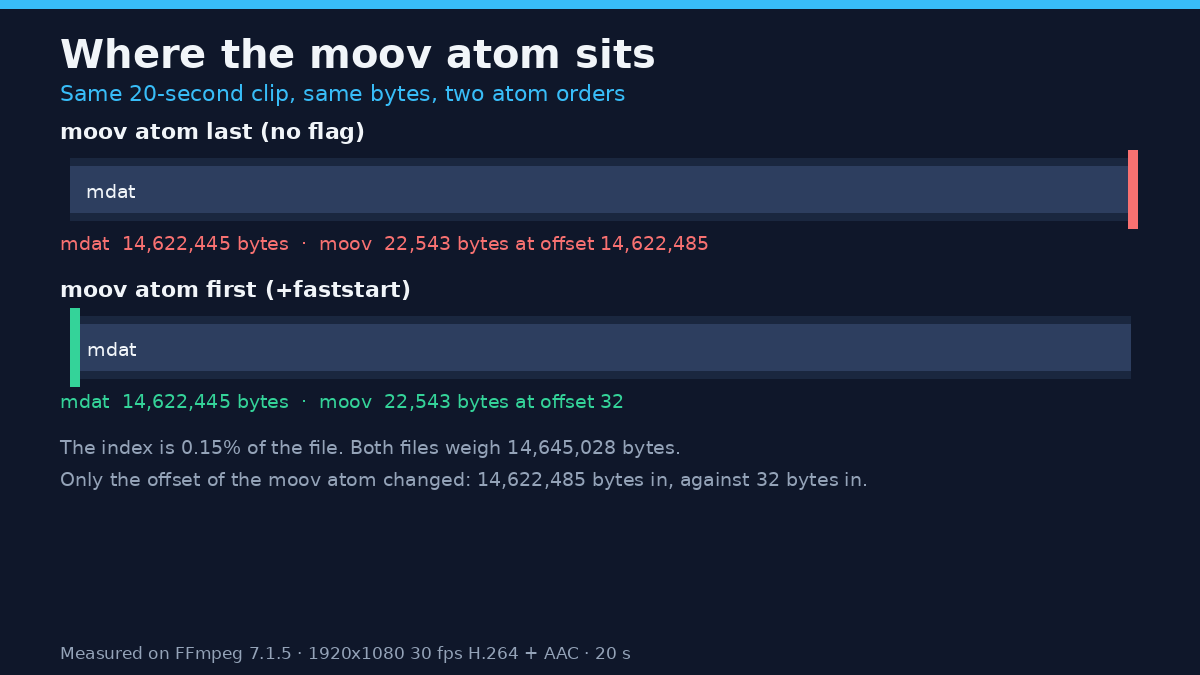
That index is the moov atom. I built two copies of one 20-second 1080p clip on this machine, identical in every byte of picture and sound, with the moov atom at opposite ends, then measured what each copy makes a player do. The numbers below come from that pair on FFmpeg 7.1.5.
What the moov atom holds
An MP4 is a tree of boxes the specification calls atoms. Three sit at the top level: ftyp says what the file claims to be, mdat carries the encoded samples and nearly all of the bytes, and moov holds the index. It’s neither video nor audio but the map: a movie header with duration and timebase, one trak per stream, and per track a sample table with the codec description, frame durations, the keyframe list and chunk offsets.
Those offsets are the only thing that says where the first frame begins. Take them away and mdat is a wall of bytes in the right order with no labels, which is why a truncated MP4 fails with the line this build printed: moov atom not found. On the test clip the moov atom measured 22,543 bytes against 14,622,445 bytes of sample data: two tenths of one percent of the file, deciding whether any of the rest can be read.
How to see where the moov atom sits
You don’t need a hex editor. FFmpeg’s trace log lists the top-level atoms in the order they appear, with their payload offsets:
ffmpeg -v trace -i input.mp4 -f null - 2>&1 | grep -m3 -E "type:'(ftyp|moov|mdat)'"Output for the untouched export, numbers kept rather than trimmed:
type:'ftyp' parent:'root' sz: 32 8 14645028
type:'mdat' parent:'root' sz: 14622445 48 14645028
type:'moov' parent:'root' sz: 22543 14622493 14645028
The first number is the box size and the second its payload position, so the box starts eight bytes earlier, at 14,622,485. A moov atom printed last is stored last, and that’s the file that makes a sequential reader wait. After the fix the same command put the moov at payload offset 40.
| Box | moov atom at the end | moov atom at the front |
|---|---|---|
| ftyp | offset 0, 32 bytes | offset 0, 32 bytes |
| free | offset 32, 8 bytes | offset 22,575, 8 bytes |
| mdat | offset 40, 14,622,445 bytes | offset 22,583, 14,622,445 bytes |
| moov | offset 14,622,485, 22,543 bytes | offset 32, 22,543 bytes |
| Whole file | 14,645,028 bytes | 14,645,028 bytes |
Nothing was added and nothing removed. The index kept its exact size and moved 14.6 megabytes to the left.
The fix is one flag, and it doesn’t touch the picture
FFmpeg’s MP4 muxer takes a faststart flag that moves the index in a second pass. With -c copy the streams aren’t decoded or re-encoded, so pixels and audio samples come through untouched (the muxer documentation lists the flag with the rest of the movflags):
ffmpeg -i input.mp4 -c copy -movflags +faststart output.mp4The muxer says so in its log: Starting second pass: moving the moov atom to the beginning of the file. That’s the only work the flag does, and it needs a seekable output file because the index is written at the end first and then shifted to the front.
I checked whether untouched survives a remux: both files hold byte-identical streams.
| Check | Before the flag | After the flag |
|---|---|---|
| Video stream MD5 | b1df26357662585560f4e84dee388ae0 | b1df26357662585560f4e84dee388ae0 |
| Audio stream MD5 | 4727e403142f91947f2ba1d7236a709d | 4727e403142f91947f2ba1d7236a709d |
| Video packets read | 600 | 600 |
| Audio packets read | 939 | 939 |
| File size | 14,645,028 bytes | 14,645,028 bytes |
The size row is worth a second look: a file with its moov atom at the front is exactly as large as one with it at the back, so size tells you nothing about which you have. Run the flag on a file that already has the index up front and nothing changes either, same bytes and same MD5s. Re-running it over a folder you aren’t sure about is safe.
What changes in practice: the pipe test
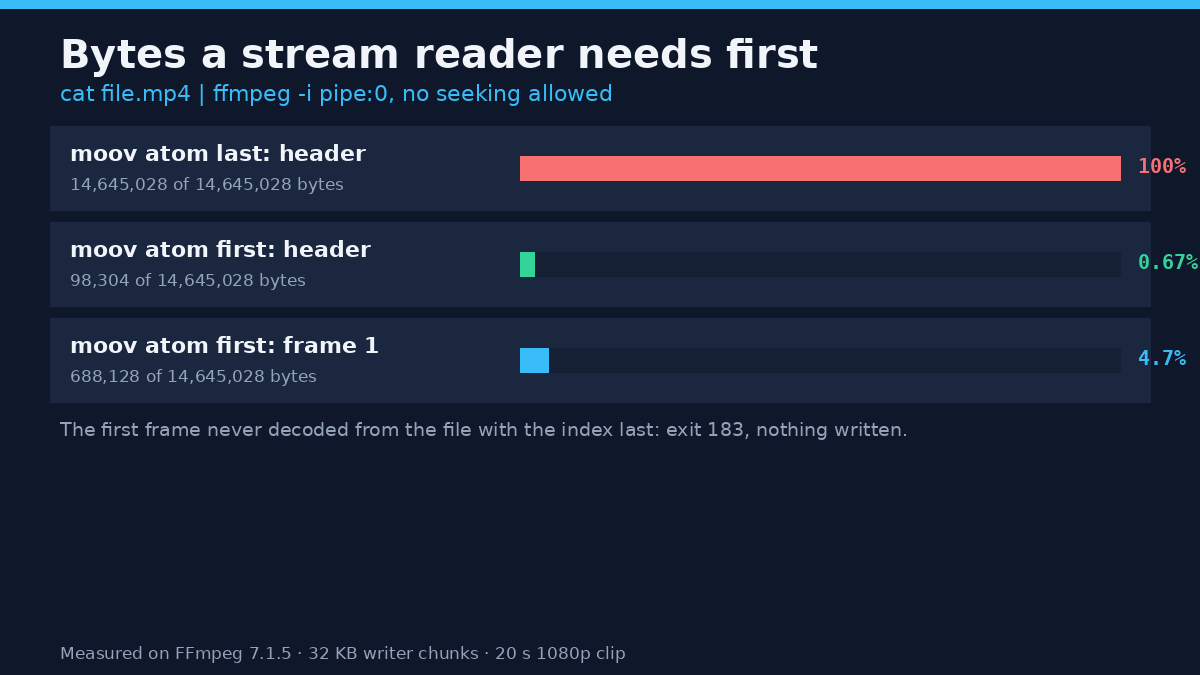
Not every player can jump to the end of a file. A browser with range support can ask for the tail; a pipe, a download still copying, a player fed from a network share and plenty of embedded players can’t, and for those the file is a stream where the index has to arrive in sequence. You can reproduce the difference with one line:
cat input.mp4 | ffmpeg -v error -i pipe:0 -frames:v 1 -f null -On the untouched file that command exited 183 and wrote nothing, with stream 0, offset 0x30: partial file in the log. The reader reached the end, never found the map and had nothing to decode. On the faststart copy the same command exited 0 and decoded the frame after consuming 688,128 bytes, or 4.7% of the file.
Counting the bytes a reader swallows before it can print the header is the cleaner measurement, and the gap is wider:
| Reader | moov atom at the end | moov atom at the front |
|---|---|---|
| Bytes before the header parses, 20 s clip | 14,645,028 (100%) | 98,304 (0.67%) |
| Same test, 120 s clip | 6,559,876 (100%) | 32,768 (0.5%) |
| Bytes before frame 1 decodes, 20 s clip | none, exit 183 | 688,128 (4.7%) |
One caveat on the first row: the harness writes in 32 KB chunks and stops when the reader closes the pipe, so 98,304 bytes is three writes rather than a precise index size. The moov atom ends at byte 22,575.
Does it matter in a browser?
Less than the pipe test suggests. I served both files from a local HTTP server with range requests and asked FFmpeg to decode frame 1 over HTTP (range requests are what let a player do this). The file with the index at the end opened with three requests: the first asked for the final 22,543 bytes, got the moov atom, and only then did the player know where to read. The faststart copy opened with one request, the same first frame and no full download before playback.
So a modern browser can play a badly ordered file and pays a round trip for the privilege. Position decides the outcome only where there’s no random access: a pipe, a file being copied, a host with ranges off, an app that downloads the whole asset first, or a player that quits when the tail request fails.
There’s a second effect when something goes wrong. I cut both files to the first 4,881,676 bytes, a third of their size. On the file with the index at the end, ffprobe exited 1 with moov atom not found and printed nothing. On the faststart copy, cut at the same byte, ffprobe exited 0 and still reported the real duration, 20.000000 seconds, the real resolution, 1920×1080, and the full 600 frames. The decoder then played 200 frames, 6.67 seconds, before it hit the cut. A damaged file that still describes itself is one you can salvage, and the specs you read this way are the reason.
How big does the index get?
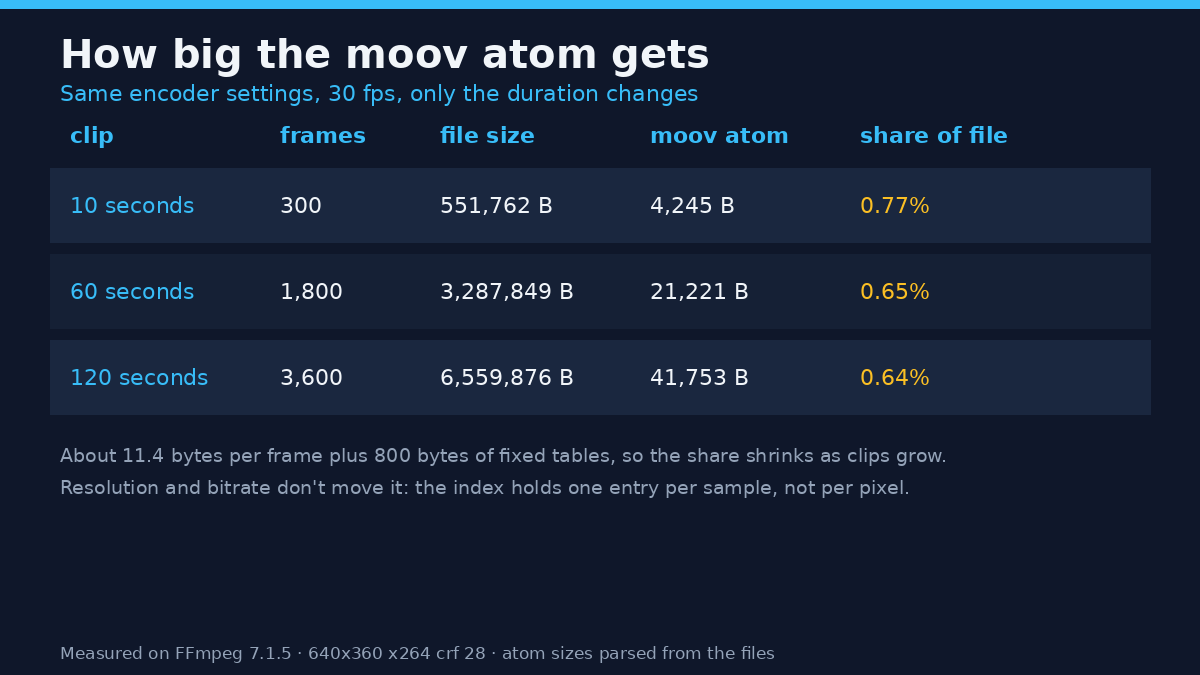
The moov atom grows with the number of frames, not with resolution or bitrate, because it holds one entry per sample. I encoded three clips at 640×360 and 30 fps with the same settings and read the atom sizes back:
| Clip | Frames | File size | moov atom | Share of file |
|---|---|---|---|---|
| 10 seconds | 300 | 551,762 bytes | 4,245 bytes | 0.77% |
| 60 seconds | 1,800 | 3,287,849 bytes | 21,221 bytes | 0.65% |
| 120 seconds | 3,600 | 6,559,876 bytes | 41,753 bytes | 0.64% |
Growth is linear at roughly 11.4 bytes per frame plus about 800 bytes of fixed tables, which is why the share falls as a clip gets longer. For a 10-minute 30 fps clip that’s 18,000 frames, and the measured slope puts the index near 206 KB: small enough that moving it costs nothing, large enough that a sequential reader notices.
When the flag does nothing at all
Fragmented output. If the export uses fragmentation, with frag_keyframe and empty_moov, the moov atom is written first and stays tiny because the rest of the map lives in per-fragment boxes. Combining +faststart with those flags produced a file byte-identical to the fragmented-only export: same MD5, same 14,635,268 bytes, a 1,249-byte moov at offset 36. It exits 0 and says nothing, so the flag looks applied and isn’t doing a thing. Read through a pipe, a fragmented file also reports no duration up front, and this one claimed 8.344 seconds of a 20-second clip.
Writing to a pipe. With and without the flag, writing MP4 to stdout fails with exit 234 and muxer does not support non seekable output, because the muxer needs to seek back and write sizes. If you’re streaming to stdout, faststart isn’t available to you.
Re-encoding by accident. Swapping -c copy for an encoder lands the same index position after a full decode and encode, at the cost of a generation of quality and time. The flag is a container operation and needs no codec. The keyframe spacing inside the index is a separate decision that does affect seeking.
Common mistakes
The first is treating fast start as a cure for buffering. It fixes one cause, the map arriving last. A 4K file at 60 megabits per second stalls for another reason, and getting the file smaller is the answer there, not a flag.
The second is checking file size to confirm the fix. It’s the one number that doesn’t move: 14,645,028 bytes before and after. Check the atom order, or the stream MD5s if you want proof that the picture survived.
The third is pointing the flag at a half-written recording and expecting a rescue. It can move an index that exists, and it can’t rebuild one that never was. moov atom not found means exactly that.
The fourth is forgetting that the second pass rewrites the container, so it needs free disk space at least the size of the output.
FAQ
Does fast start reduce quality? No. With -c copy neither stream is decoded, and both stream MD5s matched exactly before and after. Only the container layout changed.
Does it make the file bigger? No. Same 14,645,028 bytes, because the index keeps its size and only changes position. Both files carry the same 8-byte free box, just in a different place.
Should I run it on every export? On anything streamed from a host, embedded on a page or sent as a file, yes. It costs one container pass and removes a whole category of slow-start complaints.
Is the same option available outside FFmpeg? It lives in the MP4 and MOV muxers, so any tool writing those containers may expose it under another label: HandBrake calls it Web Optimized, and its output settings carry the checkbox. What matters is the result, so run the trace command on the output and read the atom order.
What about MKV and WebM? They’re different container designs with their own index handling, so this flag belongs to MP4 and MOV. If the question is container choice rather than index position, the format differences are a separate decision.
The short version
A player needs the map before it can read the picture. When the moov atom sits at the end of an MP4, a sequential reader has to consume the whole file first, and on this build it gave up rather than decode one frame from a pipe. One flag moves the map to the front without touching a pixel: ffmpeg -i input.mp4 -c copy -movflags +faststart output.mp4. Verify it with the trace command, since size won’t tell you. And when buffering has nothing to do with the map, look at the bitrate before you blame the container.