
Multicam Sync: How to Align Multiple Camera Angles by Audio
I recorded a two hour workshop with three cameras and a separate audio recorder. Every file was fine alone. Played together, they slid apart inside ten minutes and the claps ended up in three places. Three clocks were running at different speeds, and that’s the problem every multicam edit runs into. It’s a measuring problem before it’s an editing problem, and once you can measure the gap, the fix is arithmetic.
I measured that gap here with synthetic recordings at known offsets, then injected a realistic clock difference. Everything below comes from those runs on FFmpeg 7.1.5 and numpy 2.5.3, in a container with a 2 CPU cgroup quota.
What You’ll Learn
- How to measure the offset between two multicam recordings from audio alone
- Why room tone gives a wrong answer and one clap gives the right one
- The FFmpeg flag that quietly leaves your right channel behind
- How to build a multicam grid and check the layout by its pixels
Why Two Cameras Never Line Up On Their Own
In a multicam shoot every device counts time with its own crystal, so two cameras started together still disagree, and the disagreement grows with how long you record. That’s why a short clip looks perfect and a long take doesn’t.
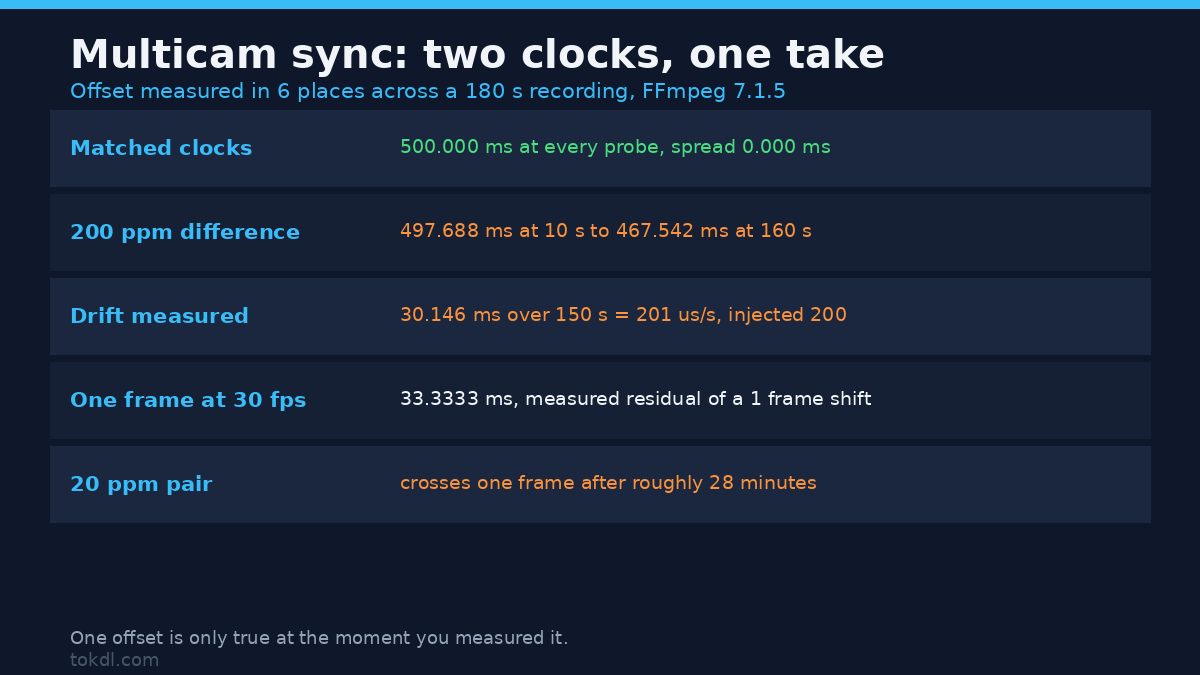
I injected a 200 parts per million difference between two recordings and measured the offset in six places across a 180 second take. With matched clocks it read 500.000 ms at every probe, spread 0.000 ms. With the 200 ppm difference it moved from 497.688 ms at ten seconds to 467.542 ms at 160 seconds, or 30.146 ms over 150 seconds. That’s 201 microseconds per second against 200 injected, so the detector measured the defect to within half a percent.
The multicam drift is the clock difference multiplied by elapsed time:
| Clock difference | Drift per hour | Drift per 10 minutes |
|---|---|---|
| 20 ppm | 72 ms | 12 ms |
| 50 ppm | 180 ms | 30 ms |
| 100 ppm | 360 ms | 60 ms |
| 200 ppm (measured above) | 720 ms | 120 ms |
One frame at 30 fps is 33.3 ms, and I measured exactly that: a one frame shift left a residual of -33.3333 ms. A multicam edit inside a frame looks fine, but a 20 ppm pair crosses a frame around the 28 minute mark and the 200 ppm pair crosses it before two minutes. Measure at both ends of a take, not just the top.
Method 1: Sync Multicam by Audio
If every camera recorded the room, every camera recorded the same clap, and it sits at a different position in each file. That distance is the offset.
Cross-correlation finds the multicam offset. Slide one recording along the other and, at every candidate lag, multiply the overlapping samples and add them up. When the two line up the sum is large; when they don’t, positives and negatives cancel. The biggest sum wins, and the FFT does the sliding:
import numpy as np

def offset_samples(a, b):
    n = 1
    while n < len(a) + len(b):
        n <<= 1
    c = np.fft.irfft(np.fft.rfft(a, n) * np.conj(np.fft.rfft(b, n)), n)
    lags = np.arange(n)
    lags[lags >= n // 2] -= n
    return -lags[np.argmax(np.abs(c))]   # positive means b is late
I checked the multicam detector against known answers first. Injecting 0, 1, 240, 24000 and -1000 samples of delay returned 0, 1, 240, 24000 and -1000 exactly. Then a camera delayed 500 ms came back as 500.000 ms and one delayed 1250 ms came back as 1250.000 ms, exact to the sample at 48 kHz. Noise doesn’t stop it either. With the signal to noise ratio pushed to -14.2 dB, so the noise was louder than the sound I was matching, it still returned 500 ms.
One trap lives in that code, and my first detector hit it. An extract taken late in a long recording peaks at a lag of minus the offset plus its own start, which can be millions of samples, so an FFT sized only to the sum of the two lengths wraps the peak to the wrong side. Pad past twice the longer track.
The Alignment Window Needs a Transient, Not Length
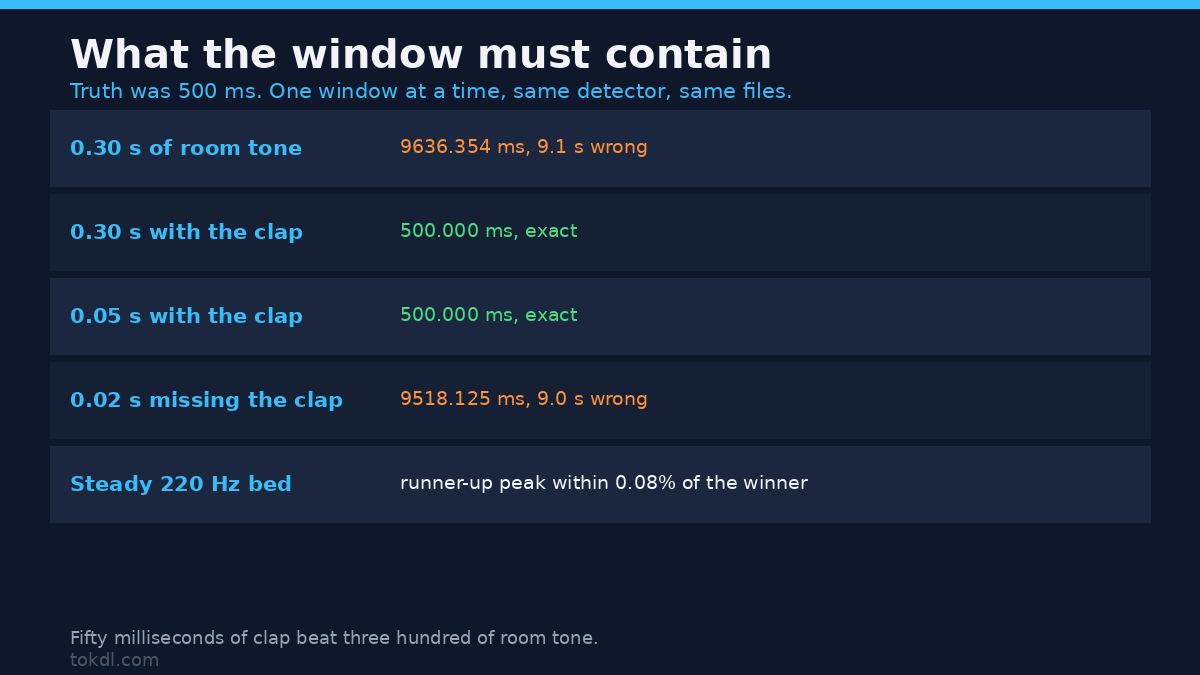
Most multicam sync attempts go wrong here, and it isn’t about how much audio you hand the detector. It’s about what’s inside it. I gave it a 0.30 second window of quiet room tone, with a truthful offset of 500 ms. It answered 9636.354 ms: nine seconds wrong, from a window that sounds usable.
| Alignment window | Contains a transient? | Detected offset | Error |
|---|---|---|---|
| 0.30 s of room tone | no | 9636.354 ms | +9136 ms |
| 0.30 s covering the clap | yes | 500.000 ms | 0.000 ms |
| 0.05 s covering the clap | yes | 500.000 ms | 0.000 ms |
| 0.02 s just before the clap | no | 9518.125 ms | +9018 ms |
Fifty milliseconds of clap beat three hundred milliseconds of room tone, and it isn’t close. Steady sound correlates with itself everywhere, so a continuous tone or a hum gives a nearly flat surface: with a steady 220 Hz bed the runners up sat within 0.08 percent of the winner. A transient is a spike, and a spike lines up in one place. So pick a multicam alignment window with a clap, a slate, a door or the first consonant of a sentence.
Read the Offset, Then Move the Clip
A positive offset means the second multicam clip is late, so you trim its head. That took the 500 ms case to a residual of 0.0000 ms:
ffmpeg -i camera_b.wav -af "atrim=start=0.5,asetpts=PTS-STARTPTS" -c:a pcm_s16le camera_b_synced.wavIf the second is early the offset is negative, and you delay the other clip with adelay or trim the late one by less. For audio out of step with its own picture rather than with another camera, there’s the classic out-of-sync fix.
The Two FFmpeg Traps That Break Multicam Alignment
adelay Delays One Channel
The adelay filter takes one delay per channel, and channels you don’t list are left alone. On a stereo file, adelay=500 delays the left channel by 500 ms and the right by nothing. I measured left 500.000 ms and right 0.000 ms. That’s a stereo file pulled apart, and summing the channels afterwards gives comb filtering instead of a wider sound. One flag fixes it:
ffmpeg -i camera_b.wav -af "adelay=500:all=1" -c:a pcm_s16le camera_b_delayed.wavSame measurement, both channels at 500.000 ms. Mono audio never hits this.
A Negative Offset Is a Trim, Not a Delay
There’s no negative delay, because you can’t ask a filter to start before the file does. The early clip gets its head trimmed instead, by a different amount than the late one. Don’t trim both by the same number and call it fixed, since that moves the pair without closing the gap.
Method 2: The Slate, and What to Do When You Forgot It
A clap in front of the lens at the start of every multicam take costs nothing and gives every camera one sharp, shared event, which is what the detector needs.
If you forgot, you aren’t stuck. Any shared event will do, and the table above shows how little you need. Hunt for a door, a cough or the first hard consonant of a sentence, then check against a second event later in the take. Two events agreeing means you have your offset. Two disagreeing means drift.
Method 3: Timecode, When You Have the Hardware
Devices that accept a jam sync write the same running clock into their files, so the offset is zero by construction. It’s worth one measurement at the end of a long day too, because a device that lost its jam drifts like any other crystal. On phone and mirrorless multicam shoots, that audio is the sync signal you already have.
Build the Multicam Grid with xstack
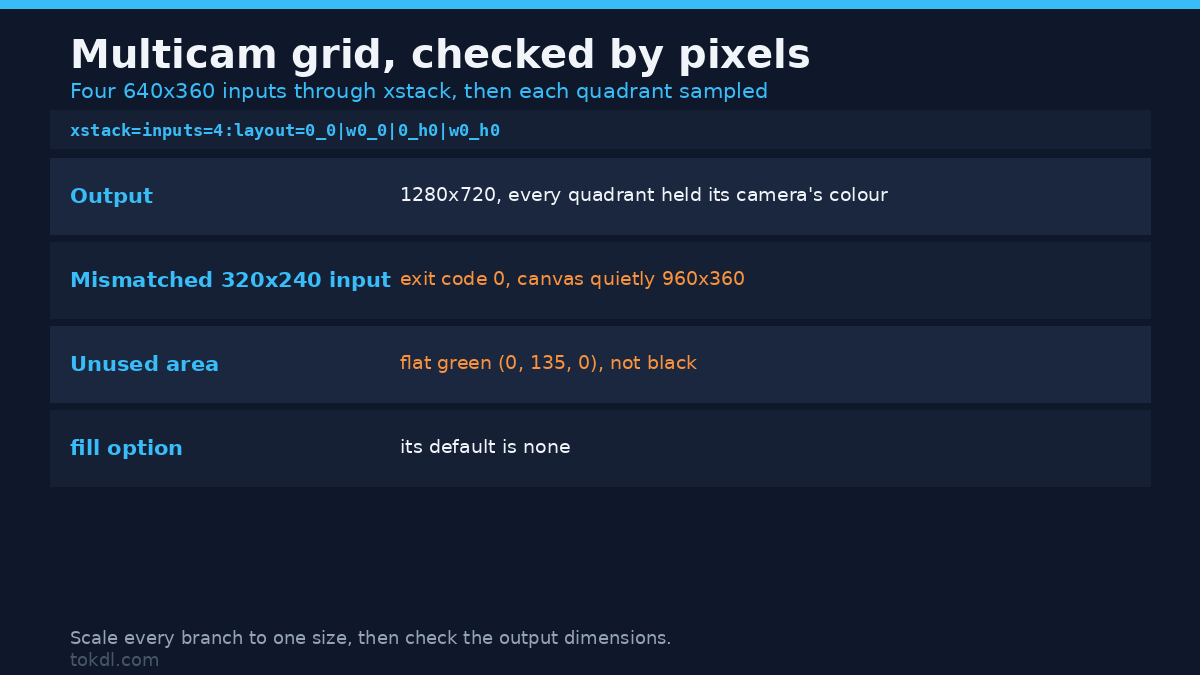
Once the angles line up, xstack lays the multicam grid out on one canvas. The layout string gives each input a position, written as x underscore y, with w0 and h0 standing for the width and height of the first input:
ffmpeg -i cam_a.mp4 -i cam_b.mp4 -i cam_c.mp4 -i cam_d.mp4 -filter_complex
"[0:v][1:v][2:v][3:v]xstack=inputs=4:layout=0_0|w0_0|0_h0|w0_h0[v]"
-map "[v]" -c:v libx264 -crf 18 multicam_grid.mp4
Four 640×360 angles gave a 1280×720 grid, which is what the arithmetic predicts. I don’t trust a multicam layout by looking at a thumbnail, so I gave each camera a solid colour and a white marker, then sampled the pixels of one rendered frame. Every quadrant held the colour I put there. That’s the check that catches a swapped input. For two angles, the side by side video guide covers the layout side.
Mixing a 640×360 input with a 320×240 one did not raise an error: exit code 0, a 960×360 canvas, the short input in its corner and the area below it filled with flat green measuring (0, 135, 0). The fill default is none, so mismatched sizes leave a file with a hole in it. Scale every branch to size with scale=640:360 and setsar=1, then check the output dimensions rather than the exit code.
Which Method Should You Use?
| Method | Accuracy I measured | Handles drift | Best for |
|---|---|---|---|
| Audio cross-correlation | 0.000 ms error at 500 ms and 1250 ms | only with per-segment re-measurement | phone and mirrorless shoots |
| Slate clap | exact, and it feeds the audio method | no | anything with a person on camera |
| Timecode jam sync | zero by construction | yes, until a device loses sync | paid work with matched hardware |
None of the three removes drift, and a single offset is only true at the moment you measured it. On a take long enough for the clocks to walk apart, split it and measure each segment.
Common Mistakes in Multicam Workflows
Measuring once and trusting it all take. Sample the start and the end of a long recording and compare the two numbers.
Aligning on ambient sound. Room tone and music correlate with themselves everywhere. That cost nine seconds of error on a third of a second.
Summing two mics without checking polarity. Two aligned recordings summed to -13.65 dBFS, and inverting one took the sum to -34.93 dBFS: 21.3 dB cancelling itself. Also watch amix, which divides by the input count unless you stop it, measuring -19.5 dBFS with its default against -13.65 dBFS with normalize=0. Keeping the angles on multiple audio tracks in one video is the cleaner multicam mix.
Expecting FFmpeg’s axcorrelate filter to hand you the offset. I fed it the same pair with delays of 0, 250, 500, 750 and 1000 ms. The output buffer length changed run to run, between 552,960 and 576,000 samples, and the peak moved from 0 to 397,502 to 25,901 to 40,097 to 47,993. There’s no lag axis in that output, so the number means nothing.
Frequently Asked Questions
Can you sync two cameras without a clap?
Yes, if the recordings share any sharp sound, and the table above shows a 50 ms slice is enough when it contains one. Quiet room tone isn’t, however long it is. The same timing maths drives subtitle sync, where captions drift against picture for identical reasons.
How accurate does a multicam edit need to be?
Inside a frame is a safe target: 33.3 ms at 30 fps, 41.7 ms at 24 fps. The detector here resolves to one sample, 0.021 ms, so accuracy isn’t your limit. Where you place the cut is. For the audience side threshold, broadcasters work from ITU-R BT.1359, Relative timing of sound and vision for broadcasting.
What do I do about drift inside one long recording?
Measure the offset at the start and at the end. Differing numbers mean the recording needs a speed change rather than an offset. I applied atempo with the inverse of the injected ratio to the 200 ppm pair, and drift fell from 30.146 ms across the take to 2.896 ms. For the rest, split the take and re-align the segments. Combining angles into one file has its own pitfalls, which merging clips into one file walks through.
The Short Version
A multicam sync comes down to two numbers. The offset says where to cut and the drift says whether one cut is enough. Both are measurable from audio you already recorded, with no plugin involved. Align on something sharp, watch the channel flag on adelay, and check your grid by its pixels, not its exit code.