

Rolling Shutter Explained: Why Your Video Skews and How to Fix It (2026)
A doorway at the edge of a fast pan comes out leaning, the classic rolling shutter frame. The building is fine. The camera read the frame from top to bottom while the pan was still moving, so the last row recorded a moment the first row never saw.
That gap of a few milliseconds is the whole story of rolling shutter. It’s why propellers bend, why guitar strings curve, and why a handheld shot can look like it’s made of jelly. A CMOS sensor gives you a rolling shutter, and it’s a property of the hardware rather than a setting you forgot to change.
The useful part is that you can predict how bad the rolling shutter will be before you press record, and you can tell in about ten seconds whether a repair is worth attempting or whether the honest answer is a reshoot.
The direct answer: what rolling shutter does to a frame
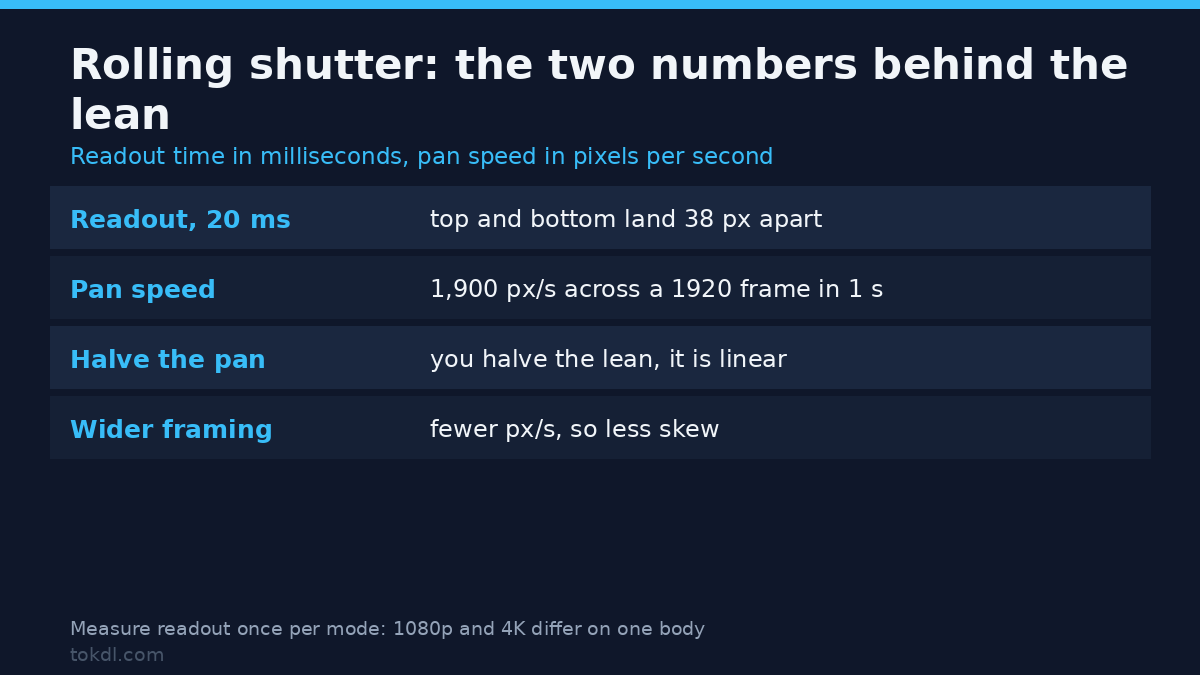
Every row of the sensor is exposed in sequence instead of all at once. Spec sheets call the scan a readout time, and that’s a separate number from exposure time. On many consumer cameras the readout is a sizeable fraction of a frame; on stacked sensors it can be a small one.
Two numbers decide how visible the rolling shutter is. The first is how far the scene moves between the first row and the last. Multiply an object’s speed across the frame, in pixels per second, by the readout in seconds, and you get the lean in pixels.
A 1920-wide frame that takes a full second to pan across moves roughly 1,900 pixels per second. With a 20 ms readout, the top and bottom of a vertical edge land about 38 pixels apart. That same edge in a static shot sits perfectly straight, which is why the problem only appears once something moves.
Wobble is the same rolling shutter mechanism with an unsteady camera. Partial exposure is the same mechanism with a fast object: a propeller blade that crosses the frame during the readout is only partway through its arc in any single row, so it comes out curved.
Before you shoot: two measurements worth five minutes
You need your readout time and your pan speed, and both are easier to get than the spec sheet suggests.
For readout, film a vertical edge such as a door frame or a ruler while panning at a steady, known speed. Count how many pixels the edge leans, divide by the pan speed in pixels per second, and you’ve got the readout in seconds. Do it once per mode, because the number changes between 1080p and 4K on the same body.
Pan speed is easier expressed in frame widths per second. A pan that crosses the whole frame in one second is a controlled documenting move. Half a second is a whip, and doubling the speed doubles the lean because displacement is linear in speed.
Method 1: shoot so the rolling shutter never shows
Slowing the pan is the most effective rolling shutter fix and the only free one. Halve the speed and you halve the lean. If the shot needs the speed, you’re choosing between accepting the lean and changing the equipment.
Framing does the same work in reverse. Content crosses a wide frame more slowly in pixels per second than it crosses a tight one, so the same physical pan produces less lean. Step closer with a wider lens instead of zooming in from across the room, and you get a similar shot size with less skew.
A faster shutter speed doesn’t fix rolling shutter, and usually makes it worse. Shortening exposure freezes each row, so the moving edge stays crisp and the staircase between rows reads clearly. If you want hard edges, expect the lean to be part of the look; the trade-off between shutter angle and motion blur is a separate decision.
Higher frame rates can shorten readout on stacked sensors, because each frame has less time to scan. Check it rather than assume: plenty of bodies reach high frame rates by cropping, and a crop is sometimes a better trade than the rolling shutter skew.
A gimbal doesn’t remove rolling shutter skew. It removes operator shake, which is a different error, and a gimbal that hunts adds motion of its own. The hardware answer, if this problem recurs, is a global shutter body; that’s still a small and expensive group, with Sony’s α9 III as the best-known full-frame example.
Method 2: the repair tools that try to undo rolling shutter
Rolling shutter repair estimates where each pixel ought to have been and warps it back there. That means optical flow, and optical flow needs something to track across frames.
After Effects ships the reference implementation: the Rolling Shutter Repair effect, which takes a scan direction and a strength and resynthesises rows. At moderate strength on smooth, single-speed motion it visibly reduces a lean. On footage with cuts, occlusions, or a subject crossing the frame it produces warping, and the warp is usually more distracting than the lean was.
Premiere Pro has no equivalent effect of its own, so the usual route is a round trip to After Effects. That’s why so much skewed footage ships as it is.
If you stabilise instead, read the settings first. Warp Stabilizer exposes a ripple control with a warp option aimed at exactly this artifact on short clips; the default smoothing modes can leave the wobble in place. Our walkthrough of stabilising shaky footage in an editor covers the trade-offs.
For a constant-speed pan there’s a crude one-line rolling shutter option, because a steady pan turns linear timing into linear displacement. The shear filter leans the whole frame back by a fixed factor, which cancels a fixed lean for as long as the pan speed holds. It pulls the edges inward, so you crop the empty wedges afterwards.
ffmpeg -i input.mp4 -vf "shear=shx=-0.02,crop=trunc(iw*0.94/2)*2:trunc(ih*0.94/2)*2" -c:a copy output.mp4The filter list for this is documented in the ffmpeg filter documentation; shear’s a static option, so a variable pan needs a keyframed editor instead. That’s not laziness in the filter: on FFmpeg 7.1.5 the shx value takes no time expression, and shear=shx=’-0.4*t’ exits with code 234 and “Unable to parse option value”. A lean that changes speed mid-shot is editor work, not a one-liner.
What rolling shutter repair cannot do

No rolling shutter tool recovers information. If a row never saw the propeller blade, no filter puts it back, and the repair is guessing at best. That’s the difference between a tool that reduces a visible lean and one that reconstructs a frame.
Rolling shutter repair also assumes one global motion. Real footage has a subject moving against a background, so the tool picks a dominant motion and warps everything else around it. Faces and text are where this shows first.
A crop isn’t a rolling shutter fix. Trimming the edges removes the part of the frame where the lean is worst, but the lean is present across the whole frame; you lose resolution and keep the problem. For the same reason, a horizon fixer is the wrong tool here: it levels a tilted frame, whereas lens distortion correction and skew correction both bend geometry that a level tool leaves alone.
Distrust anything marketed as one-click correction with no direction or strength settings. Both values have to come from somewhere, and the tool can’t read your pan off the pixels.
Rights and responsible use
A camera file belongs to the person who shot it. Repairing a skewed clip changes the geometry, not the ownership, and rendering it into a new container doesn’t either.
If a client hands you footage, the job is to fix the skew and hand it back. Keeping a copy for your own reel, or posting the before and after as a teaching example, needs their agreement first, and a voice message isn’t that.
Private study and a published edit are different uses, and only the second one carries public obligations. A repaired file is still someone else’s work when it goes up on a channel, and YouTube’s Terms of Service are the contract you accept when you publish there.
Troubleshooting: five cases that get misdiagnosed
Verticals lean but the camera never moved
Subject motion, not camera motion. A person or a vehicle crossing the frame at a steady speed produces the same lean a pan would, in the opposite direction. Fix it with a wider shot of the same subject or accept it.
The wobble got worse after stabilising
The stabiliser compensated frame by frame and pulled the warped geometry around with it. Turn the ripple handling on, or stabilise before you squeeze the clip.
Only part of the frame bands under LED light
Readout and mains frequency interacting, not a sensor fault. The band travels because the rows are sampled at different moments, so the fix is an exposure time matched to the light, which we cover in LED flicker and banding.
Strings and propellers curve in a static shot
Intra-frame motion. Nothing in post repairs a shape that was only partly recorded, so the options are a faster shutter for a strobing look, a slower subject, or a global shutter camera.
The lean changes between 1080p and 4K on the same camera
Different readout per mode. Full-sensor 4K asks the sensor to move twice the data, and many bodies trade scan speed for resolution without saying so in the menu.
Frequently asked questions
Can rolling shutter be fixed in post?
Sometimes, and only when the motion is smooth. A single-speed pan over a clean background responds well to an optical-flow pass. Erratic handheld motion, cuts, and subjects crossing the frame usually gain more artifacts than they lose.
Does a gimbal remove the rolling shutter jello effect?
No: a gimbal smooths the camera, not the sensor’s readout time. The jello effect comes from rows being scanned in sequence, which mechanical smoothing leaves alone, so mounting a skewed camera on a gimbal gives you a smooth skewed shot.
Why does a tripod shot still skew?
Because the subject moved, not the camera. Skew needs relative motion between the scene and the sensor, and a tripod only holds one half of that pair still.
Does a faster shutter speed reduce the lean?
No: a shorter exposure sharpens each row and leaves the timing untouched. The lean becomes easier to see rather than smaller, because the moving edge stops smearing between rows.
Is skew the same thing as motion blur?
No: blur is how long a pixel collected light, and skew is when it started. A one-second exposure on a global shutter gives you heavy blur with no lean at all.
Can I just crop the frame to hide it?
No: cropping hides the worst edges and keeps the lean everywhere else. You pay for it in resolution, and the geometry inside the crop is still bent.
Do phones suffer more than cameras?
Often yes, though not because of pixel count. Phone sensors read fast but run heavy processing, and high-resolution or high-frame-rate modes slow the scan down considerably.
Which rolling shutter approach fits your footage?
Start with the size of the error. A few pixels of lean is invisible at playback size, so leave it alone and spend the time elsewhere. Between roughly ten and forty pixels on a smooth pan, one repair pass is worth a try, and you’ll know within a minute whether the warp beats the lean.
Past that, or wherever a subject crosses the frame, treat repair as a demo rather than a delivery. Reshoot the pan slower if the schedule allows, and if it doesn’t, say so before the edit rather than after the render.
For anything that repeats, the durable fix is upstream: practice pans that take longer than the readout, keep the lens wider than instinct suggests, and note the mode you shot in. A camera whose rolling shutter you have measured is a camera you can plan around, and that’s a cheaper habit than a shelf of repair plugins.