
How to Stabilize Shaky Video Without Losing 10% of the Frame
Handheld footage looks steady on the camera screen, then you watch it on a monitor and the whole frame is bobbing. So you look for the stabilize shaky video button, press it, and get a clip that sits still but looks softer and a little closer. I wanted to know what that button does, so I built a test and measured it instead of repeating the manual.
The test scene is 1,200 by 675 pixels of fine detail. I slid a 960 by 540 window across it with a known shake: 24 px sideways at 2.7 Hz and 15 px vertically at 3.3 Hz, at 30 fps, for four seconds. Because I injected that motion myself, the true camera movement is known to the pixel, an average of 11.40 px between frames. Then I measured the motion left in each output with a phase-correlation meter, a different algorithm from the one FFmpeg uses, so the filter doesn’t grade its own homework.
Here’s what those numbers say about the best way to stabilize shaky video, and what the trade costs.
What to know before you stabilize shaky video
A stabilizer doesn’t reach into a frame and flatten the shake. It moves the whole frame around, frame by frame, so the background lands in the same place twice in a row. The camera did swing 24 px to the left, and no filter can put back the bits of street that left the sensor. What it can do is decide the frame should have been centered on the cafe sign all along.
That shift has a price. Once a frame moves, the edge it moved away from has nothing behind it. You can fill the gap with black, which looks broken, or zoom in a few percent so the empty edge never enters the visible frame, which is a crop whether you asked for one or not. Every stabilizer picks the second option, which is why the result so often looks cropped. My test filter asked for a 5.62% zoom, and that’s the trade you make every time you stabilize shaky video.
Three things no filter can do:
- Recover detail that never hit the sensor. A 24 px swing costs the outer 24 px of that frame.
- Separate your camera from your subject. It fits one motion model to the whole frame.
- Fix rolling shutter skew. The jelly wobble of a phone sensor read out line by line is a per-row distortion that a global shift can’t undo.
The two routes inside FFmpeg
FFmpeg ships two stabilizers. Both stabilize shaky video, and they aren’t the same tool twice.
vidstab is a two pass filter. The first pass, vidstabdetect, watches the clip and writes a file of motion estimates. The second, vidstabtransform, reads that file and applies smoothed movement. Two passes buy the important thing: the filter knows what happens later in the clip, so it can decide how hard to correct a wobble.
deshake is a single pass filter. It estimates motion as it goes and corrects immediately, so it needs no temporary file. On gentle handheld drift, deshake can stabilize shaky video well enough. On the swing I injected, it didn’t, and you’ll see the number in a moment.
How to stabilize shaky video with FFmpeg
Three steps, and the first is the one people skip.
Step 1: analyse the clip and save the motion data
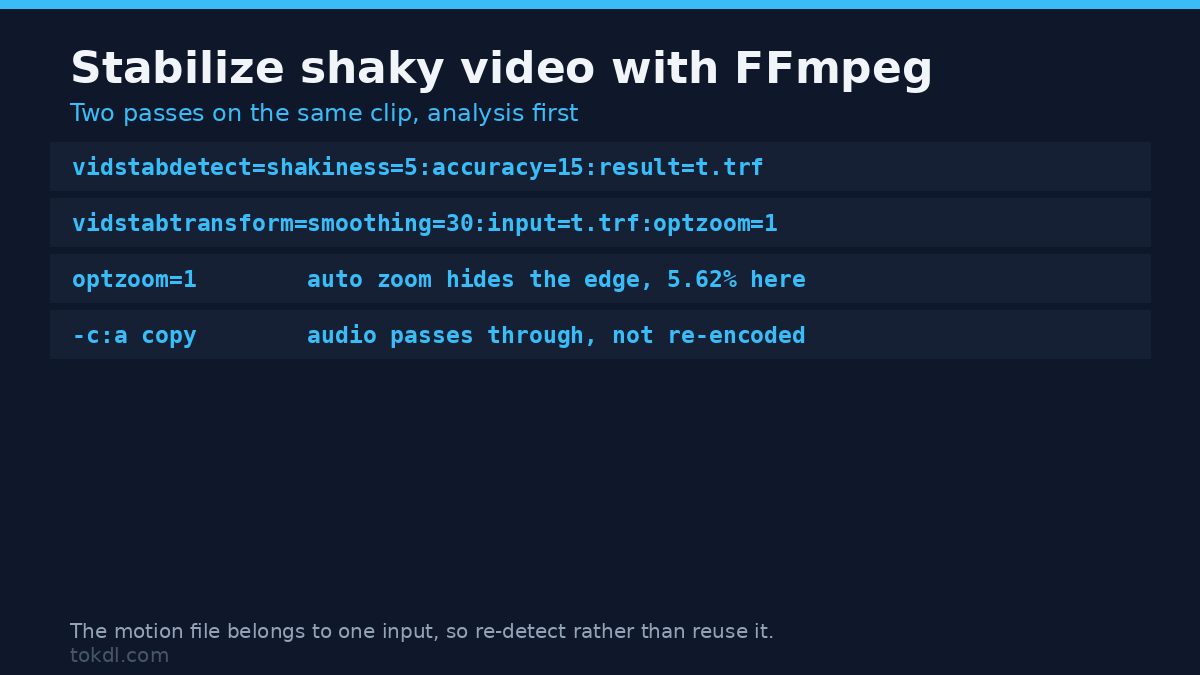
ffmpeg -i shaky.mp4 -vf vidstabdetect=shakiness=5:accuracy=15:result=transforms.trf -f null -No video file is written here. The last two arguments throw the frames away and keep only transforms.trf, the motion file the second pass needs; the rest of the flags are in our FFmpeg command list. shakiness tells the detector how violent the footage is, on a scale of 1 to 10, and accuracy widens the search for matching blocks. On my clip this analysis was the slow half of the job, running at about 15 frames per second, so a minute of footage is two minutes of work.
Step 2: apply the smoothed movement
ffmpeg -i shaky.mp4 -vf vidstabtransform=smoothing=30:input=transforms.trf:crop=black:optzoom=1 -c:a copy steady.mp4smoothing is the real dial. It sets how many frames feed the average, so 30 smooths the wobble over a second of 30 fps footage. Low values follow the shake closely and leave some in. High values put the camera on rails, and genuine panning starts to lag. optzoom=1 lets the filter pick the zoom that hides the empty edge, and -c:a copy passes the audio through untouched. The second pass is where you stabilize shaky video; the first only describes the motion.
Step 3: check the crop before you cut the final version
Play the result at full size and look at the corners. If the stabilized clip cuts off something you framed deliberately, lower the smoothing and re-run the transform. The analysis file stays valid, so the retry costs only an encode. That’s the whole loop required to stabilize shaky video in FFmpeg.
Test results: what happens when you stabilize shaky video
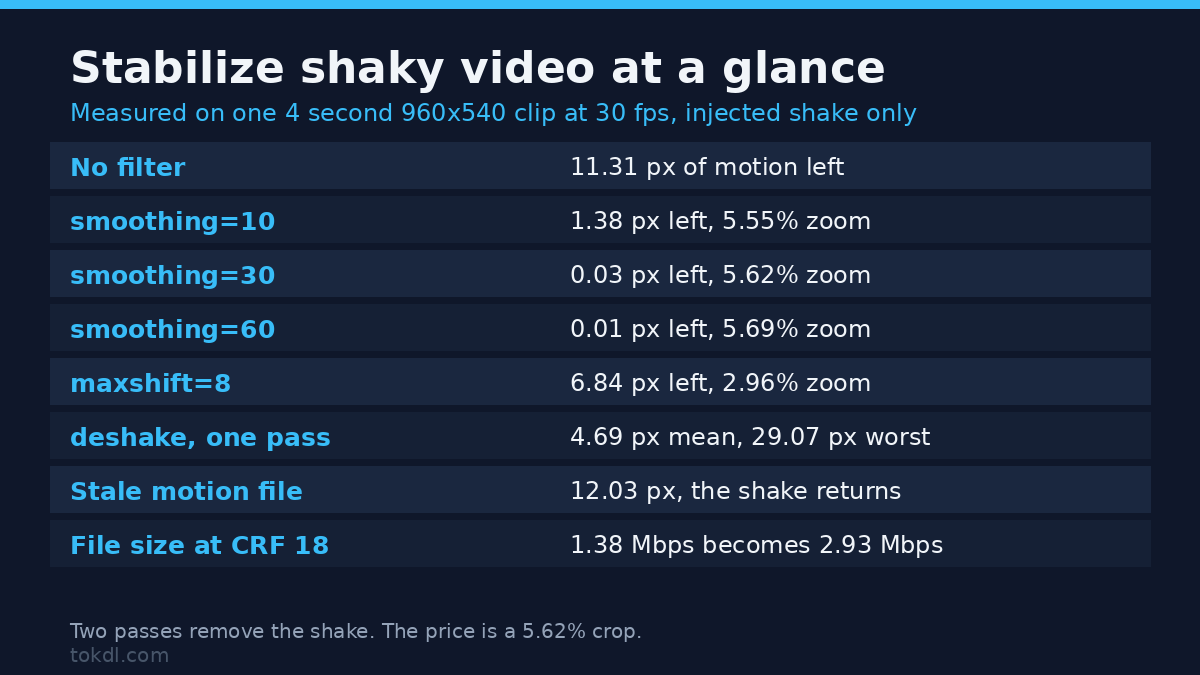
Same clip, same injected shake, one variable changed at a time. Residual motion is what’s left after the filter ran, averaged across 119 frame pairs.
| Pipeline | Motion left (mean) | Motion left (max) | Auto zoom |
|---|---|---|---|
| No filter, straight re-encode | 11.31 px | 20.00 px | none |
| vidstab, smoothing=10 | 1.38 px | 3.18 px | 5.55% |
| vidstab, smoothing=30 | 0.03 px | 0.18 px | 5.62% |
| vidstab, smoothing=60 | 0.01 px | 0.08 px | 5.69% |
| vidstab, smoothing=30, maxshift=8 | 6.84 px | 14.15 px | 2.96% |
| deshake, one pass | 4.69 px | 29.07 px | none |
| deshake, rx=32:ry=32 | 6.25 px | 47.57 px | none |
The two pass filter didn’t just shrink the shake, it removed it: 0.03 px left against 11.31 px with no filter. That’s the ceiling when the shake is pure camera movement and the scene holds still. Smoothing harder bought almost nothing, 0.01 px instead of 0.03 px, so 30 is where useful correction ends.
The interesting line is maxshift=8. That setting caps how far the filter may move the frame, and the cap becomes the result: limited to 8 px, 6.84 px of motion survived. maxshift is a safety limit, not a strength knob, and small values quietly hand the shake back to you.
deshake is the surprise. It halved the average motion, 11.31 px to 4.69 px, then made the worst frames worse: the largest frame to frame jump rose from 20.00 px to 29.07 px, and widening the search to 32 px pushed the maximum to 47.57 px. When real movement sits beyond the estimator’s search range, the estimate is wrong and the correction adds motion instead of removing it. I re-measured both files with two analysis windows to rule out an artifact of my own meter, and the numbers held.
The file size caught me out too. The shaky clip and the no-filter re-encode sat at about 1.38 Mbps at CRF 18, while the stabilized version landed at 2.93 Mbps, twice the size for a stiller picture. It isn’t the zoom: a static window came in at 0.20 Mbps, and the same window scaled by the filter’s 1.056 factor came in at 0.21 Mbps. The cost is sub-pixel resampling, since each frame gets interpolated at a different fractional offset and consecutive frames stop matching. Cap the bitrate if size bites more than softness.
What the crop costs when you stabilize shaky video
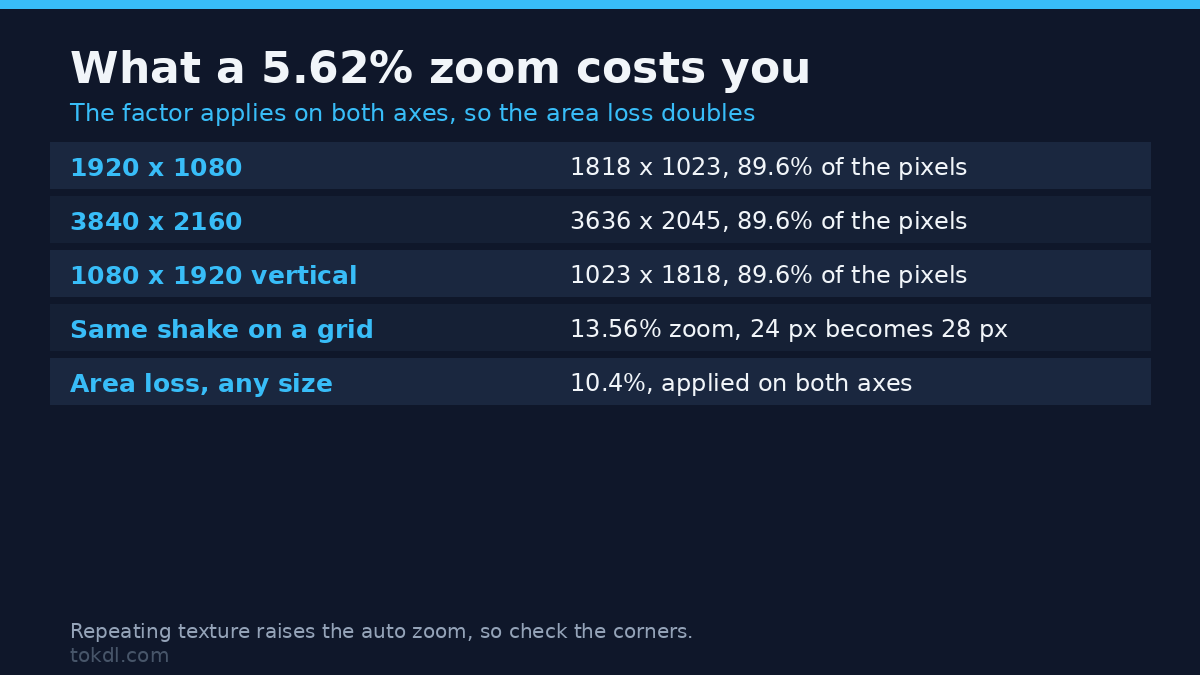
The zoom percentage sounds small and behaves like a bigger cut than it looks, because it applies on both axes. A 1.0562 factor removes about 10.4% of the pixels, not 5.6%.
| Export size | After a 5.62% zoom | Pixels kept |
|---|---|---|
| 1920 x 1080 | 1818 x 1023 | 89.6% |
| 3840 x 2160 | 3636 x 2045 | 89.6% |
| 1080 x 1920 (vertical) | 1023 x 1818 | 89.6% |
That’s the arithmetic behind the softness people notice after they stabilize shaky video. The filter’s log line reads like a horror story, Final zoom: 5.619728, and it’s a percentage rather than a factor, so the real magnification is 1.0562. I checked that against the picture, by scaling a 24 px grid on a second plate and measuring the spacing afterwards: 24 px in, 28 px out, which fits the 13.56% that plate produced. Worth the check, because the raw number looks like a 5.6x crop and isn’t.
Mistakes that make it worse when you stabilize shaky video
Re-applying an old motion file. This is the trap I’d warn a friend about. The motion file records the picture before you stabilize shaky video, so applying it to the stabilized export moves a stable image by the correction it already received. Measured: 12.03 px of average motion against 11.31 px in the original. You get the same wobble in the opposite phase, plus a second generation of compression.
Re-analysing that stable file instead is harmless. A fresh detection asked for a 0.081% zoom, cosmetically nothing, and left 0.02 px of motion. So if you ever stabilize shaky video a second time, re-detect first. A motion file belongs to one input.
Pointing it at repetitive texture. When you stabilize shaky video over a repeating pattern, the estimator can match a patch at the wrong offset. My second plate is a plain 24 px grid carrying the identical injected shake. The aperiodic scene needed a 5.62% zoom; the grid pushed the filter to 13.56%, nearly two and a half times the crop for the same camera movement. Tiled floors, brick walls and tight striped fabric do the same. If a clip comes back over-cropped, check for repeating texture before you blame the settings.
Expecting it to fix a moving subject. I added a subject crossing the frame at 180 px per second. The stabilizer didn’t flinch: auto zoom held at 5.619728% and 0.03 px of motion remained, because the fit is global and the static background outvotes a small moving box. That’s the good outcome when you stabilize shaky video over a moving subject, and it shows the limit too. A stabilizer doesn’t know what your subject is. It knows which pixels fit one motion model best, and when moving content fills the frame, the fit follows it.
Stabilizing before you cut. Trim first, to the cut you want. You pay analysis time for footage you’ll never use, you carry the crop at the ends of the take, and smoothing runs across the cut and lurches at the join. Tighten the clip, then stabilize shaky video that survived the edit.
If you’d rather not touch a command line
Editors sell the same three decisions under different names, and the dials you use to stabilize shaky video in FFmpeg translate across. The strength slider is smoothing. The crop lock is the automatic zoom. The second pass is what your editor does internally, so never apply the effect twice to one clip.
Two habits beat any preset. Shoot with more room around your subject than feels necessary, because the filter claims a few percent of the frame. And judge the result on the shot, since the wobble you hate usually sits in the first two seconds.
Frequently asked questions
Does it lose quality when you stabilize shaky video?
It loses pixels and it costs bitrate, and both are easy to quantify. The zoom removed about 10% of the frame area, and the fixed CRF export came out 2.1 times larger than the same clip unfiltered. Detail inside the retained area survives well, so the visible cost is the crop plus interpolation softness near the corners.
What settings should I start with?
vidstab, smoothing=30, shakiness=5, accuracy=15, optzoom=1. That combination took 11.31 px of frame to frame movement down to 0.03 px, and it won’t lock out a legitimate pan. For a slow deliberate pan, drop smoothing to 10 or 15 and re-run the transform only.
Why does the video come back cropped after you stabilize shaky video?
Because the alternative is black bars. When a frame shifts, the edge it left behind has no picture behind it, so the filter zooms in enough to push that gap out of view. The log tells you how much: 5.62% on the aperiodic plate, 13.56% on the repeating grid, for the same shake.
Can I combine it with a speed change in one pass?
Put the filters in one chain and keep the analysis on the original clip. The motion file is built from the input it analysed, so retiming first invalidates the estimates. Stabilize shaky video first, change the timing second, and copy the audio rather than re-encoding it.
Conclusion
Stabilization is a trade, not a fix. It buys a still frame and charges a crop, a bigger file and some softness, and on clean camera shake the correction can take motion to nearly nothing. How you stabilize shaky video matters less than the clip you feed it and the smoothing you pick.
The number I’d remember is 0.03 px, the shake left after a two pass run on a clip that started at 11.31 px. The catch, as always, is what happened to the frame to get there.
[…] on short clips; the default smoothing modes can leave the wobble in place. Our walkthrough of stabilising shaky footage in an editor covers the […]