
Scene Detection in Video: Split Clips Automatically (2026)
You’ve got 84 cuts inside a 38-minute interview, and the edit needs them as separate files. Scrubbing for each one is an afternoon gone. Scene detection promises to do it in one command, and on paper it does. On my first test clip the default settings missed a real cut, and the fast way to cut the files returned clips longer than I asked for.
So I measured both failures on this machine. You’ll learn how FFmpeg’s scene detection decides a frame is a cut, which threshold to use, the edits it always misses, and a two-pass recipe that returns frame-accurate clips. Every number comes from test footage with known cut points, run on FFmpeg 7.1.5.
What scene detection actually measures
Scene detection is a frame difference. FFmpeg compares each frame to the one before it, works on a luma plane, and turns the size of that difference into a score. No object recognition, no shot grammar, no awareness that somebody walked out of frame. Big differences score high, small ones score low, and you decide where the line sits.
FFmpeg ships two ways to read that score, and they don’t share a scale.
scdetis a filter with its ownthresholdoption, default 10, on a 0 to 100 scale. It reportslavfi.scd.scoreandlavfi.scd.timefor every frame past the line, as the FFmpeg filter documentation describes.select='gt(scene,0.1)'exposes the same idea as a frame variable on a 0 to 1 scale, capped at 1.0.
On my eight-shot clip, a cut at 9.0 seconds printed 33.00 in scdet and 0.8448 in select. A cut at 18.0 printed 50.67 and hit select’s cap at 1.000. They move together but aren’t the same measurement, and the cap hides how big a big cut was. Scene detection through scdet is the instrument; keep select for chains.
Run scene detection once
The cleanest first pass for scene detection writes nothing and only reports:
ffmpeg -hide_banner -v info -i input.mp4 -vf "scdet=threshold=5" -an -f null -That -v info matters: the filter logs at info level, so -v error hides every result and you’ll conclude the file has no cuts. A real run ends like this:
[scdet @ 0x55d1] lavfi.scd.score: 28.372, lavfi.scd.time: 3
[scdet @ 0x55d1] lavfi.scd.score: 21.841, lavfi.scd.time: 6
One quirk for any script: a cut often fires twice, one frame apart. My clip produced hits at 18.0 and 18.033 for the same transition, because the frame after a cut can differ enough from the new shot’s first frame to cross again. Scene detection without deduplication leaves a 33-millisecond clip, so drop hits closer than half a second.
Pick a scene detection threshold from measurements
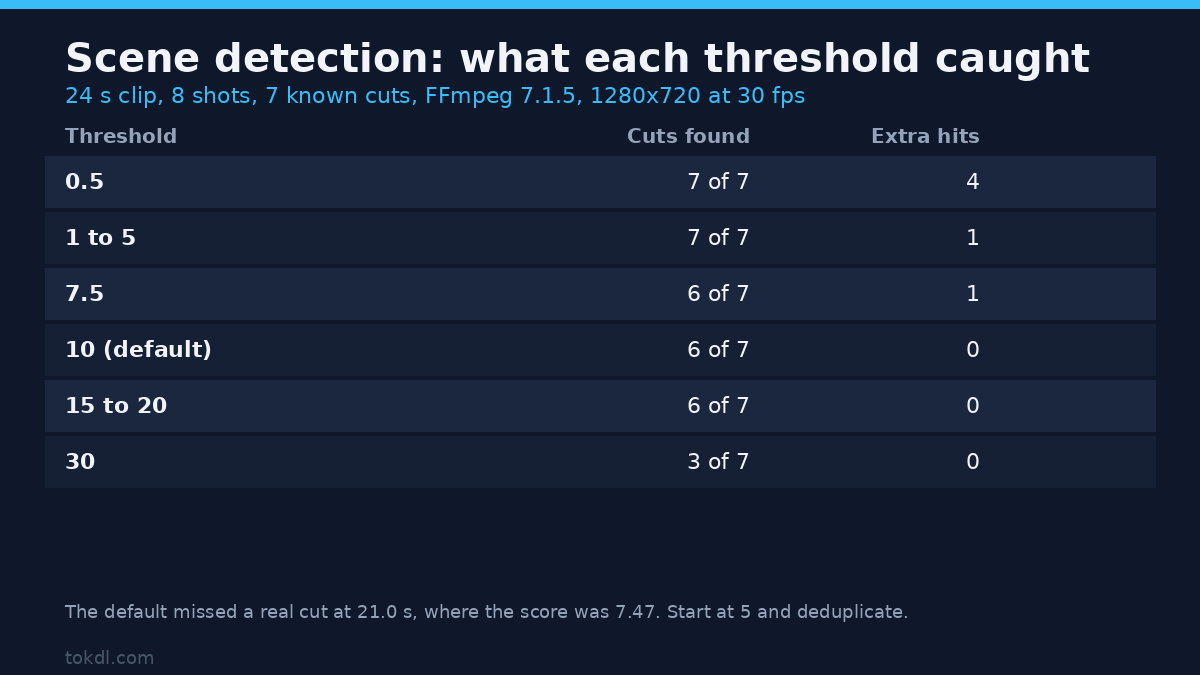
Threshold advice online is mostly folklore. I built a 24-second clip from eight distinct shots of exactly 3 seconds at 30 fps, so the true cuts sit at 3, 6, 9, 12, 15, 18 and 21 seconds. Then I ran scene detection at twelve thresholds and counted what each found.
| Threshold | Real cuts found (of 7) | Extra hits | What it means |
|---|---|---|---|
| 0.5 | 7 | 4 | Everything, including frame 0 and duplicated cuts |
| 1 to 5 | 7 | 1 | Full recall, one duplicate to filter |
| 7.5 | 6 | 1 | Lost the 21-second cut (score 7.47) |
| 10 (default) | 6 | 0 | Lost the same cut, no duplicates |
| 15 to 20 | 6 | 0 | Same result, less margin |
| 30 | 3 | 0 | Only the loudest cuts survive |
| 40 to 50 | 1 | 0 | Just the strongest transition |
That’s the argument for starting at 5, not the default 10. A missed cut costs a manual fix, while a duplicate is a one-line filter, so bias toward recall and deduplicate after. Scores ran from 7.47 to 50.67, which is why no single threshold fits every edit.
A second lever surprised me: scale the footage first and the scene detection verdict changes. at threshold 10 the full 1280×720 clip found 6 of 7 cuts, while 640×360 and 320×180 found all seven. Downscaling averages neighbouring pixels, and here it made the weak 21-second cut visible. It doesn’t save time. Decoding alone took 0.90 seconds, full-resolution scene detection 0.99, and detection at 320×180 1.40 on a 24-second clip, so the detector is cheap next to the decode. This box reports 64 CPUs against a 2-CPU quota at load 53, so read those as ratios.
Where scene detection lies
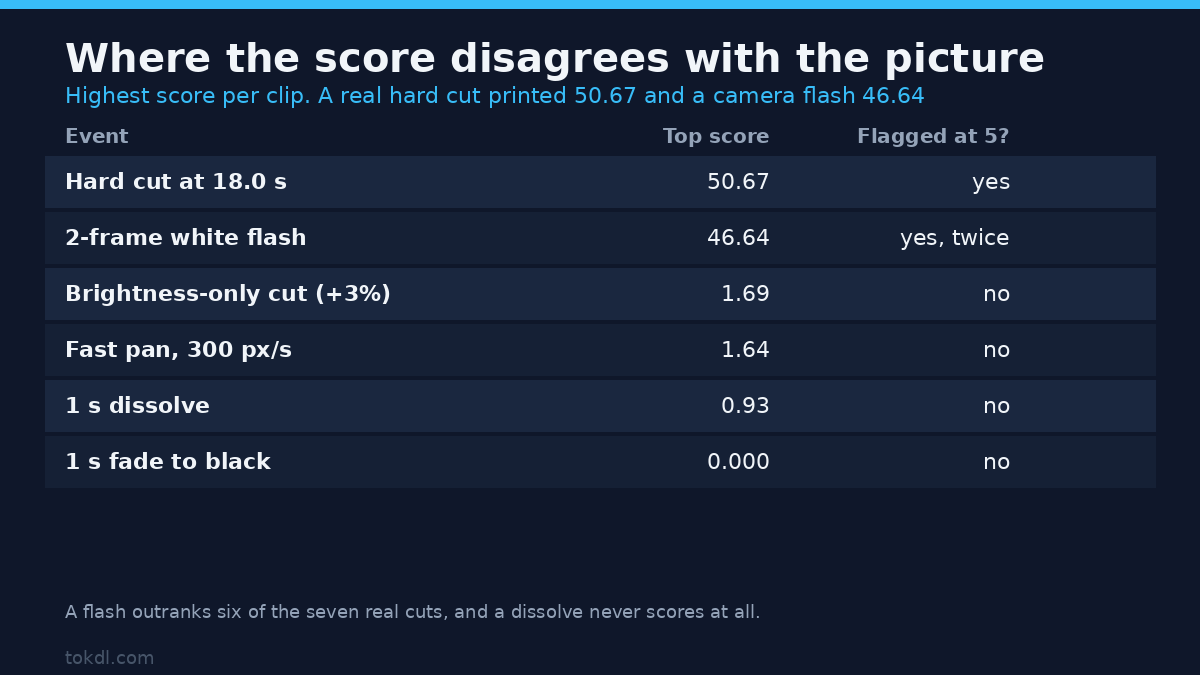
Frame difference doesn’t know what a cut is, so it fails both ways. I built four more clips, each with one event and no cuts.
| Event (no real cut) | Highest score | Detected at threshold 5? |
|---|---|---|
| 2-frame white flash (camera flash) | 46.64 | Yes, twice |
| Cut between shots differing only in brightness (+3%) | 1.69 | No |
| 1-second dissolve between two shots | 0.93 | No |
| 1-second fade to black and back | 0.000 | No |
| Fast pan, 300 pixels per second | 1.64 | No |
The flash is the one that costs you. Two frames of white scored 45.60 and 46.64, higher than six of the seven real cuts on the other clip. Scene detection will hand you a 33-millisecond clip where a flash went off, and no threshold that catches soft cuts will filter it. The fix isn’t statistical: require a minimum shot length near half a second and merge anything shorter.
The dissolve is the opposite failure. A one-second crossfade never scored above 0.93, so it’s invisible at any usable threshold and the two shots arrive as one clip. A fade to black scored exactly 0.000, which makes sense once you remember the change is spread across thirty frames at about 3% each. If your source has dissolves, scene detection is the wrong tool, and you’ll mark those transitions by hand.
The fast pan is the folklore I expected to confirm and couldn’t. The usual warning is that camera movement trips the detector, yet my pan peaked at 1.64. Real pans may differ, so don’t budget a cleanup pass on folklore. Run scene detection at threshold 1 and see where your footage’s noise floor sits.
Cutting: why the fast way gives the wrong file
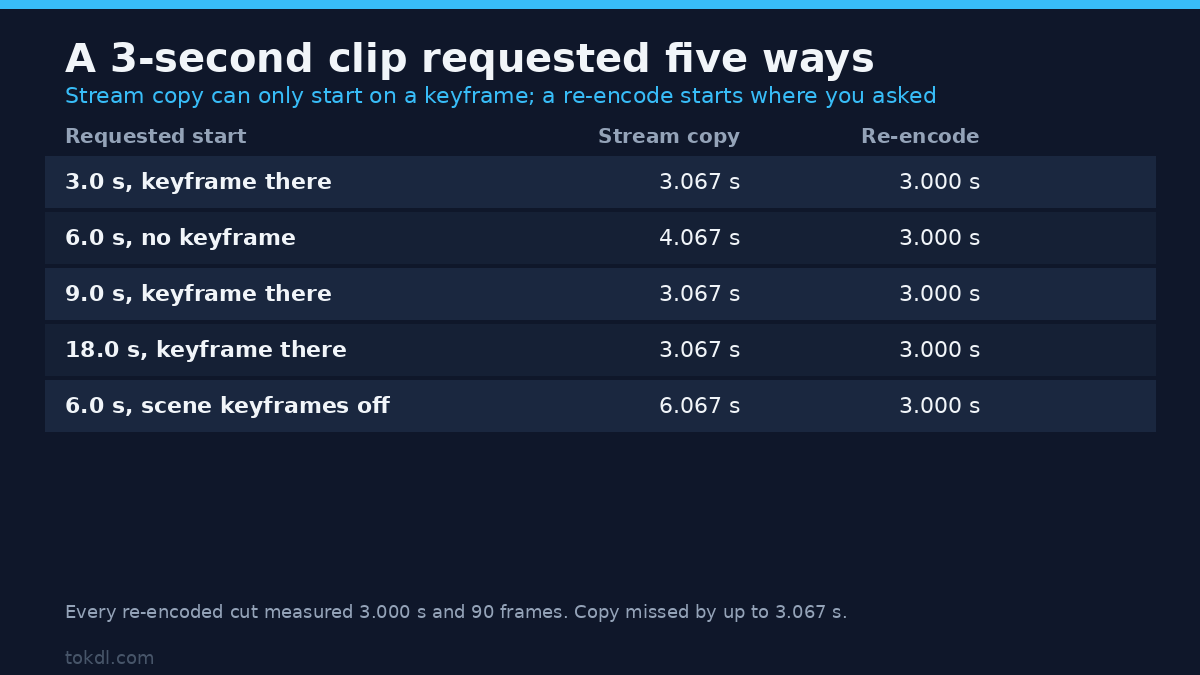
With timestamps in hand, the obvious move is to cut without re-encoding. Stream copy is fast and lossless, and here it’s wrong more often than you’d think, because a copy can only start on a keyframe. If your time isn’t one, FFmpeg starts at the previous keyframe and the clip carries extra footage at the head. For a rough pass, splitting the recording by hand is the same trade.
Keyframes are the part people miss, and the GOP length you exported with decides where they fall. x264 places one on most scene changes by default, so a detected cut often lands on a keyframe and copy looks fine. My default encode carried 14 keyframes, including one at 6 of the 7 cuts. Re-encoding the same shots with -g 250 -sc_threshold 0 left 2, at 8.333 and 16.667 seconds. Same picture, completely different copy behaviour.
| Requested start | Stream copy | Re-encode | Frames (copy) |
|---|---|---|---|
| 3.0 s (keyframe at the cut) | 3.067 s | 3.000 s | 92 |
| 6.0 s (no keyframe at the cut) | 4.067 s | 3.000 s | 122 |
| 9.0 s (keyframe at the cut) | 3.067 s | 3.000 s | 92 |
| 18.0 s (keyframe at the cut) | 3.067 s | 3.000 s | 92 |
| 6.0 s, encoder without scene keyframes | 6.067 s | 3.000 s | 182 |
I checked the 6-second case by reading pixels. The copied clip’s first frame was identical to the source frames at 5.867 and 5.933 and sharply different from 5.967 onwards, so it began at the keyframe near 5.0 and carried a full second of the previous shot. Every re-encoded cut came back at 3.000 seconds and 90 frames on both encodings.
So: detect with a filter, cut with a re-encode. The extra encode buys a clip that starts where you asked. Copy is usually close on an editor export, but check the durations.
The segment muxer trap
FFmpeg also offers a single-pass route with -f segment and -segment_times, which looks like it does the whole job. I tried the four variants the segment muxer documentation allows on the same clip, and every run exited 0 while producing the wrong result.
- Stream copy: eight files, with durations of 5.0, 2.0, 4.0, 3.0, 2.967, 3.033, 3.0 and 1.0 seconds. They sum to 24, so nothing is lost, and every boundary snapped to a keyframe.
- Stream copy, encoder without scene keyframes: three files instead of eight, at 8.333, 8.333 and 7.333 seconds.
- Re-encode: six files, the first one 9.0 seconds, because the cuts at 3 and 6 seconds were dropped.
- Re-encode with
-force_key_frames: seven files, the first one 6.0 seconds, because the 3-second cut was still dropped.
None of those runs printed a warning. If you go the segment route, count the files and read their durations with ffprobe before deleting the source. Exit code 0 means the process didn’t crash, not that it produced your files.
A scene detection recipe that measures out
Two passes, one for the cut list and one for the clips, is what I trust. Detect at reduced size with a low threshold, drop duplicates closer than half a second, then cut each shot with a re-encode. If you’re new to the tool, the everyday FFmpeg commands guide covers these flags.
ffmpeg -hide_banner -v info -i input.mp4 -vf "scale=640:360,scdet=threshold=5" -an -f null - 2>&1 | grep -o "scd.time: [0-9.]*" | cut -d" " -f2 > cuts.txtThen run one command per shot, with the flags that make the cut land on the frame you named:
ffmpeg -ss 9.000 -to 12.000 -i input.mp4 -c:v libx264 -crf 20 -pix_fmt yuv420p -c:a aac -b:a 128k shot_04.mp4That pipeline produced eight clips of exactly 3.000 seconds and 90 frames, totalling the source’s 24 seconds. Frame accuracy was verified: the 9-second clip’s first frame matched source frame 270 at 44.8 dB PSNR and the frames either side at 6.2 and 26.9 dB, so scene detection put the clip on the cut, not a frame away from it.
Six scene detection mistakes that cost clips
- Running scene detection with
-v error. You’ll get no output and assume the file has no cuts. - Keeping the default scene detection threshold. It missed a real cut on a clip built to be easy.
- Cutting at every raw hit. One cut often reports twice, a frame apart, which produces sub-second clips.
- Trusting stream copy at a non-keyframe. A 3-second request came back as 6.067 seconds.
- Checking the exit code and not the files. The segment muxer returned 0 while writing three files where seven were requested.
- Assuming a dissolve will be found. A one-second crossfade never scored above 0.93.
FAQ
Does scene detection work on variable frame rate footage?
It runs, but the timestamps are only as good as the file’s own. Convert to a constant frame rate first if the source came from a phone, then check with ffprobe.
Which threshold should I start with?
Five, on a downscaled copy, then look at the scores. Quiet footage with soft cuts wants lower. Dozens of hits per minute means raising it and planning on manual review.
Can I split on scene changes and keep the audio?
Yes. Cut with -c:a aac at or above the source bitrate, or the clips drift out of sync in the editor. Stream copy keeps audio intact and keeps the keyframe problem too.
Does this replace an editor’s shot detection?
No. It’s a frame-difference alarm, not a shot classifier. It finds hard cuts well, misses dissolves and fades, and can’t tell a flash from a cut. Use scene detection to get most of the marks in seconds, then fix the rest by hand. For stills rather than clips, extracting frames is the better fit.
What to do with the cut list
The workflow that holds up is boring: detect with a low threshold at reduced size, deduplicate, then re-encode each shot. Keep the timestamp list, because you’ll re-cut after review, and a second scene detection pass is a waste.
Hard cuts from a camera or an editor export will feel like magic. Footage full of dissolves, fades and flashes will cost ten minutes of manual marking. Trusting the default threshold, the exit code, or a duration you never measured is what breaks a batch job.