
SRT vs VTT vs ASS: Which Subtitle Format Should You Export?
Three caption files, the same words inside them, three different results. That’s the shape of most subtitle problems I’ve had to debug. An SRT plays fine on YouTube, the same lines exported as VTT lose the colour you set, and an ASS file shows its own tags as literal text on a smart TV. Nothing in the file extension warns you. The subtitle format you pick decides what your text can carry, and most converters throw features away without telling you.
So I stopped guessing. I built one small styled caption file with italics, bold, underline, a colour, a position tag and a two-line cue, converted it into every subtitle format I use, read each output back byte by byte, and burned the results onto video so I could sample the delivered pixels. Everything below was measured on this machine with FFmpeg 7.1.5 and libass, and every command is one I ran myself.
What you’ll learn
- Which styling each subtitle format keeps and which it drops silently
- Why the red text in your SRT turns up plain white in an MP4
- Which containers accept which subtitle format, and the copy command that fails
- The six file-level mistakes I reproduced, one of which exits successfully with an empty file
The three subtitle formats you’ll meet
SRT (SubRip) is the oldest and the least ambitious. It holds a cue number, a start and end time written as 00:00:01,000 --> 00:00:03,500, and one or two lines of text. Players started honouring a few HTML-style tags inside it, so <i>, <b>, <u> and <font color> usually work. There’s no official specification for this subtitle format, which is why every tool treats it a little differently.
VTT (WebVTT) is the web’s subtitle format, and it’s the one the W3C specified for HTML5 video tracks in the WebVTT specification. It keeps the text-and-timestamps model, adds a mandatory WEBVTT header, allows hour-less timestamps such as 00:01.000, and supports cue settings for line, position and alignment plus voice spans like <v Narrator>.
ASS (Advanced SubStation Alpha, the successor to SSA) is the subtitle format of anime fansubbing and of every serious editor’s export menu. It carries a full style block with font, size, outline, shadow, margins and colours, and each line can carry override tags such as {i1} and {an8}. It’s also the most verbose of the three: for the same four cues my SRT file weighed 316 bytes, the VTT 257 bytes and the ASS 960 bytes, because it writes a style header and a dialogue record for every line.
What survives a subtitle format conversion
I converted the same styled file three ways, then pulled the text back out to see what was left:
ffmpeg -i styled.srt -c:s webvtt out.vtt
ffmpeg -i styled.srt -c:s ass out.ass
ffmpeg -i styled.srt -c:s mov_text out.mp4| In the source SRT | Into VTT | Into ASS | Into MP4 (mov_text) |
|---|---|---|---|
<i> and <b> |
kept as tags | kept as {i1}, {b1} |
kept |
<u> |
kept | kept as {u1} |
kept |
<font color="#ff0000"> |
dropped, text kept | kept as {c&HFF&} |
dropped, text kept |
{an8} position tag |
dropped | kept verbatim | dropped |
| VTT cue settings (align, line, position) | kept in the file | dropped | dropped |
<v Narrator> voice span |
dropped | dropped | dropped |
<c.yellow> class span |
dropped | dropped | dropped |
| Millisecond timestamps | kept exactly | rounded to 10 ms | kept exactly |
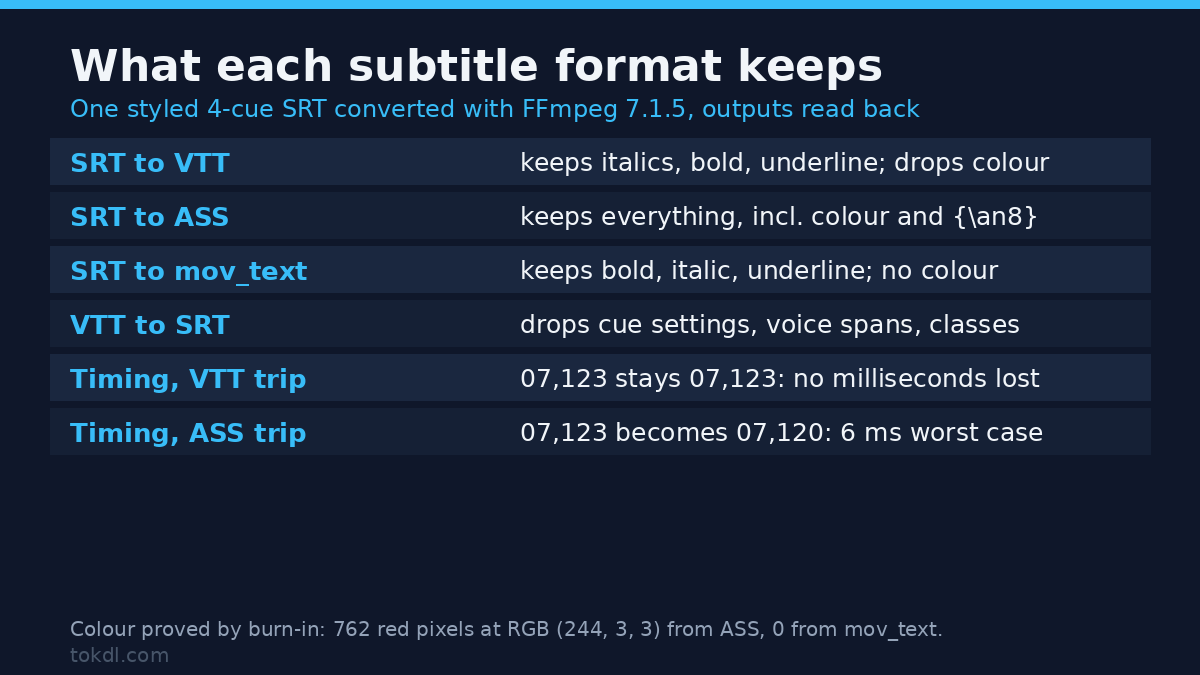
The pattern is simple once you see it. ASS keeps everything, because it’s the only one with somewhere to put styling and positioning. The VTT subtitle format keeps formatting tags but has no idea what to do with a font colour, so it strips the tag and leaves the words. MP4’s subtitle codec, mov_text, keeps bold, italic and underline and nothing else.
The red-word test
A table tells you what’s in the file, not what reaches the screen. So I burned each subtitle format onto a black 1280×720 clip and counted the pixels.
From the SRT and from the ASS it produced, the cue carrying <font color="#ff0000"> rendered as 762 red-dominant pixels averaging RGB (244, 3, 3), inside 4,211 lit pixels. The colour arrived, and FFmpeg’s ASS shorthand {c&HFF&} does mean full red rather than the blue you might expect from reading the hex as raw RGB. From the MP4’s mov_text stream, the same cue produced 4,896 lit pixels and zero red ones: all white. So when an SRT goes into MP4 with -c:s mov_text, any colour you set is gone, and it’s gone quietly.
VTT positioning exists only inside VTT
I wrote a WebVTT cue with align:middle line:85% position:50% and rendered it next to a plain twin with the same words. The two frames were identical: the text sat in a bounding box from x 518 to x 763 and y 661 to 687, with its vertical centre at 93.8 percent of the frame height in both cases. FFmpeg’s renderer didn’t move the positioned cue at all.
Then I converted that VTT into the SRT subtitle format. The file shrank from 224 bytes to 101 bytes and every cue setting vanished, along with the <v Narrator> span and the <c.yellow> class. The words arrived intact and nothing else did. If positioning matters, VTT is the wrong intermediate step even though VTT is the subtitle format that invented it.
If you want FFmpeg itself to draw your styling, ASS is the only subtitle format of the three that survives the trip into the renderer, so convert to ASS before you burn anything in.
Timing: where the milliseconds go
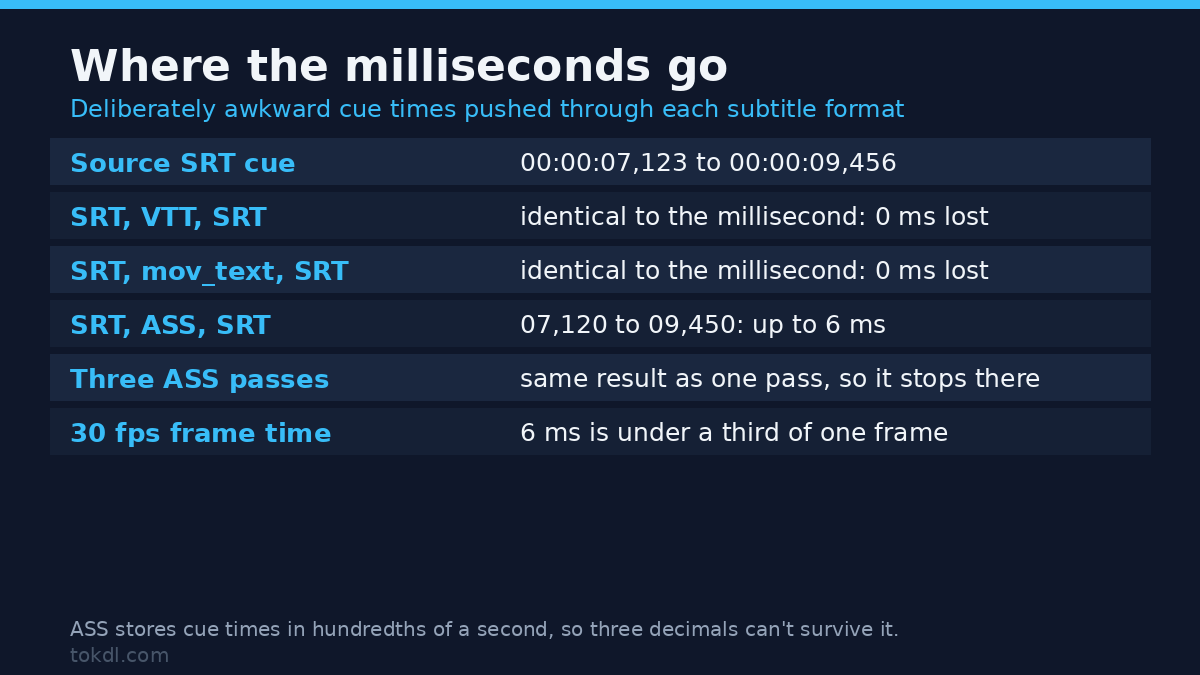
I used deliberately awkward timestamps, 00:00:07,123 and 00:00:09,456, and checked what came back.
| Route | Result on the awkward cue | Worst shift in the sample |
|---|---|---|
| SRT, VTT, SRT | 07,123 to 09,456, unchanged | 0 ms |
| SRT, MP4 mov_text, SRT | 07,123 to 09,456, unchanged | 0 ms |
| SRT, ASS, SRT | 07,120 to 09,450 | 6 ms |
The reason is structural. The ASS subtitle format stores cue times in hundredths of a second, so a three-decimal SRT timestamp can’t survive the trip. The same pass turned 00:00:10,001 into 00:00:10,000 and 00:00:12,999 into 00:00:13,000, which is rounding going the other way.
The good news is that it stops there. I ran the file through ASS three times over and the timestamps after the second and third passes were identical to the first, so the drift doesn’t accumulate. Six milliseconds is under a third of one frame at 30 fps, so it’s harmless for dialogue and only matters if you’re captioning something that has to line up with a hard cut. That’s the same precision problem you meet when you split a video into parts and the cut lands on the nearest keyframe instead of your chosen frame.
Which container accepts which subtitle format
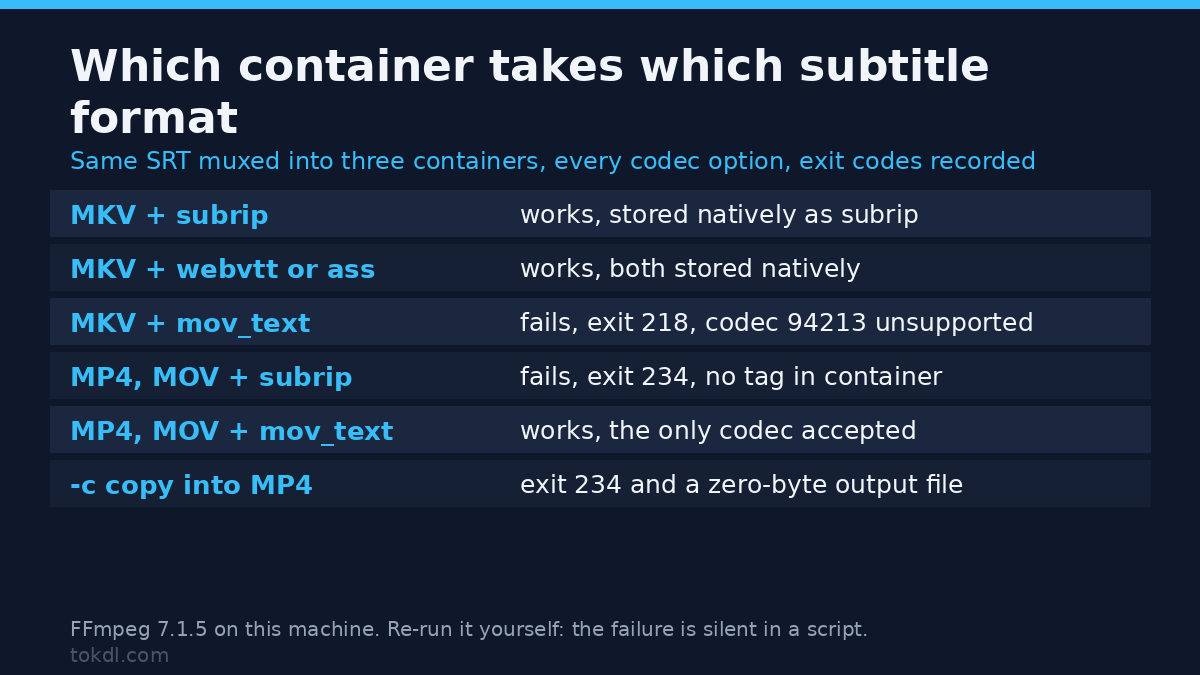
Formats and containers are separate decisions, and the second one bites harder. I muxed the same SRT into three containers with every codec option and recorded the exit codes:
| Container | subrip | webvtt | ass | mov_text |
|---|---|---|---|---|
| MKV | works | works | works | fails, exit 218 |
| MP4 | fails, exit 234 | fails, exit 234 | fails, exit 234 | works |
| MOV | fails, exit 234 | fails, exit 234 | fails, exit 234 | works |
Matroska is the tolerant one: it carries SRT, WebVTT and ASS as native subtitle tracks, and refuses mov_text with a blunt Subtitle codec 94213 is not supported. MP4 and MOV are the opposite. Of the four codecs I tried, they accepted only mov_text, and FFmpeg’s own documentation lists its subtitle support the same way. Our MKV to MP4 remux guide covers the same copy-versus-convert decision for video and audio.
Here’s the trap that costs people an afternoon. This is the natural command to attach captions to an existing MP4:
ffmpeg -i video.mp4 -i captions.srt -c copy -map 0 -map 1:0 out.mp4It fails with exit code 234 and writes nothing. FFmpeg names the reason exactly: Could not find tag for codec subrip in stream #2, codec not currently supported in container. The output file exists, it’s zero bytes, and a script that only checks for a file will move on. The fix is to say which subtitle format the container wants:
ffmpeg -i video.mp4 -i captions.srt -c:v copy -c:a copy -c:s mov_text -map 0:v -map 0:a -map 1:0 soft.mp4That one produced a 1,047,756 byte MP4 with three streams: h264 video, aac audio and a mov_text subtitle track. The same copy-or-convert logic shows up in our guide to converting video to MP4. To keep the captions as a real SRT track instead, put them in Matroska, which lets you stream-copy everything:
ffmpeg -i video.mp4 -i captions.srt -c copy -c:s srt -map 0 -map 1:0 soft.mkvAnd if you want the words permanently on the picture, skip the subtitle stream and let libass draw them:
ffmpeg -i video.mp4 -vf subtitles=captions.srt -c:a copy burned.mp4That burn-in route is the only one that keeps your colour, because the styling becomes pixels instead of a codec feature. Burned text always looks the way you designed it, and nobody can turn it off. Our guide to adding subtitles to a video covers the tooling side of that choice inside an editor.
Six file-level mistakes I reproduced
I wrote each bad file, ran it through FFmpeg, and recorded the result. None of these are hypothetical.
- VTT with comma timestamps. Take a WebVTT file whose cues read
00:00:01,000 --> 00:00:03,500, copied from an SRT by hand. FFmpeg exits 0 and writes a zero-byte subtitle file with no cues in it. I ran it twice and got the same silent empty result both times. That’s the worst failure in the set, because your script sees success. - Four digits in the millisecond field. An SRT cue starting at
00:00:01,1200becomes00:00:02,200. The parser read 1200 as a fraction of a second and rolled it, so the cue moved more than a second later and nothing complained. - A blank line inside a cue. Put an empty line between the two lines of one caption and the SRT parser treats the cue as finished. My two-part cue came out as a single cue with the blank removed.
- Timestamps without an hour field. The hour-less form belongs to WebVTT, not to SRT. Feed
00:01,000 --> 00:03,500to the SRT parser and it fails hard with exit 183,Invalid data found when processing input. At least this one tells you. - A legacy Windows-1252 file. An old SRT with a Latin-1 character in it dies with exit 69 and the message
Invalid UTF-8 in decoded subtitles text; maybe missing -sub_charenc option, writing nothing. Add the flag and the same file converts cleanly, 53 bytes of correct text:ffmpeg -sub_charenc ISO-8859-1 -i legacy.srt -c:s srt fixed.srt. This flag is the most useful one in subtitle work and almost nobody knows it exists. - An arrow inside the caption text. A cue reading
Press play --> then pausecame out asPress play -- then pause, because FFmpeg dropped one hyphen to keep the line parseable.
Two related notes. A WebVTT file missing its WEBVTT header still converts fine in FFmpeg, but browsers are stricter, so an export that passes your terminal test can still fail in the player. And an SRT with no blank line between cues is parsed correctly despite being sloppy, so this subtitle format punishes some mistakes and forgives others with no obvious logic.
Frequently asked questions
Which subtitle format should I upload to YouTube?
SRT or VTT. I’d send SRT, because YouTube’s own tools export it and your editor is more likely to write it correctly. Neither keeps a position, so don’t spend time placing cues precisely before you upload.
Does the WebVTT subtitle format support colours?
It supports CSS class spans such as <c.yellow> when the player’s stylesheet defines them, but FFmpeg doesn’t carry those classes through a conversion, and the SRT-style <font color> tag is dropped. If colour matters, use the ASS subtitle format and burn it in.
Can an MP4 hold the ASS subtitle format?
No. MP4 and MOV accepted only mov_text in my test, and it keeps bold, italic and underline. MKV is the container that carries ASS properly.
Why did my subtitle file come out empty?
Comma timestamps inside a VTT file are the most common cause. The conversion reports success and writes nothing, so check the size of any subtitle file you’ll generate in a script rather than trusting the exit code.
The short version
Pick your subtitle format by what you need to keep, not by which extension your editor offers first. SRT is the safe interchange format for anywhere you don’t control the player. VTT is what the web wants, and it converts from SRT without losing a millisecond, but its positioning and class styling die the moment they leave the file. ASS carries everything, which makes it the right master for a project you’ll keep editing and the right target when you want libass to draw your subtitles properly.
Whatever subtitle format you settle on, check the output file rather than the exit code. The failure here that would have cost me real time was the VTT with commas in it: FFmpeg reported success and handed back a file with nothing inside.