
Video Debanding: Remove Color Banding Without Smearing Detail
You graded a sky, exported the clip, and the gradient came back as stripes. Nothing changed in the grade. The file lost levels between the master and the delivery copy, and a smooth transition turned into a staircase you can see across the room.
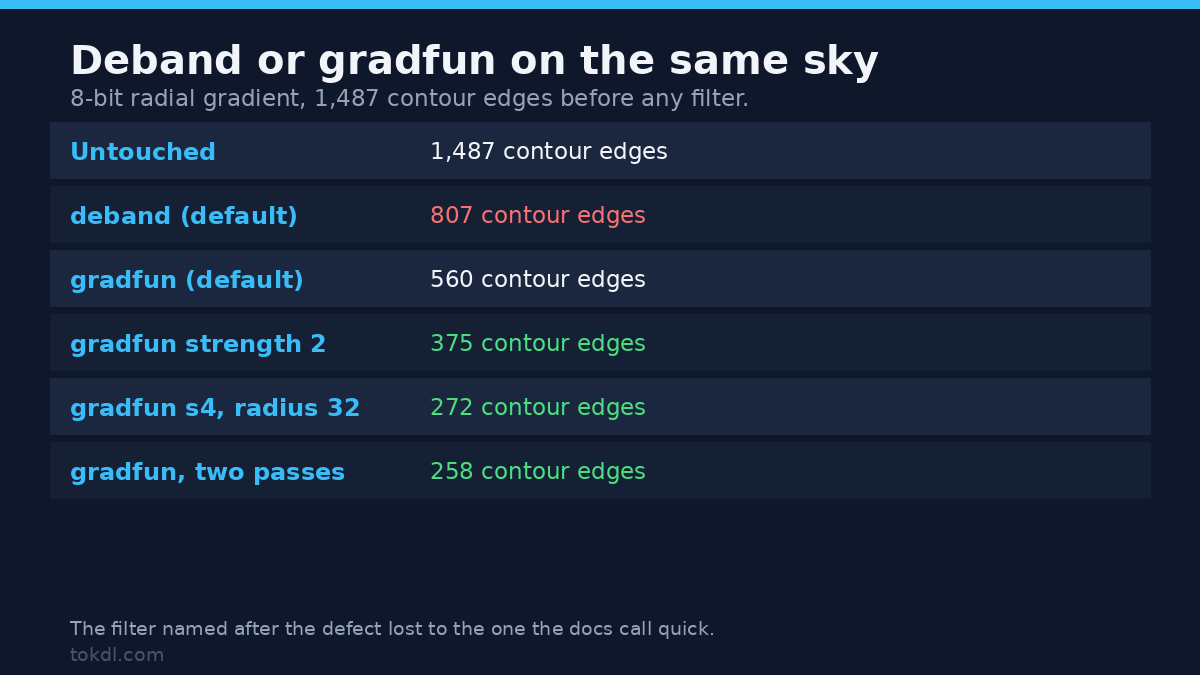
I measured what the two FFmpeg filters that claim to fix it do on a controlled sky. The result is uncomfortable. deband cut visible contour edges by 46 percent. gradfun at strength 2, the option the documentation calls quick, cut them by 75 percent. On a 2 second clip, encoding at CRF 23 put almost every one of them back.
So this isn’t a list of flags to paste. It’s what the numbers say and the order to run them in.
What banding actually is
A gradient is a ramp with hundreds of values packed into it. 8-bit video stores 256 codes, and in limited range only 16 to 235 carry picture, so a frame gets about 220 usable levels. On a gentle ramp one level covers 50 or 100 pixels. Your eye finds those edges fast, which is why a 1 level step reads as a contour line.
Four things put banding there. You exported a 10 bit master to 8 bit. An encoder with too few bits flattened a gradient. You graded an 8 bit file and spaced the levels apart. Or you scaled the clip and the resampler smoothed it into flat patches.
Only the first case is about bit depth. If you’re still choosing a format, the trade-offs are in 8-bit vs 10-bit video. Here the file exists and the damage is baked in. This is repair.
Measure the file before you filter it
You can’t tell whether a deband pass worked from a still in a player. Pull one frame as luma and count what’s in the pixels. This prints distinct levels, the longest run of identical pixels and the number of transitions.
ffmpeg -v error -i input.mp4 -frames:v 1 -pix_fmt gray -f rawvideo - > frame.graypython3 - <<'PY'
import array
from itertools import groupby
w, h = 1280, 720
d = array.array("B")
d.frombytes(open("frame.gray", "rb").read())
row = d[(h // 2) * w:(h // 2 + 1) * w]
runs = [len(list(g)) for _, g in groupby(row)]
print("levels:", len(set(row)), "longest flat run:", max(runs), "steps:", len(runs))
PYOn my test sky, a 1280 by 720 radial gradient stored as 8 bit, that printed 76 levels, 151 steps and a longest flat run of 13 pixels on the middle scanline. Sampling 13 rows instead of one, the longest plateau anywhere on the frame was 167 pixels. A run that long is a band you can point at, and its edge is one pixel wide.
A single row is a rough proxy, so I summed a stricter count over 13 rows: transitions with a flat plateau of at least four pixels on both sides. That number, contour edges, was 1,487 on the untouched sky. Every figure below uses the same harness and fixture, so the comparisons are like for like.
Which filter, deband or gradfun
deband is the adaptive one. It keeps four thresholds, one per plane, all defaulting to 0.02, plus a range of 16 pixels that sets how far it looks for a band edge. When it finds one it dithers both sides of the step instead of rebuilding the gradient. The parameters are in the FFmpeg filter documentation.
gradfun fits a local gradient across a radius and dithers the difference, with strength capping how far one pixel may move. That cap is the whole safety mechanism. Set it low and the filter nudges values; set it high and it moves them far enough to erase texture. Its notes are in the gradfun section of the same page.
| Setting on the banded sky | Longest run, any of 13 rows | Steps | Contour edges |
|---|---|---|---|
| Untouched 8 bit file | 167 px | 151 | 1,487 |
deband (1thr 0.02) |
81 px | 302 | 807 |
deband=range=32 |
112 px | 299 | 889 |
gradfun (default) |
91 px | 880 | 560 |
gradfun=strength=2 |
79 px | 920 | 375 |
gradfun=strength=4:radius=32 |
71 px | 929 | 272 |
gradfun twice at strength 2 |
63 px | 1,013 | 258 |
Two results surprised me. First, deband halves the contours and stops improving, and its parameter range hides why. I ran 1thr at 0.005, 0.01, 0.02 and 0.05 on one frame. The 0.005 run was byte identical to the input, so the filter did nothing. The 0.02 and 0.05 runs were byte identical to each other.
Second, the quick filter won on both fixtures. On the radial sky it left 560 contour edges against deband‘s 807. On a ramp with 1 level steps it left 186 against 860. That’s the opposite of what the names suggest.
Chaining buys little. Two gradfun passes dropped the sky from 375 to 258, at the cost of a second full pass. Putting deband after gradfun made both fixtures worse, 373 and 442.
What each setting costs you in detail
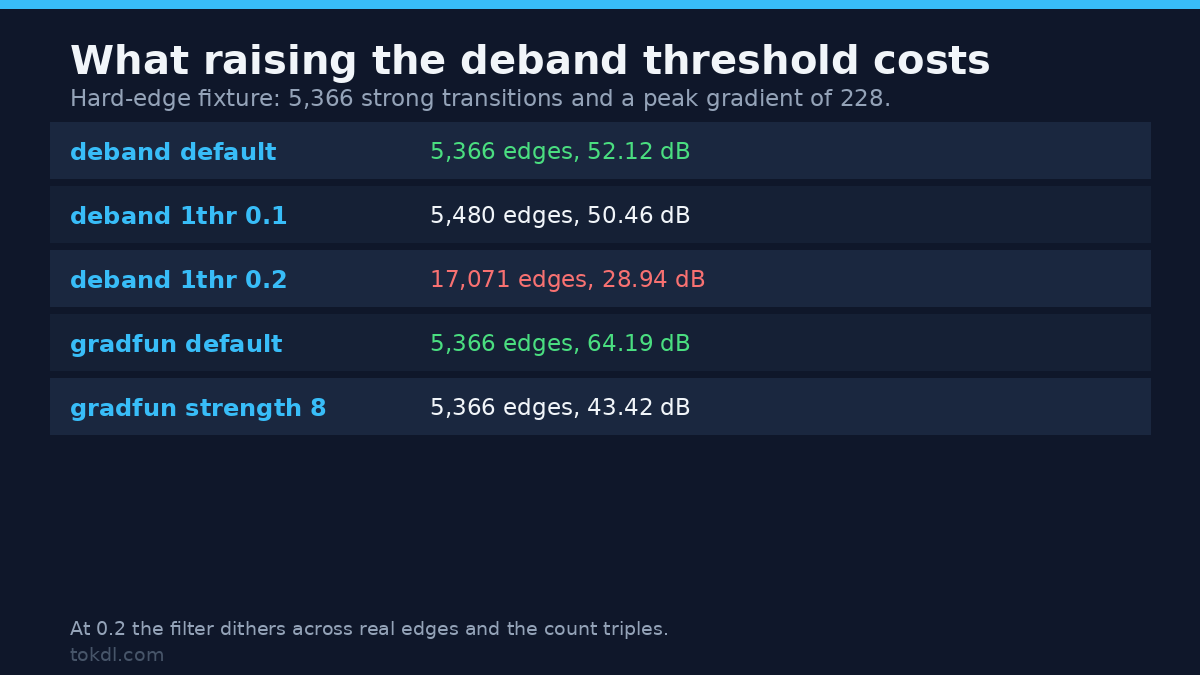
A deband pass trades accuracy for smoothness, and the trade only pays while hard edges survive. I tested that on rectangles and a fine grid over the same gradient, counting strong transitions, peak gradient and PSNR against the source.
| Setting on the hard edge fixture | Strong transitions | Peak gradient | PSNR vs source |
|---|---|---|---|
| Untouched | 5,366 | 228 | reference |
deband (default) |
5,366 | 228 | 52.12 dB |
deband=1thr=0.1 |
5,480 | 234 | 50.46 dB |
deband=1thr=0.2 |
17,071 | 234 | 28.94 dB |
gradfun (default) |
5,366 | 228 | 64.19 dB |
gradfun=strength=8 |
5,366 | 228 | 43.42 dB |
The defaults are safe. Both filters keep every strong transition and peak gradient where it was. The failure is in raising the threshold. At 1thr 0.2 the strong transition count goes from 5,366 to 17,071 and PSNR falls to 28.94 dB, because the filter dithers across edges that were never bands. That isn’t smoothing. It’s noise painted over the frame.
That also explains why gradfun looks free at its default and expensive at strength 8. At 64.19 dB it’s nearly a no-op on hard content, which makes it safe before an encode. At 43.42 dB you’re trading detail you can’t get back, so 2 or 4 is the practical ceiling.
The recipe that survives a re-encode
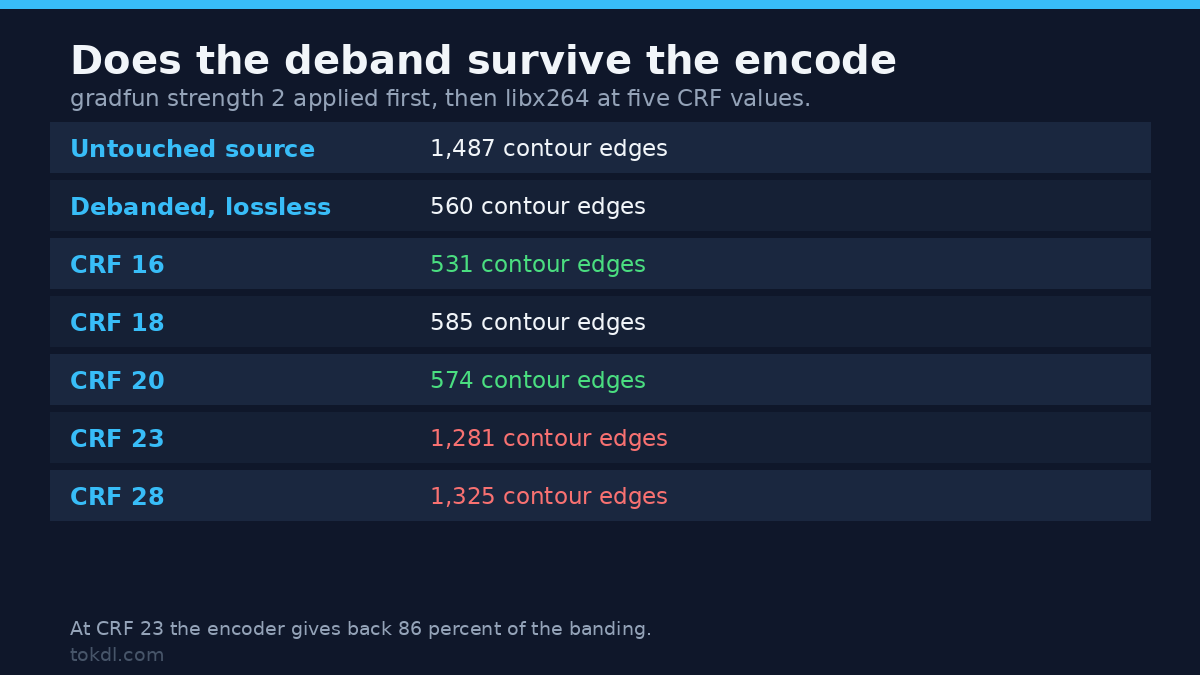
Here’s the part nobody tells you. The filter output isn’t the deliverable, and the encoder is where the fix usually dies. I applied gradfun=strength=2 to the sky, encoded with libx264 at five CRF values, then measured the decoded file with the same harness.
| Delivered file | Contour edges |
|---|---|
| Untouched source | 1,487 |
| Debanded, lossless | 560 |
| CRF 16 | 531 |
| CRF 18 | 585 |
| CRF 20 | 574 |
| CRF 23 | 1,281 |
| CRF 28 | 1,325 |
Up to CRF 20 the fix holds. At CRF 23 the encoder spends the dither away and returns 1,281 contour edges, 86 percent of the untouched file. You did the work, the file shipped, and the banding came back on delivery.
So the order is: measure, deband, encode at CRF 18 to 20, then verify the encoded file rather than the filter output. If the delivered numbers are bad, lower the CRF before you add anything. I learned that the hard way. Adding fine grain after the pass, the trick covered in adding film grain to a video, held at 336 contour edges at CRF 18 and collapsed to 1,071 at CRF 23. -tune grain only moved it to 1,092. Grain you can’t afford to encode disappears and takes the smoothing with it.
ffmpeg -i input.mp4 -vf "gradfun=strength=2" -c:v libx264 -crf 18 -preset slow -pix_fmt yuv420p out.mp4ffmpeg -v error -i out.mp4 -frames:v 1 -pix_fmt gray -f rawvideo - > frame.grayRun the counter again on out.mp4. If the contour count is close to the lossless pass, the file is done. If it jumped, bitrate is the problem, and no filter order will save it.
Dither at the bit-depth conversion
The last place banding gets created is the conversion on the way out, and it’s the one people skip. I took the 10 bit ramp to 8 bit three ways. With zscale at its default, dither=none, the frame came out with 129 transitions, one clean step per level. With dither=error_diffusion it came out with 403, because the noise breaks the steps. Swscale’s automatic path gave 385.
Then the trap. I passed -sws_dither none and -sws_dither ed to compare them and got byte identical frames from both, same MD5, alongside the default. On FFmpeg 7.1.5 that flag exited 0 and changed nothing. If you want control over the dither, name it on the filter doing the conversion.
ffmpeg -i master.mov -vf "zscale=dither=error_diffusion,format=yuv420p" -c:v libx264 -crf 18 out.mp4Both filters also accept a 10 bit input directly. On the 10 bit sky, deband changed 191,324 of 921,600 luma samples, peak shift 3.5 levels out of 1,023. So you can deband at working depth, keep the master, and dither once on the way to 8 bit.
Common mistakes
1. Reaching for deband because of its name
It’s the obvious first move and it underperformed on both fixtures. Measure the result instead of trusting the label, and try gradfun at strength 2 before calling the file hopeless.
2. Raising the threshold to fix stubborn banding
At 1thr 0.2 the edge fixture lost 23 dB against its own default and gained 11,705 strong transitions. More aggressive isn’t stronger. It’s a different filter that sees bands everywhere.
3. Debanding before a low-bitrate encode
CRF 23 undid 86 percent of the fix. Treat the pass and the encode as one job, and set the CRF with gradients in mind.
4. Adding grain you can’t encode
Grain masks banding only while it survives compression. It held at 336 contours at CRF 18 and collapsed to 1,071 at CRF 23. Tight bitrate? Skip the grain and spend the bits on the gradient.
5. Confusing banding with noise
They look similar in a still and need opposite treatment. Banding is missing levels and gets smoothed. Noise is unwanted variation and gets reduced, as in reducing video noise and grain. Smooth a noisy clip and it goes soft. Denoise a banded one and the bands stay.
6. Skipping the conversion dither
A perfect pass followed by an undithered 10 to 8 bit conversion puts the steps back at the last step of the chain.
FAQ
Does deband remove compression blocks?
No. Blocking comes from the transform, and the filter for it is deblock. Squares on an 8 or 16 pixel grid are blocking. Steps that follow the gradient are banding.
Can I fix an 8 bit file I already exported?
Visually, mostly yes. The lost levels don’t come back, which is why PSNR against the 10 bit master sat near 52 dB after every pass. You get dither in the right places, and that’s what the eye reads as smooth.
Is gradfun deprecated?
It’s present and working in FFmpeg 7.1.5, the build I measured, and it beat deband on both fixtures. The documentation calls it quick, not obsolete.
Why does banding come back after I upload?
Platforms re-encode at a lower bitrate, the same mechanism as my CRF 23 test. Deband, deliver at the best quality the platform accepts, and measure the file you published.
Does the fix work on 10 bit footage?
Yes, both filters take 10 bit input. Working at 10 bit and dithering once at the end avoids flattening the gradient twice.
Conclusion
Banding is a levels problem, and the filters that fix it add a little noise in exactly the right places. The job is a negotiation between how smooth the gradient looks and how much real detail you’ll move.
My numbers point one way. Measure first, use gradfun at strength 2 rather than the filter named after the defect, keep thresholds low, and treat the encode as part of the fix. A pass that looks perfect in a lossless preview and dies at CRF 23 hasn’t fixed anything. The delivered file is the only one that counts.
If you’re chasing a different artefact, the same habit pays off. Flicker and banding get confused constantly, and the flicker guide separates them by pattern. If your gradients look wrong rather than stepped, the problem may be range rather than depth, which is what a washed out export usually turns out to be.