
Video for Website: Format, Size and Poster Frame (2026)
A five second loop can leave your machine at 400 KB or at 40 MB. Same clip, same resolution, same codec. The difference sits in three export decisions, and none of them is visible in a preview window.
That gap matters more on a website than anywhere else. A visitor on a phone gives the page a couple of seconds before deciding it isn’t worth the wait, and a video for website pages that hasn’t started by then has already lost.
This guide covers what a video for website pages has to be: the format that plays everywhere, the bitrate that survives a weak connection, the poster frame that stops the layout jumping, and the two routes for getting the file onto the page.
The direct answer: what a video for website pages needs
Export an MP4 with H.264 video and AAC audio, 8 bit color in the yuv420p pixel format, sized for the space it fills. That one file plays in every current browser on desktop and mobile, and it’s the only format a video for website page can count on without testing.
Bitrate decides the size. A 1080p clip at 4 to 6 Mbps holds up for most screen and camera content. A 720p background loop at 1 to 2 Mbps is plenty, because it sits behind text and gets dimmed anyway. If you’re unsure which number to pick, choosing a bitrate comes down to resolution and how much motion is in each frame.
Then add a poster image to the video for website page and keep the file off the network until someone presses play. Ten lines of HTML decide whether those choices reach the visitor at all.
Decide four things before you export a video for website
Choosing a codec first is the usual mistake. The slot the video fills dictates everything else, so work through these in order.
| Where it plays | Resolution | Bitrate | Realistic size |
|---|---|---|---|
| Background loop, muted, behind text | 1280×720 | 1 to 2 Mbps | 1 to 2.5 MB for 8 seconds |
| Feature clip at the top of a page | 1920×1080 | 4 to 6 Mbps | 15 to 25 MB for 30 seconds |
| Product demo with narration | 1920×1080 | 3 to 5 Mbps | 25 to 40 MB for a minute |
| Anything over three minutes | Platform embed | Their player decides | Not self hosted |
The fourth question is whether the clip needs sound at all. Most decorative video doesn’t, and a muted file is the only kind a browser will start on its own.
Then find out what your master is. A phone that recorded in HDR, or an editor that exported 10 bit, gives you a file that looks right on the device and shows a black rectangle in a browser. The formats a browser can decode are a short list, documented in the web media formats guide.
Method 1: export the file and host it yourself
This self hosted route for a video for website gives you control and costs nothing beyond storage. Six steps, in order.
Trim to the loop you need. Length is the main reason pages get heavy. Eight seconds of motion that repeats is usually enough for a background, and the trim costs one command.
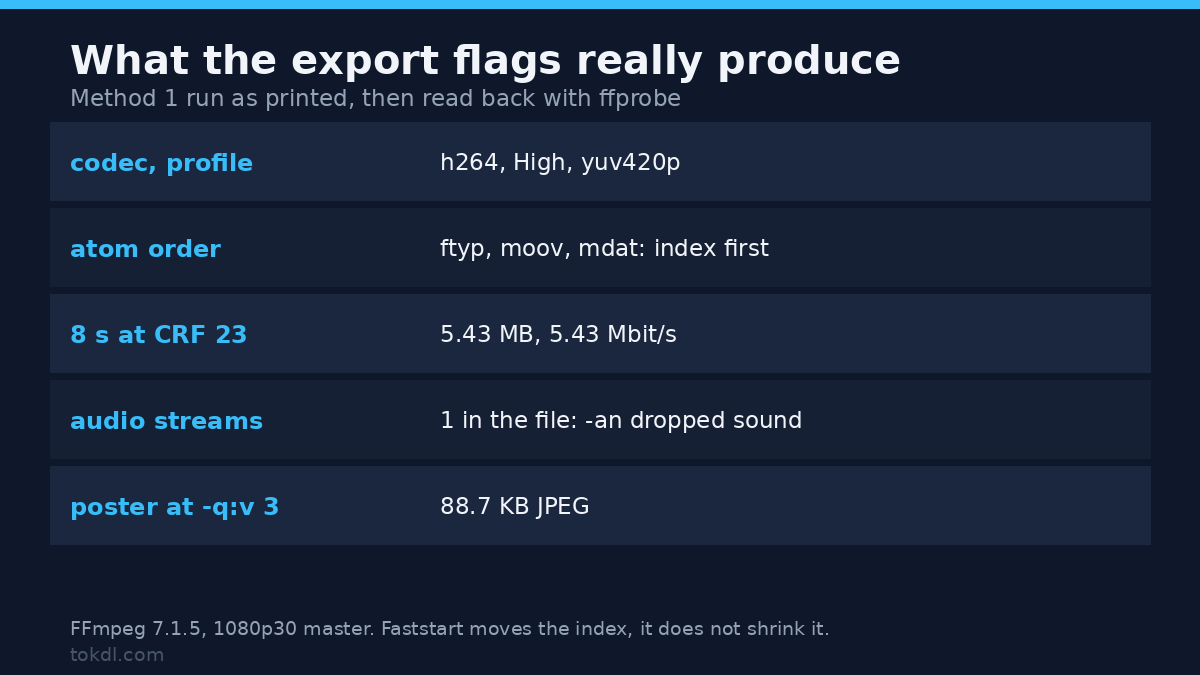
ffmpeg -ss 00:00:12 -to 00:00:20 -i master.mov -c:v libx264 -crf 20 -an loop.mp4Encode the web MP4 for the video for website. Three flags do most of the work: yuv420p for compatibility, a slow preset for a smaller file at the same quality, and faststart so playback can begin before the download finishes. One trap sits in this chain: step 1 used -an, so the -c:a aac here writes no audio stream at all. The finished test file held a single stream, video only. Drop -an in step 1 if the page needs sound.
ffmpeg -i loop.mp4 -c:v libx264 -profile:v high -preset slow -crf 23 -pix_fmt yuv420p -c:a aac -b:a 128k -movflags +faststart web.mp4If the result is still over budget, raise CRF by two or three points and look again. If the master is 4K, downscaling to 1080p before the web encode is cheaper than throwing a lower CRF at a larger frame.
Putting the index at the front of the file is the flag people skip, and it’s why some MP4s buffer before they play. It’s a container move, not a re-encode: on a test file the atom order went from ftyp, free, mdat, moov to ftyp, moov, free, mdat, with every video frame identical and the file the same 5,433,309 bytes.
Add a WebM source if size matters. VP9 usually beats H.264 at the same visual quality, at the cost of a much slower encode and a second file to store.
ffmpeg -i web.mp4 -c:v libvpx-vp9 -crf 34 -b:v 0 -row-mt 1 -c:a libopus -b:a 96k web.webmPull a poster frame for the video for website. Pick a frame that looks like the video at rest, not the most dramatic one. A poster that differs from the first frame produces a visible jump the moment playback starts.
ffmpeg -ss 00:00:02 -i web.mp4 -frames:v 1 -q:v 3 poster.jpgWrite the element. Two attributes are load bearing. preload set to none keeps the file off the network until someone asks for it, and playsinline stops an iPhone from taking over the screen. Both are documented on the video element page.
<video controls preload="none" poster="/video/poster.jpg" width="1280" height="720" playsinline>
  <source src="/video/web.mp4" type="video/mp4">
  <source src="/video/web.webm" type="video/webm">
  <a href="/video/web.mp4">Download the clip</a>
</video>
Serve the video for website with range support. Ask the host, or check the response headers yourself. A request for part of the file has to come back as a 206 with a Content-Range header. Without that, seeking breaks and Safari can refuse the file outright.
Method 2: embed from a platform instead
When the clip runs past three minutes, or the bandwidth isn’t yours to pay for, don’t self host a video for website. Upload once and paste the embed code the platform hands you.
An embed is an iframe pointing at their player. The file stays on their servers, the player picks a bitrate that fits the connection, and your page weight barely moves.
You give up the player chrome, the thumbnail choices, and whatever appears when the clip ends. For a tutorial or an interview, that’s usually the right trade to take for a video for website.
One detail worth knowing: an iframe is heavier than a bare video tag before a single second plays. Most platforms offer a lightweight thumbnail that swaps in the real player on click, and on a homepage that pattern is worth the extra markup.
What the tools in this space actually do, and where they stop
Search for help with a video for website and three kinds of product appear: converters, players, and hosts. Each solves one problem and quietly assumes the others are already solved.
A converter changes the container, the codec, and the bitrate. It can’t put back detail the master never had, and it can’t make a two minute clip the right choice for a hero banner.
A player adds controls, captions, and lazy loading around a file you already made. It won’t shrink that file.
A host or a CDN moves the bytes closer to the visitor. A CDN in front of a 40 MB loop is still a 40 MB loop. It arrives sooner, which isn’t the same as arriving small.
The limit that catches people is the server, not the tool. A static host that answers every request with a full 200 response, never a partial one, will pass a desktop test and fail in Safari. No encoder setting repairs that.
Rights and responsible use
A video on a page you run is published, not stored. That makes the rights question sharper than for the same file sitting on your own drive.
The clip belongs to whoever made it, and putting it on your site doesn’t move that ownership. Watching something privately and republishing it are different acts, and a licence that covers the first rarely covers the second.
Embedding through the platform’s own player keeps the file on their servers and their terms in force. Copying that file onto your host is re-hosting, which is redistribution, even when the player looks identical to a visitor. Music is where this usually goes wrong: a track cleared for a social post isn’t cleared for a site you own.
Start with YouTube’s terms of service if you embed there, and keep your own footage, or footage you licensed in writing, for everything you serve yourself.
Six video for website failures, and what causes each
Most video for website failures come from the file or the server, not from the markup. These six cover almost every case I have had to debug.
| Symptom | Cause | Fix |
|---|---|---|
| Black rectangle where the video should be | 10 bit, yuv444p, or HEVC | Re-encode to H.264, 8 bit, yuv420p |
| The file downloads instead of playing | Wrong Content-Type, or an attachment header | Serve as video/mp4 with no attachment |
| Chrome plays it, Safari won’t | No byte range support on the server | Enable 206 responses, or change host |
| Poster shows, click does nothing | Wrong source path, or a blocked request | Look for a 404 in the network panel |
| iPhone takes over the full screen | playsinline is missing | Add the attribute |
| Page loads slowly with the video visible | preload set to auto, no faststart | Set preload to none, re-mux with faststart |
Two of these explain most of the reports. The first is a master that was never web compatible, which no amount of markup will fix. The second is a host without range support, which looks like a browser bug and isn’t one.
If the file plays for you and fails for someone else, ask which browser and which connection before touching anything. A clip that works on your desktop and fails on a phone is usually a codec or pixel format problem, not a caching problem.
Frequently asked questions
What format should a video for website pages use?
MP4 with H.264 video and AAC audio. Every current browser plays it, so it needs no fallback to work.
Add a WebM source only if the size saving matters and you’re willing to run a second encode on every file.
How large should the file be?
Under 5 MB for a background loop and under 25 MB for a clip someone chose to watch. A visitor who pressed play has agreed to a download. A visitor who scrolled past hasn’t.
Do I need a WebM version?
Only when size is the binding constraint. H.264 in MP4 is the file that plays everywhere, so ship it first and treat VP9 as an upgrade for the browsers that support it.
Why does my video show a black box?
The codec or the pixel format is unsupported. 10 bit HEVC and yuv444p are common exports from phones and editors, and browsers generally decode neither.
Re-encoding to H.264 with yuv420p fixes it in one pass.
Can I embed a video I didn’t make?
Only through the platform’s own player, and only where that platform’s terms allow it. That arrangement keeps the file on their servers, where it started.
Serving a copy from your own host is a different act with a different answer, and the answer is usually no.
Should captions be a separate file or burned in?
A separate file. Burned in captions can’t be switched off, can’t be searched, and can’t be translated later.
Web players take WebVTT, which is close enough to SRT that converting one to the other is trivial. The differences between the subtitle formats mostly matter at export time.
Does the poster frame slow a video for website page?
Slightly, and it’s worth it: at -q:v 3 a 1080p poster came out at 88.7 KB. A 60 to 120 KB JPEG in exchange for a layout that doesn’t jump when the video loads is a fair trade.
Which route should your video for website take?
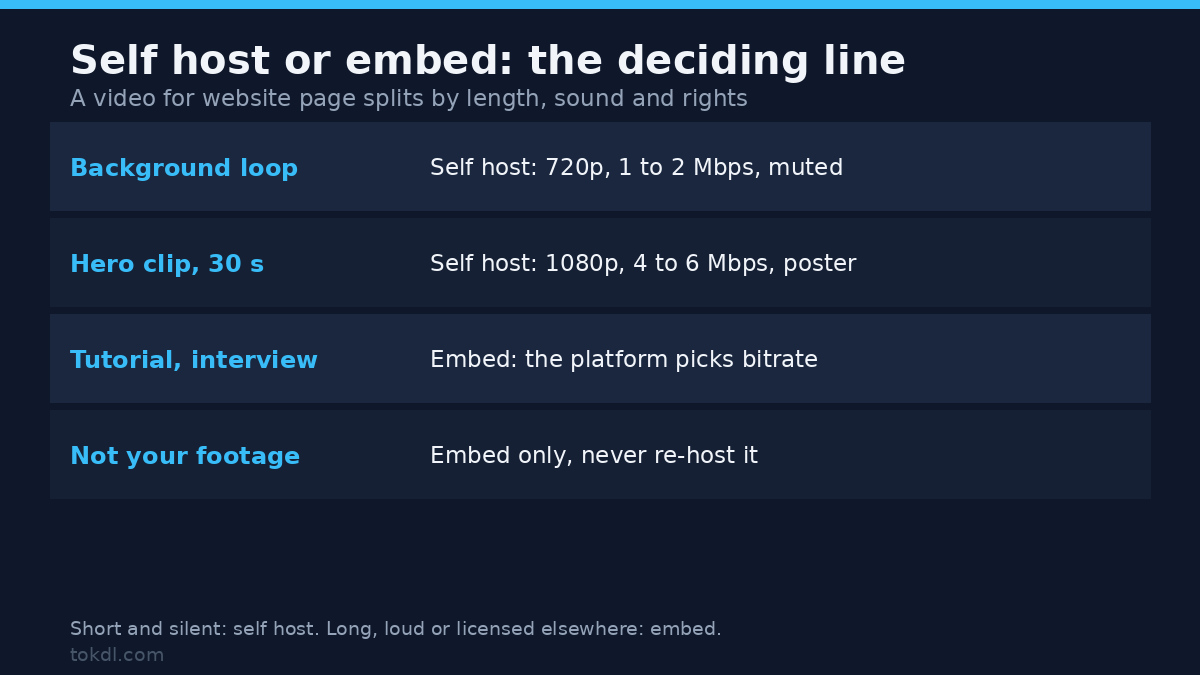
Self host a video for website when the clip is short, silent, and part of the design: a background loop, a product turntable, a five second demonstration. The file stays small, you control every frame, and no third party appears in the page.
Embed when the clip is long, needs sound, or will be replaced next month. A tutorial, an interview, and a recorded webinar all belong on a platform whose player already handles bitrate switching.
For anything people watch deliberately, neither route has to be perfect. What matters is that nothing loads until someone asks for it, and that the first frame arrives as an image rather than a grey rectangle.
Start any video for website with the poster frame and a preload value of none. Those two decisions buy most of the speed, and they take about a minute to make.