
How to Make a YouTube Thumbnail: Size, Text and Safe Zones (2026)
The upload finishes, the video looks sharp, and the YouTube thumbnail is whatever frame happened to be on screen when you grabbed it. On a laptop it passes. In the sidebar next to a playing video it’s a dark smudge with five words nobody can read.
Most YouTube thumbnail advice is about style: bold colors, a shocked face, a red arrow. The part that decides whether anyone clicks is duller than that. It’s size, contrast, and what the player draws on top of your picture.
Below are the specs that matter, a way to build a YouTube thumbnail from footage you already own, and the two settings that break more thumbnails than bad design does.
The short answer
Upload 1280 × 720 pixels, 16:9, as a JPG or PNG under 2 MB. Keep the YouTube thumbnail text to four words or fewer, set those words in a heavy weight, and put your subject near the middle of the frame.
Then run the only test that predicts anything. Shrink the image to roughly a fifth of its size, open it on a phone, and look at it for one second. If the subject isn’t obvious and the words aren’t legible, the design isn’t finished.
YouTube thumbnail size and file limits
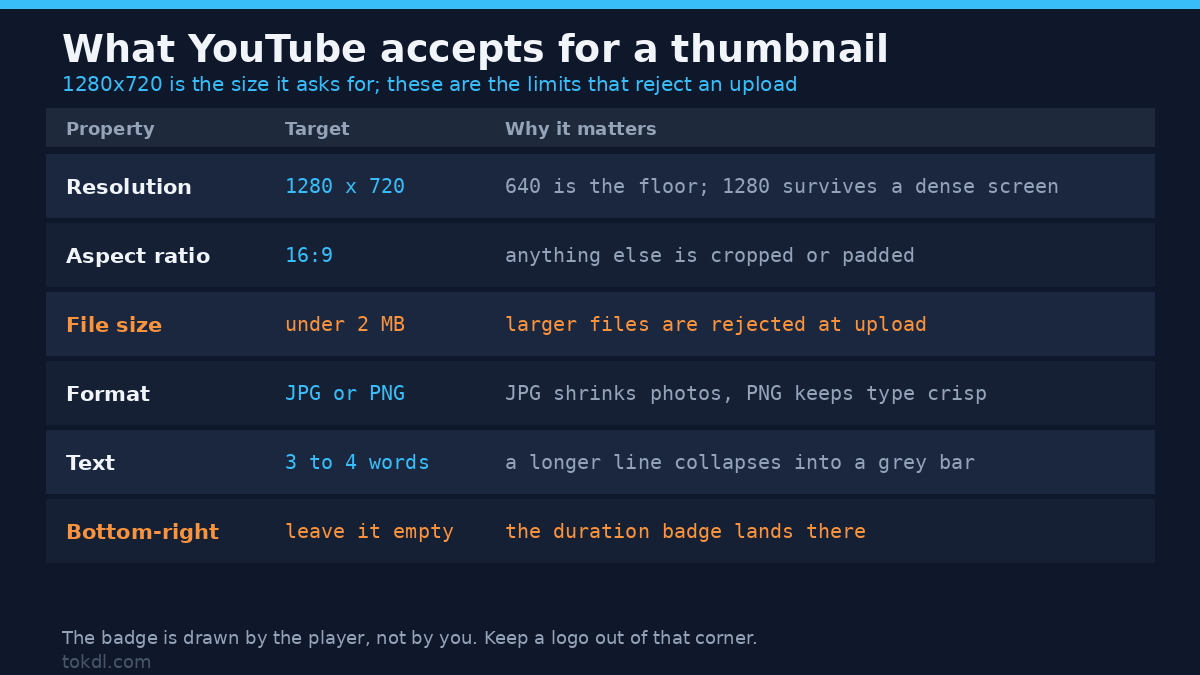
YouTube’s requirements are short, and most thumbnail problems come from ignoring one of them.
| Property | Target | Why it matters |
|---|---|---|
| Resolution | 1280 × 720 | The minimum accepted width is 640; 1280 survives a high-density screen without upscaling |
| Aspect ratio | 16:9 | Any other shape gets cropped or padded somewhere in the interface |
| File size | Under 2 MB | Larger files are rejected at upload |
| Format | JPG or PNG | JPG keeps photographs small; PNG keeps flat graphics and type crisp |
| Text | 3 to 4 words | At sidebar size, a longer line collapses into a grey bar |
| Bottom-right corner | Leave it empty | The player prints the duration there |
Note the last row. The duration badge is drawn by YouTube, not by you, and it lands on the lower-right corner of your YouTube thumbnail. Put a logo or a number there and part of it sits under a black label reading “18:42”.
The 2 MB ceiling is the second most common failure. A full-size 1920 × 1080 PNG exported for a YouTube thumbnail can sail past 3 MB without looking any better than a 400 KB JPG.
Before you build a YouTube thumbnail
You need three things, and one of them is a permission rather than a file.
- A frame or a photo you have the right to use. Your own footage or your own photograph is the simple case.
- A verified channel. YouTube offers custom thumbnails to verified accounts, and the upload option stays hidden until phone verification is done.
- An editor that exports a 1280 × 720 JPG. That’s a lower bar than it sounds.
If your clip is also going to Reels or Shorts, the video aspect ratio guide covers the vertical crop. The thumbnail stays 16:9 either way.
Method 1: build a YouTube thumbnail from a frame in your own video
This route takes about ten minutes. It produces a thumbnail that matches the video exactly, because it’s the video.
Step 1. Find the candidates without scrubbing. A contact sheet shows the whole file as a grid of stills, one every ten seconds, the quickest way to pick a YouTube thumbnail frame, and it’s a single command:
ffmpeg -i episode.mp4 -vf "fps=1/10,scale=320:-1,tile=5x4" -frames:v 1 sheet.pngRead the grid and note three timestamps where the subject is lit, facing the lens, and not mid-blink. If you only need one still rather than a set, extracting frames from a video covers the flags in more detail.
Step 2. Pull the winner at full resolution.
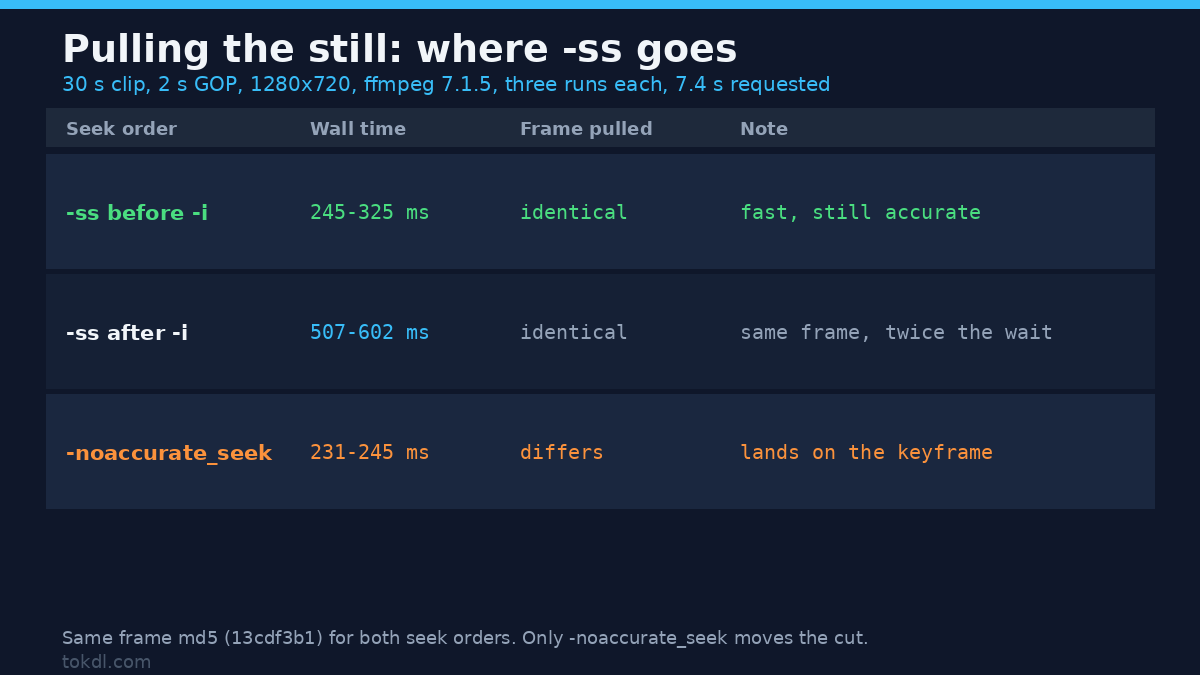
ffmpeg -ss 00:02:14 -i episode.mp4 -frames:v 1 -q:v 2 frame.pngPlacing -ss before -i seeks quickly, and on FFmpeg 7.1.5 it stays frame-accurate: on a 30-second test clip the input seek returned the same frame as an output seek, identical md5, in 245-325 ms, against 507-602 ms for the seek after -i. Only -noaccurate_seek stops at the keyframe, at 231-245 ms, and that frame is a different one. Timings come from three runs each on a 2-CPU container. The -q:v 2 keeps the still close to source quality instead of re-compressing it into mush.
Step 3. Fit it to the 16:9 canvas without stretching.
ffmpeg -i frame.png -vf "scale=1280:720:force_original_aspect_ratio=increase,crop=1280:720" -q:v 3 thumb.jpgScaling up first and cropping after keeps the proportions honest. Cropping first leaves a smaller image that then gets stretched, which is the usual cause of a thumbnail that looks subtly wrong.
Step 4. Add the words. Three or four of them, on the side of the frame the subject isn’t using. If the face sits left, the text goes right, in the upper third.
Step 5. Check the YouTube thumbnail file size. A 1280 × 720 JPG at quality 3 usually lands at a few hundred kilobytes, comfortably inside the limit. If yours is larger, something is exporting at a higher resolution than you think.
Step 6. Look at the YouTube thumbnail at the size it appears. Not at 100 percent on a 27-inch monitor, but at the size a viewer sees it. If the text needs burning into the video itself as well, adding text over video is a separate job with different rules.
One caveat worth knowing: frames from video are softer than photographs, because the encoder discarded detail to keep the file small. If you’ve got a phone photo of the same person or product, it’ll usually beat the frame. Use the frame when the moment matters more than the sharpness, and expect the YouTube thumbnail to come out slightly soft.
Method 2: the official route in YouTube Studio
Once the file exists, the upload is the easy part. YouTube’s custom thumbnail help page lists the current limits if any of them ever change.
- Open YouTube Studio, go to Content, and pick the video.
- In Details, find the YouTube thumbnail section and choose Upload thumbnail.
- Select your 1280 × 720 JPG and check that the crop preview matches what you designed, especially at the edges.
- Save. On a published video the public page changes within minutes; on a scheduled one the image is saved with the rest of the details.
Where the channel has Test & Compare, Studio will run up to three thumbnails against each other and report which one drew more watch time from impressions. It needs real traffic and days rather than hours. Testing two images that differ by a single word rarely returns a result you can trust.
You can replace a thumbnail at any time. The old image tends to linger in places YouTube doesn’t fully control: embeds, cached search results, the comment that quoted your video. Give it a day before concluding the upload failed.
What YouTube thumbnail tools do, and where they stop
Template sites and design apps solve the YouTube thumbnail layout problem. Pick a grid, drop in a picture, type four words. The catch is that the same template is doing the same work for thousands of other channels, and the result reads as a template at exactly the size where recognition matters most.
AI image generators are useful for backgrounds and abstract shapes, and unreliable for anything specific. They rarely render legible text, they can’t reproduce your face or your actual product, and their terms differ on whether the output can be used commercially. Read those terms before building a channel identity on one.
Then there’s the third category, tools that pull the thumbnail off somebody else’s video. They function. They also hand you artwork that belongs to another creator, which turns a design problem into a copyright one, and YouTube removes thumbnails that infringe. There’s no version of that shortcut worth taking.
Rights and responsible use
A YouTube thumbnail is creative work, and on YouTube it normally belongs to the person who made the video. Frames pulled from your own uploads are yours to reuse. Frames pulled from someone else’s video aren’t yours, and neither is their thumbnail image, however easy it looks to save.
Watching a video, or keeping a copy of it, gives you no rights over it. Personal reference is one thing. Putting another creator’s frame into your own thumbnail is republishing their work as your advertising, and that’s where claims begin. Commercial use raises the bar again, because a thumbnail is the shop window for a channel that earns money.
If you use a stock photo, a commissioned illustration, or a frame a collaborator sent you, confirm the license covers commercial use and modification. The YouTube Terms of Service put responsibility for uploaded material on the uploader, thumbnails included.
YouTube thumbnail troubleshooting
The YouTube thumbnail option is missing
Phone verification isn’t complete on that channel. The setting stays hidden until it’s done, and brand accounts also need the right permissions from the owner.
The upload is rejected for file size
The image is over 2 MB. Re-export it at 1280 × 720 as a JPG at quality 3 instead of a full-size PNG. The video upload size limits guide covers the same problem for the video file.
It looks soft on a television
The source was narrower than 1280 pixels, or it was saved at a low quality setting. YouTube displays what you hand it and doesn’t sharpen. Heavy sharpening before upload makes this worse by adding bright halos around edges.
Words disappear behind the duration label
They were placed in the lower-right corner, where the player draws the timestamp. Move them to the upper third, away from the edge.
The thumbnail changed but people still see the old one
Caching on the viewer’s side, or in an embed that hasn’t refreshed. The watch page normally updates within minutes, while search results and third-party players can lag for a day.
Readable on desktop, unreadable on mobile
The design relies on detail that the small crop removes. Centre the subject, cut words until two or three remain, and raise the contrast between text and background.
Frequently asked questions
What size should a YouTube thumbnail be?
1280 × 720 pixels in a 16:9 frame, under 2 MB. That’s the resolution YouTube asks for, and anything smaller is upscaled before it reaches a large screen.
Can I use a frame from my own video as the thumbnail?
Yes, your own upload is yours to reuse. Choose a frame where the subject is lit and looking toward the lens, and expect it to be slightly softer than a photograph.
Does the thumbnail change how many people see the video?
It can, because click-through is one of the signals YouTube watches when it decides how widely to show a video. A clear image won’t rescue a video nobody wants to watch, but a muddy one caps a good video.
Do I need Photoshop to make a YouTube thumbnail?
No. Any editor that exports a 1280 × 720 JPG will do, including free desktop and browser-based options.
Why does my thumbnail look blurry after uploading?
Because the source was under 1280 pixels wide or saved at a low quality setting. The upload isn’t the problem; the file was already soft when you exported it.
Can I change the thumbnail after the video is published?
Yes, at any time, from the video’s details page in YouTube Studio. The new image replaces the old one on the watch page within minutes.
Is it acceptable to reuse a thumbnail from another channel?
No, that image is another creator’s work. Saving it transfers no right to publish it, and reusing it can bring a copyright claim against your channel.
Which route should you use?
If the video is a person talking, use a frame from the footage or a photo you took. The face is the YouTube thumbnail, and no layout will beat a good expression on a clear background.
If the value of the video is a result, a finished build, a before and after, or a number on a screen, build the thumbnail as a still image instead. Compressed video frames rarely hold small details well enough to survive the sidebar.
If you can’t choose between two images, upload both and let Test & Compare decide, provided the channel has the traffic for it. Without that traffic, pick the one you can read from across a room. The test costs nothing and it beats taste more often than designers admit.