
Inverse Telecine: Remove 3:2 Pulldown Without Losing Frames
You open a DVD rip or an old capture, and the motion looks wrong in a way that’s hard to name. Edges on a moving hand show a comb-tooth seam, and it comes and goes in a rhythm. The file says 29.97 fps, but the movie was shot at 23.976, and those extra frames were never real. Inverse telecine is the step that throws the invented frames away and rebuilds the 24 pictures per second that were photographed.
I tested this on FFmpeg 7.1.5: a 48-frame 23.976p clip pushed through the telecine filter to 60 frames at 29.97, then five ways back. One returned all 48 frames byte for byte. Three returned frames that looked plausible and weren’t. Inverse telecine is a measurement, not a preset, and the gap between those results is what this guide is about.
What inverse telecine removes
Film runs at 24 frames per second. American broadcast runs at 29.97. To carry one inside the other, a telecine machine splits each film frame into two fields and repeats some of them in a 3:2 rhythm, so five stored frames hold four original pictures. The picture count goes up by 25 percent and nothing new is photographed.
On my fixture the arithmetic was clean: 48 frames in, 60 out, same 2.002 second duration, and every one of the 60 frames had a distinct checksum. The extra frames aren’t duplicates. Each is stitched from the fields of two neighbours, which is why a combed edge has a seam: the top half of the picture is a moment ahead of the bottom half.
That detail decides which tool is right. A deinterlacer takes a combed frame and guesses the missing lines, softening detail everywhere while keeping the fake frames. Inverse telecine matches fields back to the frames they came from, then drops the redundant ones. If your file is genuinely interlaced video shot at 60 fields, the second approach is wrong and destructive, and I’ll show the measurement for that below. My guide to deinterlacing covers the other case.
How to tell a file needs inverse telecine
Three checks, in order of reliability.
1. Compare the frame count to the content
A 90-minute film at 23.976 holds about 129,500 frames. The same film telecined to 29.97 holds about 161,900. Runtime doesn’t change, so the count tells you which container you have:
ffprobe -v error -select_streams v:0 -count_frames -show_entries stream=nb_read_frames,r_frame_rate -of default=nw=1 input.mp4On my two-second test clip that printed r_frame_rate=30000/1001 and nb_read_frames=60. Sixty frames in two seconds is 29.97, and 29.97 on film-sourced material is the signature of pulldown.
2. Don’t trust the field flag or field_order
This one cost me a false clean bill of health. My telecined file reported field_order=progressive, and all 60 of its frames carried interlaced_frame=0. The frames were combed anyway, the defect inverse telecine exists to remove; the flag comes from what the encoder was told, not from the pixels. The genuinely interlaced control file I built reported 30 of 30 frames flagged, so the flag is useful when set and worthless when clear.
3. Treat idet as a hint, never a verdict
idet counts combed frames, and its numbers are easy to over-read. On my clean, progressive 48-frame source it reported 39 frames top-field-first and 9 progressive. On the file inverse telecine rebuilt from that source, frame for frame identical, it reported the same 39 and 9. Two clips, one a perfect reconstruction, indistinguishable to the filter. Sharp synthetic motion reads as combing, which is why an inverse telecine decision shouldn’t rest on idet alone.
The check that always works is a still. Pull a frame from a moment with fast horizontal movement:
ffmpeg -ss 1 -i input.mp4 -frames:v 1 -update 1 frame.pngCombing looks like two edges interleaved a pixel or two apart, so a diagonal picks up short horizontal teeth of uneven height. A clean diagonal steps evenly. Some players show it while paused, but a PNG removes all doubt.
The inverse telecine command that returns the original frames
Inverse telecine in one line, two filters in this order:
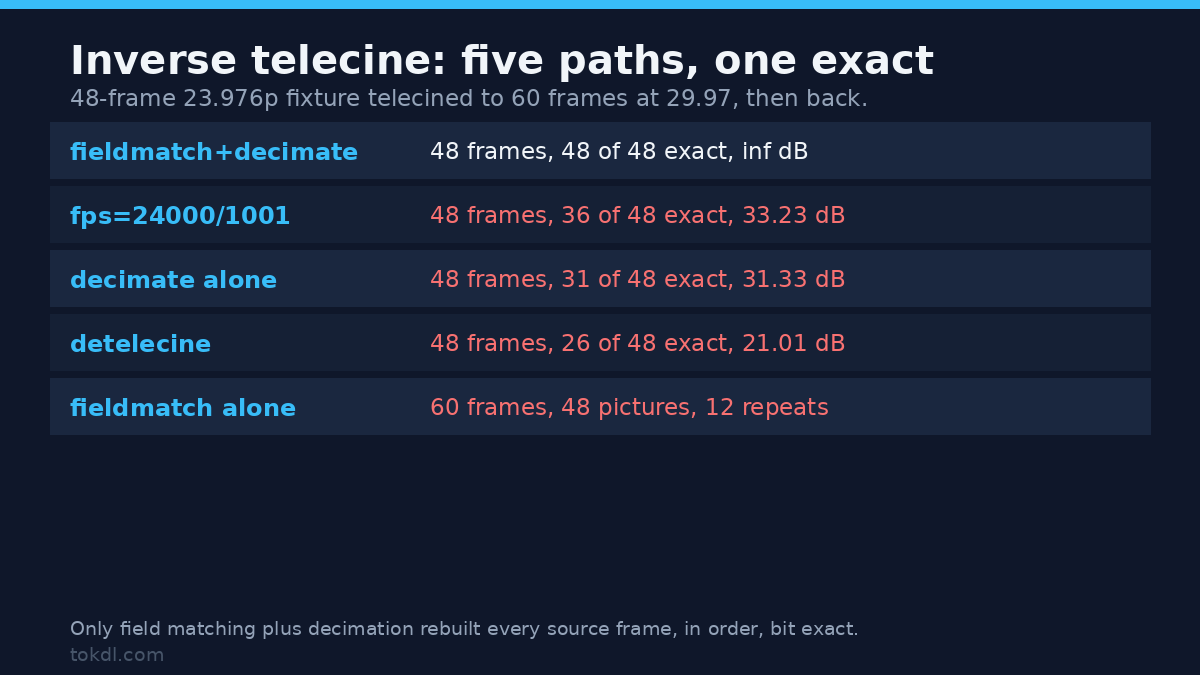
ffmpeg -i input.mp4 -vf fieldmatch=order=auto:mode=pc_n_ub,decimate=cycle=5 -c:v libx264 -crf 18 -c:a copy output.mp4fieldmatch finds, for each frame, the pair of neighbouring fields that belong together and rebuilds a whole progressive frame from them. decimate removes the frames that repeat. On my telecined fixture the result was 48 frames at 24000/1001, and all 48 were byte-identical to the source frames in the original order. PSNR against the source came back as infinity, which is the polite way of saying there was nothing to measure.
Here’s the same fixture through every path I tried. A frame counts as identical when its checksum matched a source frame exactly; the PSNR column compares the whole clip against the 48-frame original.
| Path | Frames out | Identical to source | PSNR vs source |
|---|---|---|---|
fieldmatch + decimate |
48 | 48 of 48, in order | inf, bit exact |
fps=24000/1001 |
48 | 36 of 48 | 33.23 dB |
decimate alone |
48 | 31 of 48 | 31.33 dB |
detelecine |
48 | 26 of 48 | 21.01 dB |
fieldmatch alone |
60 | 48 unique, 12 repeats | 27.32 dB |
The fps filter is the tempting inverse telecine shortcut, and it quietly ruins detail. It hit the right frame count and rate, but 12 of its 48 frames were blends of two neighbours, which is why the best it could manage was 33.23 dB. Smeared motion is worse than judder, and it’s permanent once you export.
Why the two filters come as a pair
Run fieldmatch alone and you get 60 frames at 29.97 with 48 unique pictures and 12 repeats. The combing is gone, the cadence isn’t, and the result judders in the same rhythm as before. Run decimate alone and you get 48 frames, but 17 of them are stitched field pairs that were never matched, so seams stay and motion tears. The table shows both failures, 27.32 dB and 31.33 dB against infinity, and that’s why inverse telecine is two filters rather than one.
detelecine is the one-filter option, and it scored worst: 26 of 48 identical, 21.01 dB, and the output started nine frames late. It’s a blind cadence filter that assumes where the pattern starts and drops fields on a fixed schedule, so a phase error keeps the wrong frames. I tried start_frame at 0, 1 and 2 and got 30, 33 and 20 exact frames. fieldmatch measures instead of assuming, which is why inverse telecine built on it recovers the source exactly.
When inverse telecine is the wrong tool
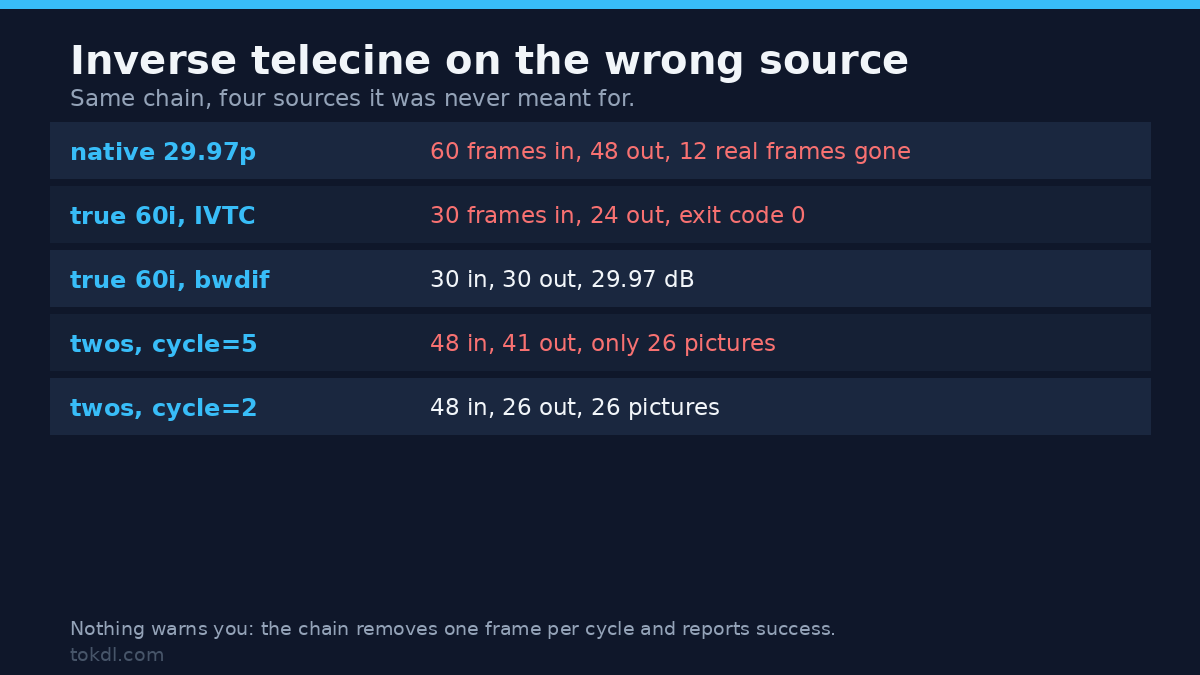
This is the part that costs people footage. The chain doesn’t check whether the frames it removes were redundant. It removes one per cycle and reports success.
| Source | What I ran | Frames out | Damage |
|---|---|---|---|
| Native 29.97p, 60 unique frames | fieldmatch + decimate |
48 | 12 real frames deleted, exit 0, no warning |
| True 60i, 30 frames / 60 fields | fieldmatch + decimate |
24 | a fifth of the motion samples gone |
| True 60i, same file | bwdif, send_frame |
30 | none, 29.97 dB against the 60p original |
| Animation on twos, 48 frames / 24 pictures | decimate=cycle=5 |
41 | 26 pictures, duplicates kept |
| Animation on twos, same file | decimate=cycle=2 |
26 | 26 pictures, cadence removed |
The first row is the one to remember. Sixty frames of genuine 29.97 progressive footage went in and 48 came out. Every survivor was an exact match to a source frame, so nothing was blended; 12 frames of real motion vanished, the file finished with exit code 0, and nothing in the log mentioned it.
For real interlaced video, use a deinterlacer and keep the field rate:
ffmpeg -i input.mp4 -vf bwdif=mode=send_frame:parity=tff:deint=all -c:v libx264 -crf 18 -c:a copy output.mp4That returned 30 frames from 30, the full 60 fields of motion at 29.97. yadif with the same options scored 30.05 dB, marginally ahead of bwdif‘s 29.97 dB. Either works; the point is that the field rate survives.
Animation is its own case. Content animated on twos shows every drawing twice, and duplicates there are content, not pulldown. decimate at the default cycle=5 left 41 frames holding 26 pictures, so the duplicates stayed. cycle=2 returned 26 frames and 26 pictures. The filter removes one frame per cycle, so the cycle has to match the pattern you have.
What decimate does to the frame rate
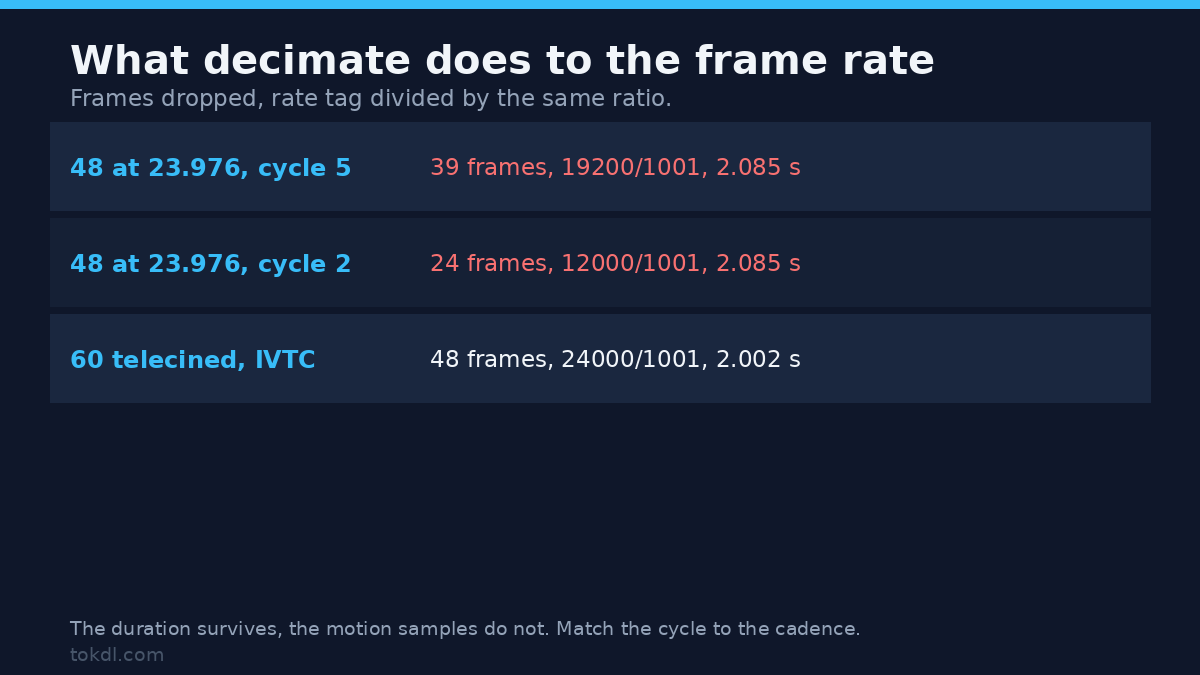
Nobody warns you about this. decimate doesn’t just drop frames, it divides the rate by the same ratio, so the clip keeps roughly its duration and plays with fewer samples of motion. On a clean 24p file with nothing to remove:
| Input | Filter | Frames | Rate tag | Duration |
|---|---|---|---|---|
| 48 frames at 23.976 | decimate=cycle=5 |
39 | 19200/1001 | 2.085 s |
| 48 frames at 23.976 | decimate=cycle=2 |
24 | 12000/1001 | 2.085 s |
| 60 frames at 29.97, telecined | fieldmatch then decimate=cycle=5 |
48 | 24000/1001 | 2.002 s |
Read the middle row carefully. A clip that never needed inverse telecine came back as 24 frames at 12 fps, the odd-numbered ones, with every second picture thrown away, so check the source before you point inverse telecine at it. Duration barely moved, so the damage doesn’t look like damage in a player until something moves.
After a correct pass the rate tag lands on 24000/1001 by itself, because 29.97 times four fifths is 23.976. If your editor ignores the tag, force it with -r 24000/1001 on the output. Don’t reach for -r to fix a cadence problem before the frames are right; it resamples timestamps and will duplicate or blend to hit the number you asked for.
Common mistakes
Trying to copy the video stream. Filters need decoded frames, so -c:v copy next to a filter graph is refused. Mine exited with code 218, the message Function not implemented, and no output file at all. Copy the audio, re-encode the picture.
Reading the smaller file as lower quality. At CRF 18 my telecined clip came out at 362,340 bytes. The inverse telecine result for the same content was 280,497, about 23 percent smaller, and the original 24p encode was 277,111. The saving comes from storing 48 frames instead of 60, not from discarding detail.
Judging the result by frame count. Every wrong inverse telecine path in the first table produced 48 frames. The count was right; the pictures weren’t. Compare a couple of frames with your eyes, and if you have the original, compare checksums.
Frequently asked questions
Does inverse telecine lose quality?
The frame recovery doesn’t: fieldmatch plus decimate gave me a bit-exact copy of all 48 source frames. The re-encode afterwards is where quality goes, so pick a sane CRF and keep the source until you’ve checked the output. Blending tools lose detail no later pass can restore.
Can I run it on a 25 fps PAL file?
PAL carries 25p inside 50i as a 2:2 pattern, one duplicate per two frames rather than the 3:2 rhythm. That’s the cycle=2 case, which cleaned a 2:2 fixture. Test the exact file before batching: I measured a synthetic fixture, not your tape.
Why did my output come out at 19.2 fps?
Because decimate divided the rate by its cycle. Feed 23.976 content to cycle=5 and you’ve asked it to remove one frame in five, so it reports 19200/1001. Save cycle=5 for 29.97 material.
Should I deinterlace first?
No. Deinterlacing resamples fields into new lines, and fieldmatch then has nothing exact to match, which guarantees soft frames. Inverse telecine matches the fields first, then drops the duplicates, and you reach for a deinterlacer only when the source is real interlaced video.
The short version
Inverse telecine is two measurements, not one guess: match the fields, then drop the repeats. On a clean telecined clip it returns the original frames exactly, and nothing else I tried came close. On native 29.97 progressive footage or true interlaced video it deletes real frames at exit code 0, so check which one you have before you run it. For the other direction, see the DVD format notes; when the rate itself must change, frame rate conversion; when there’s no combing at all, variable frame rate; and for why the numbers matter, 24 versus 30 versus 60 FPS. The fieldmatch and decimate documentation lists every option if you need to tune thresholds.