
ProRes vs DNxHD: Which Intermediate Codec Should You Edit With?
Your camera gives you a folder of files that play fine and edit badly. Scrubbing stutters, colour corrections take a second to redraw, and the fans spin up. The usual fix is to transcode those files once into an intermediate codec, a heavy, easy-to-decode format your editor can chew through, and then work from that copy. Then comes the question that stops most people: ProRes or DNxHR?
I ran both families over the same 5-second 1920×1080 clip at 25 fps, measured every byte that came out and how much of the original image each one kept. Some answers were obvious (DNxHR 444 is enormous). Others weren’t: ProRes 422 HQ delivered 71.6 Mbps where DNxHR SQ delivered 121.2 Mbps, and the chroma quality of both landed in the same narrow band. A request of -b:v 145M produced a file that measures 121.24 Mbps, which isn’t a typo.
If you’re weighing ProRes vs DNxHD for your next project, the numbers below should settle it. Everything was measured here with FFmpeg 7.1.5, and every command was run as printed.
What you’ll learn
- What an intermediate codec does that a delivery codec doesn’t
- The measured rate and cost per hour of each profile at 1080p
- Why every 4:2:2 file hits the same chroma ceiling, whatever its bitrate
- Why the DNxHD label isn’t the number you get
What an intermediate codec is, and what it isn’t
An intermediate codec (also called a mezzanine codec) sits between your camera file and your export. Camera files use long-GOP compression: one frame in dozens is stored whole and the rest are described as differences. That makes them small and slow to scrub, because the editor decodes a chain of frames to show you one. An intermediate codec throws that efficiency away and stores every frame on its own, in a fixed amount of data. Scrubbing becomes a lookup instead of a calculation.
The cost is the point. All-intra rates run 10 to 30 times higher than h.264 at the same resolution, and that’s the trade you’re buying. It’s also why keyframe settings stop mattering once you’re in an intermediate codec: an all-intra file has nothing but keyframes, as our keyframe interval guide explains for long-GOP sources.
Don’t confuse it with a proxy. A proxy file is a small stand-in you edit against and then discard, while an intermediate codec is a full-quality master you finish from. And it isn’t a delivery codec either. Nobody streams ProRes to a phone. For a web upload it’s only the step before libx264 or HEVC, which is where hardware encoders earn their keep.
The two families, briefly
ProRes is Apple’s, designed for Final Cut but read almost everywhere now; the ProRes white paper still lists the target data rates. DNxHD and DNxHR are Avid’s: DNxHD was built for 1080p and 1080i in fixed sizes, and DNxHR generalised it for any resolution. Both are all-intra intermediate codecs built to survive colour correction, and both come as a ladder you pick by name. The names are where the confusion starts, because the two ladders don’t line up.
Measured: what each intermediate codec costs at 1080p
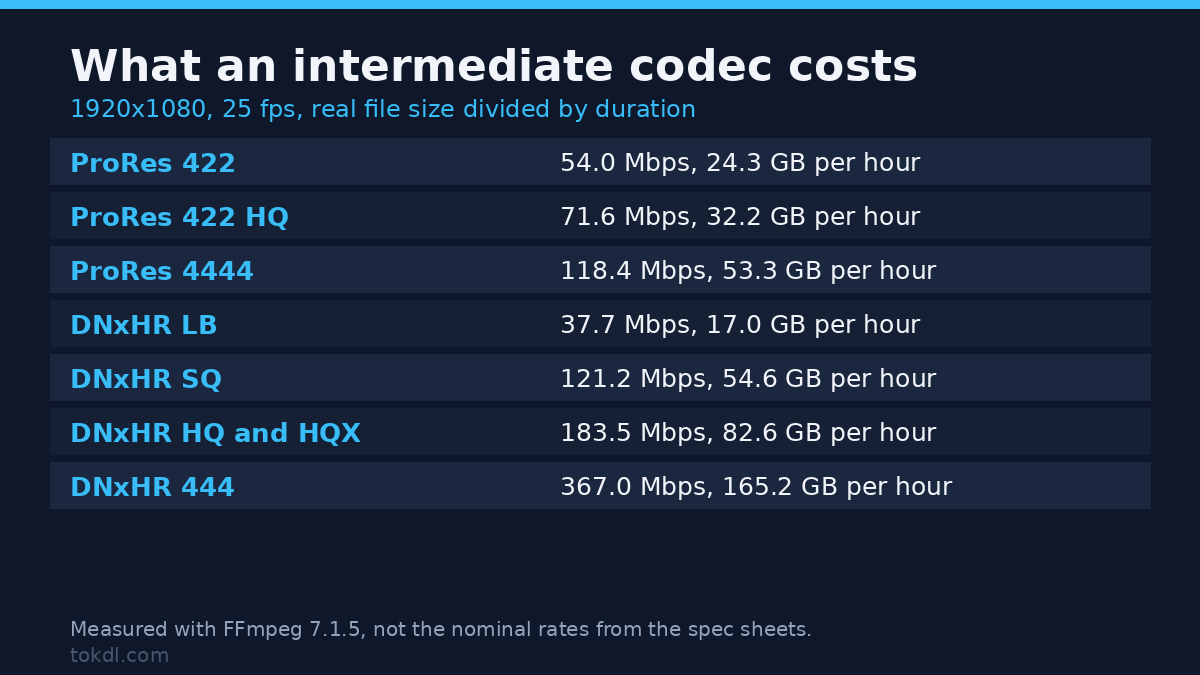
The clip is 125 frames of moving synthetic detail at 1920×1080, 25 fps, encoded from a lossless FFV1 source. Rates below are real file size over duration, not the nominal rate in the encoder’s documentation, because the actual rate depends on how much detail your footage carries.
| Codec and profile | Pixel format | Measured rate | Cost per hour | 1 TB holds |
|---|---|---|---|---|
| ProRes 422 Proxy | 4:2:2 10-bit | 21.0 Mbps | 9.4 GB | 106 h |
| ProRes 422 LT | 4:2:2 10-bit | 42.5 Mbps | 19.1 GB | 52 h |
| ProRes 422 | 4:2:2 10-bit | 54.0 Mbps | 24.3 GB | 41 h |
| ProRes 422 HQ | 4:2:2 10-bit | 71.6 Mbps | 32.2 GB | 31 h |
| ProRes 4444 | 4:4:4 12-bit + alpha | 118.4 Mbps | 53.3 GB | 18 h |
| DNxHR LB | 4:2:2 8-bit | 37.7 Mbps | 17.0 GB | 58 h |
| DNxHR SQ | 4:2:2 8-bit | 121.2 Mbps | 54.6 GB | 18 h |
| DNxHR HQ | 4:2:2 8-bit | 183.5 Mbps | 82.6 GB | 12 h |
| DNxHR HQX | 4:2:2 10-bit | 183.5 Mbps | 82.6 GB | 12 h |
| DNxHR 444 | 4:4:4 10-bit | 367.0 Mbps | 165.2 GB | 6 h |
Read the ladder as three rungs rather than ten steps. Light (Proxy, LT, LB) is for cutting on a laptop and finishing later. Normal (ProRes 422, DNxHR SQ) is the everyday choice for camera footage. Heavy (422 HQ, DNxHR HQ, HQX) is for grading and effects work. Everything above that is for graphics with fine colour detail, and it costs real money: DNxHR 444 needs 165 GB per hour, or 6 hours per terabyte.
One surprise: DNxHR SQ needs 121.2 Mbps where ProRes 422 HQ needs 71.6 Mbps. SQ isn’t a high-end profile and still spends 70% more data per frame.
The chroma ceiling: 4:2:2 has a hard limit
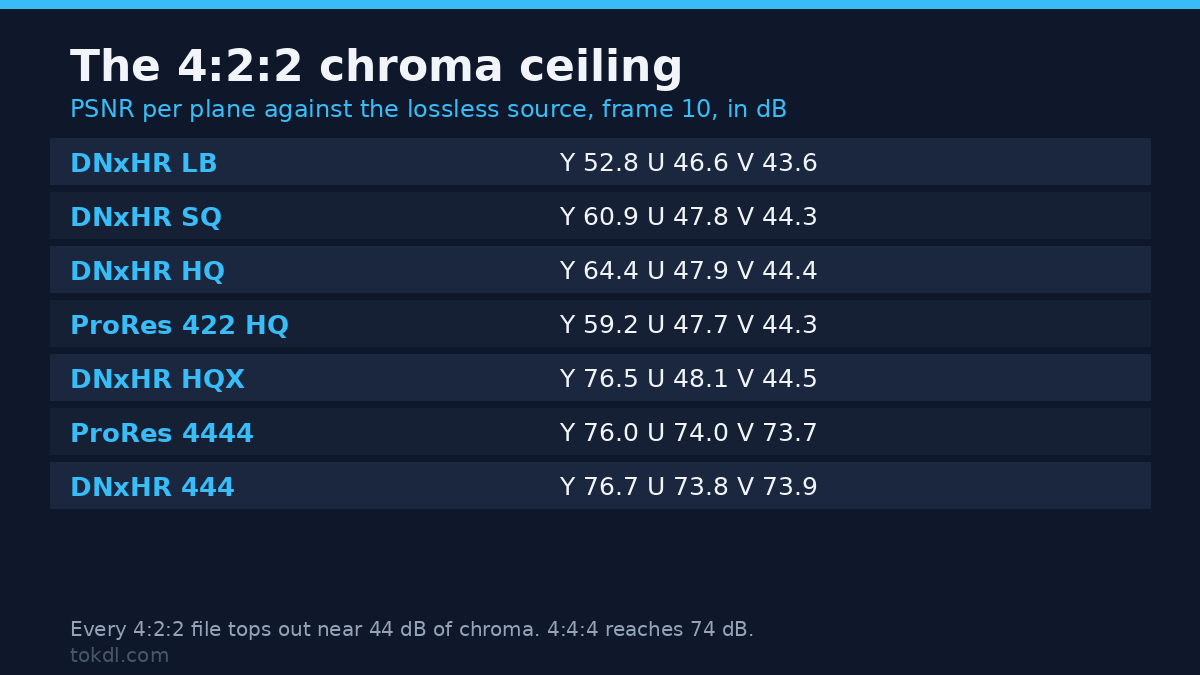
Data rate isn’t quality, so I measured that separately. Each file was decoded to a common 10-bit 4:4:4 space alongside the lossless source, and I computed a per-plane PSNR on frame 10 in Python.
| Variant | Luma (Y) | Chroma (U) | Chroma (V) | Rate |
|---|---|---|---|---|
| ProRes 422 HQ | 59.2 dB | 47.7 dB | 44.3 dB | 71.6 Mbps |
| DNxHR LB | 52.8 dB | 46.6 dB | 43.6 dB | 37.7 Mbps |
| DNxHR SQ | 60.9 dB | 47.8 dB | 44.3 dB | 121.2 Mbps |
| DNxHR HQ | 64.4 dB | 47.9 dB | 44.4 dB | 183.5 Mbps |
| DNxHR HQX | 76.5 dB | 48.1 dB | 44.5 dB | 183.5 Mbps |
| ProRes 4444 | 76.0 dB | 74.0 dB | 73.7 dB | 118.4 Mbps |
| DNxHR 444 | 76.7 dB | 73.8 dB | 73.9 dB | 367.0 Mbps |
Look at the chroma columns. Every 4:2:2 intermediate codec, from DNxHR LB at 37.7 Mbps to DNxHR HQ at 183.5 Mbps, lands between 43.6 and 44.5 dB on V. Nearly a fivefold change in bitrate buys 0.9 dB. The chroma is subsampled, so half its samples were gone before the encoder started, and no amount of bitrate brings them back.
The 4:4:4 intermediate codecs jump to 73.7-74.0 dB. That’s a 30 dB gap, and it’s the honest argument for ProRes 4444 or DNxHR 444 if you key a green screen or comp graphics with saturated colour on them. For camera skin tones 4:2:2 is fine, and luma is where the money goes: HQX reaches 76.5 dB for the same 183.5 Mbps that plain HQ spends at 64.4 dB. Same file size, better luma, because 10-bit samples stop the rounding errors 8-bit quantisation bakes in.
Why DNxHD 145 gives you 121 Mbps
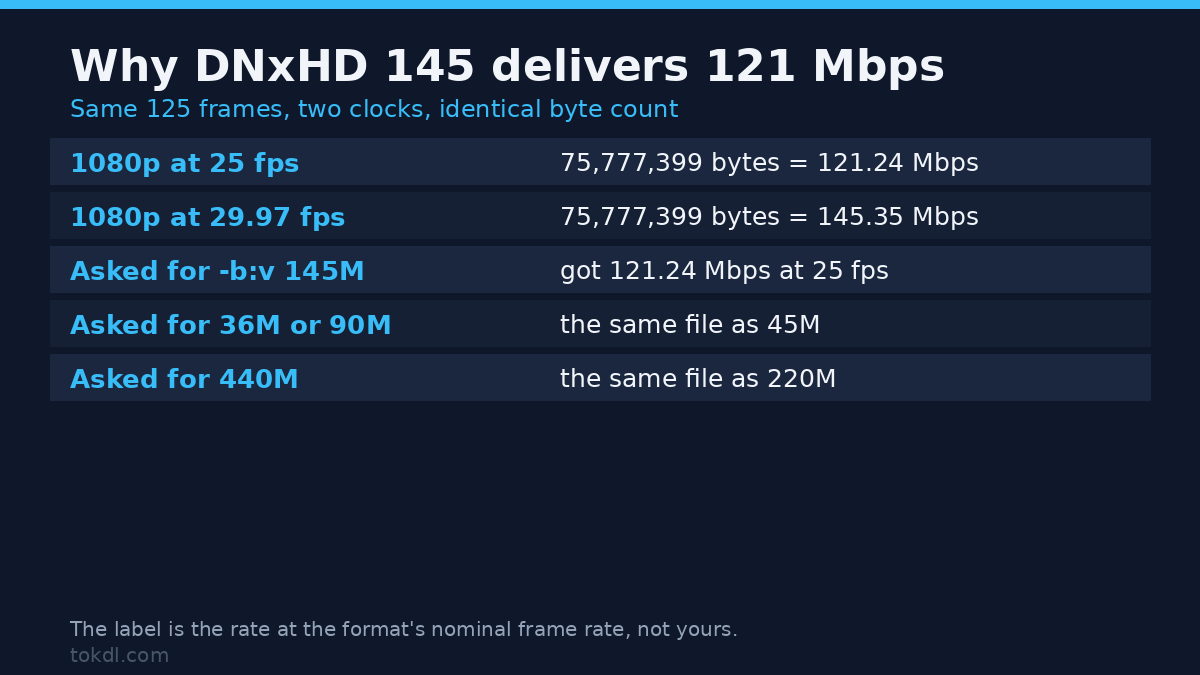
This one catches people every week. I asked for -b:v 145M at 25 fps and got 121.24 Mbps. Then I retimed the same 125 frames to 29.97 fps and got 145.35 Mbps from a file of exactly the same byte count: 75,777,399 bytes both times, confirmed by file size and md5.
The DNxHD numbers (145, 220) are labels for a fixed frame size at the format’s nominal frame rate. An intermediate codec in this family writes the same number of bytes per frame no matter how fast frames arrive, so the rate scales with the clock. At 25 fps you get 25/29.97 of the label, which is 83%: 145 becomes 121, and 220 becomes 183.5. Budget storage from the label and you over-estimate by a fifth.
-b:v is a request, not a dial
The DNxHD encoder also only knows a fixed list of frame sizes, as the FFmpeg codec documentation hints at. At 1920x1080p it refused 60, 100 and 350 Mbps outright and printed its table of 54 valid combinations. No intermediate codec encoder will honour an arbitrary number, so requests that land between entries get snapped: 36M, 45M, 75M and 90M produced a byte-identical file, as did 115M, 120M and 145M, and again 175M, 185M, 220M and 440M. Four different numbers, one file, md5 confirmed.
On the DNxHR profiles the flag does nothing at all. -b:v 36M and -b:v 300M with -profile:v dnxhr_hq both produced a file of 114,689,287 bytes. The profile name sets the quality, and the bitrate flag is ignored. Want a specific rate? Pick a profile and measure it.
Pin your pixel format, or you get a 4:4:4 file in a 4:2:2 jacket
Here’s a trap I hit while measuring. I encoded a 4:4:4 source with -profile:v 3 and no -pix_fmt, then checked what came out. FFmpeg reported profile HQ and pixel format yuv444p10le: a file labelled ProRes 422 HQ that carries 4:4:4 chroma. It was 80.0 Mbps against 71.6 Mbps for the properly pinned file, and its chroma PSNR was 54.3 dB against 47.7 dB, so the extra data was full-resolution chroma.
Feed it a 4:2:0, a 4:2:2 or a 4:2:2 10-bit source and the same command produces a genuine yuv422p10le file. The source’s chroma format leaks into the output when you leave the pixel format unset, and the profile label doesn’t change to match. The fix is one flag: pin -pix_fmt yuv422p10le for every 4:2:2 profile, and check the delivered file with ffprobe before you trust it.
Alpha: ProRes 4444 keeps it, DNxHR 444 doesn’t
I fed a clip with an alpha ramp into both 4:4:4 intermediate codecs and read the alpha plane back from frame 10. ProRes 4444 preserved it exactly: alpha values from 0 to 254, with 255 distinct levels. DNxHR 444 came back with 255 everywhere, a single flat value. The alpha was dropped, and nothing in the output warned about it.
If your project has titles, lower thirds or layered graphics with transparency, that’s the deciding vote for ProRes 4444. If you hand over flattened footage, alpha is irrelevant.
4K: where the two families part company
As an intermediate codec, ProRes handles 2160p without drama. The same 3840×2160 clip, 10 frames, encoded to ProRes 422 HQ in 5.12 seconds and produced 12,115,057 bytes at 242.3 Mbps, peaking at 1.02 GiB of memory. DNxHR HQ on the identical clip was killed after 6.17 seconds at 3.75 GiB, against a 4 GiB memory cap on this container. It never wrote a frame.
That isn’t a claim about your workstation; it’s a warning about constrained hosts. This box advertises 64 CPUs while its cgroup allows two, and the load average during measurement sat near 45 on a shared machine. On a desktop with 16 GB it’s slow but works; on a small container or a memory-limited VM it dies. If you must encode there, watch memory and try DNxHR SQ, which spends fewer bits per frame.
Common mistakes
Transcoding 4:2:0 camera files to ProRes 422 and expecting more colour. You can’t create chroma that was never recorded. Upsampling 4:2:0 to a 4:2:2 intermediate codec makes the file bigger, not the colour better. Do the conversion for editing speed, not for quality.
Choosing an intermediate codec by bitrate alone. DNxHR SQ spends more data than ProRes 422 HQ and delivers nearly the same chroma. Number the work instead: LB and Proxy for offline cuts, SQ or 422 for footage you’ll grade, HQ or HQX for heavy finishing, 4444 or 444 only for alpha and fine chroma detail.
Leaving the pixel format of your intermediate codec to chance. As measured above, it changes what the file holds. Pin it, then verify with ffprobe -v error -select_streams v:0 -show_entries stream=codec_name,profile,pix_fmt -of default=nw=1 yourfile.mov.
Trusting the DNxHD label, or tuning a DNxHR profile with -b:v. The label is the rate at the format’s nominal clock, so at 25 fps expect 83% of it, and the flag is ignored entirely on DNxHR profiles. Change the profile instead.
FAQ
Which intermediate codec should I pick for camera footage? ProRes 422 for most work, or 422 HQ if you’ll push the grade hard. On Windows, DNxHR SQ is the equivalent. Both are read by Premiere, Resolve and Media Composer.
Is the ProRes vs DNxHD choice a quality difference or a size difference? Mostly size. At comparable rungs, luma lands within a couple of decibels and chroma sits in the same band, because both are 4:2:2. The real quality jump comes from going 4:4:4, not from switching brand.
Can I keep audio in the same intermediate codec file? Yes. Both live comfortably in a .mov container beside PCM audio, which is why every command here writes -c:a pcm_s16le.
Which one, then
For most people editing their own footage, it comes down to ProRes 422 (or 422 HQ for a heavy grade) on a Mac and DNxHR SQ or HQ on Windows, with the pixel format pinned so the file holds what the label says. Keep 4:4:4 for graphics, keying and titles, where it buys a 30 dB improvement in chroma that no bitrate can substitute for. Stick to one intermediate codec per project and export from that timeline. And plan storage from measured rate rather than the name on the tin, because a DNxHD 145 file at 25 fps quietly costs 121 Mbps.
# ProRes 422 HQ, 4:2:2 10-bit, the everyday intermediate
ffmpeg -i camera_file.mp4 -c:v prores_ks -profile:v 3 -pix_fmt yuv422p10le -c:a pcm_s16le intermediate.mov

# DNxHR HQ, same job on Avid-shaped editors
ffmpeg -i camera_file.mp4 -c:v dnxhd -profile:v dnxhr_hq -pix_fmt yuv422p -c:a pcm_s16le intermediate.mov

# ProRes 4444 with alpha, for graphics and keying
ffmpeg -i camera_file.mp4 -c:v prores_ks -profile:v 4 -pix_fmt yuva444p10le -c:a pcm_s16le intermediate.mov

# What did that actually produce?
ffprobe -v error -select_streams v:0 -show_entries stream=codec_name,profile,pix_fmt -of default=nw=1 intermediate.mov