
Sibilance in Video Audio: Fix Harsh S Sounds Without Dulling Dialogue (2026)
Sibilance is the hiss that makes a clean recording sound cheap. You record a voiceover, play it back, and every S lands like a small knife. So you pull 7 kHz down 8 dB, and the hiss goes away along with the air, the detail and half the life in the voice.
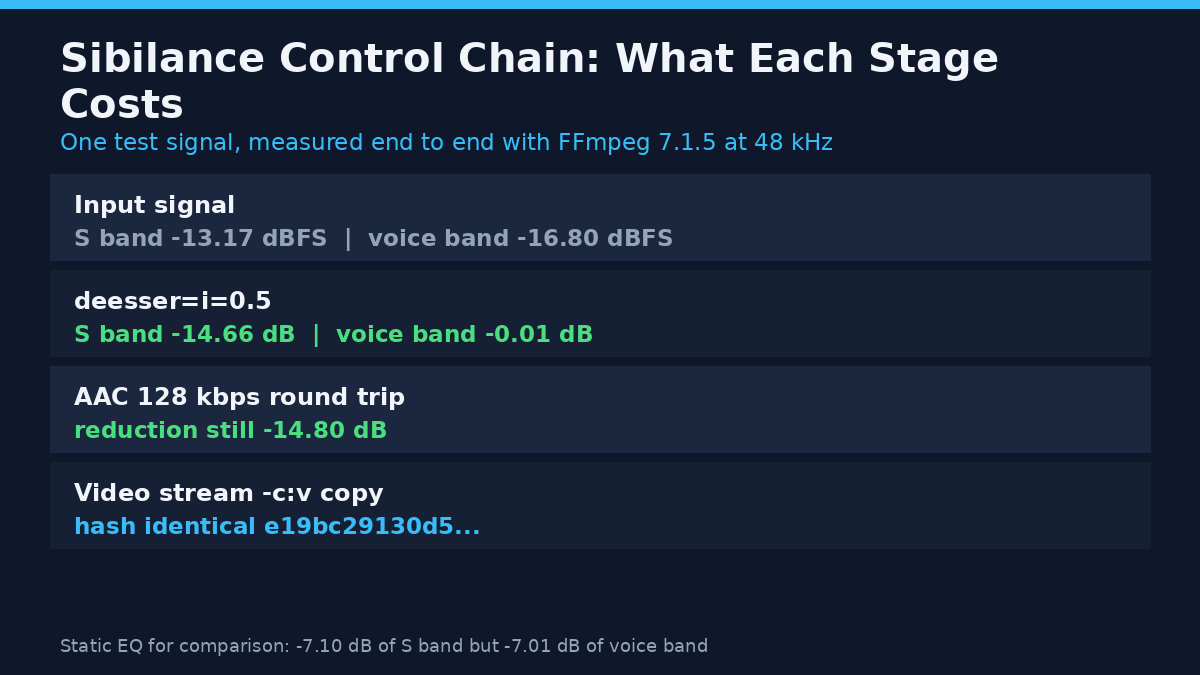
I measured both fixes on this machine with FFmpeg 7.1.5 instead of guessing. The test signal was seven voiced syllables with six noise bursts in the 4.5 to 10 kHz band, 48 kHz mono, peak -3.1 dBFS. During the bursts the high band measured -13.17 dBFS against a -16.80 dBFS body band, so the S sounds sit 3.6 dB hotter than the vowel around them. That gap is the problem you hear, and it doesn’t go away with a gentler microphone.
What you’ll learn
- Why a static EQ cut damages the whole take, measured on the same signal
- What the three FFmpeg de-esser knobs do, with a sweep for each
- Why one setting adds 15 dB of reduction on one clip and 0.1 dB on another
- The resampler that turns a de-esser into a no-op after loudnorm
Sibilance lives in a narrow band, and it’s louder than the voice
Sibilance comes from broadband noise shaped by the mouth, and most of the energy that bothers listeners sits between roughly 5 and 9 kHz. A condenser close to the mouth exaggerates it, and so does a bright preamp. When sibilance is bad, the fix isn’t to remove the band: it’s to remove the band only while the S is happening.
That’s the whole reason sibilance is a filter problem rather than an EQ problem. A high shelf is a permanent decision, while a de-esser is a moving one. To show the difference, I ran four treatments over the same file and measured the 4.5 to 10 kHz energy in the six burst windows and in the seven voiced windows.
| Treatment | S-band change (dB) | Voice-band change (dB) | Body change (dB) |
|---|---|---|---|
| High shelf, -6 dB at 5 kHz | -4.02 | -4.01 | -0.08 |
| High shelf, -12 dB at 5 kHz | -7.89 | -7.87 | -0.16 |
| Peaking EQ, -10 dB at 7 kHz, 1 octave | -7.10 | -7.01 | -0.06 |
| De-esser, i=0.5 | -14.66 | -0.01 | -0.01 |
| De-esser, i=1 | -15.20 | -0.51 | -0.77 |
Every EQ move takes the same amount out of the S as out of the voice parts that carry clarity, so a -7 dB cut buys 7 dB less hiss and 7 dB less life. The de-esser takes 14.66 dB out of the bursts and leaves the clean passage within 0.01 dB. That’s the whole argument for dynamic sibilance control, and it’s the reason I reach for one before I touch an EQ curve.
Sibilance control: the three FFmpeg de-esser knobs, swept
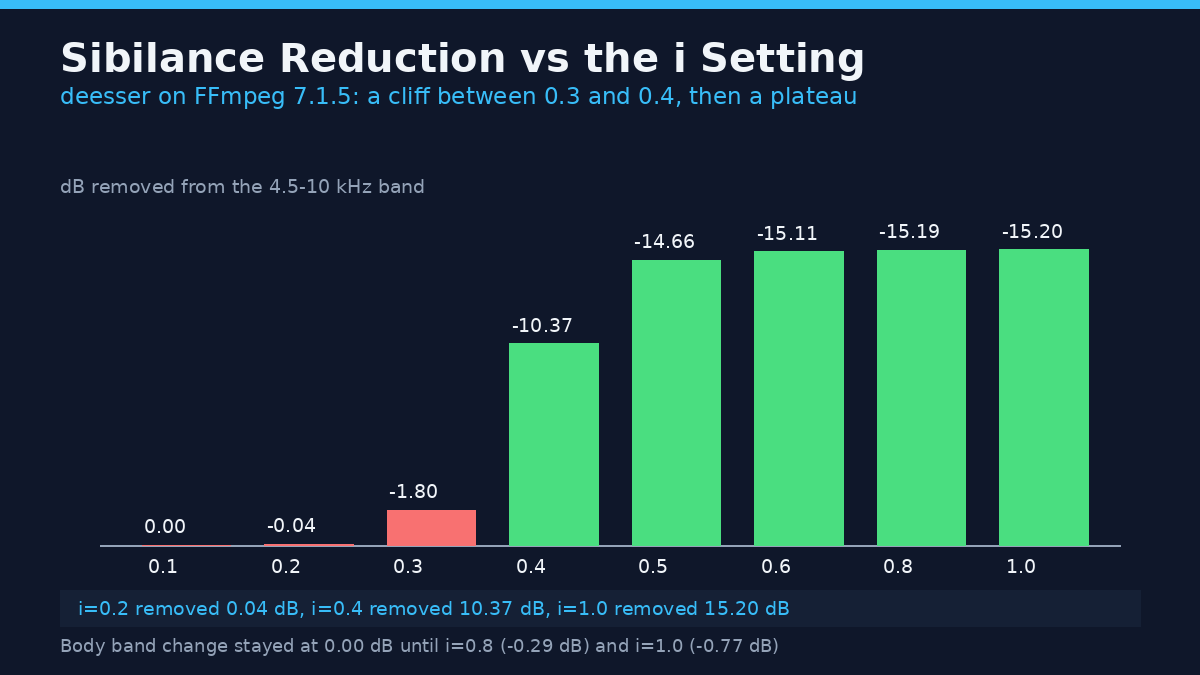
The filter is deesser (reference), and its help text is unhelpful: i is “intensity”, m is “max deessing”, f is “frequency”. None of those names tells you what happens when you move them. So I ran a sweep of each one and measured how much sibilance each setting removed.
Intensity behaves like a gate, not a volume knob
| i (intensity) | S-band change (dB) | Body change (dB) |
|---|---|---|
| 0.2 | -0.04 | 0.00 |
| 0.3 | -1.80 | 0.00 |
| 0.4 | -10.37 | 0.00 |
| 0.5 | -14.66 | -0.01 |
| 0.6 | -15.11 | -0.03 |
| 0.8 | -15.19 | -0.29 |
| 1.0 | -15.20 | -0.77 |
Between 0.2 and 0.3 the filter is asleep, then it jumps from 1.8 dB to 10.4 dB between 0.3 and 0.4 and saturates near 15 dB by 0.6. Anyone tuning sibilance by ear would conclude the knob does nothing and then that it does everything. The cause is in the source: intensity enters the detector as i raised to the fifth power, so small steps near the bottom are invisible while the same step higher up is enormous.
m runs backwards, and m=1 turns the filter off
| m (max deessing) | S-band change at i=1 (dB) | Body change (dB) |
|---|---|---|
| 0 | -17.79 | -0.77 |
| 0.25 | -17.23 | -0.77 |
| 0.5 (default) | -15.20 | -0.77 |
| 0.75 | -9.54 | -0.74 |
| 0.9 | -4.15 | -0.50 |
| 1 | 0.00 | 0.00 |
Higher m means less sibilance reduction, and at exactly 1 the output is sample-for-sample identical to the input. The source explains it: the ceiling is (1 - m) * 48 dB, so at m=0.9 the filter can’t remove more than 4.8 dB, and the measured 4.15 dB sits just under that wall. At m=0.5 the ceiling is 24 dB and never binds, which is why the measured result stops at 15 dB. Leave it at 0.5 unless you want to cap how much the filter is allowed to do.
f trades body for S, and the default is the safe one
At i=1, moving f from 0.5 to 0.3 bought 5 dB more sibilance removal (-20.21 dB) and cost 2.19 dB of body, because the split point drops far enough to catch the voice as well. Moving it to 0.7 left only -10.18 dB of reduction with -0.25 dB of body. The default of 0.5 is the sane middle, and raising f is the polite way to soften the effect when 0.5 sounds heavy.
Settings I’d start with
ffmpeg -i input.mp4 -af "deesser=i=0.5:m=0.5:f=0.5" -c:v copy -c:a aac -b:a 192k output.mp4That’s 14.66 dB off the sibilance with 0.01 dB of body change, and it survives AAC: after a 128 kbps encode and decode, the reduction was still 14.80 dB. If the voice sits low in the mix, go to i=1 instead (see the next section), and if the result sounds lispy, drop m to 0.35 or raise f to 0.6.
One warning: a bare deesser with no parameters changes nothing, because intensity defaults to 0. The output was byte-identical to the input, largest sample difference 0.0.
Why the same sibilance setting gives 15 dB or 0.1 dB
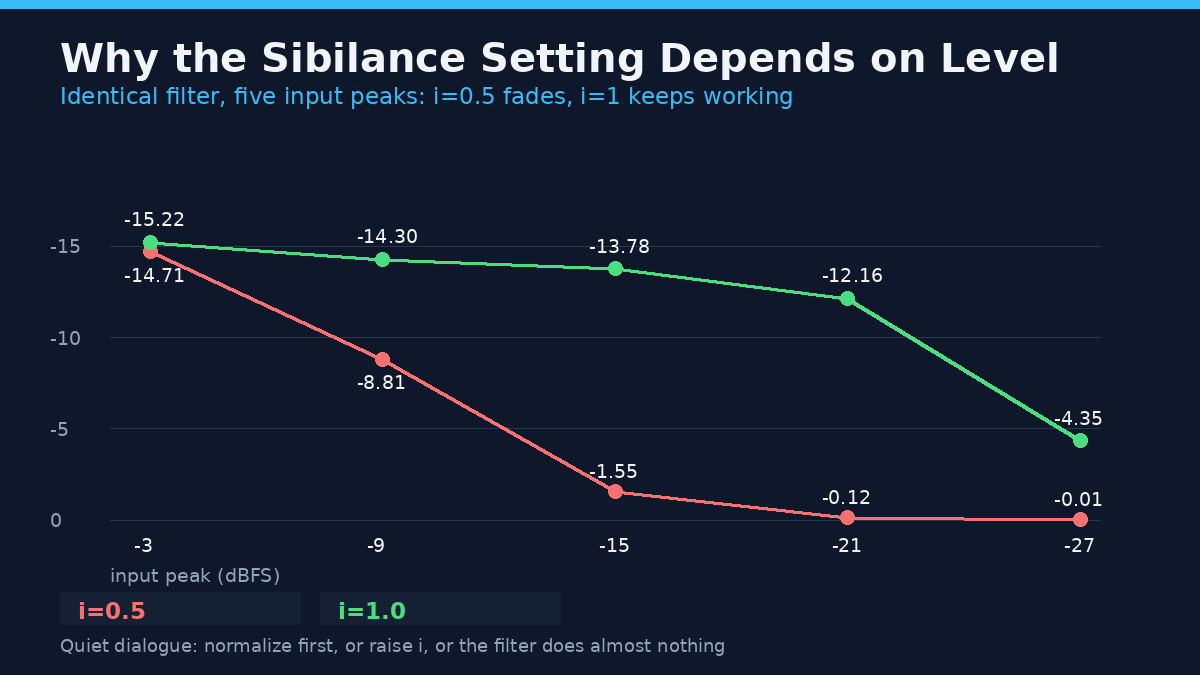
This is the finding that changed how I work, and it isn’t in most sibilance tutorials. I ran the identical filter chain at five input levels, keeping every parameter fixed.
| Input peak (dBFS) | i=0.5: S-band change (dB) | i=1: S-band change (dB) |
|---|---|---|
| -3 | -14.71 | -15.22 |
| -9 | -8.81 | -14.30 |
| -15 | -1.55 | -13.78 |
| -21 | -0.12 | -12.16 |
| -27 | -0.01 | -4.35 |
At i=0.5 a quiet track gets almost no sibilance treatment, because the detector needs level to trigger. At i=1 the filter holds up all the way down to -21 dBFS and only collapses at -27. So the correct order of operations is gain first, de-esser second: normalize the dialogue to a working level, then de-ess. If you can’t normalize for some reason, use i=1 and accept the slightly higher body change. This is why chasing a forum preset is a waste of time: it was tuned at a level you don’t have.
The sibilance setting that dies at 192 kHz
Here’s a sibilance failure that produces no error at all. FFmpeg’s loudnorm filter outputs at 192 kHz unless you tell it otherwise, and the de-esser behaves completely differently up there.
| Sample rate | i=0.5: S-band change (dB) | i=1: S-band change (dB) |
|---|---|---|
| 44.1 kHz | -14.63 | -14.90 |
| 48 kHz | -14.66 | -15.20 |
| 96 kHz | -1.45 | -16.60 |
| 192 kHz | -0.01 | -3.81 |
On a chain of loudnorm=I=-16:TP=-1.5:LRA=11,deesser=i=0.5, the measured S-to-body ratio moved from 1.77 dB to 1.73 dB, which is nothing: the de-esser did zero usable work while returning a clean exit code. Insert aresample=48000 between them and the same chain reached an S-to-body ratio of -14.45 dB. If your graph contains loudnorm and a de-esser, put the resampler in the middle or run the two passes as separate files, or your sibilance fix will be imaginary. You won’t hear an error, you’ll just hear the hiss you thought you’d fixed.
Run it on a real video file
The command above keeps the picture untouched, and I checked it myself. Before and after the de-ess, the video stream hash was identical (e19bc29130d5ac7d80a76b9aa8836ebc) while the audio hash changed, which is exactly what -c:v copy promises.
Two errors will bite you. Asking for a stream copy of the audio while filtering it fails hard: -c:a copy with -af deesser=i=0.5 exits with code 218 and the message “Filtering and streamcopy cannot be used together”, and no output file gets written. And the option names are short by design, so -af deesser=intensity=0.5 exits with code 8 and “Option not found”. Use i, m and f, as the audio options documentation names them.
Where the de-esser sits next to a compressor
On my signal, an acompressor at 4:1 with a -20 dB threshold already pulled 5.91 dB out of the S band, because it ducks everything loud. Adding the de-esser brought the S-to-body ratio down by another 9 dB in either order: -8.65 dB with the de-esser first, -8.13 dB with the compressor first, so pick whichever keeps your gain structure simple. Stacking passes works poorly: two at i=1 reached -28.65 dB but cost 1.40 dB of body, and two at i=0.5 gained only 1.09 dB over one. Fix the recording or the room instead. If the S is distorted rather than loud, the problem is clipping, and you want the repair pass instead.
Common mistakes
- Set the de-esser before setting the gain. At i=0.5 a -21 dBFS track got 0.12 dB of sibilance treatment. Normalize first, then de-ess.
- Left the filter at its defaults.
deesserwithout parameters is a verified no-op, so a bare filter in the chain is decoration. - Treated m as a strength control. It caps the reduction, and at 1 it disables the filter entirely.
- Ran loudnorm and deesser in one graph without a resampler. At 192 kHz the i=0.5 setting did 0.01 dB of work and reported success.
- Reached for a -10 dB EQ cut when the hiss was intermittent. It removed 7.01 dB from clean speech too, which is why the voice sounds soft afterwards.
- Tried
-c:a copyto save time. The run fails with exit code 218 and writes no file.
FAQ
Can I remove sibilance without re-encoding the audio?
No. Filtering means decoding and re-encoding the audio, and FFmpeg won’t accept the combination: exit code 218. The video stream can still be copied.
Does this sibilance filter work on a stereo track?
Yes, and the channels get processed independently. I put the bursts only in the left channel and the filter cut 14.66 dB there while the right channel changed by 0.00 dB, so a hard-panned S won’t drag the other channel down.
What about S sounds in music, not speech?
It works, but cymbals and hi-hats don’t stay out of that band, so an aggressive setting dulls them. Use i=0.4 with m=0.4 to cap the reduction, or automate the filter with the enable timeline option so it runs only on vocals.
Is a de-esser a substitute for fixing the recording?
No. Moving the microphone off-axis, backing off two inches and picking a less bright capsule removes sibilance before it exists, which is cheaper than any sibilance filter.
Conclusion
The measured picture on sibilance is simple. A static EQ cut takes as much from the vowel as from the S, while a de-esser takes 14.66 dB from the burst and 0.01 dB from the clean passage. Set i=0.5 at a healthy level, keep m and f at 0.5, normalize first, and put a resampler between loudnorm and the filter. If the hiss survives, check the graph’s sample rate before you blame the settings, because a 192 kHz chain reports success while doing nothing.
Once the S sounds are under control, the compressor stops reacting to bursts, the limiter has less to catch.